Buy anything from 5,000+ international stores. One checkout price. No surprise fees. Join 2M+ shoppers on Desertcart.
Desertcart purchases this item on your behalf and handles shipping, customs, and support to Kyrgyzstan.
🎮 Dominate mobile gaming with pro-grade precision and zero lag!
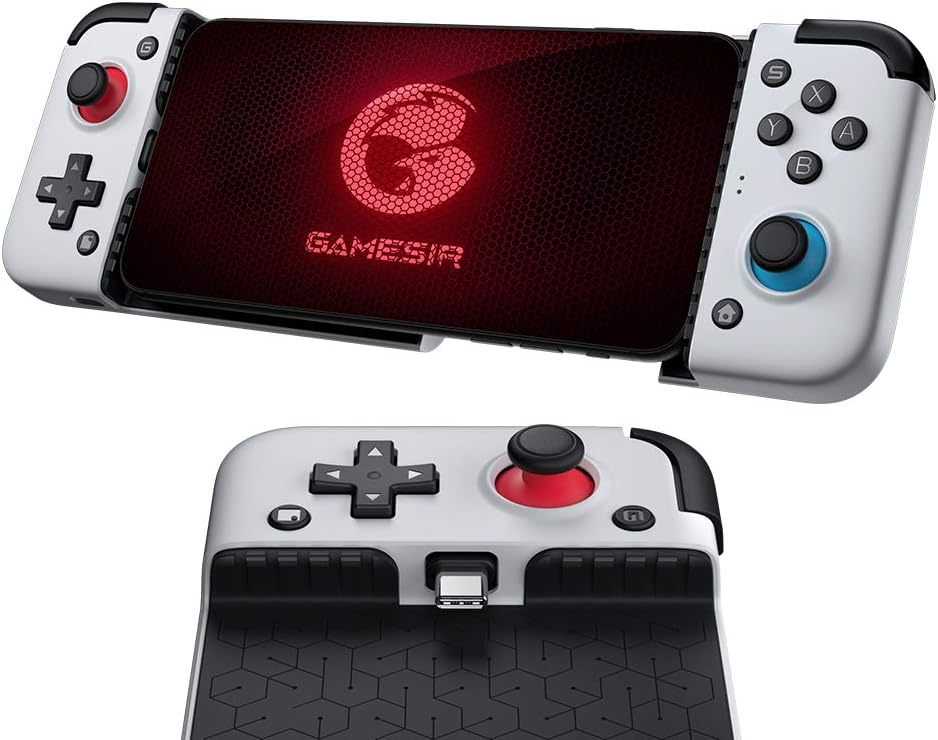
The GameSir X2 Type-C Mobile Gaming Controller is a wired, plug-and-play grip designed for Android phones, featuring a patented adjustable Type-C plug, e-sports class joysticks, and durable micro switch buttons rated for 3 million clicks. It supports major cloud gaming platforms like Xbox Game Pass, xCloud, Stadia, and Vortex, while its ergonomic design and heat dissipation gap ensure comfort and performance during intense gaming sessions.


| ASIN | B08HC8XMMN |
| Batteries | 1 Lithium Polymer batteries required. |
| Best Sellers Rank | #436,117 in Electronics ( See Top 100 in Electronics ) #130 in Mobile Gaming Controllers |
| Customer Reviews | 4.0 4.0 out of 5 stars (3,049) |
| Generic Name | Gaming Controller |
| Importer | Bellstar Trading Pvt Ltd - A24, Naraina INDL Area Ph-1, Delhi-110028 - 01145629914 |
| Included Components | no |
| Is Discontinued By Manufacturer | No |
| Item Dimensions LxWxH | 20.3 x 10.6 x 5.5 Centimeters |
| Item Weight | 300 g |
| Item model number | 8499277 |
| Language | English, English |
| Manufacturer | GameSir, Gamesir |
| Packer | Bellstar Trading Pvt Ltd - A24, Naraina INDL Area Ph-1, Delhi-110028 - 01145629914 |
| Product Dimensions | 20.3 x 10.6 x 5.5 cm; 300 g |
| Rated | Unknown |
| Release date | 23 November 2020 |
R**L
Best purchase :)
Extremely happy with the product Perfectly fits my mobile Everything is good If your using emulator on mobile this is a must buy 10 months later still working really good For some games the joystick seem to lose slight response like char is running and will stop and run again I dont know might be game/emulator fault or joystick Need to see
H**K
Software support
The Android app is good but needs some bug fixes and button mapping need to be easier
K**F
Awesome gamepad in this price range
Ok so I'm reviewing this gamepad again after 10 months , I'm dividing this review in 3 categories. ( 1st : Gamepad overview ) gaming experience is very good in this gamepad , you can play Nintendo switch games through egg NS emulator but it heats a lot and we can't attach additional cooler with this device like Gamesir X3. Thumbsticks and triggers are really good 👌Play grid autosports and you will understand what I'm talkin about. (2nd : build quality and comfort) Well built quality is not so good it is decent but yeah gamepad is comfortable while holding in hands and its very lightweight. (3rd : Games ) I will recommend y'all purchase this device only if you do emulator gaming like aether sx2 , egg ns ( not very heavy games ) Not recommended for battle royale games like PUBG and COD. So here is my full review I hope you will find this helpful
K**V
Not working piece of S##t
It doesn't work in any game, doesn't work via Bluetooth keys don't map. Deluxe will turn off immediately if the able is disconnected.
N**M
Works well
Bought this to convert by Pixel 3 XL with glitchy touchscreen as a retro gaming console. Works pretty well.
P**H
Case was excellent
Bluetooth connection not available.this one is major problem
A**.
Awesome Product
S**S
Concerned about the overal built quality
Concerned about the overal built quality and button placement... Little bit difficult to get around it... Still loved it anyway
U**N
I love the uniqueness of Sony's current Xperia line of smartphones. 21:9 is an non-common aspect ratio on phones, but I love it due to more room for vertical scrolling apps and movies. However, not all devices can work with this odd aspect ratio due to how long 21:9 is if holding it horizontal. I have the 2019 Xperia 1, and I tend to play a lot of emulators on this device since the Snapdragon 855 is still very solid for emulation and more in 2021. I didn't want to deal with Bluetooth due to input lag, so I was hoping for a true controller that can plus into USB C and I can have everything on my hands. I saw a video of the earlier generation X2 from Retro Game Corps's YouTube page, and the X2 caught my attention. GameSir stated that Xperia 1 phones will work on their device, and thus I did an order. Glad I did, it is excellent for my needs. I was worried that the placement of the D-Pad being below the left analog stick will be an issue, but it wasn't a problem at all. It is a good D-Pad that is great for 2D games. Is it the best? No, but most people won't have an issue with it. The buttons are solid and so are the analog sticks. Most people who will run it for emulation will not have an problem with the unit. Since the button layout is the Nintendo layout (not XBox layout which is common on Android apps), you will have to adjust the button layout on a program/game. Not all games support changing buttons, so you might have issues with the button layout using this. If you are into racing games, the R2/L2 buttons are digital buttons and not analog. Due to how wide the Xperia 1 phones are, you will have to stretch out the X2 to its limit in order to put the Xperia in the X2. The USB C connector on the X2 is great since it moves up and down, which will help reduce stress on the USB C connector on your phones. While the X2 will work with most phone cases, I would be careful and not use the X2 with the Xperia 1 phones with thick cases. I currently have the Spigen Rugged Armor Case for the Xperia 1 and it is not a thick case at all. I was able to put the Xperia 1 in the X2 with this case on, but any thicker phone case it wouldn't fit. But if the phone was smaller then the Xperia 1 with a phone case that is thicker then it should fit just fine on the X2. There is also an USB-C connector at the bottom left corner of the X2, since it is a pass-thru USB-C Connector. You can use it for charging or anything you want to use it for USB-C wise. Almost forgot, since the USB C connector on the X2 will be on the left side, some apps may not work since they are used to be in horizontal mode when the USB C connector is on its right side. X2 is pricey, but I gotta admit with the Xperia 1 in the X2 it feels great, my hands don't hurt when using it, and just feels solid. If you do a lot of emulation of gaming with a D-Pad that supports different controllers, then I highly recommend the X2 new edition with the D-Pad. Also gets a plus for me since it supports the Xperia 1 phones and its weird aspect ratio.
L**R
Androidのスマートフォンで使用しました。主に遊んでいるゲームはマインクラフトです。 有線接続であることから遅延は皆無だし、コントローラーの充電を気にする必要も無いし、とにかく快適! パススルー充電もあることから、スマートフォン本体の電池切れの心配もありません。 有線接続を選んで本当に良かった!と思いました。 しかし、6月に購入して、10月に入り、左スティックに異常が……たまに勝手に右に入ってしまいます。 頻度は少なくないながらも、右に入り続けるのではなくたまに何度か右方向が入るので、常に高所からの落下死の恐れが。 たまに遊ぶ風来のシレン5でも勝手に移動してターン経過してしまうなど、プレイが困難に。 コントローラーは消耗品なので仕方ないかもしれませんが、こんなに早くダメになってしまうとは……乱雑に扱ってたつもりもないんですが……
A**O
Il Gamesir X2 Type-C mi sembra un ottimo prodotto, ben costruito e funzionale. Viene rilevato correttamente come gamepad USB e funziona bene nei giochi ed emulatori che supportano il gamepad. Dalla relativa app sarebbe possibile anche mappare i controlli su quelli dei giochi che supportano solo il controller a schermo ma, per qualche motivo, mi permette solo di assegnare le leve analogiche e nessun pulsante. L'ho acquistato per trasformare il mio vecchio telefono (perfettamente funzionante ma senza il touch screen e le fotocamere dopo essere stato a contatto con l'acqua) in una console portatile e, dopo un po' di personalizzazione, riesco anche ad usare Android solo con il gamepad, unica eccezione per il tasto Home che non permette di tornare al launcher delle applicazioni come ci si aspetterebbe (ma per chi ha il touch funzionante non è un problema). E' possibile caricare il telefono collegando il cavo USB direttamente al Gamesir X2 Type-C il che è molto comodo ma in questa modalità non è possibile trasferire file da e sul telefono. Non è possibile collegare degli auricolari con jack da 3,5mm perché il connettore è coperto ma è possibile risolvere usandone un paio bluetooth. Anche la fotocamera posteriore è coperta quindi non è possibile utilizzarla. Mi sarei aspettato un prezzo di qualche decina di euro in meno ma sostanzialmente ne consiglio vivamente l'acquisto.
M**O
If you're into emulators and Android games that support a joypad this is about as good as it gets no battery to charge it connects via usb c connector which swivels up and down and opening the clam shell and enclosing phone it feels like a true handheld console only with my old phone the one plus 7 in truly powerful enough to run everything up to PS2 and GC almost perfectly. The phone drives the joypad yet uses less power than a Bluetooth connection at 2mah although it has buttons for a dpad this works well all round a great piece of kit that needs little set up most button combos are ready to go on games when plugged in.
M**A
Note: I got the USB-C version that plugs in directly to the phone, not the Bluetooth version. This device is incredible! I was searching for something to work with my OP7P and this was it! It hardly drains any battery, as advertised, and is of higher quality than I thought it would be! ALL buttons are clicky like a tiny button, not like a membrane button. INCLUDING THE D-PAD! I like this! I also like the sound it makes. Feels good! It does not work with my phone's original case, which is pretty thin, though I hear it works with some people's thin phone cases. This isn't really a con for me. I don't mind taking off the phone case to play. My only real struggle is getting my phone out while pulling it apart to open it. Maybe next one should have segmented locking mechanism with release button to make it close. Not a big deal. No points lost. Otherwise, it's performance and feel exceeds my expectation. Much lower latency than the Bluetooth controllers I've tried, though I understand Bluetooth controllers don't always work well on a OP7P. Carrying case is good! Nice and solid! It has a small pouch on the lid I use for my phone case while I play. It does NOT work for all games. That's not the controller's fault. For my phone, OTG does NOT need to be on. The screenshot button on the controller, at least for my phone, works to bring up the volume slider. This has more utility for me than screenshotting, and I'm glad it works this way. Not sure if it will work this way for your phone. In conclusion, I think this is a controller done right!
Trustpilot
2 weeks ago
4 days ago