Buy anything from 5,000+ international stores. One checkout price. No surprise fees. Join 2M+ shoppers on Desertcart.
Desertcart purchases this item on your behalf and handles shipping, customs, and support to Kyrgyzstan.
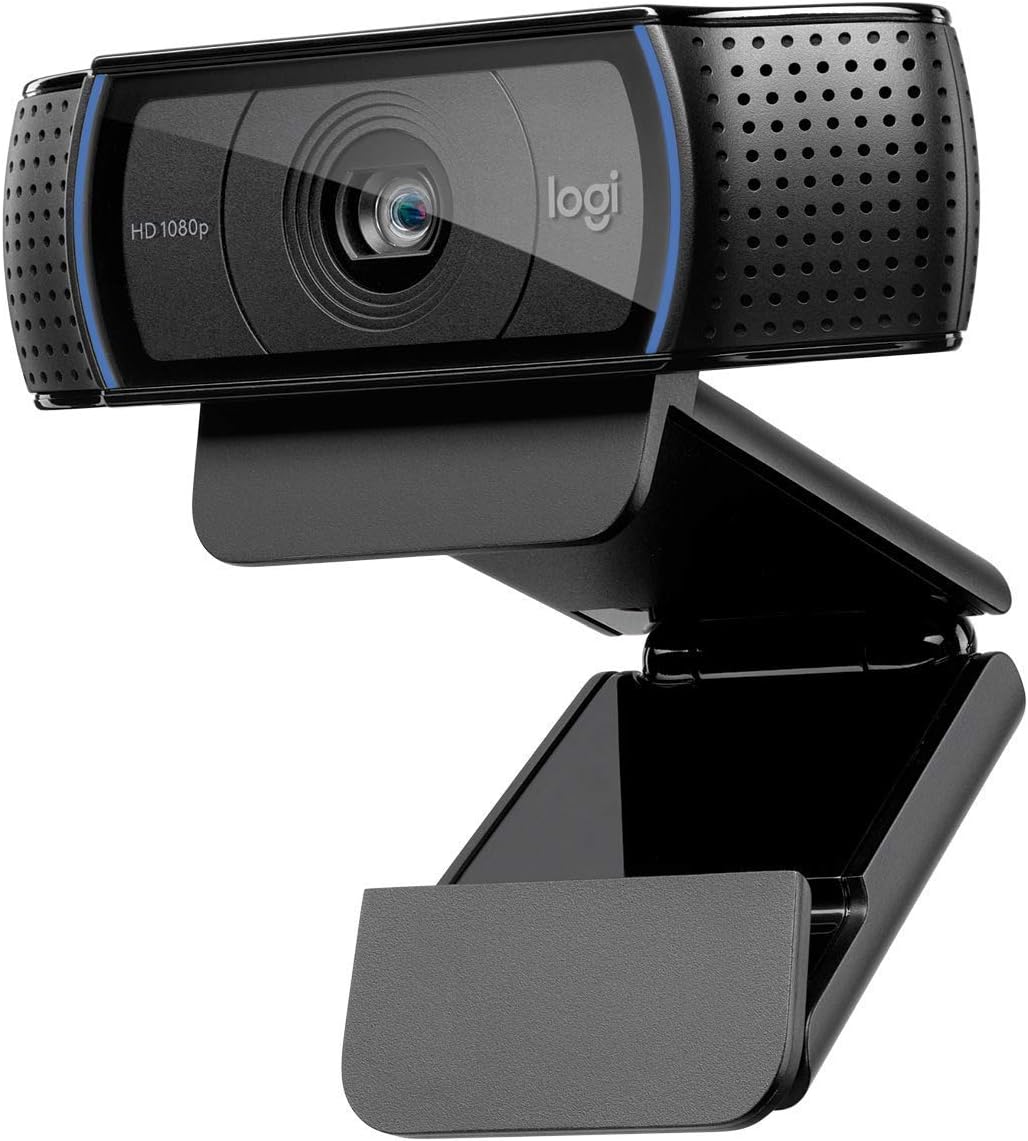
๐ฅ Elevate your video presence โ because your image deserves pro-level clarity!
The Logitech HD Pro Webcam C920 delivers professional-grade Full HD 1080p video calling and recording with advanced H.264 compression for smooth streaming. Featuring a five-element glass lens with precise autofocus, dual noise-reducing microphones, and automatic low light correction, it ensures crystal-clear visuals and natural stereo sound. Compatible with Windows, macOS, Chrome OS, and Android, it supports all major video conferencing platforms. Its durable build and tripod-ready clip make it a reliable, long-lasting choice for professionals seeking standout video quality.
| ASIN | B006JH8T3S |
| Antenna Location | video calling and recording |
| Are Batteries Included | No |
| Best Sellers Rank | #28 in Webcams |
| Brand | Logitech |
| Built-In Media | USB Cable, User Manual |
| Camcorder Type | Webcam |
| Color | Black |
| Compatible Devices | Personal Computer |
| Connectivity Technology | USB |
| Customer Reviews | 4.6 out of 5 stars 32,659 Reviews |
| Digital Zoom | 3 x |
| Display Resolution Maximum | FHD |
| Effective Still Resolution | 15 MP |
| Effective Video Resolution | 1080 Pixels |
| Exposure Control Type | Automatic |
| Features | Auto Noise Reduction,Auto Low Light Correction,Autofocus |
| File Format | JPEG |
| Flash Memory Speed Class | C10 |
| Flash Memory Type | Micro SD |
| Flash Memory Video Speed Class | V10 |
| Focus Type | Auto Focus |
| Form Factor | Webcam |
| Global Trade Identification Number | 00097855074355 |
| Has Image Stabilization | No |
| Image Aspect Ratio | 16:9 or 1.78:1 |
| Image Capture Speed | 30 fps |
| Image stabilization | Digital |
| Item Dimensions D x W x H | 3.7"D x 1.7"W x 2.8"H |
| Item Weight | 113 Grams |
| Lens Type | Glass |
| Manufacturer | Logitech |
| Maximum Aperture | 2 f |
| Minimum Aperture | 2 Millimeters |
| Model Name | Logitech HD Pro Webcam C920 Video Calling and Recording 1080p Camera |
| Model Number | 960-000764 |
| Number of Batteries | 1 Lithium Polymer batteries required. |
| Operating System | Windows 7, Windows 8, Windows 10, macOS 10.10 or later, Chrome OS, Android 5.0 or above |
| Photo Sensor Technology | BSI CMOS |
| Screen Size | 3 Inches |
| Sensor Type | BSI CMOS |
| Shooting Modes | Autofocus |
| Style Name | C920 |
| Supported Audio Format | AAC, MP3, WAV |
| Supported Image Format | Likely includes: JPEG (for still images), MP4 or MOV (for video) |
| UPC | 097855074355 |
| Unit Count | 1.0 Count |
| Video Capture Resolution | 1080p |
| Video Resolution | 1080p |
| Warranty Description | No Warranty |
| Water Resistance Level | Not Water Resistant |
| White Balance Settings | Auto |
| Wireless Compability | 802.11a |
| Zoom | Digital |
D**T
Going strong, two years later
I'm puzzled when I read the negative reviews, about this camera not working with [x]; this is my 3rd Logitech camera, and I've never had a problem getting them to work when I've reviewed the system requirements and made sure I was on a compatible machine running appropriate software. I've split use of this camera between my Mac Mini and my Macbook Air, and had no problem getting it to work on either machine, nor have I had any issue switching back and forth between them. Picture and sound quality are excellent, and there's a free Logitech app in the App Store that lets me adjust the zoom, lighting etc that's also effective and simple to use. What's really blown me away is that it's also just as impressive now as it was almost two years ago, when I first started using it. I bought it in October 2016, to replace another Logitech camera; the cord connected to the back of the camera had frayed over time as a natural consequence of adjusting the angle over and over, making the older camera only work sporadically, and I fully expected something of that nature to happen to any camera I purchased. Not so with this one. The cord has held up, and not because I've babied it; it's just a sturdier design and tougher than the model it replaced. And while we now have Ultra HD/4K cameras and better, this 1080p is still respectable quality; it's not like the old "high def" TV a friend of mine has that's 12 years old but whose picture now looks grainy and not at all impressive compared to other newer TVs. I've used a projector as a monitor for my Mac Mini and broadcast the video from this camera onto a relatively big screen (bigger than any TV I've seen) and the picture quality is still impressive. (I hope I don't jinx myself!) I'm not accustomed to peripherals like this maintaining their function over time. Either the gadget breaks or it becomes obsolete because newer versions of it do the job so much better that it becomes a relic. Not so with this camera. I spent more than the current price (not quite double what it's going for now) and still really feel like I got my money's worth. If I needed another camera I would consider buying another one, it's that good. It's nice to not have One More Thing that needs to be replaced, that just keeps working. So yeah, take the time to look at the system requirements, and make sure you're using a Mac running the stated minimum version of MacOS (or better), or a PC running the stated minimum version of Windows (or better), and your processor is fast enough and you've got enough room on your hard drive and all that, before you buy it. If you're planning to use it for a specific app, perhaps you should check with that app's developers to be sure that it's compatible with it, but I can vouch for Mac versions of Skype, Zoom, ezTalks, and of course FaceTime and Photo Booth, as well as browser plugins for Firefox, Safari, Vivaldi and Opera: it works with all of them. I can't say enough good things about this camera. Unless you just absolutely have to have 4K/Ultra HD quality video, it's well worth the price it's currently going for, and I am happy to recommend it.
M**N
Excellent Quality and Easy to Use!
This webcam is fantastic! The video quality is super clear and crisp โ 1080p looks great even in lower lighting. It was incredibly easy to set up and worked right away without any complicated software. The widescreen view is perfect for video calls, meetings, and recordings, and the built-in microphone picks up sound really well. Overall, itโs a high-quality, reliable camera thatโs perfect for work or personal use. Highly recommend!
R**Z
Very good HD WebCam.
Very good product, very decent audio and and video. This has been on top of my display monitor for years, still very good for videocalls, even for today standards.
L**I
I am happy to report that the camera works great with Windows ...
I was a bit leery about ordering this since I read that some users appeared to be having issues with the camera working with the Windows 10 Creator Update. I am happy to report that the camera works great with Windows 10. I already had the latest Logitech software (LWS280 - ver. 2.51) installed on my system since I was upgrading to this C920 from an older Logitech Quickcam Pro 9000. (The camera does not come with any software but it can easily be downloaded from Logitech's website.) All I had to do was plug the camera in and everything worked fine. One small annoyance, the mirroring feature does not work at the higher resolutions. You have to go to a lower resolution (480p or lower), enable mirroring, then you can go back to the higher resolution; do the same to turn mirroring off. I don't use this feature much so the few extra steps is not a big deal. Although the specs show this to be a 15 mp. camera, in reality I have read in other reviews that it is much lower at I believe 3 or 5 mp., with software interpolation to mimic 15 mp. Video streaming at full HD (1920 x 1080p) was very smooth due to the camera using internal H.264 hardware compression. Overall picture quality was good. Autofocus seems to have a bit of latency in response, but I used fixed focus most of the time since I use the camera primarily for video chatting with family and sit at a more or less fixed distance. A small plus is the ability to mount this camera either on top of your monitor, or on a small tripod through the bottom of the stand. Using the "RightLight" feature of the camera, it seems to adjust to different lighting conditions very well. Although the auto white balance seems to lean towards the blue side, it can be turned off and manually adjusted towards "warmer" colors. Video recording was smooth, but does not quite have the sharpness you would expect at true HD1920 x 1080 when viewing the recorded video at full screen, so not sure if it is actually true HD or again just interpolated. Audio recording quality through the built-in stereo mics was fair. Overall, I will say it works well right out of the box and the quality is as good or as better as what you would expect for a camera in this price range and would recommend it to anyone looking for a decent webcam without breaking the bank.
I**N
a good camera, worth the money.
this camera's picture quality (see first photo) is definitely superior to that of the iSight camera built into my mid-2011 MacBook Air (see second photo), as well as to that of most, if not all, other webcams i've seen images from - though the Logitech's colors are a bit washed out due to its light sensitivity. the mounting system is pretty ingenious - or so it seems to me, who's been out of the standalone webcam loop for probably 10 years now - allowing you to mount it on top of a flatscreen monitor of just about any thickness, lay it on a flat surface such as the top of a CRT (if anybody still uses those) or an LCD's sunshade - the camera has a rubberized bottom surface and a little bit of weight to it so it won't slide around easily - or to mount it on a mini tripod (not included). it has dual (i.e., stereo) mics which sound decent, though you won't get great sound from them unless you're in a very acoustically dead room, since their integration with the body of the camera means you're going to be at least a foot away from them most of the time, so they're going to pick up any reverberation present and many background noises. i choose to stick with my Blue Yeti for sound input as i can put it closer to where i'm sitting...plus it's just a better-sounding mic to begin with, as well it should be. the camera can be pivoted up and down about 45 degrees, and while it can't be pivoted side-to-side when mounted atop a flatscreen monitor, that's mitigated somewhat by the fact that it's a widescreen camera, so it captures a wider area side-to-side without being pivoted. if lateral pivoting is really important to you, you can mount the camera either on a flat surface or a mini tripod as mentioned before. on the Mac, it's 100% plug-and-play; plug it into an available USB port and you're in business. FaceTime, Photo Booth, Messages, Skype...it just works, and well. Windows users just go to the URL given on the instruction sheet, download and install the software, and i imagine from there on out their experience will be similar. the unit itself is very nice-looking and, again, produces a picture most other webcams can't match. i think Logitech's set a new standard here, and it won't be long before all new webcams on the market produce an image at least this good. at the $71.00 and change i paid, i consider this camera well worth the money. i'm sure i'll be using it for years to come.
D**A
This webcam is great!
I purchased the Logitech C920 and I'm very happy with it so far. After reading lots of reviews, I decided to purchase this webcam because 1) with software you could get 15 megapixel image quality and 2) you could use a tripod with it. I had read many reviews with some saying that the C910 had better image quality because it had 5 megapixel true whereas the C920 had only 3 megapixel true. That was a concern for me at first. Also I was concerned about reviews that said it is very good for close-ups but not good quality for the background. I found it was high quality for both close-ups and background. Also, some had said that the camera only "sits" on top of the monitor. Well, that is NOT true. There is a clip and it allows it to fit any monitor thickness which is a plus. You can even have it sit on top of you CPU tower on on the tripod (which you must purchase separately -- important because I thought that the tripod came with it). I purchased this webcam to replace my much older Logitech 4000 webcam. As I expected, the image quality of this webcam is so much better. I don't get the blur and it isn't as grainy as my older webcam. I took a video of me holding up my credit cards and you could read the numbers on the credit cards very clearly. It blew me away because I wasn't even using zoom. I even made a video with the lights off with just the monitor on and the image quality of my face was super! I love the widescreen to it and I love the hi-def. I also read about the noise quality -- I think all webcams have this issue, but this one is much better. Some said that this is not a good webcam for travel. I disagree. This webcam folds up and it will fit any thickness of monitor you need it for, and if you have one of those dinosaur monitors, you can just have it sit on top of it. Only 2 negatives I see so far is that it does not have 360 degree turn or any turn for that matter. But for sitting on top or my monitor or on a tripod (which I need to purchase), it does great. My old Logitech 4000 that did rotate was always turning when I didn't want it too. Very annoying I must say. With the 920 I can adjust it going up and down, just not side by side, so it is not a problem for me. Other negative is that if you want to do a video call with someone they have to be using the same software and I don't yet know how the image quality would be with other software since it is the Logitech software that gets it to 15 megapixels. I need to try that out too. Could I get a better webcam? Sure, if I wanted to pay a lot more! For the price, this is a great webcam and so far it is doing what I need it to do. I only did a few test pictures and videos today (only received it today), but so far I love it. I still need to see how it works for web calls and such. I also need to learn how to make some of the great effects it has. All in all, this webcam beats any of the other ones in the Logitech line for features and image quality. This is also my first review ever. I felt I needed to write a review because there were so many negative reviews on this product. I am ready happy with my purchase and I'm glad the negative reviews did not sway me to not purchase it. I'll play around with it a bit more and see if I still love it :)
J**R
An absolute bargain with first-rate components and technology
Audio-video telephony is upon us -- Skype is currently this technology's most visible manifestation. But as the other big developers, including Facebook and Twitter -- move toward the industry's Number One goal -- real-time communication -- having a webcam that doesn't make you look like something from "I Love Lucy" at the other end is becoming more and more important. There are the cheap webcams that are built into PCs and are so bad they don't deserve mention here. At the other end of the spectrum are the pro units that cost hundreds and need a well-let studio and sound setup to do them justice. And then then there is a vast middle range of so-so cams with limited capabilities. Over the years I've owned all of these except the top end. None of them made me happy, especially as video technology got better and data speeds got faster. After my last one bit the dust, I opted to go a bit above my price range and get the Logitec C920. Its specs are SO impressive -- full 1080p HD resolution, UVC H.264 video compression (just like high-end camcorders), two stereo mics, low-light correction, mount for a tripod, and to top off the list, a first-class Zeiss lens. The result is an absolutely gorgeous picture. Use the image adjustment software from Logitech's website (easy), make sure your face is well lit (not dark but with some contrasting light and shadow), and check that you're broadcasting at the maximum quality your software and data connection allow. Your expectation should be an image as good as you'll get on your HD TV. You'll never use a cheapo camera again. The Logitec C920 camera cost a bundle when it first came out a coupe of years ago but I see a new model is taking over and Amazon is discounting the 920 heavily. My recommendation -- and I've not been given an "evaluation" unit or any of that nonsense -- is to add a few bucks to your budget and, if you carefully adjust your lighting, you'll come across like a movie star to the person on the other end of your Skype call.
T**S
I still use this
Great product. I still use this. I've owned it for a long time.
M**T
Great camera, worth the $
Best web cam Iโve ever used, arrived in two days. Amazing and worth the price.
H**M
ุงูุตุญ ููู
ูุงููู ูุงููุงู ู ู ุชุงุฒ ุฌุฏุงู ุงูุตุญ ููู ุฌูุฏุฉ ูุณุนุฑ ูุงููู ุชูุฑูุจุงู ูุณุชุฎุฏู ู
A**Y
Great Camera
As I podcast and Zoom link a lot I wanted a camera like this for my extended large screen. It took me a short while to understand the settings and learn how to mirror my image but it isn't that hard to work out once you get the hang of it. Slots and rests on top of the big HP screen in my small office and it gives me a lot better screen view and recording sound. I have also liked Logitech products and they have not failed again in this item.
L**E
Crystal-Clear Connections: Elevating My Craft with the Logitech C920 HD Pro Webcam
As the owner of a multifaceted creative business that spans from the delicate work of jewelry making to the cutting-edge realm of 3D design and beyond, maintaining a high-quality online presence is paramount. This necessity became all the more apparent as I ventured into the world of vlogging and live streaming to showcase my work and connect with my audience. The Logitech C920 HD Pro Webcam has been a revelation in this journey, transforming how I share my craft with the world. From the moment I integrated the C920 into my setup, the difference was night and day. The camera delivers stunning 1080p video quality that captures the intricate details of my creations, from the subtle textures in a piece of hand-carved wax to the vibrant colors of a sublimation print. This level of clarity has allowed me to share my work with unparalleled precision, providing my audience with a true-to-life view that's as close to holding the pieces in their hands as possible. The C920's widescreen format has been particularly beneficial for my live demonstrations and tutorials. It offers a broad field of view that easily encompasses my workspace, allowing viewers to follow along with every step of the process without missing a beat. This feature has made my streaming sessions more engaging and informative, fostering a deeper connection with my audience. Moreover, the webcam's autofocus and light correction capabilities have proven invaluable. Whether I'm working late into the night or capturing the delicate sparkle of a gemstone under studio lights, the C920 adjusts seamlessly, ensuring my videos always look professional regardless of the lighting conditions. This adaptability has saved me countless hours of setup time, allowing me to focus more on my craft and less on troubleshooting technical issues. The ease of use and compatibility of the Logitech C920 HD Pro Webcam have also been standout features. Its plug-and-play setup meant I was up and running in no time, compatible with both my desktop and laptop. This versatility has been essential for maintaining the flexibility my work demands, whether I'm streaming from my studio or sharing insights from a craft show. In conclusion, the Logitech C920 HD Pro Webcam has been more than just a tool; it's been a catalyst for growth in my business. It has elevated the quality of my online content, enabling me to share my passion for jewelry making, 3D design, and more with a clarity and professionalism that truly reflects the essence of my work. For any creative professional looking to enhance their online presence, the C920 is, without a doubt, a wise investment. It's not just about showing your work; it's about sharing your vision with the world, one crystal-clear video at a time.
J**N
great camera at a great price
great camera. I bought it for remote learning at a University in the UK. They report the sound and video quality was exceptional. The little edge that holds the camera on top of the monitor - it intrudes a very small amount onto the displayed information on the screen, but other than the camera sitting on your desktop, there is no way around this. I would buy this camera again.
Trustpilot
3 days ago
1 month ago