🚀 Unlock next-gen speed and dominate your game library like a pro!
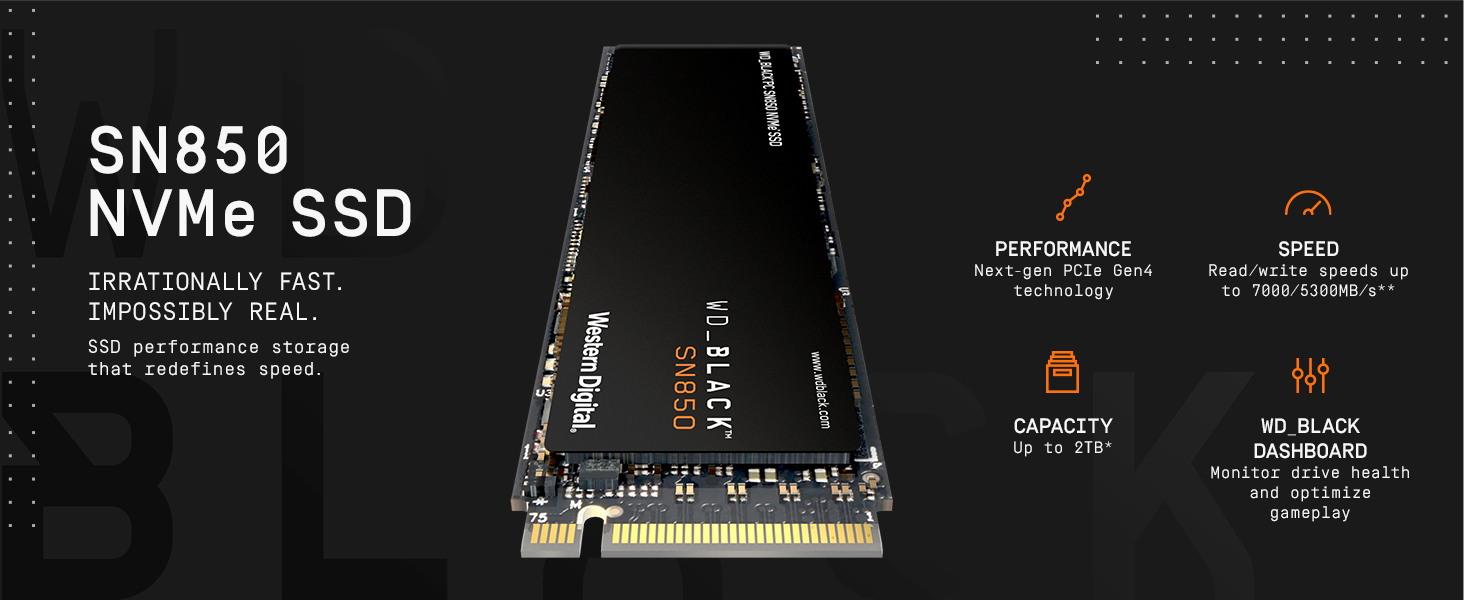
The WD_BLACK SN850 500GB NVMe SSD leverages PCIe Gen4 technology to deliver ultra-fast read speeds up to 7000 MB/s and write speeds up to 5300 MB/s in a compact M.2 2280 form factor. Designed specifically for gamers and high-performance users, it offers reliable 3D NAND storage with customizable controls via WD_BLACK Dashboard software. With a 5-year warranty and optimized for seamless integration into PCs and consoles, this SSD ensures rapid load times and ample space for your favorite games.


| ASIN | B08KFN1KT1 |
| Best Sellers Rank | #282 in Internal Solid State Drives |
| Brand | WD_BLACK |
| Color | Black |
| Customer Reviews | 4.8 4.8 out of 5 stars (17,701) |
| Date First Available | October 6, 2020 |
| Flash Memory Size | 500 |
| Hard Drive | 500 GB Solid State Drive |
| Hard Drive Interface | NVMe |
| Hardware Platform | Mac, PC |
| Item Dimensions LxWxH | 3.15 x 0.87 x 0.09 inches |
| Item Weight | 0.26 ounces |
| Item model number | WDS500G1X0E |
| Language | English, English, English, English, English |
| Manufacturer | Western Digital |
| Product Dimensions | 3.15 x 0.87 x 0.09 inches |
| Series | SN850 |
A**S
Bought for PS5, Excellent for the price!
You should and will need a compatible heatsink for this drive, regardless of what youtubers or others say. If you wish to extend the life of this device it is paramount to get one. I bought this one: https://www.amazon.com/gp/product/B07KDDKDNN/ref=ppx_yo_dt_b_asin_title_o01_s00?ie=UTF8&psc=1 for $17.99 and it is an EXCELLENT fit and I mean PERFECT. Super easy to apply and install and takes less than 5 mins. Even comes with a screwdriver that can be used to also unscrew the ssd compartment on the console, one tool for the job! As far as this drive goes, once installed it registered at 6532.91 MB/s which is significantly faster than the internal SSD. I transferred 5 games totaling about 200gb in under 5 mins to this ssd from the internal storage. Afterwards, I proceeded to download some games from the PS Plus collection and several others from previous free PSN games. That obviously took some time but after finishing I now have about 13 games at 900GB and still have 1.3 TB of space available. Unlike with traditional or hybrid HDDs you get the FULL ADVERTISED SPACE. Not 1.97 TB or 1.8 TB, 2 TB which can be used immediately upon rebooting your console. Booting up Farcry 6 with the disk from the home screen to the saved game position took about 25 secs give or take a couple for me to move the cursor to Continue Game. I have had no game crashes as of yet and no issues with pop in or textures or assets missing other than what the game shipped with. No slow downs and load times from death screen are about the same as internal storage which is approx 6 secs. Don't expect to load large open world games like that any faster than internal storage unless made by first party studios. Primarily, this drive is to allow you more space for your current collection. I have 37 games, 9 of which are PS5 games and in theory I could install my entire library between the internal and M.2 storage. Tips: Make sure you either take a picture of your drive before you install the heatsink or write down the serial number as it is not on the box so you can register it at Wester Digital for your warranty. I did not do it and would have to remove the card, remove the heatsink and get the product serial number then reassemble and reinstall (dammit bobby!). Warranty is 5 years which is better than spinning drives which tends to be about 3. The Samsung 980 is the comparable drive releasing end of this month for $449.99 and the only main difference is the price and convenience of plug and play, no additional heatsink purchase necessary. However, if you want to save $110.99 buy this drive and the heatsink I linked and you save bigtime, using the extra money for your next game! Should you later decide to get a larger 3 or 4 TB SSD you can take this one and add it to your PC. Or if we get a PS5 with a 2TB SSD built in then add this drive to that console and double your storage capacity which would be more than enough until the next console cycle. I really hope this review helps others specifically buying for their consoles. I cannot speak to the performance on PC at this time. Game on Comrades!
S**R
Would buy again
Great Quality, bought for my playstation so i could expand the memory. Lifespan is great we have had this for three years already no issues. Makes my computer run well with the memory, and I have had no issues with performance or connectivity when using it. If needed to replace. Would replace again. Speed is functional, easy to move data over.
R**N
Expensive, however offers great performance
Now from my perspective I’m not going to get into the nitty-gritty about write and read speeds and maximizing them because I installed the storage for real world usage, not its maximum benchmarks. I did get the slightly hampered 2GB model, because it’s worth noting at the one gigabyte model seems to put out better numbers, however either way you go you will get a very performance storage drive that is rather easy to install, depending on your motherboard. My motherboard had a built in heat sink for the NVMe slots left on the board, so I did not need to buy one separately for this stick, nor buy the one with the heat sink on it. But I emphasize that you will need the Heat dissipation. Using the drive you can certainly tell that it is getting rather hot while in use. So I do primarily gaming and loading up virtual instruments for music production on this particular drive and I have seen no particular issues or hiccups that I would expect. Adding and mounting the drive was very easy, and my particular OS, which I am using windows 11 preview, picked up the drive just fine. Write speeds are incredibly fast, maximizing any both times, transfers, and gigabit downloads. All incredibly fast. The price is a bit steep but you know what you’re getting into when you’re paying for this at this particular time. It is cutting edge speeds so there’s an expected premium on that. In terms of comparing it to GEN3, I don’t think you’re going to see or notice the difference enough during regular use or even gaming for that matter if you were to make the upgrade. Probably a few seconds here and there. However I went from a standard SATA SSD do this thing. It is a substantial difference. So this product is best for people who are just entering into the M2 space. There are a few competitively priced alternatives to this drive such as Sabrent Rocket Plus, however the warranty that comes with this drive is a notable difference.
D**.
Fixes one of the main design flaws of the PlayStation 5.
Been a PlayStation user since the original system and have owned two of most of them. Since the PS3 Sony has had the terrible habit of launching consoles with hard drives and SSDs that have laughable capacity considering the file sizes of the games. One of the good aspects of the PS5 is that they make it extremely simple to add an SSD to augment the minuscule stock offerings. Anyway, this is a review of the SSD, not the system I’m using it in. Upon reading many reviews this one seemed to be the one in my price range that had the best quality/bang-for-the-buck I could find. The installation was a snap, (just remember not to over-tighten the screw holding it in, and absolutely don’t lose the little spacer, which is very much needed.) The system immediately recognized it and asked about formatting, which took less that half a minute. Assigning the new SSD to be the installation location of games, also you have to manually transfer your games already on the stock drive, which is also easy to do. All in all, a week in it has been operating without a problem, the speed at which the games load seems to be exactly the same as before; not any slower or quicker. It’s been very nice to be able to reinstall all of my PS5 library as well as a few of my favourite PS4 titles; and I still have more that 1TB remaining. The only drawback I can find with this SSD is that it only seem to max out a 2TB, I think it would behoove Western Digital to make a 4TB version available or more ubiquitous if they already do.
I**H
PS5 Use
Had mine in my PS5 for years, still working fine. Use it everyday. It has a heatsink already so don't worry. Simple install. No need for extra stuff, plug and play.
O**R
Memnun kaldım. Uzun süredir kullanıyorum, bir problem yaşamadım.
C**.
Está no meu ps5. Uso para jogos ps5/4, nenhum problema. No início esquentava muito até desligava o aparelho. Agora não mais posso jogar o dia todo sem super aquecimento
ラ**グ
プレステ5に取付るのに適しているには2TBまでが適していると思いました。 いろんなコメントも読みましたが、メモリ数が上がると比例して熱がこもりやすくなる為 ヒートシンク(冷却機能付き)は、少し高いが、ながい目で見るとどうしても必要です。 それをふまえて買って欲しいです。
A**R
Fast + cheaper than Samsung Pro. Gets hot when loaded up. Get the heat-sink if you dont have one on your motherboard. Mine (Asrock Taichi X570) copes with heat fine. I dont feel a lot of change in loading times compared to PCI-E v3 Samsung Evo (3500 / mb per second). I needed more space and got the fastest affordable drive at 2TB. I think you just dont feel the same difference in speed as when going from spinning drives to SSD. Its great to do some docker container work on these - super fast DB loading and processing. I definitely recommend these for the developers if you deal with a lot of data. Cool packaging if you are into that sort of a thing.
M**S
A great SSD, built-in heatsink and perfect for my PS5! After 2 years of owning a PS5 I've come to the point where I need the extra SSD space for my growing PS5 game collection, my PS4 games are all stored on an external HDD so I could have as much stock SSD storage as possible without wasting it on PS4 games that don't benefit from the SSD. Installing this SSD takes all of 5 minutes, I've built PCs and have a bit of experience but even then it's a very simple task for someone that hasn't done it before. Once installed turning on the PS5 greets you with the 'Format new storage' just like it did with my USB HDD, once that's done in all of a minute or so the PS5 launched as usual. Now all that's left is to organise the new drive with a few games which is very easy as the PS5 allows you to move the PS5 games to the new M.2 without having to delete and reinstall! As shown in my clip the copying is super quick! I was able to move 130+GB in just over a minute 😃👍🏻 I can also change the default install location to the new SSD instead of the stock one without too much fuss. Overall I'm really happy with this upgrade, the SSD works flawlessly and seems to boot games faster than the stock PS5 SSD 👍🏻 Purchased on offer for just under £70 for the 500GB version.
Trustpilot
4 days ago
1 month ago