Desertcart purchases this item on your behalf and handles shipping, customs, and support to Kyrgyzstan.
💡 Light up your life smarter, not harder.
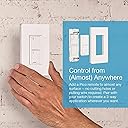
The Lutron Caseta Smart Light Switch 12-pack offers professional-grade smart lighting control with 720W load capacity, app and voice integration, and easy 3-way wireless setup. Designed for seamless compatibility with leading smart home ecosystems, it empowers millennial professionals to automate, secure, and elevate their living spaces with minimal installation effort.


| ASIN | B08H5T6FSB |
| Actuator Type | N.A |
| Best Sellers Rank | #7,602 in Tools & Home Improvement ( See Top 100 in Tools & Home Improvement ) #44 in Electrical Light Switches |
| Brand | Lutron |
| Brand Name | Lutron |
| Circuit Type | 1-way |
| Color | White |
| Compatible Devices | Alexa, Apple Home, Google Assistant, Ring, Serena shades, Sonos, Lutron Clear Connect compatible devices |
| Connectivity Protocol | N.A |
| Connector Type | Wireless |
| Contact Material | Metal |
| Contact Type | Normally Open |
| Control Method | Voice |
| Control Type | On/Off, Scheduling, Scene Activation |
| Controller Type | Amazon Alexa w/Lutron Smart Hub |
| Current Rating | 6 A |
| Customer Reviews | 4.7 out of 5 stars 3,086 Reviews |
| Included Components | Unit^Instruction Guide |
| Item Dimensions | 1.44 x 2.94 x 4.69 inches |
| Lower Temperature Rating | 100.12 °F |
| Manufacturer | Lutron |
| Material Type | Metal, Plastic |
| Model | PD-6ANS-WH |
| Mounting Type | Wall Mount |
| Number of Items | 12 |
| Number of Positions | 2 |
| Operating Voltage | 120 volts |
| Operation Mode | ON-OFF |
| Part Number | PD-6ANS-WH |
| Switch Type | Push Button |
| Terminal | Screw |
| UPC | 784276806770 |
| Unit Count | 12 Count |
| Upper Temperature Rating | 100 °F |
| Warranty Description | Manufacture |
| Wattage | 720 watts |
T**Y
3-year experiment: Lutron by a longshot
For 3 years we've been incrementally smartening our home. Intentionally we've experimented with a variety of different products to see which we want to use as we continue to smarten different areas of the home. From a smart switch perspective (which, sidebar, we strongly prefer over smart bulbs because if you want to control smart bulbs with an app or alexa, you can never turn them on or off at the wall switch...no thanks...smart homes are about convenience - if the switch is more convenient, i want to be able to use it...switches you can turn on from an app or alexa and off at the switch or vice versa), we've used GE, Lutron, and TP-Link (more recently) smart switches. While all ultimately get the job done, we've found the Lutron to be well worth the premium price (although for 3-ways if you use the remote for one location it is often actually cheaper). Setup: Lutron are by far the easiest to setup both from a electrical and electronic perspective. From an electrical perspective, it is first worth noting that you do not need a neutral wire in order to install, which, depending on when your house was built, you may not have (which means you are dead in the water with many other smart switches). Additionally, we've found the instructions to be much easier to follow and there to be fewer steps to get up and running. Even adding only 1 of these or so a year (easy to forget) and having no electrical background, I am able to get everything functioning within 15-30 minutes. With the others, it has seemed to be a re-learning and trial and error process (although it does get better over time). From an electronic perspective, the Lutron Hub almost immediately picks up the switches via the Clear Connect technology they use, despite some being on the other side of the house. When using the wink hub to connect others (mostly using z-wave or zigbee if i remember correctly) it was hit and miss. Some connected right away, others I was on the phone with Wink for 15-20 minutes trying all of the back-end solutions and re-setting factory defaults until they finally took. Function: Once installed, I've found the Lutron to be the most reliable as well. To be fair, I've never had the GE or TP-Link switches not respond if I put a good clean hit on the paddle switch, but it will often take me a couple of times to get a clean hit as i'm passing by. When at the switch or using Alexa to turn lights on and off, the Lutron lights are typically first to respond, although we're talking about no more than a second delay most of the time, just another data point on the reliability of the technology they are using.
A**.
Simple solution
Have them controlling all my exterior lighting. The work great.
J**N
Works well with Google Home
I have steadily added automation to my new house. These Lutron Caseta switches have been a key part of my automation. I have now installed several switches, dimmers, and fan controls throughout the house. If you are comfortable with replacing an outlet or simple light switch, these are easy to install. It gets more challenging when you have an existing three-way switch setup (two switches in different locations controlling the same light). This takes more experience and patience, figuring out which wires on your existing switches go where. You will need to replace one of the three-way switches, and modify the connections on the other three-way switch. I think I have done five 3-way switches or dimmers at this point, and the first couple required some research to understand how to connect them. It didn't help that the instructions that came with the first switches I installed had at least one wire color mislabeled. The latest I bought had corrected this error in the instructions. The Google integration works great! Once you add the device to Google Home, you can group several together in a room so that you can control them individually or as a whole room. Now we can say "hey Google, turn the kitchen lights on", and three different lights are turned on. We can also say "hey Google, turn the kitchen sink light on" or "he Google, turn the kitchen island light on" to turn them on individually. It works great!
B**R
Resetta the Caseta.
Update 2021 01 16: The problems listed below were the result of a bad CAT 5 ethernet cable. I swapped cables and all of those problems went away. Caseta is now one of the more reliable Homekit switches I have. Caseta bridge keeps disconnecting from all devices. Have to keep resetting the Caseta smart bridge to reconnect with devices. All devices continue to function locally and all pico remotes continue to function regardless of smart bridge connection. But once smart bridge disconnects from system the app is unusable which renders any automation inoperative and remote management inoperative. Everytime the smart bridge is reset, the bridge stays disconnected from Apple Homekit. That requires deleting the bridge from the home which also removes all devices that the bridge controls. Then bridge has to be re added to Homekit from scratch along with all devices. I did this several times. With ten switches it's an involved process everytime. Eventually I stopped adding the Caseta bridge to Homekit, but that renders all the automation I created with Homekit inoperative. I also have Hue, Lifx, Ecobee, iDevices, Egato, and Fibaro. All of them have occasional connection issues with Homekit with the exception of the Eve Elgato switch. That always works. The iDevices is also very reliable with rarely any issues. But all of the others come back online at some point except for the Caseta. The Caseta never comes back on it's own and always has to be reset. I travel a lot and that means that all Caseta devices stay off line completely until I can come home and rest the bridge again. And then delete and re-add the bridge and all devices to Homekit. My son calls it "Resetta the Caseta." Hardware quality is very good. Local control works well. Pico remotes work well.
J**E
Great For Retrofitting Smart Features Into 1985 Era Home
I own a 1985 home that I've recently been trying to add some smart functions. I got hooked into smart home tech after solving a few basic quality of life issues through automation. My next project was lighting. I debated between adding smart bulbs or smart switches and after trialing these Lutron's - the smart switches clearly won. These basic on/off switches are great for locations where you don't want dimming functions. Locations such as fans, fluorescent ballasts, outdoor security lights and the like. They provide simple push on-off capabilities, "smart" on/off through the Lutron app and in my case, advanced control using an integration with Home Assistant. It's really cool to see and control the status of my lighting/fans, regardless of where I'm at. Pairing the switches with your Lutron hub was quite intuitive and easy to do. Just press a button while you add the switch in the app. Integration into Home Assistant was equally easy, the native Lutron integration is quite slick. For examples of how I use these switches for advanced automation? If I take a shower, I use humidity values to turn on or off my exhaust fans. I also have motion detection triggering the lighting in my bathrooms, entry way and closets. (No more "turn the lights off" from me anymore!) For outdoor lighting, I can now control it based on AI-analyzed security cameras. No more security lights turning on because of snowfall, heavy rain or animals - it's for people only! Install of these is generally fairly easy in most cases. If you understand electrical basics, such as the load wire, the neutral wire and the hot wire(s), they are pretty straight forward to install. 3-way applications get a bit more tricky where you have to use a Pico remote, which seems to make sense so you don't have smart things fighting with each other. Installation requires a few very basic hand tools. For the most part, these are fairly slim and fit into their boxes quite well. I did have some challenges in a couple boxes that had a lot going on, but made it work. I definitely recommend using Wago connectors for your retrofit, they make connections a breeze compared to wire nuts. If you're concerned about electricity or think it's beyond your ability, an electrician should be able to install these without any troubles. I think with smart technology, it's very important to define "rules" by which the stuff will operate. These are mine. First, everything has to operate intuitively, like a light switch would. Second, it has to operate without any "fancy" server side smarts or network capabilities. Three, it has to integrate with my home automation system of choice as I don't want to be beholden to any particular vendor or app. Generally speaking, these Lutron's satisfy my requirements. If you're in the market for smart switches, these are about as good as they get. I've been really happy with the advanced capabilities it offers the home owner. While they are expensive, a full "smart" retrofit with a single platform is going to add value to your home, should you go to sell it. I'm glad to be partnered up with Lutron in my home, they are definitely on the "recommend" list.
F**O
Used as a pool light switch - detailed
I (husband) installed this down stream of a GFI to operate a pool light. (read below why this one and not a dimmer) This product has the neutral wire, and I figured down stream (load-side) of a GFI would like the hot/neutral balance. Works like a charm. The device is not in the switch's operating location, and it is operated by a (separately purchased) Pico remote. [The remote is in the intended switch's position.] The entire set-up is also connected to Lutron's SmartBridge Pro. I located this device (PD-6ANS) inside the house because I was told by Lutron it's not exterior rated. The rewire is a whole other story in itself...and was worth the effort. The pool light switch was originally installed using a "remote" operating switch that was part of a 'house-wiring' system (X10 Wireless). After a couple of home owners later, this system was stripped of its components and only remnants remained to help me figure it out. I could have reconfigured the X10 system for far less money, but I wanted a system that has "smart house" technology. I chose Lutron's product line because of my prior history with the products. I also looked at Insteon. As of June 2016, Lutron only has lighting control, and I have the SmartBridge Pro (yes, Pro) for future systems linking. In discussing the PD-6ANS with Lutron, I was told that this device doesn't send a dimming signal. If you used the (very cool) Caseta dimmer, you know what I mean. This non-dimming signal is important because the pool has an old incandescent bulb that is going to be changed soon to an LED bulb (at 1/10 the energy usage). In reading about LED pool lights, there are many fun options, like multiple pre-programmed color changing party-on light shows... The way to change to the different light patterns is to toggle the light switch on and off. I don't know for certain, but am guessing a dimming signal (gradual power-down / power-up) wouldn't give the correct signal to the LED's circuit board to change the light's light-show patterns. Hence, I chose the on/off signal of the PD-6ANS. Lutron does offer a neutral wire option for a Caseta wireless dimmer in its Pro version. So, if I wanted to install a dimmable LED pool light (non-color changing fun), the Caseta wireless dimmer Pro would be the choice. Lutron told me the Caseta device itself uses roughly 1/2 Watt of energy to power the switch. GFI's trigger at roughly 1/2 Watt (5-6 miliamps) difference between the hot and neutral, so a neutral wire Caseta switch is a must on the downstream (load-side) of the GFI.
M**X
Works perfectly
Easy to install and setup. Does not come with the cover or the remote, had to get that separately. You can get the whole kit cheaper at the big orange box store, wish I had known that before I installed it.
S**N
Great addition to our Alexa and HomeKit Smarthome.
I installed the Lurton Caseta light switches in my home a little over a year ago and they have been nothing short t of spectacular. I’m writing the review here on the 6-ANS but my system also includes PD-10NXL, PD-5WS-DV and PD-3PCL and certainly applies to them as well. First of all let me say that when up and running the system is flawless. Not once have I lost network connection with any of my switches! The switches look great on the wall and are of very high quality to the touch. A switch isn’t a glamorous device so to say that it functions as it supposed to isn’t particularly awe inspiring. Rest assured these switches do turn things on, such as lights, fans and lamps every single time. Dimming works well too. But these are smart devices so it’s the way they go about the work that is awesome. They work perfectly with Alexa or Siri for voice control inside your home, or from anywhere in the world via Apple HomeKit or Lurton Caseta app. Can’ remember if you turned off a light in your house? No problem, pull up either app and it gives you each switch’s status and of course you can operate the switch as well. There are other third party apps that integrate as well. Product selection: You need to research which product does what and which works for each specific application. This means single pole versus multi-pole (3 or 4 way switches), dimmer or non-dimmer, how much wattage the switch can handle (for multiple bulbs per switch) and fan amperage if appropriate. This was the most time consuming part for me because I have a varied mixture of situations which required different switches to do the job. I have 16 individual Caseta switches in all controlling over 50 bulbs, fans or lamps. Installation: I am in no way a trained electrician so this was a big undertaking. However the instructions were clear so I had no hesitation. If you don’t like to wire your own fixtures, switches, etc., you may want to hire an electrician as it is a little complex when dealing with three way switches. That being said, I did call customer support on a few occasions and they were excellent at helping me wire and troubleshoot my error. Setup: The Lurton bridge connects to your router or Ethernet switch and setup is a breeze using any internet connected device. Adding each device is as simple as pressing the switch and adding it via the app. It couldn’t be easier really. Cons: Price! These are very expensive devices which really adds up when you have several of them. The prices haven’t fallen over the past year either. Cheap faceplates from my local hardware store didn’t fit, requiring me to trim or buy better quality ones which of course added to the cost. I also replaced all of my toggle switches with rectangular ones so the would match. If you hire the installation then that obviously adds more. Conclusion: We love our smart home devices and these are no exception. It was well worth the time planning and researching and I enjoyed the challenge of the install. Not having to get out of bed to turn off the back yard light from letting the dog out is just one example of convenience. We will be installing them in our vacation place this spring.
T**R
The best around.
What you expect from Lutron. Works seamlessly with their products - easy to install and setup. Instructions are very easy to follow.
M**1
Funcionales y calidad
Yo le dije producto igual de la misma marca metros garantía por funcionalidad y calidad no fallan y aunque son costosos vale la pena
E**O
Excelente diseño
Muy buen diseño instrucciones ilustradas para instalación
S**N
These are excellent switches. I entered the Caseta world with the ...
These are excellent switches. I entered the Caseta world with the purchase of Lutron Caseta Wireless Smart Lighting Dimmer Switch Starter Kit, P-BDG-PKG1W-C, Works with Amazon Alexa and have loved them. They integrate with my Apple devices via Homekit and automations work excellent. However, I had a 3 way that didn't need dimmer functionality and I didn't want to get a Pico remote to leave in the other switch location since it is infrequently used. This is precisely the right product since it allows you to keep the existing mechanical switch. You just need to follow the advanced wiring guide (not included in the packaging). It's a shame, since many folks online think that for these Caseta to work in a 3-way you need to use the Pico remote. In case you're wondering, you can also get a dimmer in a 3-way with an existing mechanical switch. However, this would require you to get one of the pro switches Lutron PD-10NXD-WH Caseta Pro In Wall Dimmer 250W LED / 1000W Incandescent/Halogen/Magnetic Low Voltage
J**0
Excellent Switch Eliminated the buzzing noise emanating from our LED potlights
We moved into a 20 year old condo last year that had ancient halogen bulbs in the over 50 potlights. We immediately switched them to LED bulbs to save energy and prevent fire, but they were constantly buzzing. i deduced it was the ancient switch and bought this Lutron switch instead. The electrician installed it and he has his own input as to what he thought was causing the buzzing, because they always think they know everything.. but he was wrong. It was the switch and this Lutron switched fixed it. I gave it 4 star instead of 5 because it was very expensive for a switch and i didn't need the wireless function but there was no way to buy one without the wireless feature.
Trustpilot
1 day ago
3 weeks ago