Buy anything from 5,000+ international stores. One checkout price. No surprise fees. Join 2M+ shoppers on Desertcart.
Desertcart purchases this item on your behalf and handles shipping, customs, and support to Kyrgyzstan.
🚀 Elevate Your Connectivity Experience!
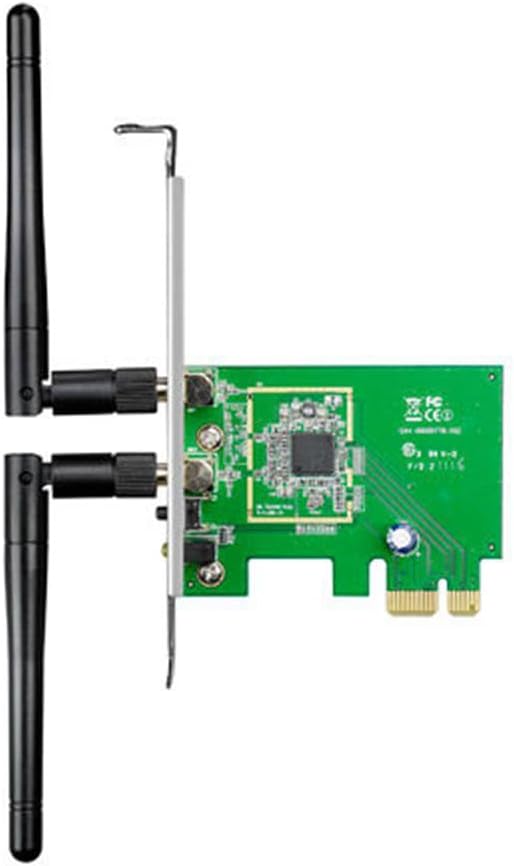
The ASUS PCE-N15 Wireless-N Network Adapter delivers maximum performance with speeds up to 300Mbps, a PCI-E interface, and versatile compatibility across multiple operating systems. Featuring a WPS button for quick secure connections and a dual antenna design, this adapter is perfect for gamers and professionals seeking reliable wireless connectivity.
| ASIN | B0053GR2YI |
| Best Sellers Rank | #1,924 in USB Computer Network Adapters |
| Brand | ASUS |
| Built-In Media | ASUS PCE-N15 802.11n Wifi N300 PCIe Adapter |
| Color | Green |
| Compatible Devices | Desktop |
| Compatible Operating System Family | Linux, Windows |
| Customer Reviews | 4.0 out of 5 stars 1,592 Reviews |
| Data Link Protocol | IEEE 802.11b |
| Data Transfer Rate | 300 Megabits Per Second |
| External Testing Certification | CE, FCC, C-Tick, IC |
| Global Trade Identification Number | 00610839379774, 00777004581353, 04719543379783, 04719543379790, 05711045953002 |
| Hardware Interface | Ethernet |
| Item Part Number | 90IG1U003M000PA0, PCE-N15 |
| Item Type Name | ASUS COMPUTER INTL PCE-N15 802.11n Wi-Fi N300 PCIe Adapter |
| Item Weight | 2.19 ounces |
| Manufacturer | ASUS Computer International Direct |
| Mfr Part Number | PCE-N15 |
| Minimum Required Operating System Version | Ubuntu 20.04 Focal Fossa, Windows 10 |
| Model Number | PCE-N15 |
| UPC | 656266637865 777004581353 803982771490 777060001574 610839379781 610839379774 |
| Unit Count | 1.00 Count |
| Warranty Description | 2 years |
B**S
Better than ethernet
If you are looking to make your desktop wireless, look no farther. The PCE-N15 works great. This is the updated/ faster model of the PCE line. I did a lot of research on this- on many other sites than amazon. I installed it in just a few minutes, and in a couple more minutes, was connected to my network. I had to install the included software. The PCE-N15 can be installed with just a little common sense and mecanical know-how. It does take a little pressure to snap it into place on the plate- the only tool required is a screwriver. Since then, no looking back. When I wake up my computer from sleep mode, it connects to the network in about 15 seconds (if that long). No dropped signal issues, no problems at all! Always stays connected. I do not have to refer to the software to make any changes, or reset anything. One VERY IMPORTANT thing to know before purchase: can my computer accomodate this device? Make sure your motherboard has an open slot for installation. Just open your case and look. I bought the bigger slot version (dual band) from ASUS and did not realize it was already being used by my video card until after it arrived. There are only two slot size versions- easy to tell the diffrence. The return process was easy-I did not open the box. I cannot comment on reception because my router is about three feet away through an interior wall. Better than ethernet: I have a good cable connection. Previously I had my internet conversion box connected to my PC by the ethernet cable. After installation, it seemed to me that pages and video were loading up faster than before. I do not have numbers to back it up, just from what my experience was. Its a great product made by a great company. And its worth the money.
S**S
Seems to work fine
I used a USB plug-in type of wireless antenna for about a year, which worked fine until recently, then needed to be re-set frequently, and finally stopped working altogether. A friend recommended this adapter as a more permanent replacement. It's working just fine for the past month or so - and hopefully he's right on durability. It was fairly easy to install, but I am not a computer geek, and I would have liked to have seen some basic instructions for this. It seemed like I should have just known how to change or add things on the inside of a computer, but this made me fairly nervous. Also, there were three choices on how to connect, for which I made the wrong choice at first - again, I think there needs to be some basic guidelines on what to choose and why. I'm sure for the hardcore techies, this is no big deal at all, but even the simplest of these can be frustrating for someone seeing it for the first time. On the very positive side, before I bought this, I was reading through the reviews, and when a negative comment was made, a response came from ASUS. I was able to use the email link in these responses to solve my issue, and everything is working very well now.
D**Y
Good overall
I installed this item into a desktop computer that occasionally requires wireless access. The computer and card saw heavy use while setting up my new rig, and has so far performed admirably. Pros: -Very low profile, good for airflow. I was able to sandwich this in a PCIe slot above my massive 3-slot GFX card with no problems, other than my fat fingers during the install. -Connects well and quickly. No required bloatware (which I find important), so you can use windows built in wireless features and not install unnecessary junk. Drivers included on CD or can be downloaded from website. -Comes with interchangeable short bracket for micro-ATX/low-pro cases. -Opinions generally state card-style wireless solutions perform better with a lower error rate than USB counterparts, and it keeps USB slots open for other devices. -Dual antenna -ASUS Cons: -After a crash on my computer unrelated to this device, the device somehow lost connectivity. Had to physically remove card from slot and re-insert, after which it ran perfectly again. I have no real reason to blame this card for these issues however, and haven't experienced a problem since.
D**Y
Sort of great when it wants to be..
So. I began by installing this in my computer and installing all the necessary drivers. With Windows, it worked great. For awhile, that is. After said while passed, it began starting off with strong signal, then slowly decreasing into nothingness. I switched it to another PCI slot, and it worked marvelously. Then I installed Linux. What a different story. It says it reaches the network, but pinging any website brings, lo and behold... NOTHING! So, if you like Windows, it's great, but I warn you now: DO NOT BUY THIS IF YOU WANT TO RUN IT ON LINUX (UBUNTU AND DERIVATIVES). The process for getting the drivers and such is complicated. I still haven't figured it out.
R**S
It works as it should
I replaced the D-link Wireless 150 N dwa-525 in my computer with this. When I upgraded my internet from 3/.something too small, to 30/5 I didn't expect that card to suck that bad. I had only bought 3 years earlier. The thing would be able to get at most around 8Mbps but would usually drop down to 4Mbps and stay there for a while. I upgraded my router because that too was bottle-necking my other devices. Even with the new router that D-Link card would usually just get 4Mbps. With this Asus I have been able to get 30Mbps down whenever my router would let it but most times my router recedes from 300Mbps down to 130Mbps and I get left at about 24Mbps down. Upload is fine, I get all that I can get. Installation is real easy. Windows detected it immediately. At first this card wasn't performing that well, but that was because when I put this in, I was to lazy to take out the D-Link. I just disabled it and as a result my speed was stunted a bit. When I took the D-Link out it started working as well as I had hoped for. I haven't had any dropped connections and my connection strength has improved to pretty much perfect constantly. In future builds, I'll probably use this again or whatever replaces it.
A**Y
Great on paper, fail in systems!
Purchased one of these cards for a computer build for one of my customers. Paired it with an Asus P8H61-I B3 Revision motherboard. I ran across an odd issue where the system would not post or boot. Tried the RAM, tried re-seating CPU, removed motherboard from case and ran on cardboard even... The motherboard worked with everything stripped down. As I started to put the system back together, piece by piece, I tested the system to make sure it continued to POST. Once I got to this Asus PCE-N15, the system would not POST or respond. It locks the entire system up, and can be proven as you cannot simply press the power button 1 time to turn it off. The power button has to be held down for 8-10 seconds to shut it down. This is typical if your system does not have a CPU, RAM or Video Card (or they aren't able to work with one another). This is not simply the motherboard detecting PCI-E activity and changing the default video to PCI-E. As soon as this wireless card is removed, everything boots fine. It was being placed in a 16x PCI-E slot which is completely compatible with 1x slots. I have tested this 16x slot with a PCI-E video card and it works completely fine. I would highly recommend staying away from this wireless card as it looks like even other Asus products don't play nice with it. This is in fact the first Asus product I've ever had to write a complete fail or bad review about. I don't believe this to be a fault unit, its simply a faulty design as I found other users who had the same issue with the PCE-N10 and PCE-N15 cards. Another user with a similar issue, locking up Windows before it start or can even be installed. [...]
K**O
Constant Disconnects / High Latency
I bought two of these adapters because I moved into an apartment with "free internet" - which happened to be a wireless network through out the house. Having two desktops, that wasn't very fun. Installing the unit was a breeze - power down your PC, pop it into your mini PCI-e, install the drivers - and off to the races you go. Although, if you're running Crossfire/SLi you may not be able to use this card. I only have one GPU per PC, and I had to drop the cards down to the next available slot to access the proper port. After installing and getting up and going, the fun began. At first, I was disappointed because the card was only reporting 2-3 bars - after connecting though it maxed out and stayed at 4-5 the entire time. Then the disconnects started happening. The card would simply lose the network after a couple of minutes, and only when it decided it was the proper time would it come back. The entire time, any surrounding networks would still be visible - but the router for the apartment just didn't exist anymore. I verified that the router was still going through my cell phone. Eventually, it would return and remain working for about 5 minutes before disappearing again. A little research showed that the chip inside the card is actually a Realtek RTL8192CE - so I uninstalled the drivers I downloaded from Asus and installed the drivers from Realtek. Same issue persisted. I played around with various settings trying to find anything that the card would like that would keep it from dropping out so bad - but in the long run it just doesn't want to work at all for more than 5 minutes (on a lucky attempt). Then, I decided to be bold and try to play a video game (RIFT, to be exact). Upon entering the world, my latency would jump sporadically from 47ms to a whopping ~4,000ms - making any actions useless. I ran a number of Pingtests, and even kicked on a recurring command prompt ping for about 15 minutes. Both tests reported a consistent ~40ms, with the exception of the CMD test spitting out a random ~100ms here and there. I took breaks in my time with this card to test out another, was supposed to be temporary, USB dongle that I picked up (the Netgear WNA3100). Signal strength isn't as great, but latency and stability are superb comparative. In the long run, I've attempted everything that other users have reported works fine. The card itself would have been fantastic for standard browsing (should the connection have remained) - but as I'm a gamer and a web designer - I rely on my packets getting where they need to be without any delay (especially 4,000ms worth of it). I still don't know what exactly is wrong with it, but I'm already done playing with it and am shipping it back for a refund tomorrow.
J**E
Easy installation and flawless performance
This product was installed on a windows 7 computer that previously had no wireless capability. The installation is easy but does require removing the side panel of your computer. It fit well into the slot it was designed for and the antennas screw on easily afterwards. Once I started the computer I was told it found new hardware. The installation instructions that came with the product say to cancel that notification, so I did. Then it's as easy as installing the included disc and following the on screen instructions. Really this means selecting complete installation or custom installation, and if you want to use windows to manage your wireless connections or the included program. I selected windows because this is what we use on all the other computers. Once installed the computer found several new wireless connections. Once I selected our network and entered in our passcode this thing has been working great. It has never lost its connection as some people have reported and the passcode has never had to be reentered as some people have reported.
K**T
Brilliant - Except the default drivers from ASUS
Ever since installing this PCI-E card it has been working flawlessly for me. The only minor issue I've encountered since purchase (Dec 2013) was that the latest drivers from ASUS are pretty unreliable in terms of connection up time. But there is a simple fix to this. The on board adapter with this card is that of a Realtek RTL8192CE, You can download the RTL8192CE-VA4 Windows driver auto installation program and your on board device should be fully up to speed and reliable at the same time. They can be found here: [...] I achieve a faster link speed to the router than a power line adapter I used for a few months, apparently my router (Sky's free router) can only output 100mbits over a wired connection, but whilst it has wireless N technology, it can output more over this medium. So, in short. This is a great card for the price I paid for it, and would wholly recommend it without the current default drivers!
D**G
Five Stars
Works excellent in a Asus Sabertooth 990FX R2.0. Just drop it in, press the button and your done, fast and very easy.
T**H
Ottima scheda PCI Wireless - 300mbps
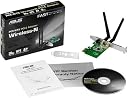
La scheda funziona veramente bene Viene riconosciuta immediatamente da Windows 7 e 10. Ho procedutoi ad ii driver di Asus Tramite il cd incluso nella scatola, oltre a quello troviamo la staffa ridotta per i minipc, con i driver asus il segnale è diventato decisamente più stabile rispetto ad quelli compatibili microsoft. Caratteristiche Tecniche: Pulsante WPS(Wi-Fi Protected Setup) Wizard per setup facilitato. WLAN adapter facilmente trasformabile in wireless AP con software AP dedicato. Supporto WEP, WPA e WPA2: sicurezza Wi-Fi migliorata. Access Point mode Sicurezza Wi-Fi migliorata. Basta premere il pulsante WPS per impostare e proteggere la vostra rete wireless. La modalità software AP permette a questa scheda WLAN di funzionare come access point virtuale
Z**H
Review
Mine stopped working after 2 months
C**N
Excelente producto
Cumple con las funciones que ofrece y es un excelente producto, lo recomiendo, su instalación es fácil y muy rápida
Trustpilot
3 days ago
3 weeks ago