We remain fully operational. Our teams are working around the clock to ensure your deliveries continue safely.

DOWNLOAD THE APP


Copyright © 2025 Desertcart Holdings Limited
DOWNLOAD THE APP
Buy anything from 5,000+ international stores. One checkout price. No surprise fees. Join 2M+ shoppers on Desertcart.
Desertcart purchases this item on your behalf and handles shipping, customs, and support to Kyrgyzstan.
🔀 Effortless USB sharing for the multitasking pro who refuses to slow down.
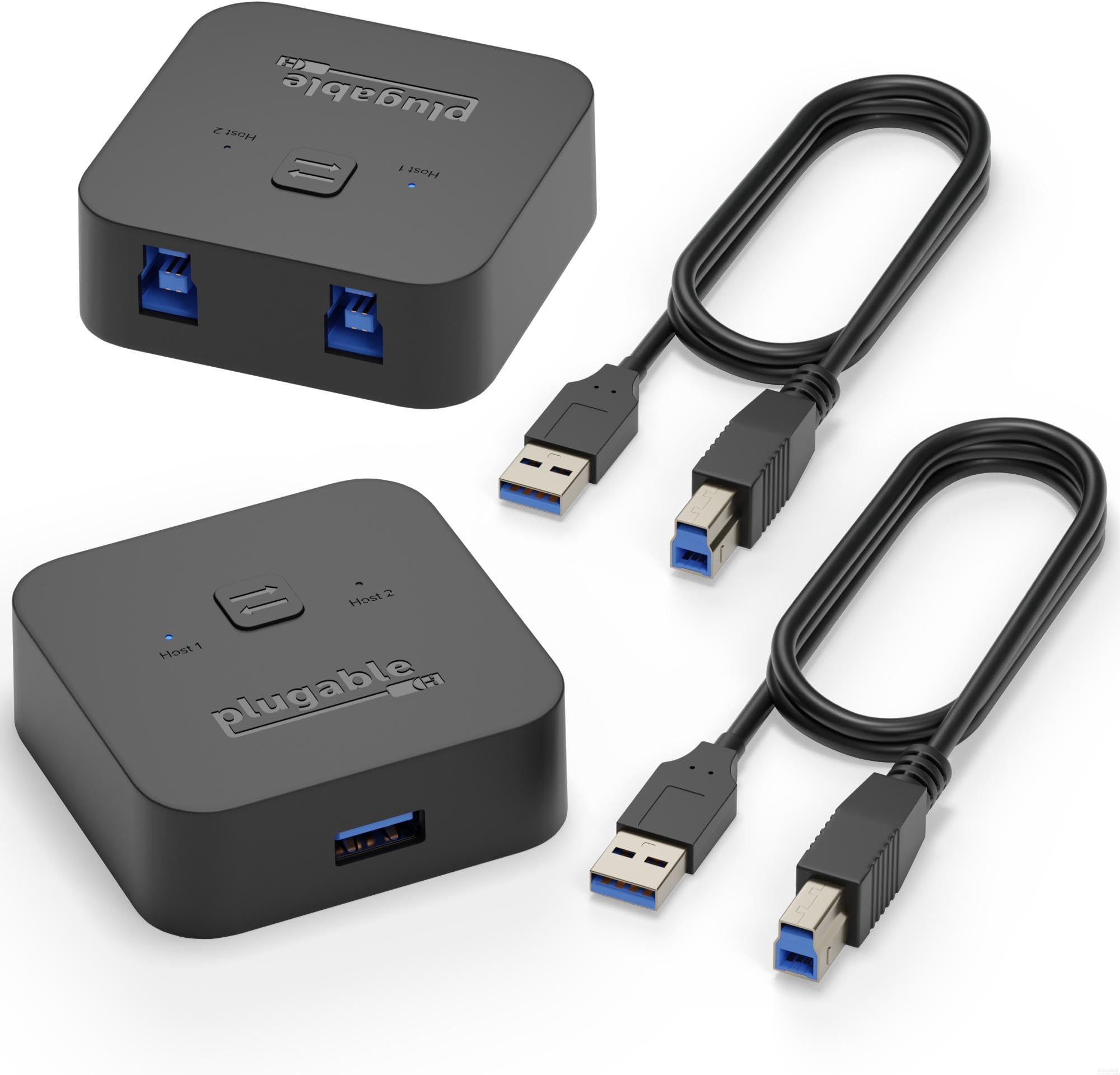
The Plugable USB 3.0 Sharing Switch is a compact, driver-free USB A switch that lets professionals share keyboards, docking stations, and other USB peripherals between two computers with a single button. Compatible with USB 3.0, 2.0, and 1.1 devices, it features LED indicators for active host status and supports plug-and-play operation, making it an ideal productivity booster for dual-computer setups in home or office environments.


| ASIN | B00JX3Q28Y |
| Best Sellers Rank | #84 in KVM Switches |
| Brand | Plugable |
| Color | Blue |
| Customer Reviews | 4.2 4.2 out of 5 stars (1,414) |
| Date First Available | April 24, 2014 |
| Is Discontinued By Manufacturer | No |
| Item Dimensions LxWxH | 2.76 x 1.69 x 0.91 inches |
| Item Weight | 7.3 ounces |
| Item model number | USB3-SWITCH2 |
| Manufacturer | Plugable |
| Operating System | Linux |
| Product Dimensions | 2.76 x 1.69 x 0.91 inches |
| Wireless Type | 802.11bgn |
J**E
Very nice and simple to use switch for switching USB devices between two systems
My intended application for this product was sharing the USB ports on two different computer systems utilizing my Asus Predator 32" 4K Monitor's built in USB 3.0 Hub. One of the systems is running Windows XP SP3 which has some legacy applications and hardware attached that I still regularly use. The other is a late model MSI Motherboard based Windows 10 system. I am using a G. Skill Ripjaws keyboard and a Logitec G400S mouse. Both systems have Nvidia graphics cards, one having a display port and the other a HDMI for video. This is handled by the monitor, which has two inputs. So, I don't need a switch which can handle video. My audio is via the display port for the Windows 10 machine to built in speakers in the monitor and via a standard audio connector for the Windows XP machine, using stand alone speakers. Needing to switch video and audio would have greatly complicated my installation. The device comes packed in a very nice, easy opening plastic package along with two very good quality USB cables. I disconnected the keyboard and mouse from computer and connected them to the monitors USB 3.0 hub outputs. I connected the hub cable to the device's common input. I plugged in the two cables which came with the unit and connect one to each of my systems. The Windows XP machine only supports USB 2.0. As a note, the keyboard and mouse are also USB 2.0. With everything connected, I powered on the Windows XP machine, which was the last one selected on the monitor. It booted normally. There was a very brief pause after the login screen was displayed for the USB addresses to resolve and the system came up and worked perfectly normally. Next, I switched the monitor over to the Windows 10 machine. I switched the Sharing Switch selector to this machines USB port, so it would be ready and waiting upon first boot with the Plugable device attached and powered the machine on. It also booted normally, with keyboard and mouse working just as when directly connected. The Plugable USB 3.0 Sharing Switch seems of very nice quality and worked perfectly the first time right out of the box. Obviously, a hub is required if connecting more than one device - USB 3.0 if at least one of the connected devices requires this. I would suggest on first use to only connect devices to it which have been previously installed on the target computer and to make sure the switch is set so that computers USB port is selected when the computer is first booted. That way, the system can find and correctly address the known devices. Then, if your switch is always plugged into the same USB port, it should work very predictably. From my experience with USB in general, with some devices, they expect to be attached to a particular port. They shouldn't. But, some do. This doesn't apply to devices which install themselves. But, mostly to ones which require drivers to be installed from a downloaded file or attached media (CD/DVD.) If you attach such devices, and they don't seem to connect properly through the switch I would suggest simply rerunning the installation program for these devices, following the manufacturer's instructions for installation, but, with them attached to the switch, probably via a hub. That should correct most common problems. Remember, if the USB device will not function correctly attached directly to the computer, it will not work through this switch. Also, when switching, after the first boot up and when everything was working correctly, it might take a few seconds for the USB interrupts to do their thing and for the device to connect. Again, when booting a system up, I would suggest making sure the switch is in that device's position so everything can be registered correctly. Some system's, especially older ones, BIOS routines will "blow up" on boot if they fail to find expected devices and cause your system to hang or perform "unexpectedly." This is not the fault of the switch, but that the devices were not there when expected. Remember, a system expects to find a keyboard and mouse when it starts up. If your switch is not turned on to that computer when it boots it will not find them attached. This little device is perfect for my needs. I expect to be using it for a long time. It's highly recommended.
C**.
This worked out great!!
It did exactly what I was hoping it would. It turned my docking station into a KVM. So using this switch allows me to switch between my laptop and desktop, including the three monitors that I have hooked up to the docking station.
J**N
Proper usb switch w/o hub. Great for linux!
I bought this after trying multiple USB and DisplayPort KVM/switch devices that all behaved poorly with Linux. Those other units worked fine on macOS and Windows but caused random and intermittent failures on my Arch Linux desktop. Sometimes my mouse or keyboard was missing after boot, or sometimes my webcam w/mic would break my audio stack. I noticed in logs that devices failed to enumerate after switching and I had repeated USB descriptor errors requiring me to unplug/replug devices or reboot. The root issue appears to be how many switchers are built internally. Most “USB switches” are actually USB hubs that stay electrically connected to both computers and try to fake device handoff. Windows and macOS seem to tolerate that behavior well, but I'm starting to see believe that Linux expects a real disconnect/reconnect event from the USB host controller. When that doesn’t happen cleanly, devices don't reappear and Linux starts logging enumeration errors. This Plugable unit behaves differently. It a true disconnect from one host and reconnect to the other. From the linux perspective it looks exactly like physically unplugging a cable and plugging it into another computer. Another side benefit is that this device is not adding an additional USB hub layer. From what I can tell, more hub chaining increases complexity and failure/error opportunity. 4 stars because the cables are too short. I run this with a quality powered hub downstream (StarTech ST7300USB3B, a VL817-based hub), so the switch only handles host selection while the hub handles expansion. That separation seems ideal and has solved my usb issues in linux.
A**S
Great Functionality Matched by Great Customer Service!
At first, I had quite a few issues getting my Sharing Switch and Pluggable Docking station to work together. I wanted to have one docking station with all of my peripherals to go between my personal gaming tower and my work laptop. On my work computer it always worked fine, on my personal desktop the screens would intermittently flash black and I would have delayed functionality in some of my peripherals. Things would work fine if I pluged the dock directly into either computer, but I really wanted the functionality of the Switch. I looked up fixes others had used but nothing worked. Finally, I reached out to Pluggable's customer service and they couldn't have been better! Not only did they send me a free replacement Switch to see if that would solve the problem but also, after noticing one of my monitors didn't have the expected refresh rate available, did research into the manual of the monitor and provided me recommendations and screenshots of the manual to configure my setup properly. It actually solved a different issue I'd just come to deal with when using my monitors! With everything combined, we got my setup working perfectly. With that, I highly recommend Pluggabe not only for the ease of use with their devices, but that they genuinely want to help their customers out and have great customer service!
B**L
I spent a long time researching the various USB switch options and finally landed to this as the best for my use-case that probably won't kill any of my devices. This is excellent for anyone working from home and wants to share USB devices between personal and work computers. It arrives in good packaging, with 2x 1.5m USB cables included. The switch is relatively small, and comes with rubber feet on the bottom to help keep it in place if you're leaving it on your desk. My setup: - Work laptop connected to a dock - Personal desktop - One switch input going into the work laptop dock and one going into my personal desktop - Switch output going into my monitor's USB hub - 4 USB devices (keyboard, mouse, microphone, security key via keyboard USB pass-through) are connected to my monitor. I have the switch secured behind my monitor to keep my desk surface a bit cleaner, so all I have to do is reach just under my monitor and press the button. All USB devices connected to my monitor switch nicely and easily, with a delay of about 1 second. This is very acceptable. I haven't noticed any disconnects or glitches so far. In addition, devices switch automatically when one input disconnects, so when I shut down my work laptop, it automatically switches back to my desktop. This is not advertised, so it may not work in everyone's setup, but it works well in mine. If you don't have a monitor with a built-in USB hub, you can use any other simple USB hub instead where all your devices connect to, or look into other switches with more than one USB outputs. Overall: Highly recommended, will be buying another one to have as a spare. Pros: - Good build quality, unlike cheap no-name products - Comes with rubber feet to keep it in place and 2x 1.5m USB cables - Works well connected to a USB hub with 4 USB devices connected Cons: - The price is a bit on the higher side, but I guess you get what you pay for. - The fact that inputs and output are on opposite sides, so it can be a bit messy when leaving on your desk. But then again, this is the case for just about every other KVM or USB switch.
A**L
Goeie prijs, 2 USB 3.0 kabels inbegrepen. Doet wat het moet doen.
P**O
ok
G**.
I tried many switches and finally got this one. This switch is amazing, no power required, works great with a single hub/dock. All services transfer perfectly. Only one recommendation, the light can be a bit brighter.
H**Y
Es perfecto conecto mis auriculares usb a la play y al pc al tiempo no tengo que desconectar de 1 y conectar en otro simplemente pulsar un botón
Trustpilot
2 weeks ago
2 months ago