Buy anything from 5,000+ international stores. One checkout price. No surprise fees. Join 2M+ shoppers on Desertcart.
Desertcart purchases this item on your behalf and handles shipping, customs, and support to Kyrgyzstan.
🔐 Unlock your digital world with a touch—security that keeps up with you!
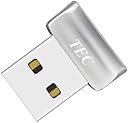
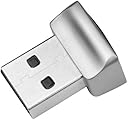
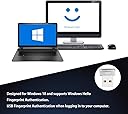
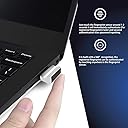
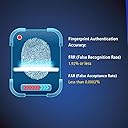
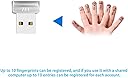
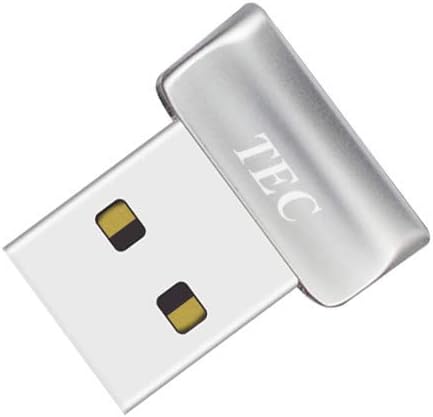
The TEC Mini USB Fingerprint Reader TE-FPA2 is a compact, USB-powered biometric scanner designed for Windows 10 and 11. Featuring 360° fingerprint recognition and ultra-fast authentication within 1-2 seconds, it supports multi-fingerprint registration and Windows Hello integration for password-free login and file encryption. With a false acceptance rate below 0.0002%, it offers enterprise-grade security in a sleek, portable form factor.
| ASIN | B08DCFMSLG |
| Best Sellers Rank | #29 in Security & Surveillance Biometrics |
| Brand | TEC |
| Connection Type | USB |
| Connectivity Technology | USB |
| Customer Reviews | 4.2 out of 5 stars 867 Reviews |
| Item Dimensions D x W x H | 0.47"D x 0.81"W x 0.47"H |
| Item Weight | 5 Grams |
| Light Source Type | LED |
| Manufacturer | TEC |
| Media Type | USB |
| Minimum System Requirements | Windows 10 |
| Model Name | TE-FPA2 |
| Product Dimensions | 0.47"D x 0.81"W x 0.47"H |
| Resolution | 600 dpi |
| Scanner Type | Finger Print |
| Unit Count | 1.0 Count |
F**S
Great Device for the Price
Works as advertised with Window Hello on Windows 11 but I had a slight hiccup at first. When the product arrived I immediately plugged it into my laptop and let Windows recognize it and automatically install the device driver, which it did just fine. Next I went to my system settings to configure Windows Hello but was told that my system couldn't find a compatible fingerprint reader which had me worried. I unplugged the reader and inserted it into a different USB port and waited few minutes and then went back to Windows Hello and this time it recognized the reader without any issues so I'm guessing that Windows needed to install and activate some additional features to use the reader and I hadn't waited long enough with the initial insertion. It shows up as an Elan WBF Fingerprint Reader in the Windows Device Manager under Biometric Devices. Logins are now very fast with just a touch. Much faster than a password or PIN and much faster than I had expected. So I'm happy that this device is compatible with Windows 11 and relieves me from having to use a password when I login. It's quite small and very lightweight and appears to be wrapped in an aluminum body so it should be very durable. You can enroll several different fingers just in case you injure your favorite finger or hand so that you don't get locked out of your system. So for folks having issues, just plug it into a different port and come back a few minutes later like I did. I'm guessing that this device will also work under Linux since it uses an Elan chip but I haven't tested it there and the packaging only advertises Windows 10/11 compatibility.
S**J
Small, just works with Windows 11
This works with Windows 11. Any drivers are automatically installed by Windows after insertion. Easy to add fingerprints with Windows Hello. Settings\Accounts\Sign-in options\Fingerprint recognition (Windows Hello) Works with a KVM, and can be used on multiple computers. Removing the scanner doesn't lock or log off the computer. It is fairly small, sticks out 5/16" / 1cm from edge of computer
S**E
It takes a little finess, but it works great!
So depending on your Windows version this sensor may or may not be plug-and-play. BUT, there is a way to make it work amd it's not hard to do so. I'll leave pictures to show the steps. There are two things that need to be done in order for it to work with Windows Home/Pro 24H2. 1. You have to shut off power management to the device. Not a big deal as the device uses very little power to begin with and is only needing said power when it's looking for your fingerprint. Otherwise it's just as dormant as your keyboard with use. 2. You have to enable the use of external sign-in options in windows. Because it's not integrated and therefore considered a third-party device to the system Windows enhanced sign-on doesn't recognize it as a Windows Hello device. By enabling the use of external sign-on devices you enable the use of devices like this. Mind you you will have to have a pin to enable the device and store fingerprints. Go down to the start button and RIGHT-click it. Go to Device Manager Open Biometric Devices RIGHT-click ELAN WBF Fingerprint Sensor LEFT-click Properties LEFT-click Power Management Uncheck the box that says "allow the computer to turn off this device to save power" LEFT-click Okay Again, RIGHT-click the Start Button and select Settings. LEFT-click Accounts LEFT-click Sign-in options LEFT-click Sign in with an external camera or fingerprint reader to turn it on Restart the computer Now you can enjoy this great reader. It is fast and accurate and is a great addition to any Windows Hello setup!
S**A
Stopped working at about one month.
At about a month, mine stopped recognizing my fingerprint. Windows 11 said, "Your device is having trouble recognizing you. Make sure your sensor is clean." It was clean. Seller sent a replacement, but it soon started doing the same thing. Within a week or two of the errors, it caused my new workstation to freeze up. I could move my mouse, but couldn't click on anything or type. I couldn't see the app bar at the bottom of my computer screen or my wallpaper. After rebooting in an attempt to free it up, I couldn't even get my PC to power up again. After removing all devices, including this reader, I was finally able to get it to turn back on. I spent a lot of time troubleshooting it, scared that my new PC was failing. Turned out it was just this fingerprint reader! I've spent hours and hours removing my fingerprint, removing the drivers, finding and reinstalling drivers, and changing settings to accommodate it. Honestly, I don't spend this much time or experience this level of trauma typing in my password, so what's the point? Don't buy it for Windows 11. It's not a convenience and it will waste your time, not save it. Besides, you'll probably want a newer one that processes your fingerprint on the device for security. This is an outdated product. I contacted them and instead of responding, they immediately closed the case, which is why you're getting the uncensored truth.
R**T
No direction.
Does not come with directions and window may not work with the reader at first install. Did a search and watched a video on how to make it work. Used windows update to find the drivers. Then to finger print reader in the settings to set up the reader. Works well after everything is installed and set up in windows.
S**T
Works Great with Windows 11 25H2
I love this device! I don't know how I've gone so long without one. Installation on Windows 11 25H2 is quite easy! Here's how. * Plug in the TEC fingerprint reader and Windows plug-and-play quickly recognizes it and installs the driver. * Go to Settings -> Accounts -> Sign-in Options and under "Fingerprint recognition (Windows Hello)" you should see "Sign in with your fingerprint scanner (Recommended)". If it says "This option is currently unavailable", check Device Manager to see if the Biometric Devices -> ELAN WBF Fingerprint Sensor is there without a warning icon. * Open "Fingerprint recognition (Windows Hello)" and click the Set up button to register a finger to get you started. You can add registration of more fingers later if you like. * Lock screen, or sign out. * Simply put the registered finger on the fingerprint reader. Boom, you're logged in instantly! * If you're installing on a laptop or desktop that goes to sleep (my desktop isn't configured to go to sleep, so I didn't bother with this), you'll find that Windows may choose to turn off power to the fingerprint reader at times. You should change that behavior in Device Manager. Open Biometric Devices -> ELAN WBF Fingerprint Sensor properties, and on the Power Management tab uncheck "allow the computer to turn off this device to save power". Warning: Don't expect fingerprint to show as a sign-in option on the Lock or Login screens! Microsoft apparently chose to not show fingerprint as an option once "Fingerprint recognition" is enabled. Just go ahead and use the fingerprint reader. This behavior had me confused for quite a while, as I wrongly thought its absence on the Lock or Login screens sign-in option meant the fingerprint reader wasn't available. Note: In Windows 11 Microsoft got rid of the "Sign in with an external camera or fingerprint reader" Sign-in Option so there's no need to turn that option on as it's just enabled automatically. Some reviewers who installed on Windows 10 state that you must turn that option on, but don't worry because you can't find it any more.
H**R
Low profile, accurate. Easy to install, small footprint.
Low profile and great accuracy/consistency. I have an LG Gram Pro 16 inch laptop. The one short fall of this laptop is no fingerprint scanner. It does use fascial recognition, but I prefer to keep my cameras off. The installation was easy and straightforward. I told Windows 11 to use "Hello" and then it installed after a reboot. It scanned and stored my fingerprint without any issue. It has worked flawlessly over the past week and has never failed to allow a login on the first use. It is very low profile. It is barely noticeable. Of interest, the Gram Pro is the same thickness as the amount the scanner protrudes from the USB port. So, when the computer is open, the scanner and the laptop are equally contacting the table surface.
A**E
works fast, but took a minute for computer to recognize scanner
actually works wicked fast on my windows 11 pc. just had to restart pc after plugging in for the first time to get it to work
M**K
Small, but powerful
Was looking for something super small for my laptop, this is exactly the right size. Works great!
4**5
Windows11で問題なく使えました
指紋認証リーダー非搭載のWindows11搭載ノートパソコンでWindows Helloの認証を行うために購入。 問題なく認証/ログインができています。満足です。 ドライバー等も特に手動インストール無しでUSBに挿しただけで大丈夫でした。 製品パッケージの裏面にWindows11/10対応と記載があります。
T**Y
Does not work - Tried every driver option on desktop and laptop.
Tried Microsoft/Dell drivers, none of them worked with this fingerprint reader...
A**Z
Tardo
El vendedor no hizo la tramitacion del IVA y me ha tocado pagar 5,92€ al cartero. Por otra parte el lector funfiona bien y Windows 11 lo reconoce sin ncesidad de instalar ningun driver.
B**M
Werkt niet
Doet het niet op Windows 10 en ook niet op W11. Gedownloade drivers (van de originele site) werken ook niet. Zonde van het geld en de moeite.
Trustpilot
2 weeks ago
1 day ago