Buy anything from 5,000+ international stores. One checkout price. No surprise fees. Join 2M+ shoppers on Desertcart.
Desertcart purchases this item on your behalf and handles shipping, customs, and support to Kyrgyzstan.
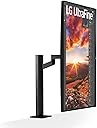
🚀 Elevate your workspace with LG’s 32" 4K Ergo Monitor — where productivity meets style!
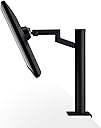
The LG 32UN880-B is a 31.5-inch UltraFine UHD 4K IPS monitor featuring HDR10 and 95% DCI-P3 color gamut for exceptional image quality. Its ergonomic C-Clamp stand offers extensive adjustability—height, swivel, pivot, and tilt—optimizing comfort and desk space. Equipped with USB Type-C delivering 60W power, it simplifies connectivity and cable management. Ideal for professionals demanding precision, flexibility, and a clutter-free workspace.


| ASIN | B08BCR862L |
| Adaptive Sync | FreeSync |
| Additional Features | Anti Glare Screen, Height Adjustment, Swivel Adjustment, Tilt Adjustment |
| Aspect Ratio | 16:9 |
| Best Sellers Rank | #158,803 in Electronics ( See Top 100 in Electronics ) #3,277 in Computer Monitors |
| Brand | LG |
| Brightness | 350 Candela |
| Built-In Media | Monitor, Power cable, Stand, USB-C cable |
| Color | BLACK |
| Color Gamut | 0.99 |
| Connectivity Technology | Bluetooth |
| Contrast Ratio | 1000:1 |
| Customer Reviews | 4.4 out of 5 stars 1,196 Reviews |
| Display Resolution Maximum | 3840 x 2160 Pixels |
| Display Technology | LCD |
| Display Type | IPS Display |
| Hardware Connectivity | USB |
| Has Color Screen | Yes |
| Image Contrast Ratio | 1000:1 |
| Item Dimensions D x W x H | 16"D x 28.1"W x 25.2"H |
| Item Type Name | LG 32UN880-B 32" UltraFine Display Ergo UHD 4K IPS Display with HDR 10 Compatibility and USB Type-C Connectivity, Black |
| Item Weight | 10.3 Kilograms |
| Manufacturer | LG Electronics |
| Model Name | UltraFine |
| Model Number | 32UN880-B |
| Mounting Type | Wall Mount |
| Native Resolution | 3840x2160 |
| Number of Component Outputs | 2 |
| Picture Quality Enhancement Technology | HDR10, 4K UHD |
| Pixel Pitch | 0.18159 |
| Power Consumption | 60 Watts |
| Refresh Rate | 60 Hz |
| Resolution | 4K UHD 2160p |
| Response Time | 5 Milliseconds |
| Screen Finish | Matte |
| Screen Size | 31.5 Inches |
| Screen Surface Description | Matte |
| Shape | Rectangular |
| Specific Uses For Product | Business, Multimedia, Personal |
| Total Number of HDMI Ports | 2 |
| Total USB 3.0 Ports | 3 |
| Total Usb Ports | 3 |
| UPC | 719192641303 |
| Unit Count | 1.0 Count |
| Viewing Angle | 178 Degrees |
| Voltage | 240 Volts |
| Warranty Description | Limited: 1 Year Parts & Labor |
| Warranty Type | Limited |
P**N
Photographers will loving seeing their work on this monitor
The prefect monitor for home office setups. All you need is a decent desk that will handle the clamp on Ergo arm and you've saved the space that any other monitor stand would have taken up, with the choice of height, angle and distance perfect for however you're sitting. It's bright, vivid, and big enough for any photo or media editing software, with plenty of room for all your tools and timelines. Three 8.5x11 sheets (plus another inch or so) wide, with 5 inches under them gives you plenty of room for working with multiple documents, or for developers who need a text editor/IDE with all the sidebars and 2 browser/app windows, side by side. If you have anything less than a 4k screen now, you'll love seeing your hi-res photos or 4k video blown up on this screen. You'll make sure your phone camera is shooting at its highest setting from now on. The 2 USB ports in the back are perfect for attaching a webcam and mic to your desk without paying for another hub. The extra HDMI let's you plug in a Chromecast/Google TV/Apple TV/etc. in the back for watching 4K streaming stuff, but keep in mind your streaming device remote won't be able to control volume. The only way to control the monitor's volume is the toggle stick under the screen. But you'll probably use your computer's audio out anyway. The speaker, like every other review says, is just okay, but note it sounds worse if the monitor is at its lowest height from the bottom pointing speakers bouncing off your desk surface. My use - web development, alongside an LG 27" ultrawide gives me plenty of screen for all my working windows and I can keep communications and distractions (email, slack etc) on my second screen. A webcam and mic plugged into the back keeps my desk hub-free, freeing up the other ports on my Mac Mini for other stuff. I can lean back and watch 4k video, adjusting the screen distance, angle etc. without worrying about how much fiddling I'll need to do to set it back to working angles. The arm works better than the cheap/medium priced VESA arms, never creeps or moves, and is easy to get level. But it's not like the expensive arms that you can move with one finger. But still - if you want to set up something like a Zoom call with this thing vertically (the only time I do that), it's no trouble to rotate it that way and back. Get an arm mount for your webcam, and position it in the middle of your vertical screen, and you'll always appear to be making eye contact during meetings, even as you use the top of the screen as a teleprompter. I wish the volume and screen settings had an interface on my Mac, (and then could be controlled with software, shortcuts or a Streamdeck) but the toggle switch is easy enough to figure out and you'll probably rather use speakers/headphones from your computer's output. But I use the monitors speakers a lot of the time and they're loud and clear. If you need them to be really loud, they can be. Why wouldn't you buy this monitor? - If you're a gamer and want fast refresh rate. - If you have a thousand dollars or more and want more size or more than 4k, or crazy amounts of 'nits', or truly realistic HDR, or something curved. - If you've done research and know that the 'N' in the model number means 2020 and you want to wait for the absolute newest model, however long that'll take to get made and ship. - If you have a desk surface not suitable for the clamp (or supplied grommet plate) or want/need to mount it on a wall – buy the same screen LG sells for less without the Ergo arm. - If you don't have 28 inches of space for the width of this screen. You don't need that much desk width though, since the arm lets it overhang as much as you want. You could rotate it vertically if you have at least 16" in your cubicle or wherever you've been stuffed into. - If you're obsessive about cord management - wires run nicely through the arm, but they come out a couple of inches before the base. In most setups you won't see any wires, but if the arm is rotated to get the screen as far back as possible, you'll see this, but it probably wont bother anyone but those truly obsessed by wire OCD, and those types would probably find a way to hide them. - If you don't want your phone/cloud storage to fill up with all the hi-res content you'll now want to shoot, and/or don't want to increase your internet bandwidth use with all the 4K YouTube you'll want to watch now.
T**E
This is the best monitor for a mac mini m1
With this review, I will walk you through my journey on finding the best under 1k monitor out there. I will tell you what to keep in mind and what to expect. And the issue I had prompted a replacement. Having a bad sample is inevitable every once in a while, and this is the first time I had to return a monitor because of issues. Still, I hope to debunk some things and help you make the best of this monitor. 1. I started by purchasing an LG 32 inch VA monitor. Bad idea for a mac mini or if you care about black colors. VA monitors for productivity are not the best because the black will ghost with every screen scroll against a lighter background. I do photo, design, and video work, and I couldn’t deal with the narrow view angles. so I returned this to my local Sams and upped my budged to include an IPS display 2 I found this 32un880-b monitor. This monitor has the best ergonomic stand if you have a solid desk, as I do. See picture. I had to get a replacement within a week because of a power supply issue that will make the screen flicker after a prolonged sleep session. After I troubleshot with LG, Amazon sent me a replacement the next day, and the second monitor is perfect. See below for my troubleshooting issues to help you if you’re experiencing the same. 3. You need to use this monitor with USB c or display port to USB c with the mac mini. If you don’t, the retina resolutions will not be available to you. You can use HDMI; just be prepared for your text to look small or big on a mac. A BIG difference between display port 1.4 over UBC compared to HDMI. 4. This monitor is not meant to be turned off manually. Just leave it on, and the monitor goes to sleep to save power according to your computer. On the mac mini, I just hit the lock button, which prompts the computer to turn off the screen right away. If you turn it off manually, the hub on the back will power down as well. 5. take your time with the cable management solution and use velcro ties cut to size so that the wires have plenty of space to move with mount. If you don’t, you will stress the connectors or the cables. 6. The antiglare coating is fine. If you’re used to a shiny glossy screen on your laptop, you will see a difference, but I’ll rather have a reduced glare than having everything reflecting on the monitor. 7. You will not be able to control the speaker's volume within the OS. the speakers work ok, but I recommend the Logitech 407 speakers via USB connection to control over OS. Great sound and low noise. You don’t need to disconnect these either. If you disconnect, you will always hear a power-up chime that can be loud. I never disconnect the speakers, so I never hear the noise. 8. If you plan to use a webcam, make sure it is secured to the monitor with alien tape or position it away from the monitor. I use a camera stand with a splitter. See picture. Yes, you can connect behind the monitor on the hub. 9, USB strip lights will draw too much power on the USB hub with a mac mini. I’m using with an extension and using the stand cable management system to keep everything clean. 10. I will be creating a complete setup guide like on the picture, so check out youtube soon if you would like to see my setup in action. Troubleshooting info: I had to buy this monitor twice. The first one had a flickering power issue that I troubleshot and determined to either be the power supply or the power management in the monitor. The monitor would work great for a while, and then when it would sleep for a time, it would wake up and flicker and distort the image. (See the second pic)I had to cut power to the monitor and power it on again to get it to go away. I loved the monitor, so I requested a replacement with the same through amazon, which transferred me to LG for troubleshooting. after I explained everything, I called Amazon again, they send me a replacement monitor the next day. The new one works perfectly.
F**K
Excellent 4K Monitor With Amazing Ergonomics
This monitor exceeded my expectations. I have tow of them. The 4K image quality is crisp and vibrant, and the IPS panel makes everything look clean from any angle. The ergonomic stand is the real star — it’s incredibly flexible, easy to adjust, and perfect for long work sessions. The USB-C connection makes setup simple and keeps the desk clean with fewer cables. Colors are accurate, text is sharp, and the overall build feels premium. I’m extremely happy with this purchase. If you're looking for a high-quality 4K monitor with great flexibility and comfort, this is an excellent choice!
F**E
Superb Monitor for Photo/Video editing use! Fantastic Ergo stand! Perfect with MBP M1 MAX
I am a Professional Home and Personal Chef and I teach cooking both in videos, directly online, and in live streams. I am also an online influencer and commentator. As such, my needs are mixed and many when it comes to microphones, mixers, and input devices to computers, studio & EDITING equipment, and various software. Quality Monitors are an exceptional need for both video and photographic editing. This LG monitor has met my expectations and my needs. The installation of the monitor on my desk is phenomenally great! The Ergo stand is fantastic and allows the 32" monitor to "float" in any position it is maneuvered to. Awesome! The monitor can also be placed in horizontal or vertical format. This stand is something that needs to be available as a stand-alone product with VESA mount for many monitors. Really, REALLY great innovation! I have the monitor connected to my new 16" MacBookPro M1 MAX via USB-C and have not experienced ANY of the issues reflected by other reviewers here. The monitor presents excellent color and brightness without flicker, whiteouts, or other calamities. I use the monitor primarily for Video Editing and Photographic post-production. DaVinci Resolve and Final Cut Pro look fantastic on the monitor, as does Lightroom and Photoshop. Gaming with productions like the new, updated Myst are also really visually intense. There are certainly other IPS 4K monitors that exceed the capability and performance of this monitor, but the downside is that those will cost a LOT more, and unless you are editing to Theatre Release standards, this monitor can perfectly handle everything else. As others have mentioned, if using a USB-C cable with a Mac, it is important to turn off HDR in OS System Preferences to assure proper color representation. Controls on the monitor are straightforward and relatively easy to adjust. Cable and wiring control is managed within the Ergo stand internally. For various other needs, the monitor has two HDMI ports, a display port, USB-C port, and two USB-A output ports. A MacBookPro can be powered by the connected USB-C cord. The monitor itself is powered through a pretty large brick, but with enough length to allow it to be on most floors. All in all, I couldn't be more pleased with this incredibly functional and superb monitor...especially at the reasonable price! For me, it rates an unequivocal FIVE STARS and easily gets my honest and very hearty recommendation. My second external connected is an older, yet great performing Dell 2410, but I am likely to purchase a second, identical LG monitor soon to replace it. Awesome unit!! *If you found my review helpful to you, PLEASE let Amazon know by clicking the "HELPFUL" button below!
O**E
Great 4k Monitor for most
The image is excellent and the screen does great. As IPS monitor it has wide view angle so I can us it at any crazy angle I want and still see it clearly. The mount and arm works well. It is a little stiffer than I would like so you really have to adjust it by holding the arm components and not by pushing/pulling the monitor itself... Cable management is not as good as it suggests. I cant fit all of my cables through the base, it simply doesnt have enough room. They should have designed to have 2x the cable space in the stand. Mostly this is because I have two HDMI cables along with power, and USB cable. Not a deal breaker but an obvious shortfall not mentioned in any YT videos I watched about the monitor. Overall I really like it, the price is great, and I will buy one or two more over the next few months. I do not game, but this is only 60 hz so not the best for serious gamers. Update: I bought a second monitor and I did have an issue with it being defective. It would flicker on and off during games or videos but not on basic applications like web browsing. Having two monitors, I was able to test all components and determine it was a fault on the monitor. Issue only occured on one monitor, only on HDMI (both ports) and not on USB or DP. Removing one star for this issue. I have ordered a replacement.
K**V
Great 32 inch monitor with a very nice mount
First the plus side - the mount hype is real. this is a very nice ergo mount and does a fantastic job. It can be a little tricky to mount the monitor to the mount once it is on your desk though. I advise putting the monitor on the mount before the mount is attached, and be sure to leave the cardboard piece on the mount until the monitor is secure. The cable management for the mount is also stellar, no complaints at all. The monitor itself is a very nice bezel less ips screen, it has all the issues every other ips screen will have. Black might look dark grey in a dark room, sometimes white isn't perfectly pure white, the corners can have some edge glow, etc etc etc. All ips moniors will have this, if you can't stand these issues don't buy an ips monitor. That said, the black is pretty black, the white is pretty white. If anything I think this monitor is a little too contrasted and saturated. Currently I am using it with an hdmi 2.1 cable but may swap over to a displayport just to see what if any differences emerge. My only major complaint is sharpness does almost nothing. I can barely tell the difference between max and off. So far I say it is a great monitor that is doing exactly what I paid for. 60 hrtz refresh rate with 4k resolution, good color gamut, great mount, and 32 inches. I will need to do more color calibrating to it but just a few minor changes out of the box has almost gotten it to my version of perfect already. Those who are reporting yellow is basically white either lost the lottery on this model, or just need to do more work on their settings. Any higher end monitor will always need tweaking out of the box it is just how it is. I will say all color settings other than customer are basically useless because you forfeit control of every setting other than brightness.
T**M
Incompatible with Mac Mini M1, poor panel picture quality, cheap speakers. Good stand though.
I'm a fan of LG monitors in general I think they're good value. I use their 43 inch as a daily driver. This 32UN880-B monitor has a great design - it's light, simple, thin bezels, and the stand is very well thought out. In fact the stand is exceptional. Saves a lot of space on my desk and gives a floating effect for the screen. Build quality overall is reasonable. It would have been better to include no speakers than the cheap tinny sounding speakers it has. But it's the panel that's the big letdown overall. And that's really a shame because there was the potential for a great product here. I read a comparison to TN panels in the reviews below and I couldn't agree more. This reminds me of a TN panel. You'll need the ergonomic arm to reposition the screen exactly in line of your field of view - because the viewing angles are narrow. Pairing with a Mac Mini M1 was very difficult. The USB C connection won't work at all that's a known issue online and the latest software updates don't help (I'm on 11.2.3). HDMI gives a picture. It looks color oversaturated, and the text isn't sharp. Not great for anything except watching movies. Useless for coding. You can enable HDR in system preferences and that helps correct the picture some, but it's just barely acceptable, and with HDR the colors look washed out. Overall the panel is sub par, even though the size and resolution are decent. The poorest viewing angles I've seen in many years, dimly lit, blacks look shiny grey. On the Mac Mini M1 there was a flickering issue. Over HDMI every few minutes part of the screen flickers black, say for a half second. I've tried 3 HDMI cables including the original they included. No dice. Tried to ignore it but surprisingly frustrating and absolutely a dealbreaker. This monitor is totally unusable, and even if they fixed the bugs it's a $450 value IMO. Returning. Big waste of time. LG you owe me one. UPDATE: Got a brand new replacement 32UN880-B from Amazon and borrowed a friends Mac Mini M1. As before USB C would not display a picture and over HDMI there was flickering. So if you have a Mac Mini M1 this isn't the monitor for you.
N**N
Flexible stand and great picture
I was replacing a 2013 iMac that I was slaving as dedicated monitor for my 2018 MacBook Pro. A display I was very happy with but the kids needed a computer for school from home work. This monitor is pretty great so far but at first I was horrified because I could not configure any settings and the colors were yellowed and washed out. Turns out, OS X had enabled HDR by default when I wasn't actually trying to display HDR content. This caused the monitor to lock out other picture settings. After unchecking this box in the display settings, everything looked good and colors were accurate. The Ergo stand allows you to clamp to your desk or utilize a through hole if your desk has one. The latter will allow you to get the desk against the wall. The adjustments are smooth and sturdy. It stays where you intend it too. You can swing it every which way which would be really nice in an office setting but not totally necessary when WFH, but it is nice to have the option. I do wish the vertical travel was a little higher though. It comes with a Thunderbolt 3 USB-C cable which allows you to use a single cable for data and power. It's only up to 60W but this should be fine for typical use. I've only noticed it pulling from the battery when there is processing intensive stuff happening. I have my wall charger nearby if ever needed though. 2 USB-A ports on the back of the monitor are convenient and prevent me from needing a hub for accessories I need constantly plugged in. Overall, it's a nice display, attractive in design, bright enough for a sunlit room, a broad color gamut for accurate design work, and a very flexible stand.
M**N
LG 32UN880-B: Workstation Wonder
This 32" 4K monitor is a productivity powerhouse! The expansive screen gives me ample space for multitasking, while the Ergo stand ensures perfect ergonomic positioning. Crystal-clear visuals and USB-C connectivity make it a joy to use. Highly recommended for any workstation!
G**A
Perfect
Very nice Monitor!
J**H
Solid monitor
Great quality per price. As far as I've seen so far, this is the best you're going to get per price on the market. Great quality at 4K and reasonable refresh rate at 60hz/60 FPS. I've really enjoyed it as a video editor/photo editor. Color accuracy is great and very customizable if you need further tweaking. USB in and out = making my MacBook full screen while also charging it, which is tremendous. As for gripes, I wish it was a little brighter. Be careful with cords, as the USB is sensitive and broke in this time. Thankfully LG warranty covered it when I pulled too hard on the USB cord to get a USB out of a shot (lol), but be cautious. Also, the speakers go haywire and glitchy, so that's been a complete write-off. I try to just have earphones or go through MacBook earphones because it's that spotty and choppy. Very weird. That being said, it's affordable and high quality enough that I'd bother leaving a review and considering buying a 2nd version for dual monitor.
V**J
Superb Monitor. Awesome Display. Money Well Spent!!
This is my best purchase out of all the gadgets that I own. It feels wonderful to work on this monitor. Display couldn't be any better than this. 4K experience is pleasing to the eye. In-built speakers are also good. I am using it with Apple Mac Mini M2 (Pro) and the combo is great. My major reason for buying this monitor is that I wanted to read lots of Kindle books that I own. It feels really amazing to read books on this. Also, I do lots of R&D coding projects, so programming experience with this monitor is fantabulous!! Money well spent! I wish I had bought it way back...
A**O
Muy buen monitor 4k HDR10
Yo antes tenía un monitor FullHD de la marca Asus, de 27", era muy bueno pero ya tenía 10 años con él, así que decidí hacer ya un upgrade a 4k, por lo que mis expectativas eran altas, así que al tener este monitor ya después de un mes de uso, puedo decir que es una gran elección, la calidad de la imagen es extraordinaria, tal cual como debe ser un 4k, el HDR le da una riqueza a los colores y debo decir que el sonido es bastante bueno, pero me refiero al que sale por el jack de auriculares, se escucha mucho mejor ese audio que el de sus bocinas integradas. Debo decir que yo uso este monitor para dos cosas, para el trabajo y para el gaming, yo soy diseñador gráfico y los colores son muy buenos para edición de video o la parte audiovisual, las fotos tienen mejor detalle que son más perceptibles, eso si, el monitor LG soporta una profundidad de color de 10 bits los cuales no puedo disfrutar lamentablemente por mi tarjeta de video, tienes que ser una RTX de Nvidia, ya que sus controladores soportan esa salida o en su defecto, contar con un puerto Display Port ya que estos puetos si siportan la salida de 10 bits, si usas HDMI puede que te pase como a mi que solo puedas usar hasta 8 bits (menos cantidad de colores) sin embargo con esta profundidad de 8 bits lucen bien los colores. En cuanto a gaming, la uso para ps5 y se ven super bien los colores en los juegos, su salida es hasta 60 hrz, yo lo probé en juegos como Fallout 4, Witcher 3, cyberpunk, Horizon Zero dawn, God of war y todo perfecto, en un juego de FPS como Farcry me va super bien, asi que si eres gamer te lo recomiendo, ya si quieres mas tasa de refresco busca otro monitor. En cuanto al HDR es recomendable usar el que trae el monitor, ya que si en windows 11 o incluso en la ps5 habilitas desde sus sistemas el hdr, desactiva el que ya trae el monitor, no sé porque sucede eso, asi que mejor dejo el hdr del monitor y desactivo el de los sistemas. El único defecto que le encuentro, es que no tiene selección automática de señal, cosa que extraño de mi monitor de Asus, si entraba usa señal por un puerto le monitor por si solo se cambiaba a esa señal, en cambio el LG te pregunta si quieres cambiarte a la señal detectada. El botón tipo stick que tiene espero que no se desgaste tan rápido. En general es un excelente monitor 4k hdr10 con 350 nits de 32".
Trustpilot
2 weeks ago
1 month ago