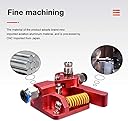
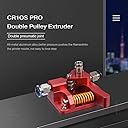
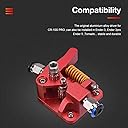
๐ Elevate Your 3D Printing Game!
The Bigtreetech Upgrade Dual Gear Extruder is a high-performance 3D printer extruder kit designed for compatibility with popular models like CR-10 and Ender series. Featuring a robust all-metal construction and adjustable spring tension, this extruder ensures reliable filament feeding and improved print quality. Ideal for various filament types, itโs the perfect upgrade for any serious 3D printing enthusiast.


| Customer Reviews | 4.2 out of 5 stars 695 Reviews |
D**.
Absolutely kills it.
To get it out of the way first, yes, as everyone else has mentioned... No instructions. However, if you pay attention when you are removing your old extruder, this is a straightforward process. I have been trying in vain to get a large nozzle (1.0 mm) to work on my ender 3 pro for rapid drafting. The stock extruder laughed in my face and skipped like a record when I tried to print with the 1 mm. I installed this extruder, not really expecting that much of a difference, but I had tried every other suggestion for fixing extruder skipping. Slowed the print down, adjusted up my zed offset, changed stepper motors, checked stepper voltage, all that crap. Long story short, I installed this guy and have run a few tests. I started with a layer height of .6 at a print speed of 30. No problemo. I was surprised. So I jumped it up to the .8, same speed. No issues. I went bananas and jumped it up as far as I could possibly need it to go: 1 mm layer height at 50 mm/s (my usual speed for PETG). I'll note here that I ran it at a 1.1 layer width as well. Holy crap, it ran it no problem. You can watch your spool as the life drains out of it at that height and speed, but it does an amazing job now. Just from the extruder change. Buy it. Buy it now. BTW, you can do a layer height the same as the nozzle, but you need to know how to set your slicer. Most people recommend no more than 75 - 80 percent, and that's perfect if you don't want to muck around too much.
B**R
No Longer fits Ender v2
With the latest Ender 3 v2 the motor has changed. The shaft is no longer keyed and the factory feed roller is pressed onto the shaft. As a result the new set screw is too high to catch the shaft. Also you need to get the old pressed roller off before you can even see this issue. The result is that this will NOT work on the newer Ender 3. If you look down at your extruder and the motor shaft does not stick up above the roller gear then this will not work. I always wondered how you connect the finger wheel filament feeders you find on Thingiverse for the Ender 3. Now I know with their latest model none of those will work either. Hmm...I guess I can kind of blame Creality for this but the vendor of this extruder needs to be current as well. If they made the lower part of the gear longer and put the set screw down there then it would work but you still have to get the pressed roller off the motor. Now that sounds all negative and if you have that model I guess it is - however, their customer service is absolutely great. They reached out to me immediately to clarify and resolve the issue. Although in the end it has been turned over to their engineers for a permanent solution, they gave me options and refunded super quick. I will definitely buy from them again.
H**.
Overall, a great upgrade! Well worth the $$
Ordered this for my Ender 3 pro as the teeth were worn and no longer feeding the filament consistently. I have installed similar hardware on other printers, so this one wasn't a big deal, but for someone new to this, the lack of decent instructions may be a bit frustrating. The only other con for me is the inability to add an extruder knob due to the design. Not a deal breaker, but maybe future versions could allow for this. Now for the good: This thing is well built and works like a dream! Anyone that has dealt with the old style single gear extruders know how aggravating feeding new filament can be! Sometimes it seems almost impossible to get it aligned and feeding properly. No such issue with this one. Feeds right through, and no slipping or jumping. I'm also not seeing the filament dust accumulate around the drive gears like in others. Would definitely purchase again!
E**N
Fits BIQU B1
Fits biqu b1, but filament sensor does not work directly with it. What Iโm doing is just unscrewed the sensor and let it hang there and works just fine. Iโm getting 2 more. Need to adjust esteps for extruder. Mine is running right at 139 e steps per mm and I noticed it prints much better with 105% flow rate. I may go ahead and adjust the e steps to get the flow rate correct at 100%. Big upgrade, dual gear drive is so much better I would imagine than just the bearing with low grip on filament. Also, get some small tweezers and reverse each of the pins in the extruder drive motor plug, as if not, it will run backwards.
H**H
Works Great but with Some Caveats (Read my Review)
(Bigtreetech Dual-Gear Extruder) I'd give it 3.5 stars if that was an option...3 seems too few but 4 seems to many...and here's why.... I bought this to complete the mod of my Longer LK5 Pro from a Bowden Tube to a Direct Drive and replace the extruder. The printer originally came with the black, single-gear extruder with the 'wheel' that is standard on most FDM printers. This does work great and gives you great control over the filament extrusion resulting in much nicer print quality but be aware of a few things: 1) Make sure the shaft of your motor is long enough to catch the lock-screw for the gear. Luckily mine was but I read many stories of their motor shaft's being too short. You're going to need at least 20mm of shaft length to secure the gear to the motor shaft. 2) I hope you have a Dremel or way to modify the spring that comes with it. The spring they send makes too much pressure and causes the gears to lockup and you get the most sporadic extrusion which will ruin every single print. I've even had prints where it stopped extruding all together because the spring pushed the gears together so hard that it locked and seized up. I took my Dremel and cut off about 3 "rungs" or "loops" of the spring to release some of the tension on the gears and it seems to work much better and doesn't lock-up (for now). 3) Make sure to measure, calculate, and change your E-steps value on your printer! They do not mention a word of this in the listing but if you watch a Youtube video, they will tell you about it. The gear sizes from your old extruder and this extruder will likely be different and you'll need to change the E-step value. The E-step value tells your motor how much to turn the shaft to extrude a certain amount of filament. This is a MUST if you are upgrading or changing your extruder or you will never have a successful print. 4) There is not a single word of installation instructions but if you pay attention when you are removing your previous extruder, you can reverse the steps and get this one assembled and installed ok. There are also Youtube videos you can watch which walk you through assembling the extruder (as well as how to calculate and change the E-steps value). I'm determined to make this work as it does give much better control over extrusion (especially in a Direct Drive setup). It's been a bit of trial and error and troubleshooting so far but I'm confident I'll get it dialed in eventually.
A**R
Definite upgrade.
Much better than stock. Very simple install that cuts down on clogging and improves overall print quality. Bigtreetech just makes great stuff.
S**L
Good deal goes sour
This unit looks like a lot of them. Once I started assembly I found it's shortcomings. The gear comes with 2 washers which if installed with a touch of grease should prevent the aluminum from being worn into for a very long time. I ordered a 3m x 25m shoulder bolt that has 3m shaft and 3m threads. Only one I could find was stainless steel and it costs $13.00. The kit is supplied with a fully threaded bolt that the 2 cages roller bearings must ride on. Then, the gear in the tension arm is lower than the threaded hole that the fitting for the Bowden tube slides into and I had to raise the entire unit with a oversized 3m washer. After replacing the motor bear with the supplied unit, I had to raise the gear within thousandths of an inch, almost even with the top of the D shaft. Now, the knob that turns the feed wheel will no longer work. This unit is very poorly engineered. I do not recommend it to anyone.
M**N
A great upgrade for my biqu b1 but needs some config changes and spacer
I have 4 BIQU B1s and installed these on 2 of them so far. I plan to do the other 2. These are a really solid upgrade. For the BIQU B1, you need to be aware of a couple things: - The esteps will need to be changed. Mine defaulted to 98 on the old factory extruder. (That resulted in 105mm instead of 100mm extruded by the way). The correct estep value for these is 136 for a BIQU B1. You can set this via gcode using "M92 E136" then issue a save with "M500". You can also use the "save to eeprom" in the BIQU B1 menu to save. If you're not comfortable entering console commands you can use the tuning menu in the BIQU B1 and do the calibration then ignore the measurements and just increase the esteps to 136. After that, make sure you use the "save to eeprom" option. - Some slicers add esteps to the gcode. The ideamaker app that comes with the BIQU B1 does this. So you'll have to edit the printer config and go to advanced and change it from 98 to 136. You can open the gcode files with notepad or such and search for M92 and make sure it's E136 not E98 in that file. - You can alternatively do none of the above and only change the value in the gcode from M92 E98 to M92 E136 but this requires editing each gcode file after saving it. - Finally, the printer's filament sensor will be slightly too low when installing the new extruder. Ideally you need a couple more 1/4" spacers and a couple longer M3 screws. What I did is unscrew the two screws on the filament sensor and move it to the left so that the right screw went into the left hole on the holding bracket. Then I just used the right screw to hold the sensor in place. This moved it to the left almost an inch and the filament can bend a little and it works with no other spacers. A better long term solution will be to get some longer M3 screws and print a couple extra spacers. But it's been working as I set it without any additional parts.
Trustpilot
2 weeks ago
2 days ago