Buy anything from 5,000+ international stores. One checkout price. No surprise fees. Join 2M+ shoppers on Desertcart.
Desertcart purchases this item on your behalf and handles shipping, customs, and support to Kyrgyzstan.
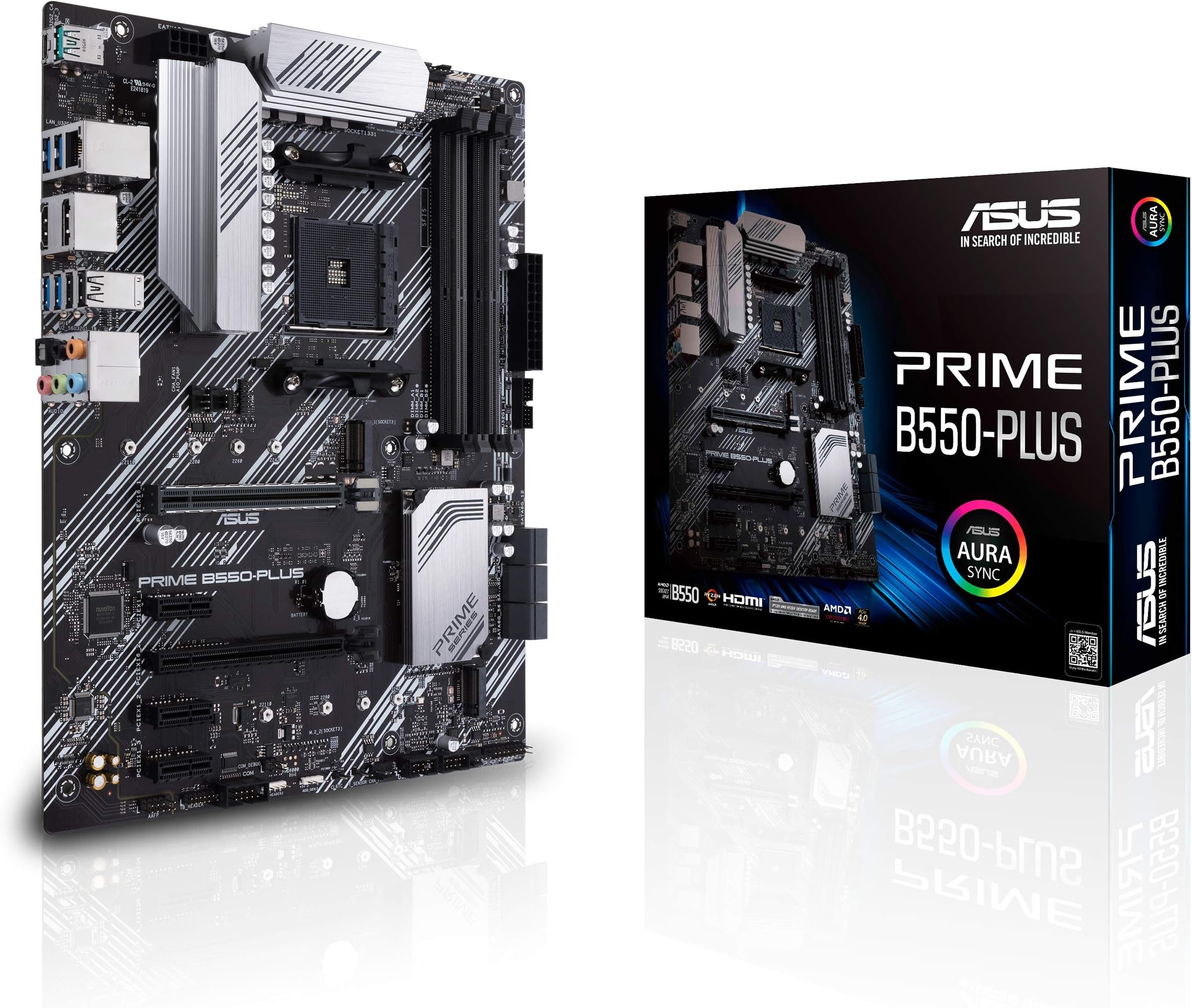
🚀 Power Your Productivity with ASUS Prime B550-PLUS — Where Speed Meets Style
The ASUS Prime B550-PLUS is a high-performance ATX motherboard designed for AMD 3rd Gen Ryzen and Zen 3 Ryzen 5000 processors. Featuring PCIe 4.0 support, dual M.2 NVMe slots, 1Gb LAN, and advanced cooling solutions, it delivers robust, reliable performance for professional-grade computing. With 4K@60Hz HDMI 2.1 output and Aura Sync RGB lighting, it blends cutting-edge tech with customizable aesthetics, making it the ideal foundation for power users and creative professionals seeking future-ready versatility.


| ASIN | B089CT5GDM |
| Best Sellers Rank | #13 in Computer Motherboards |
| Brand | ASUS |
| CPU Model | 1.2GHz Cortex A8 Processor |
| CPU Socket | Socket AM4 |
| Chipset Type | AMD B550 |
| Compatible Devices | Personal Computer |
| Compatible Processors | AMD 3rd Generation Ryzen |
| Customer Reviews | 4.6 out of 5 stars 1,958 Reviews |
| Global Trade Identification Number | 00192876782354 |
| Graphics Card Interface | PCI Express |
| Item Dimensions L x W x H | 10.35"L x 2.09"W x 12.91"H |
| Item Type Name | ASUS Prime B550-PLUS AMD AM4 Zen 3 Ryzen 5000 & 3rd Gen Ryzen ATX Motherboard (PCIe 4.0, ECC Memory, 1Gb LAN, HDMI 2.1, DisPlayPort 1.2 (4K@60HZ), Addressable Gen 2 RGB Header and Aura Sync) |
| Item Weight | 2.1 Pounds |
| Main Power Connector Type | ATX |
| Manufacturer | ASUS |
| Memory Clock Speed | 2133 MHz |
| Memory Slots Available | 4 |
| Memory Storage Capacity | 128 GB |
| Model Name | PRIME B550-PLUS |
| Model Number | PRIME B550-PLUS |
| Number of Ethernet Ports | 1 |
| Number of Ports | 4 |
| Platform | Windows 10 |
| Processor Socket | Socket AM4 |
| RAM Memory Technology | DDR4 |
| Ram Memory Maximum Size | 128 GB |
| S/PDIF Connector Type | Optical |
| System Bus Standard Supported | SATA 3 |
| Total Number of HDMI Ports | 1 |
| Total PCIe Ports | 1 |
| Total SATA Ports | 6 |
| Total Usb Ports | 14 |
| UPC | 192876782354 |
| USB 2.0 | 2 |
| Warranty Description | 3 YEARS |
M**R
Jam
Like all Asus predictable this is ine awesome motherboard. Does a great job
A**T
Good value
I paired this mobo with a 5600x, and since it came with an updated bios it rain the cpu without issue, though there is a more recent bios. I did, however, have issues getting it to work. It would turn on, but nothing would display on screen and the green boot light stayed on. Long story short, replacing the cmos battery seems to have done the trick. This issue has not returned since the new battery. Some of the plastic looks kind of cheap, but it's not a big deal and only noticeable when installing stuff. Otherwise it looks quite nice in the case. For anyone who doesn't like the "audio led", it can be turned off or set to static in the bios. Software wise, Armoury Crate sucks. I recommend going into bios and turning off the automatic install. AI Suite 3 is decent, though everything can be adjusted in the bios/uefi. If you need something to control rgbs, openrgb is a good option. Amd has more recent chipset drivers than what's available on Asus's site, so I recommend getting them from there. All in all, I'm pleased with this motherboard and it was a good price. Everything works and it has plenty of options, plus it's windows 11 ready, which is nice.
A**I
Todo excelente
Todo excelente
E**R
Good board but some learning curve
I had previously built a gaming rig with similar hardware, but the MSI B550+, still Rizen 5600 Vermeer and Ripjay V's, that build went smoother but I tried some new things with this board. First, after building I got error beeps, 1 long and 3 short, which normally means memory (multiple seating, unseating, swapping with the other build). Turns out it wasn't memory but my video card wasn't seated well. Tried again and all good. Next comes my change, old build had a sata ssd drive, for this I got a Samsung M.2 drive for the OS. Install went fine but like others have seen, the bottom two sata port would not work. Turns out I used the lower M.2 slot, this shares those ports so if you install a drive on the lower (m.2.2) slot you lose 2 sata ports. I moved the drive to the M.2.1 port (next to the CPU, above the video card slot) and those two Sata ports came back. Something to look into if you have Sata issues (I have multiple drives on this machine so I need all Sata ports) Last nuance (so far), Windows was taking FOREVER to shut down. Restarts were ok, but you click shutdown, it would do nothing for a minute, then swirly circle with Shutting down, then blank but lights still on, overall 3-4 minutes. Tried multiple installs, disable hibernate, everything. Turns out, you need to do all Windows updates and then go into the optional updates and update all drivers (I suppose you could use the disks as well). Now that is smooth again too. So, great speed, lots of Sata, USB (2.0 and 3.2), and if i want to add a bunch of RGB I have those to play with. Will be playing with this for weeks and will update if I run across anything else.
R**J
Great Replacement Motherboard – Worked Perfectly Out of the Box
I recently had to replace my old motherboard, and after some research, I decided on the ASUS Prime B550-PLUS as a solid mid-range option. I paired it with my Ryzen 7 3700x, and I’m happy to report that it worked flawlessly right out of the box. Easy Setup: The installation process was smooth, and the board had no compatibility issues with my existing components. It booted up without any problems with my Ryzen 7 3700x, which was a relief after dealing with the failure of my old motherboard. Great Features for the Price: The B550 chipset provides great value, offering support for PCIe 4.0. The board also has plenty of connectivity options, including USB 3.2 Gen 2 ports, which I find useful for my external devices. Solid Build Quality: ASUS has always been known for making durable motherboards, and the Prime B550-PLUS feels sturdy and reliable. BIOS Interface: The BIOS is user-friendly and easy to navigate. I didn’t have any issues tweaking settings or adjusting fan curves or enabling D.O.C.P, which is a plus for those who like to fine-tune their system. If you're looking to future-proof your build, I would recommend considering an AM5 motherboard for better long-term compatibility with upcoming Ryzen processors. The only reason I went with an AM4 motherboard is because I wanted to hand down my gaming rig to my little brother, and this was a cost-effective solution for my current needs. The ASUS Prime B550-PLUS is an excellent choice for anyone sticking with AM4, offering great value and features at a reasonable price. However, for those planning future upgrades, AM5 might be a better option to consider.
B**D
Saved me.
Easy install. DID NOT require BIOS update for use with 5600X Coupled with 32 GB RAM, 5600X, 1080 Gfx card (used w/warranty direct from AMD) + my own SSD and Power Supply from my failed PC ... For less than $500 I got my gaming computer back together in about an hour from delivery-to-first boot. It's been since B4 COVID since we have had money to build new. This build gave us a very affordable solution that allowed us to access our critical info and put me back into games the require high-end cards like 3070+ playing at fair-to-good FPS. (ie, Ark Survival Ascended - ok performance, Fallout 4 and 76 - OUSTANDING performance, World of Warcraft The War Within, which just came out, - OUTSTANDING performance). Hope this helps you get back in the game quickly.
F**L
Buena compra
Mas de un año de uso y funciona perfectamente, buena calidad y precio
N**N
Top tier
So for my budget build this was a must have ! Already came with the chipset for my cpu choice and was windows 11 ready so this was a no brainer. Out of the box she performed amazing and after messing with her bios settings and installing all the latest drivers she was even more amazing ! Just the speed and efficiency is mind blowing. And with the pci expansions you can pop a fast operating Wi-Fi card in which saves you money starting out so you can spend it elsewhere like for the gpu or psu. Anyway this mobo met all my needs for a comfortable price so I’m glad I picked it up ! I would absolutely recommend this mobo if you’re on a budget and just starting out to building like I am
Trustpilot
1 month ago
5 days ago