๐พ Upgrade your storage game with speed and style!
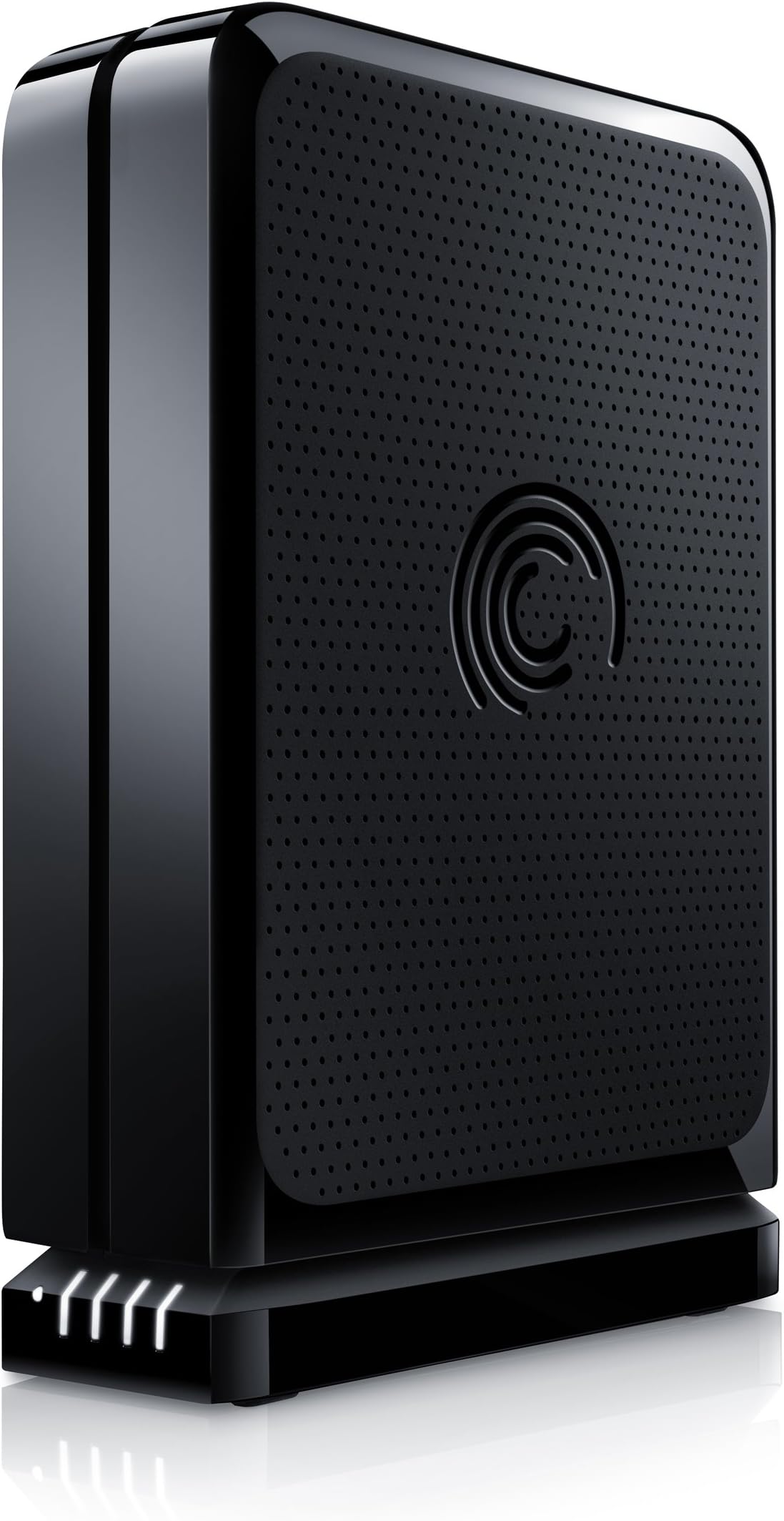
The Seagate FreeAgent GoFlex Desk 2TB external hard drive combines high-capacity storage with USB 3.0โs rapid 5 Gbps transfer speeds. Its unique upgradeable interface lets you future-proof your device by swapping adapters, while dual orientation options fit any desktop setup. Preloaded backup and encryption software ensure your data stays safe, making it a versatile and reliable choice for professionals seeking fast, secure, and adaptable external storage.
| ASIN | B0045JLPO2 |
| Additional Features | Upgradable & Dual-Orientation |
| Best Sellers Rank | #1,306 in External Hard Drives |
| Brand | Seagate |
| Built-In Media | Preloaded backup and encryption software, Frustration-Free Packaging |
| Cache Memory Installed Size | 2 |
| Color | Black |
| Compatible Devices | Camera, Television |
| Connectivity Technology | USB |
| Customer Package Type | Frustration-Free Packaging |
| Customer Reviews | 3.9 out of 5 stars 105 Reviews |
| Data Transfer Rate | 5 Gigabytes Per Second |
| Digital Storage Capacity | 2 TB |
| Enclosure Material | Aluminum/Glass |
| Form Factor | Desktop |
| Global Trade Identification Number | 00763649027899 |
| Hard Disk Description | Mechanical Hard Disk |
| Hard Disk Form Factor | 3.5 Inches |
| Hard Disk Interface | USB 3.0 |
| Hard Disk Rotational Speed | 7200 RPM |
| Hard-Drive Size | 2 TB |
| Hardware Connectivity | USB 3.0 |
| Hardware Platform | PC |
| Installation Type | External Hard Drive |
| Item Weight | 2.4 Pounds |
| Manufacturer | Seagate |
| Media Speed | 625 MB/s |
| Mfr Part Number | STAC2000103 |
| Model Name | Goflex Desk |
| Model Number | STAC2000103 |
| Number of Items | 1 |
| Special Feature | Upgradable & Dual-Orientation |
| Specific Uses For Product | Personal |
| UPC | 763649027899 777781855975 |
| Warranty Description | 2 year |
D**N
Simple External Drive
Setup of this drive is straight forward; power and USB. The USB cable uses the (now) standard USB 3.0 plug. The drive comes with a base that connect to the power and USB cables, the drive then sits on top of. This is a cool little bonus, but probably only useful if you have multiple of these drives. The base has a power light, and four capacity LEDs that show how full the drive is. On the software side of things, this drive behaves exactly as expected. Power it up, wait 5 seconds, access drive through my computer. It is simple and does not require any proprietary software. Transfer speeds are fast. Over USB 3.0, it reads and writes at about 130 MB/s. (These were simply file transfers between this drive and a SSD, nothing fancy). I recommend this drive, nothing unusual about it. Fast transfer rates.
M**E
Great backup or storage drive
I have had great luck with these drives. I currently own three of them and have two more on order. One I have been using one for almost a year and no problems yet. They are great for mass storage and as backup drives. I personaly didn't care for the included seagate software, but a reformt fixed that. I use them for family archiving, Photos, recipes, family videos etc.. Great item! and I will buy more of these. I run two systems, Windows Vista 32 bit, and Windows 7 64 bit. These work great on both.
B**L
Great speed but several annoying quirks
Pros: 1. The drive is fast. I copied 5 files totalling 11GB and the copy completed in 1'56" (96.9 MB/s). I did the same test with my previous USB 2.0 drive and it had taken 8'28" (22.3 MB/s). 2. The drive is very quiet. 3. The drive is fairly small. 4. Windows 7 detected the full 3TB automatically (~2.8 GB is available). Cons: 1. The power light on the base is always on (even when no drive is connected). You can disable the LED via the SeaGate software but the dock will only remember the setting until you lose power. At that point the light is always on again (although interesting enough the LED still shuts off while the hard drive is connected). The light is a bright whiteish light and i found it distracting. I wish the light was off except when the drive is plugged in. 2. The base sips power. I used a Kilowatt meter. The base is always using at least 1 watt of power (even with the LED off). I wish the base had a power switch or logic to avoid this unecessary waste of power. 3. The base feels slightly loose when attached to the drive. I would have liked some way (perhaps a few screws) to make it secure on the drive to feel like a solid unit. 4. The glossy plastic on the case is a fingerprint magnet. 5. The base also has a "capacity gauge". It seemed to be working when I had the seagate software installed. However, i am a minimialist with software on my computer and decided to uninstall it. After uninstalling the software only the power light is on even though the drive is half full.
J**G
Worried about Product being hold for REVIEW by Amazon
3 Weeks ago I bought 2 of this Seagate Goflex Desk Drives 2TB USB3.0, which I already received under a good time. I did a good research on all the possibilities for my budget for this kind of drives, and this seemed much better option that the other many brands, regarding quality, specs and price. The one thing that seemed a main CON, was the sleeping feature, but Seagate staff has posted many replies with instructions on how to solve this, so i am not worried by this... BUT!, i was about to buy 4 more a few days ago, when suddenly this item was TEMPORARILY no longer AVAILABLE FROM AMAZON, and Amazon wrote a MESSAGE in this product Page saying something like "ITEM UNDER REVIEW", vaguely explaining "that lately many customers have complained about something in the product, they gave like 3 generic possible issues, and they mentioned that they will soon correct this..." something like that.... I wrote to them in customer service, I got a quick response from Amazon, but their explanation was vague, and the problem is that i didn't understand what was the exact issue that this item had. Now they have it available again, and the message is gone, but to tell you the truth i am having second thoughts to buy the 4 additional SEAGATE Units because of this issue. Unless i got an exact explanation on that particular problem, i will had to go for the WD or more likely a LACIE. The thing is that i have received my 2 drives, but i have been extremely busy and with no time to install them and test them thoroughly, so i don't know yet if they work OK or not. But besides that i would like to know if the Issue that Amazon had with this item was something that could be noted under certain particular situations or environments, or is it just that they had a major fault? I might discover if my 2 drives have the issue mentioned, but perhaps it doesn't comes up until a certain time. I will Update my comment after i test them, or even better if another Customer that knows about this issue can comment on it. Regards.
J**N
Seagate FreeAgent GoFlex Desk 2TB USB 3.0 External HDD
The hardware is great. Easy to hook up and configure. It's actually plug & play. The accompanying Memeo software on the other hand I have mixed feelings about. The idea of automatic backups and automatic syncs I like. But I find the software to be way too aggressive at it's job. It'll try to sync an existing file right after I open it and start making changes. This causes the file to freeze while it's being synced. This really gets frustrating in Quicken when its trying to repaint the screen and it freezes when it's blank or you're typing away and look up to see nothing you've typed. The auto-back up is the same, it just takes off on it's own. Now you can pause the syncs and auto-backup, but for some reason they eventually get released somehow and they're back at it again. The hardware I'd rate a 5 and the software a 2.5.
S**R
Not Really Mac Compatible & Dangerous to your system
1-Drive has is own sleep schedule. When a Mac tries to access it and it is asleep, your finder will probably crash. Tested it many times. Read many posts; I am not the only one. 2-There is software Seagate recommends to disable the Drive's built-in sleep mode, allowing the Mac to manage sleep. After installing it, you cannot login. It ruined my day. I tried everything, ended up booting from an alternate drive and re-installing the OS. THIS DID NOT FIX THE LOGIN ISSUE. I finally found a post that revealed the culprit, which is an extension that the Seagate Mac patch had installed in the System>Library>"Seagate Storage Driver.kext." Once deleted I could login just like before. I wish I had known this before 6 hours of thinking my Mac was in need of a major repair. WTF Seagate? I will probably return the disk for one that is more simple and sticks with basic USB Mass-Storage protocols and does not try to have so many (relatively useless) features. -UPDATE- Seagate saw this reviews and contacted me directly, which was creepy but good. Once my issue was resolved things have been fine -a year later the drive is reliable and works well.
L**N
50/50 chance 1 TB STAC1000101 will work
Bought one of these at Best Buy, the other at OfficeMax around Labor Day taking advantage of price match & deals. I have a new Dell XPS 8300, Windows 7 64-bit OS, I5-2400 CPU & 8GB of ram. The drives are connected to a Buffalo Tech USB 3.0 PCI-E card with two ports. Drive #1 (made in China) bought at OfficeMax screamed out of the gates in file transfers from SATA3 & SATA2 internal drives in my computer via USB 3.0. I transferred a single 6 GB file in less than a minute. Transferred the same size file from an external SATA2 Hitachi using an eSata cable out to my Dell in just slightly more time (1:08). However, the more files and varying sizes you transfer at one time does affect (slows) performance speed. So there is some give & take here and perhaps that is to be expected. Drive goes to "sleep" and comes out without any of the other reported problems you may have read. BTW # 1: I have disabled all of the installed software that came with these drives. First of all, you do not need it sucking up memory & resources in the background. Second, the included "products/programs" are lightweight and then comes the marketing pitch to upgrade. If you really need to view these features, enable the programs when needed. I successfully created a "back-up" (Windows Image) using the Microsoft Windows 7 Back-up program. Less than 25 minutes for a 55GB restore/image going out USB 3.0. Drive #2 (made in Thailand) from Best Buy: way different, ugly results. Tried the same 6GB transferred, this time from Seagate to Seagate thru the Buffalo card. The speed was half (50%) slower - go figure. Wasn't ready to do any more testing, took a break, drives went to "sleep" as did the rest of the computer & peripherals. Subsequent testing (can't leave well enough alone) yielded the same type of slower results on this particular drive. When they "awoke", my system had crashed - blue screen of death. Drive #2 did not even come back on (no LED light). Possibly the Buffalo Tech card? What would you bet on? It goes back to Best Buy tomorrow. BTW #2: This drive comes with a four (4) foot USB 3.0 "A" to micro "B" cable. Some websites report a five (5) foot cable. More importantly, you will need a USB 2.0 "A" to micro USB 2.0 B cable to perform slower and/or test functionality, if so inclined or lacking a USB 3.0 connector in/on your computer. Summary: good luck. Perhaps look for those made in China, I certainly will. Also some packaging has "new USB 3.0" (a red & black) label attached on the cardboard box over the picture of the drive (OfficeMax). In the case of the Best Buy packaging, they slapped a "yellow" USB 3.0 label on the box underneath the cellophane. I'm not here to trouble shoot Seagate's products, nor should you. Of course, you have to wonder: why is there now for sale at Amazon & other sites (hence some great deals out there): a) a model version #2 STAC 1000103 b) what is the major difference between the two models?.
D**N
Outstanding
I've purchased three of these now (Amazon should show this review is from a verified buyer), with the USB 3 interface, so I can keep one off-site at all times. They're about a third of the bulk and weight of the Western Digital 2TB externals I've been using for the last three years. The price when I bought these was $179.95, which is only $60 a TB, and today they've dropped even further to $149.54 -- only $50 a TB. I'm just trying to convince myself I don't need a fourth one, no matter how good the deal. These drives move data consistently three times faster than the fastest previous externals I've had (firewire). (I added an ASUS PCIE USB3 card to each of my PCs.) These drives finally give me the capacity to keep my entire archive of digital photos, scanned slides, and transferred camcorder videos, all on a single drive with room left over for reasonable growth. I've had no problems with these at all.
B**J
Works very well, for awhile.
I would buy another. Works well, decent speed, quite, and (so far) reliable. Only con (thus far) The dang cord!! It's uber sensitive being plugged into my laptop. It must stay perfectly flat, or it will break connection... and I can't see that being good for the Hard Drive. 4 Stars, 5 if the cable worked better. -B EDIT: This device began making noise and I could no longer trust it. I was getting errors nearing the 2.5TB mark. I switch (BACK) to the Western Digital and its working flawlessly. I changed my review from 4 stars to 2.
D**W
product problems...but seagate is awesome.
i've had some issues with the power cord. seagate stepped up to the plate and have replaced it immediately. no questions asked.
E**L
NOT 7200 RPM !!!
This drive is 5900 RPM ... verified with Seagate. But it does run cool ... and it is fast anyway.
Trustpilot
3 days ago
2 months ago