We remain fully operational. Our teams are working around the clock to ensure your deliveries continue safely.

DOWNLOAD THE APP


Copyright © 2025 Desertcart Holdings Limited
DOWNLOAD THE APP




Buy anything from 5,000+ international stores. One checkout price. No surprise fees. Join 2M+ shoppers on Desertcart.
Desertcart purchases this item on your behalf and handles shipping, customs, and support to Kyrgyzstan.
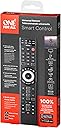
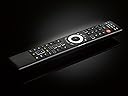
🎬 One remote to rule your entertainment kingdom—smart, sleek, and seriously powerful.
The One For All URC7880 is a universal smart remote that controls up to 8 devices using infrared technology with a 10-meter range. It features a free smartphone app for quick setup, 3 shortcut keys for popular streaming services, and a unique punch-through ‘Activity’ mode that intelligently manages volume and inputs across multiple devices. With customizable learning capabilities, it adapts to both modern and legacy equipment, making it the ultimate all-in-one remote for streamlined home entertainment.


| ASIN | B07VRP2BBP |
| Additional Features | Programming via smart phone app |
| Battery Type | Alkaline |
| Best Sellers Rank | #36,097 in Electronics ( See Top 100 in Electronics ) #1,875 in Remote Controls (Electronics) |
| Brand | One For All |
| Built-In Media | User Manual |
| Button Quantity | 48 |
| Color | Black |
| Compatible Devices | DVD/Blu-ray Player, Television |
| Connectivity Technology | Infrared |
| Controller Type | Universal |
| Customer Reviews | 3.8 3.8 out of 5 stars (511) |
| Item Weight | 0.22 Pounds |
| Manufacturer | One For All |
| Maximum Number of Supported Devices | 8 |
| Maximum Range | 10 Meters |
| Mfr Part Number | URC7880 |
| Model Name | UEBVURC7880 |
| Model Number | URC7880 |
| Number of Batteries | 2 AA batteries required. |
| UPC | 810209030636 |
| Unit Count | 1.0 Count |
| Warranty Description | 2 Years |
O**R
One of the best features of the remote isn't listed - Punch thru!
I am quite surprised the best feature of the remote isn't mentioned. Called "Activity" (note the center of the remote), this is a "punch through" system, with a better design! "Punch through", for those who don't know, allows a button to take control of a specific device, regardless what device is selected. For example, if "punch thru" is set to a soundbar, TV volume changes the soundbar volume, not the TV volume. It's a great feature to have using multiple devices. Once two devices are set up, the Activity of those devices is automatically applied. No coding needed. The Activity button will select the proper input devices based on what devices are in use. It's not perfect, but it does work very well for basic control. I have an Oppo player, Samsung soundbar, and Sony TV, and by selecting the activity with all three devices, the soundbar automatically takes control of the volume. It will take a little bit of time to get the hang of Activity, but within a day, it should be second nature. It all depends on what devices are currently in use, and this is where the icons come in. Select "Movie" if the BD player is in use. Select "Music" if a receiver is being used (which will take control of play, pause, etc). Adding to the basic pre-defined lists are the options to make your own. Very well done! As anyone with an Oppo player knows, finding a universal remote to work well with it is impossible. Well, for starters, most universal remotes don't have a Subtitle option. With the learning ability, this is easily rectified. I used the 4 colored buttons to control basics such as subtitles, output display, eject, and repeat chapter. It took less than a minute to program all 4 options. Comments indicating this was "difficult" to program probably didn't read the instructions. There is only 5 seconds open to make a selection, or the current option is turned off. It is recommended to plan out what features to program while in learning mode, but it's as straight forward as any other learning remote. Most of the codes do bring in basic functions, including the Oppo, but legacy systems will need to be programmed. One caveat: be sure the remotes are nearly touching! Any gap between them will cause the read to fail and the attempt will have to be repeated. It seems the remote is sensitive to white light in the room. I haven't had any issues learning legacy codes, but none of my equipment is older than 25 years. I hope this review helps, especially if you're looking for a punch through system. Thanks for reading and have a great day.
C**S
Does the job, but ergonomically poor layout
I was looking to replace my Harmony remote 450 which does not support my new TV and some other equipment and a newer Harmony that I purchased never worked correctly. The On-For-All 8 device remote works fairly well but has 2 major flaws and on medium flaw. 1. The buttons are poorly place on the remote, making it awkward to use. Basically, if they swapped the keypad with the controls cuttently at the bottom (leaving the silver circle set of controls where they are between the two sets of controls it would be much easier to hold and use. Generally keypads are not used nearly as much as the other controls. 2. There is no llighting for the buttons so it is very difficult to use unless you shine a light on it. 3. It also should have been made larger so would be easier to read the controls. The current layout means the controls which are most frequently use are at the bottom and therefore make it difficult to hold the remote and use them. And lighting around the buttons would help. A larger packaging with bigger buttons would also be a big help. I did find it was generally fast and easy to link to a new device. There are limited options when setting up activities, but they do work. I couldn't find another remote that seemed to offer the set of capabilities that this unit does. My biggest complaints are related to the poor location of the controls.
R**G
Works well, good price
Needed to replace my old harmony remote, and because I have an older receiver that hooks up to my tv via an optical audio cable, I needed a remote that can control the receiver volume without having to change inputs all the time. With the end of the harmony line I looked for an alternative and came across this. For $30 I gave it a shot and I’m glad I did. It is easier to set up than a harmony, although the harmony software is so terrible that isn’t saying much. In terms of functionality it works perfectly, again actually a little better than a harmony (no double presses that have to be tuned out in the clunky harmony software for example). The buttons are clicky and satisfying although to my mind the layout on most harmony remotes is superior to the layout of this remote. Of note, it doesn’t come with batteries Overall I would heartily recommend this remote. It’s a good remote at a good price that works very well. Right now I’m very satisfied with this purchase. I’ll update if anything changes in the short/medium term with its functioning or reliability
J**.
Ordered 2 both were defective! Returning!
Have owned a One For All URC7880 since 2022. Bought @ Best Buy for $49.95. Works great, was easy to program & operates all of my devices TV, STB, BLU, AUD, DVD/VCR, Game, Media, S.Bar. I recently ordered 2 of these for $25.00. Thought I was getting a deal but much to my surprise, both of these were defective! Came from a company named Ebargain World. Not sure if they're related to One For All? Remote 1 would only toggle to TV & would not toggle to any of the other 7 devices so was not able to program anything but my LG Smart TV. Remote 2 would only toggle to TV, STB, BLU, AUD, Media but none of the other devices i.e. DVD, Game, S.Bar. Was able to program my LG Smart TV, DTV-STB but not able to program my Samsung-Blu even though I entered every available code more than once. After that, I gave up even trying to program my Toshiba DVD/VCR, Bose-AUD. Very disappointed. Not sure if these were closeouts or seconds? I'll either buy from Best Buy @ full price or try a different brand.
I**S
If you require a simple setup, then it's a 5 star rating. Mine is slightly more complicated having a mix of old and new hifi components. I feel the instructions could have been a lot clearer to save time figuring it all out. Having experience with these sort of things I was able to sort it out and overall I am happy with it. Don't like the 5 presets as my needs differed. These could not be changed. My Kenwood sub-woofer is not listed and I could not get the remote to learn the buttons. Not a big deal. Working fine and am happy with the purchase. 4 stars from me.
B**S
I bought one of these some years ago. It suddenly stopped working, but having resurrected the four controllers it replaced, with all the hassles of having to find the right controller each time, I bought another OneForAll. It is simply so convenient and so much tidier than having lots of controllers around. There are some very nice features of this control. For example, if you have a separate sound system, you can set the volume controls to always control the sound system, no matter what device (e.g. TV) you currently have set. Another example: the ability to define a "macro", which is a set of commands, and link it to one button. I've defined a macro that turns the TV on, then the Sound Bar, then sets the remote control to be the SetTopBox controller. There is a smartphone app to help with setting up the remote. It worked okay, but was not very inspiring. For example, to select a TV, "Sony" wasn't in the default list of manufacturers that was displayed. It found it okay though when I typed the model number into the search, and setting that up was then easy. But it didn't find our Logitech Z906 setup - I would have thought that Logitech was a big enough name to show up. My old control had the setting for the Logitech; searching for the device on the OneForAll website gave a message telling me to contact Support. A week later, no reply. No matter, the OneForAll is capable of copying the infra-red codes from the manufacturer-supplied control. The OneForAll comes with some pretty good instructions on papre, but they're not available online as a PDF. The search function on the website didn't manage to find my remote (URC7880), which doesn't inspire confidence. They encourage you to contact Support with a question, but I didn't get any response. This compares with the support I received about 3-4 years ago when I had a question about the control back then - I actually had someone phone me up (from Holland!) to explain - a unique support experience. Perhaps they had some organisational "improvements" since then. The instructions say that you can program any key (with the exception of Magic, Devices, and Activity keys). A word of advice here - make sure your old controllers are working when you try to program the AllForOne! It transpired that one of my old controllers hadn't been used for so long that the battery was dead. Confusingly, the AllForOne looked as if it was accepting the infra-red code from the old controller, but the programmed key didn't work. Replaced the batteries in the old remote and everything worked beautifully. So, 4.5* overall, rounded-up to 5*. It's a joy to use when you've got it set up!
J**.
Having owned previously a couple of Harmony smart remotes, I'm keenly aware of the value and usefulness of such programmable remotes for my collection of electronic devices (TV, Set Top Box, BluRay player, Audio receiver, Chromecast, Fire TV, etc). Sadly, the Harmony products have been discontinued, and their web-based updating has also ended. So, although my Harmony remotes still work, they can't be reprogrammed anymore, and some of their keys keep failing due to prolonged use. Given this situation, I had to look elsewhere for a new programmable remote. So, I decided to try the All In One Smart Control 8 remote, given its advertised features and the very reasonable price (I got it on special for $48). I was a bit skeptical about its suitability due to some negative reviews, but I decided to bite the bullet and ordered it at Amazon. It arrived quickly and I proceeded with its customization for my home setup. I made a few minor mistakes at first (the user manual is fairly thin and I had to make some assumptions), but as I progressed I got the hang of it and figured out exactly how to program it correctly. I have to say that the negative reviews are given most likely by people who either didn't follow exactly the programming steps or didn't understand the instructions. I can understand that, having made a few mistakes myself, but if you persevere and do exactly as instructed, you will succeed in programming the remote as you desire. After programming mine properly, the results are fantastic! I was able to do all the macros and key reassignments I wanted, so I'm very pleased with the features and the performance of this smart remote. If you have a home setup similar to mine (which is fairly typical), you can program the spare keys (such as the colored buttons) with new functions (such as Page Up, Page Down, Skip Back, Skip Fwd, 3D, etc), or reassign the number keys of the TV and AUD devices to dedicated TV and AUD inputs using the key learning feature. This is very useful for creating macros to set the desired input on the devices used in Activities (see the Macros in Activities feature). Finally, to help those who still have trouble programming the remote, here are the typical mistakes that can be made: - not following exactly the required sequence of key presses in the programming process; - the OFA remote key to be programmed already has a function or macro memorized. A new function can be programmed only on keys from which a previous program has been deleted, so don't forget to delete a function that doesn't work before trying to reprogram it; - defective key of weak battery on the original remote; - forgetting to memorize the programmed key by pressing and holding the MAGIC key at the end. Please note that the reassignment of the number keys on OFA requires dedicated keys for the TV and AUD inputs on the original remotes of these devices. If these keys are not physically present, they need to be emulated using a Harmony-type remote in order to generate the IR command codes required for learning the original keys. Selection of inputs via scrolling in original remotes is generally not suitable for macros.
G**G
Es un control remoto con un acabado premium y en general buenos materiales. Uno de los detalles es que las baterias se gastan rapido, se las tuve que cambiar dos veces en 6 meses. El dia de ayer me tiro que las baterias estaban por agotarse y se las cambié, luego de colocarles las nuevas el control no volvió a encender
T**U
Setup was easy using the code but setting up my sound bar was not as clear cut as the buttons do not match the control so I was stuck with just volume up and down and on and off button. Pairing the two into an activity was useless as it did not work out and the sound bar was always left with a flashing mute when the TV switched off which meant I had to drag out the original controller to turn off the annoying flashing mute in my bedroom.
Trustpilot
4 days ago
3 days ago