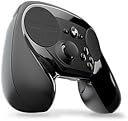
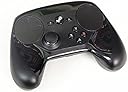


🎯 Master every game, your way—because average controllers just don’t cut it.
The Steam Controller by Valve is a wireless, highly customizable game controller featuring dual trackpads with 1:1 absolute input, dual-stage triggers, and back grip buttons. Designed for ergonomic comfort and universal compatibility, it enables seamless play of all Steam games on TV—even those without native controller support. Its extensive customization options and community-shared profiles empower users to tailor controls for any genre or playstyle, making it a versatile tool for both gaming and creative workflows.


| ASIN | B016KBVBCS |
| Batteries | 1 Lithium Polymer batteries required. (included) |
| Best Sellers Rank | #19,966 in Video Games ( See Top 100 in Video Games ) #44 in Mac Gamepads & Standard Controllers #259 in PC Gamepads & Standard Controllers |
| Customer Reviews | 4.3 4.3 out of 5 stars (4,800) |
| Date First Available | October 18, 2015 |
| Is Discontinued By Manufacturer | No |
| Item Weight | 1.2 pounds |
| Item model number | V000937-00 |
| Manufacturer | Valve |
| Product Dimensions | 8.39 x 6.3 x 2.72 inches; 1.2 Pounds |
| Rated | Kids to Adults |
| Release date | November 10, 2015 |
| Type of item | Video Game |
D**A
Perfect controller
This is the most innovative and exciting controller I have owned. The quality is excellent, the ideas are useful and well chosen, the customization software is great and the fact that it allows a practically endless number of titles previously only playable in the very specific conditions of your PC now to be approached on the couch changes and adds to the experience of those titles. Most interestingly, it is not only a perfect controller, but an excellent input device on its own, and I found myself using it to work on the Unreal Engine Editor, meaning, using it for work on certain tasks and switching them from mouse and keyboard. Lots of devices have targeted that before (for example, the Leap), and none have succeeded. That speaks a lot for this controller. It is necessary to understand what to expect from this controller in order to avoid disappointment: No, it is not a plug-and-play experience. If you are expecting to plug the controller and start playing immediately feeling and upgrade from the xbox controller, then stop, this is not the controller for you. If you are willing to spend a mild amount of time tweaking and changing some options in the customization menu, then you probably are ok. Most of the most popular games already have excellent mapping options prepared by the community and your configuration will only be choosing one and applying it. Well configured, it beats titles with native xbox controller support, and you will have fun. If you want to play games that dont have controller support or that are inimaginable with a controller (for example Civilization) then you are in for a treat and this will be one of your best purchases. Buy right now. Lastly, If you have owned before devices that were intended to be tweaked and personalized to death, and getting into those menus and spending hours making the device work just for you is part of the experience you love and seek, then you will love this controller, and you will appreciate the absurd amount of options there just for you to play with. This is not necessary to use the controller, by the way. You can stay with the community mappings if that's your thing. So, in concussion? This is my new ideal controller, not only for play, but for certain work task that I didn't imagine i would switch to a device like this. I just love it to death. I would recommend it to anyone. It is different to what you are used to, so just try it. But, stay away from it if you: a) dont want to configure anything, just want plug and play, because this is not intended to be, and b) want all your games to play the same with the device, ej, the ease and familiarity that comes with an xbox controller, where you can guess the functionality of all buttons from the go. Here, every one of your games will play different, so you have to kind of relearn to play each game. Think of it like this: It is not the same controller, but a tweaked version for each particular game. I hope this helps to make up your mind. Have fun.
D**G
Takes some time to get used to, but a really great controller once you do!
I got a Steam Link, so I thought "if the controllers was basically designed to go with the link, shouldn't I get one?" I'm glad I did! The steam controller is a great new entry into the controller market. The ability to remap anything and everything has made getting the perfect layout easier than ever. You can remap anything to anything, including the gyro and the start/back buttons. As an example, I set up "One Finger Death Punch" to use the left touchpad as the left mouse button and the right touchpad to be the right mousebutton, so all I have to do is just lightly touch each side to play rather than moving my thumb back and forth between the B and X buttons as you do with other controllers. I will say that it takes a little bit of time to get used to it, especially using the right hand touch as your camera joystick. On some games it works really well and on others it will take some tweaking of the sensitivity and settings (fiddling with deadzone, joystick vs mouse camera, etc). That said, one of the really cool things about the controller is that they've made your settings uploadable and searchable. Before you even start a game, you can find tweaked and custom layouts along with "user counts" so you can pick the one that people have found to be the best for playing that game. You can pick them and then tweak them just a little bit further, too! For an example of what you can do, I have mine set up in a few FPS games so that when I pull the left trigger (bringing up aiming), the gyro activates and I can do fine aiming by moving the controller slightly so I can get that headshot that might have been hard using a joystick to aim. The triggers are also double mode...you can set the partial pull and full pull to be separate actions. For example, in rocket league, it can accelerate as an analogue switch as you pull it, but if you pull it all the way it can activate turbo. The only thing I'd change is that the left side touch pad /Dpad is a little bit stiffer than I'd like. It's just a personal preference, though, and it may wear in a little bit and get softer. Of course, I could just change it to register touches in the quadrants as the Dpad directions, too. For the same price as many other controllers (once you buy the adaptor), this is a great device. While it does take some time to get used to, it's great once you learn your way around it.
E**A
Pretty much the most versatile controller out there, HOWEVER...
EDIT THE 2ND: So, it's finally happened. After some 2 months of owning the controller and about a rough 81 hours or so of playing, some constant, some not, the controller is finally giving me low battery warnings. That is absolutely insane for any controller in this day and age and honestly, puts anything made by Sony and Microsoft to shame just for that. And the nicest thing about this fact is that even on the off chance that you do run out, you can still use the USB cable that came with it in order to play just fine. This is the only controller on the market in which you do not have to worry about ever running low. That is a very welcome change in this day and age of wireless. EDIT: Actually I should note one glaring issue with the controller here, though this is more on game developers than Valve for this all things considered: Do be careful when trying to play games that do not come with native simultaneous Keyboard/Gamepad support (anybody that's tried to do this with a Bethesda game will know exactly what I am talking about...), as while the controller can do either or, make sure you configure it to only one or the other, or it will absolutely not work. Again, this isn't a problem with Valve as they have done a lot to make sure that developers can set up this controller no problem, but with developers who, somehow in 2016, still haven't gotten around to that kind of support. So the Steam Controller's been out for a little bit now and at this stage of my ownership of such, I can say I've logged about a good 40 or so hours on this controller thus far. I'd like to take the time to point out some arguments and such in the course of this review. First off, let's get some major dealbreakers that I have with this controller out of the way first: 1. Yeah, you do have to use Big Picture mode in order to fully utilize the controller's functions. This might be annoying for a lot of people who are just trying to play this on their desktop and kinda don't want to deal with Big Picture's interface. There is no way via the normal interface to be able to configure the controller and all of its functions in order to fully customize it your liking. 2. Controller size. Considering that I in particular have GIGANTIC MONSTER CRAB HANDS, this controller is a perfect fit for me, but this may end up being something too large for those with average to small sized hands. There are ways to get around this in terms of the controller's customization options so you can make it slightly more comfortable, but this might be a major turnoff for those who are used to things like the XBone/PS4 controllers. So with that out of the way, I just want to say one thing about whether you should buy this or not: If you're willing to be able to put in the time and effort to be able to get used to the controller and figure out what its configuration options mean, then I can safely guarantee you that you have what is astoundingly the most versatile controller in existence. What do I mean by this? Essentially speaking, if you are willing to figure out how a game you want to play would be maximized in comfort for use with a controller, the Steam Controller's configuration settings are more than you could possibly want for playing that game, even if at first blush it doesn't seem that way. The main feature of the controller, the touch pads, can be set to have a total of /9/ different kinds of input. Whether you want it to look around in an FPS the way a mouse would or you want to quickly maneuver objects and enemies in a Top-down shooter, the touch pads can easily handle it. And if it proves too weird? Just move the configurations around until you find that sweet spot that allows you to use it. And that's just the very surface of what this controller provides. Say you want to get into an old game like System Shock 2? You know, tons of interface, commands, mechanics? This controller can still do that. Through means of mode-shifting and other such options, this controller has amounts of input that easily measure in the good 40 or 50 commands. "But," you may be asking me now, "What if I don't want to spend so time making my own setup for this? I thought the point was to get into a PC game without any interruption or preparation!" Well, that is another strength of the Steam Controller, in particular, Valve's method for providing the community with configurations. Essentially, you can choose from one of a few categories for a setup. Either the Developer's own configuration for the controller, if there is one, some templates that fit a general number of cases (gamepad with FPS mouse, XBone gamepad, stupid amounts of inputs, etc.), and last but certainly not least, the community configurations. These all provide a fantastic starting point to understand what the configuration options do. You are more than able to find a good diving point for being able to understand your new controller. I couldn't possibly write all the different configurations here, but the gist is that if you can think of it, the Steam Controller can handle it in some fashion. Pretty much the only case where it becomes a little trickier to do this are games that are not part of it. Again, it's actually rather painless because you can add non-Steam games and use them in Big Picture mode without much of a hitch, but I have noticed some difficulty in making sure that the controller works the way I want it to. Another praise I have to sing about the controller is the battery life. You remember that some 40 hours I logged in so far? Those are still on THE SAME SET OF BATTERIES that I have started out with. Two AA batteries mind you. That is absolutely insane. Either Valve discovered the secret to energy efficiency (considering all the haptic feedback that this controller provides), or they made a deal with some voodoo elder god to be able to make this possible. And this was all wireless gameplay, I hadn't even touched the cable that they provide you with the controller. The fact that they can do this with just two normal AA batteries should pretty much be a slap in the face to XBone's designs. I can't even imagine the XBone's controller lasting even a fifth that long on a normal basis. Not to say that you even have to use batteries in the first place, as you can use the Steam Controller and all of its features without having a set of batteries plugged in, only using a Micro USB cable if you so desire. This pretty much insures that you have absolutely nothing to worry about in terms of being able to stay in your game for long periods of time. So, what is the point I am trying to make with all this talk? At this time, I would not give it a full five-star rating because some of the glaring issues are still pretty much there, despite all that you can do to make this controller work well with you and make sure that you aren't wrestling with your games over whether or not something works. This really is a thing that you have to get to know very well in order to have a full opinion of whether or not it is for you. Again, if you can put in the time and effort to really get used to the feel of it and get to know this controller, you have what is, bar none, the most versatile controller on the gaming market to date. However, this is if, and only if, you are willing to put the time and effort to gaining a full understanding of it. I know that is a major dealbreaker for most people seeing as one of gaming's central points of focus is just ease of use. If that is something that sounds like it might take too much time for you to get used to, then by all means, stick with an XBone or PS4 controller, nobody is going to fault you for that for wanting to use something that you know is consistent and that you know works very well for you. But, if you truly want something novel and actually innovative to experiment with and actually have a grand old time, making old games seem fresh, making new ones even better, then the Steam Controller can do all that you want, provided you put in the time. If you do want to do that, I have some helpful advice for you: Don't make the first game you play on this controller something like an FPS or an ARPG like Valve advertises. Play some games first that allow you to be able to get used to the layout of the controller with ease and without any hesitation. For instance, I started off by playing things like Batman: Arkham Asylum and Viscera Cleanup Detail. Things like that, where you can play the game at your own pace and figure out what sorts of settings you like for those types of games. As you get more and more used to it, you'll be using the controller to play these games without even thinking about it. I got this controller because I really did need something that was more comfortable to play than mouse and keyboard (bad wrists and everything that comes with it), and at this point I can safely say that I have found that thing. But, please, before going out and saying "augh I don't like it" just borrow a friend's for a little bit and play around with it. I guarantee that having done so, you won't even have thought about how weird something like this is and see the value of these things.
A**P
Killer Accessory for any PC Gamer!
I have been a PC gamer since my childhood. I have enjoyed playing console games as well, and always lamented the limitations of using a controller with a PC. The Steam Controller blows all of the downsides of PC gaming completely out of concern! Even for games that do not have native controller support (i.e., option for using an Xbox controller), the Steam Controller will work as a keyboard/mouse input. And if you're playing a game that *does* have controller support, you now have infinite more control of how your x-input controller works. The customization options are limitless. I had always preferred keyboard/mouse for its precision, but with the Steam Controller's gyro option, customizable trackpad thumb inputs, digital keyboard, customizable quick menus, mode shifting, and excellent button placements, all of that precision is present *and then some*. Games I previously wasn't really very good at because of having to navigate all over a qwerty keyboard, or that were console-to-PC ports and therefore built around controller use, have become far easier and *more intuitive* to play because of this controller. A huge bonus, and one of this reasons I decided to purchase one, is that this controller can replace your keyboard and mouse for use in your desktop! I now have an entertainment setup where my seating area is my bed, because whether if I'm surfing YouTube or Facebook, or playing games or watching a movie, the Steam Controller can be configured to my personal preferences and conveniences, including left/right clicking and typing; I no longer have to have a keyboard and mouse separately for use on the desktop or while using other Windows functions. Best of all, is how the Steam Controller will work with ANY game, Steam-based or natively controller-enabled or not. For most games, you can "Add Non-Steam Game to Your Library" and configure the controller for that game from Steam. However! You can also create your own or use other's custom configurations for your Steam Controller's *desktop settings*, which will translate over for use in the game you're playing (for example, I run Fallout 4 via the Fallout 4 Script Extender, so I have a custom Desktop Configuration for the Steam Controller so that it controls the FO4 game exactly how I want it to, without having to launch the game through Steam, using allllll the capabilities of the controller, including the gyro input). TL;DR: If you're a PC gamer who also likes the convenience, comfort, and small scale of a controller, who wants the ability to customize your controller's uses for anything in games or on the desktop, the Steam Controller is a serious must-have.
S**R
Different does not mean "worse." Don't believe the hype. It's a great controller!
If you plan on buying the Steam Controller because you want to support Valve and their bravery for executing a land grab on much contested console territory, then move along. You'll be disappointed. Most of our expectations of controllers are informed by what we are most familiar with. I liked Xbox 360 controllers because they made the most sense to me as a player. So when you buy a Steam controller, you are buying something very unfamiliar. You won't like it. You wanted a cool Xbox controller with a Valve logo on the center of it, but what you are getting is a truly unique and revolutionary piece of hardware. I don't really want to catalog walkthroughs of all my gaming experiences with the controller, mostly because it's different for everyone. The key thing to understand about the Steam controller is that its range of expression is vast. It feels very much like Windows 8, if the Xbox 360 controller was Windows 7 (or 10). Windows 8 was never meant to be exclusively a desktop solution, but a mobile one; a seamless user experience across a huge variety of platforms. The other night I was playing Total War: Attila and my mouse was acting up. So out of curiosity I booted up the Steam Controller and fumbled my way through the controls. In minutes I was playing a keyboard and mouse game with a controller. You can't do that with an Xbox controller. Moreover, if I didn't like the controls, I could go online, look at user created controls, and apply them in-game. You didn't have to do that with an Xbox controller. This changes a lot of things about the way we experience gameplay and I think Valve understands that. But we've turned to talking heads that wanted more of the same and not something that would challenge us as a gaming community. People make comments about the controller feeling cheap. It never felt cheap to me out of box. (At the end of the day, it's all plastic made in China.) People make comments about the controller lacking the sensitivity and precision of a PS4/Xbox 360 controller. The Steam controller is actually more precise, and takes a lot of fine tuning, which is very gratifying if you have the patience to work with something longer than 10 minutes to make something happen. It's buttons are sticky and bulky, but that's because you've never played anything other than the standard. A week and a half later, I now prefer the Steam controller over my wired Xbox 360 controller, and that's the result of familiarity and understanding that the right track pad is a mouse pad, not a joystick.The list goes on, etc. Bottom Line: This controller is great. It's a really empowering experience to look at keybindings and think about precision optimization alongside key mapping. There is so much potential, and it's criminal that the controller has gotten such bad press.
F**R
Not a bad device, but didn't work for me.
I have to admit that I had high hopes for this controller. My desire was to do exactly what this is intended for, play games from my couch. But after trying it out for a bit I realize it might not be the answer I was looking for. It actually feels pretty good in the hand. I happen to have relatively small hands and I had no trouble holding it. When I switched back to my Xbox 360 controller I even felt as if the Steam Controller somehow had a better feel in the hands than the 360 controller. It also really truly is a plug and play type of device. I had to do a simple update on the remote but it was good to go immediately after that. I went into the configurations almost right away and making changes to the configuration is painless and quick. Perhaps what I loved the most was the fact that the steam button can automatically launch big picture mode. Very convenient. I liked the grip paddle buttons below the remote, really wish more remotes had this option. However, perhaps I jumped into games that I needed more practice with this remote on, but I was completely unable to play the games I tried. I've recently been playing Dying Light and I was simply unable to play it with this remote. The mouse view on the track pad is not bad but it is definitely not as smooth as a joystick. I found myself often "swiping" multiple times to make a complete turn. On a game where you really need to have quick aim changes to make your experience a good one, this simply did not work. This was the same for a game like Insurgency, where you need that accuracy but also that smooth control. For me that is the biggest problem. I can't stand having to "swipe" multiple times on the touchpad to make a complete turn. So maybe this works for other type of players. But I prefer mouse and keyboard for shooters and a good old Xbox gamepad for more casual games.
T**Z
Great controller, but it takes time to learn
I've seen a lot of reviews about this controller from people who used the early releases, and there is one thing I want to say to them: "Early Release", there are always slight changes to a product before it is released to the public. Alright, now that that's over with on with the review. I got this controller on Friday, 11/13/15 and it is now 11/15/15 and this is my 2 day review. I have grown to believe that this is a great controller. It has tons of features and buttons and little "hidden" program options. For instance, I can program one of the touch pads act as my mouse with a specific sensitivity, slight actions depending on gestures used on it (like track ball emulation), and inverted axes. There is also a "Mode Shift" option that lets you configure the Touch Pad with completely different settings if you do a soft pull on one of the triggers (or any of multiple other buttons). Example of this: I am weird and when playing a game I control the camera with the X-axis inverted, only if I'm using a controller, however when I go into "aim mode" or look down my scope or whatever, the steam controller lets me switch the Touch Pad to not having the X-axis inverted and to decrease sensitivity. (I apologize if that was a difficult sentence to read) The cool thing is I can actually change the "style of input" completely with this mode shift, so I do a soft hold of a trigger and my mouse turns into a touch menu, or a scroll wheel, or a button pad (Like for going through a menu). Basically there's tons of things that can be done to make this controller work the way you want it. You don't have to program each and every game from scratch, there are 3 templates (by default) and you have access to the community shared configurations created by other people. Sadly I noticed that as of right now it is a little difficult to take your configurations from one game to the next (Like taking configurations from Assassin's Creed II to Brotherhood). Configurations are saved in the following locations: "%ProgramFiles%\Steam\controller_base\templates" is for templates and "%ProgramFiles%\Steam\userdata\%your steam userid%\241100\remote\controller_config\%specific game code%" is for each specific games. You might find it easier to make a configuration a game that is blank or defaulty and name it what the game is to make it easier to figure out the game codes while browsing around. There are tons of buttons on this controller and you can program them in whatever weird ways you want too (they even sound like weird ways to configure them). The 2 triggers are analog as a soft pull, and when you do a full pull it becomes digital, so you can program each as to different things. In addition when programming the analog stick, you can program a specific button press/action if you take the stick all the way to the end. For example, while playing Warframe I have the analog stick configured so that once push it all the way in one direction it hits the Sprint button, than when I do a soft pull on the Right Trigger I go into a crouch/slide, and finally when I finish that pull on the Right Trigger (turning it into a Full Pull) I go into a jump. This makes parkour work amazingly. I've turned holding W and Shift to Sprint, going into a slide by holding Control, and tapping Space to jump, into only using an analog stick and pulling one trigger. Some of the reviewers I've read have mentioned the gyroscope for the controller, and you know what? That's configurable, so don't act like it's forced on you. It's actually really cool and I'm looking forward to using it with the Rift. I haven't used it much but I can actually set it up so that if I'm setting in a spinny chair while holding the controller, and I spin, the my character spins! Now that wouldn't be useful for right now when your trying to play a game using the monitor in front of you, but you don't have to program it like that, maybe your flying and you actually want to "Pull Up!" you could set it up like that. Last week I read a review from someone who fell in love an early release of this controller and compared it to switching from QWERTY to DVORAK. At first I disagreed, but as I've used this controller more I can agree now. I can play these games that I've been playing for years or even a new game very well with a mouse and keyboard, but that's because I'm use to my keyboard. (I can hit most keys on my keyboard without looking at said keyboard). The point is, trying to use the Steam Controller is just like when I tried to switch to DVORAK years ago. I could very easily right now switch back to keyboard and mouse and forget about the $50 I spent on this controller because it isn't instantly easy to use. However, there are so many options that it could actually make my life easier in a lot of ways if I learn how use this controller. Heck, this controller could very well increase my gaming experience. What I'm trying to say is, don't knock it until you've spent the time to try it our properly. This controller has so many configuration possibilities that everyone online could have a different setup even though they're playing the same game. Steam MUST be open to use the controller yes that is true and there's no way to get away from it, but once the controller is working, you can use it as a normal mouse. Steam does not need to be your active program, at least on Windows, no clue on other operating systems. That is one thing that is sad about with this controller. I WISH that there was a plug and play component of this controller that would revert it to specific settings that make it act like a normal controller. D-Pad is just a D-Pad, touch pad acts like an analog stick, to be used as an analog stick, but it's not. That's my one complaint about this controller. All in all, I've fallen in love with this controller. Even though it's only been 2 days of using it...of course I've gamed pretty much all of that time (minus a few hours to sleep). I'm strongly recommending this controller for people to use, but remember this is the first release of this controller, but Valve spent a lot of time designing this there is a reason it wasn't released over year ago. The most important thing to remember about this controller is, programming. Do NOT expect to open up Fallout 4 click some random configuration for the controller and everything to be happy days. Your going to be click that Steam button, go to controller config and be remapping buttons for the first 2 hours of the game. Yes, that makes getting into the game a little tough, but once you get a basic setup for a 1st person shooter, you'll be able to build off that for the next one you play. And I say 2 hours because you'll be going back to make minor changes a lot, you could be playing the game for an hour after your last change and than say "Hey I think it would be better if I did this." OK, I'm finished you can stop reading, get this controller and remember it's completely different from any other controller out there.
A**R
Give it a chance
This is a great gamepad. It's very intuitive in design, and it does what Valve set out to do: provide a viable gamepad alternative to mouse and keyboard games. This is the type of device that you won't be able to pick up and master in 5 minutes. It seems most people think it's that type of device. This is a completely new paradigm for controllers, clearly evident since it uses touchpads. It will take some getting used to. I initially didn't like it, but I took the time to really sit down and work with it. Once I learned how to customize it, I love it. I can bind anything I want to whatever I want. I can shift emulation modes within a game for things like more accurate shooting or navigating menus. The level of control and precision you can get out of this is amazing, but only if you take the time with it. Most people hate it because they're too used to the muscle memory of tried and true dual joystick gamepads. That is not a problem with the controller, it's a problem with you. I've used it for 4 or 5 hours and so far I prefer it over any other gamepad or controller. The hardest part is getting adjusted to it. The feel of it, where the buttons are, etc. In the first few hours of using it I kept reaching for a right joystick instead of the right touchpad. However after a few more hours of using it I developed the muscle memory for it. Don't get me wrong, it still does have flaws. It could be a little bit slimmer. In some games, like Helldivers, yoy have to hold the left bumper and input directions on the d-pad quite often. However sometimes this is difficult to do in a timely fashion due to the size of the controller (difficult to reach the d-pad buttons, that is). I changed this by mapping left bumper to the left button on the back of the controller, but I can see where some people would have a problem with that. All in all, it's something that takes time. If you get this, give it at least a day of use before you decide how to feel about it. Using it for 5 minutes and calling it garbage is hardly a review, as is telling others to just buy a different gamepad. It excels above other pads if you take the time to tweak it and get used to it.
Trustpilot
2 weeks ago
4 days ago