Desertcart purchases this item on your behalf and handles shipping, customs, and support to Kyrgyzstan.
🎧 Elevate your AV game—extract, amplify, and immerse like a pro!
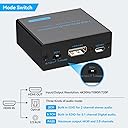
The VPFET HDMI Audio Extractor is a compact, USB-powered adapter that extracts high-quality audio from HDMI signals, supporting 4K@30Hz video and multi-channel DTS 5.1 or PCM 2.0 audio output via optical or 3.5mm connections. Designed for seamless plug-and-play use with a wide range of devices, it offers versatile audio modes and energy-efficient operation, making it an essential tool for enhancing your home entertainment or professional AV setup.


| ASIN | B084T4QDFP |
| Best Sellers Rank | #1,652 in Electronics ( See Top 100 in Electronics ) #1 in Digital-Analog Converters |
| Brand | VPFET |
| Brand Name | VPFET |
| Customer Reviews | 4.1 out of 5 stars 2,562 Reviews |
| Interface | Coaxial, Optical |
| Interface Type | Coaxial, Optical |
| Item Dimensions L x W | 2.28"L x 2.04"W |
| Manufacturer | VPFET |
| Material Type | Aluminum |
| Maximum Supply Voltage | 5 volts |
| Minimum Supply Voltage | 4.5 volts |
| Model | EDUPUP |
| Mounting Type | Freestanding |
| Number of Channels | 5 |
| Number of Pins | 4 |
| Part Number | EDUPUP |
| UPC | 077063294066 |
M**E
Fine Gadget To Connect Noise-Cancelling Headphones
A really nice little kit at such a great price! The first one had intermittent signal issues, and the switch likely was inadvertently reversed in assembly. It was strange how the signal wouldn’t hold and blacken the video or pop the audio when connecting from the Roku device. I read reviews and saw nothing to the contrary and that it worked with Roku. I initiated a return and replacement. The new device arrived the next day. It was hooked up and it works perfectly with my small Roku and my LG monitor of 8 years. Very nice device. No external power necessary. The red and green lights are lit. The audio comes out of the 3.5mm jack, through the cable, and into the 2.5mm jack of my Bose noise-cancelling headphones. I simply mute or turn down my monitor volume (they simultaneously work which is a neat feature). This is well worth the price and was glad to go with a replacement for a second chance. The kit of all items is well done. The power is not necessary but a USB adapter cable is provided and you could connect it to an outlet (with USB to AC adapter) or a power bank. But it seems this isn’t necessary. I am quite pleased with this product. 👍
C**T
Super splitter.
Did exactly what I wanted it to do!
P**E
Best ever
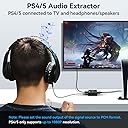
Setup was easy and works perfectly with my ps5 and red dragon speaker, sound is totally awesome 😌. Don’t think twice go for it!!
J**.
Great Customer Service, But It Didn’t Work With My iPhone Karaoke Setup
This HDMI audio extractor arrived on time, was well packaged, and made a great first impression. The unit itself feels solid, the included cables were good quality, and the instructions clearly explained the connections and the function of the switches. Setup was quick and straightforward. Unfortunately, I wasn’t able to get it to work for my particular application. My goal was to separate the audio from my iPhone (connected via HDMI) so I could send the video to my TV while routing the audio to my karaoke speaker. I used quality HDMI cables and followed the instructions, but I could never get the audio to separate properly. What really stood out, though, was the customer service. Their support team responded quickly by email, patiently walked me through multiple troubleshooting steps, had me verify both iPhone settings and the extractor’s switch configuration, and stayed with me through several rounds of testing. Even though we couldn’t get it working with my setup, they were professional, friendly, and never made me feel like I was on my own. In the end, they promptly issued a full refund with no hassle. While I can’t recommend it for my specific iPhone karaoke setup since it didn’t function as I needed, I can absolutely say the company stands behind its product and provides excellent customer support. That level of service deserves recognition
T**S
Works perfectly with PS4 Slim
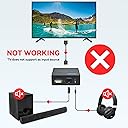
This worked perfectly for what I needed it for. My specific situation is that I have an older surround sound system that only has optical audio inputs and can’t receive an HDMI signal and interpret it as 5.1. This is unfortunate for certain devices like the PS4 slim model, which eliminated its optical audio port. I use this to extract 5.1 surround from the ps4’s HDMI then to my system via optical, and it works like a charm. I think some people in other reviews might have been confused about what this is really meant for. Also, this will not work with a Nintendo Switch dock, as I tried it and later learned that the switch uses 5.1 LPCM, and this device doesn’t seem to recognize that. You’ll still get audio, just not surround sound.
E**N
From Tiny Speakers to Big Sound in Minutes
Worked perfectly! I wanted to watch the World Cup games on my trusty ZTE Spro 2 projector, but its built-in apps are long outdated. I “hacked” it by connecting an old Chromecast, which gave me the picture but I was stuck with the projector’s tiny internal speaker. This HDMI audio extractor was the missing piece. In minutes, I had crystal-clear rich sound through my Bose speaker via the 3.5 mm output.
M**E
Works at the cost of picture quality
Bought this for my monitor that doesn't have a headphone jack and while its easy to connect and does extract audio from the monitor and out to my old stereo receiver it wont let my monitor put out 1440p 120 hz anymore it only lets me choose 1080p 120 hz or 1440p 60hz.
A**0
Some XBox Series S/X compatibility issues
I bought this since the XBox Series X doesn't have a built-in TOSLINK port (thanks, Phil). Unfortunately, while the device clearly physically supports 4k and DTS Digital, with the XBox I have to choose one or the other. With the audio selector switch in "Pass" and an optical cable connected to my Denon receiver, the XBox detects (incorrectly) that only stereo out is supported (no surround sound), but it will output a 4k signal to my projector. When I shift the selector switch to the manual 5.1 position, the XBox now offers Dolby and DTS Digital Surround options, both of which work with my receiver and sound amazing, but the video resolution drops to 1080p. There's still an option to switch to 4k, and it works (projector detects and displays a 4k input signal), but when I click the "Keep" button to maintain that resolution everything shifts back to 1080p, and the XBox "Video Info" dialog incorrectly reports that my display doesn't support 4k at either 60 or 120 Hz. To be fair, the root causes here are typical Microsoft arrogance: saving maybe a buck per console by dropping a port that most customers never use (but that they supported on the 360 and XBox One, and for which a lot of gaming-specific accessories (headphones) exist), and then failing to provide a manual "Trust me, I want DTS output" option when their auto-detection fails. And I can't think it's anything but a bug that the Series X will let me select, and correctly display, a 4k resolution, but then insist that it's unsupported and auto-shift back. However, I think there's also a flaw in the way VPFET implements the audio EDIDs; when the selector switch is in PASS the extractor doesn't correctly report capabilities of the downstream optical device, while when it's in 5.1" option it doesn't correctly report capabilities of the downstream video device. There may well be a technical reason for the former (I'm not an S/PDIF expert), but the latter is surely avoidable: either overwrite just the audio portion of the EDID coming from the downstream display (leaving the supported resolutions intact), or simulate some maximally-capable UHD device. Whatever they are reporting when the switch is in 5.1 clearly isn't satisfactory for some game consoles. Anyway, aside from this the device works great, even with other 4k sources, but I wanted to put a warning out there for anyone thinking of connecting it to an XBox that you may want to go with one of the more expensive name brands with verified support.
Trustpilot
1 day ago
3 weeks ago