

🚀 Print smarter, faster, and safer—because your work deserves nothing less.
The HP LaserJet Pro M452dw is a wireless color laser printer designed for busy professionals who demand speed, security, and ease of use. With up to 28 ppm print speed, automatic duplexing, and a 3-inch touchscreen, it streamlines high-volume printing tasks. HP’s JetAdvantage Private Print safeguards confidential documents, while Original HP High Yield Toner cartridges deliver vibrant colors and cost efficiency. Ideal for office environments needing reliable, fast, and secure color printing.


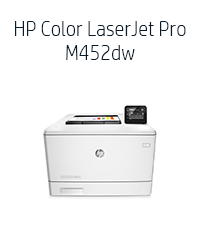


| ASIN | B014CSKEQU |
| Additional Printer Functions | Print Only |
| B&W Pages per Minute | 27 ppm |
| Best Sellers Rank | #273,654 in Office Products ( See Top 100 in Office Products ) #337 in Laser Computer Printers |
| Brand | HP |
| Built-In Media | printer |
| Color | Light gray. |
| Color Pages per Minute | 27 ppm |
| Compatible Cartridge | Arthur Imaging |
| Compatible Devices | Camera, PC |
| Connectivity Technology | USB |
| Control Method | Touch |
| Controller Type | Android |
| Customer Reviews | 3.8 out of 5 stars 378 Reviews |
| Display Type | LCD |
| Dual-sided printing | Yes |
| Duplex | auto |
| Global Trade Identification Number | 00888793383193, 00888793383230 |
| Hardware Interface | USB |
| Ink Color | cyan, magenta, yellow, black |
| Item Dimensions D x W x H | 16.2"D x 16.2"W x 11.6"H |
| Item Type Name | Laser Printer |
| Item Weight | 49.55 Pounds |
| Manufacturer | HP |
| Maximum Copy Resolution Black and White | 4800 x 600 |
| Maximum Copy Resolution Color | 4800 x 600 |
| Maximum Copy Speed Black and White | 28 ppm |
| Maximum Media Size | 8.5 x 14 inch |
| Maximum Print Resolution Black and White | 4800 dpi |
| Maximum Sheet Capacity | 600 |
| Maximum print Resolution Color | 4800 x 600 |
| Model Name | M452dw |
| Model Number | CF394A#BGJ |
| Model Series | Laserjet Pro |
| Number of Ethernet Ports | 1 |
| Number of Trays | 1 |
| Other Special Features of the Product | Wireless |
| Paper Size | A4 |
| Power Consumption | 570 Watts |
| Print media | Envelopes, Paper (plain) |
| Printer Connectivity Type | USB |
| Printer Output Type | Color |
| Printer Type | Laser |
| Printing Technology | Laser |
| Processor Count | 1 |
| Resolution | 4800 x 600 |
| Scanner Type | Sheetfed |
| Special Feature | Wireless |
| Specific Uses For Product | business |
| Total USB 2.0 Ports | 1 |
| Total Usb Ports | 1 |
| UPC | 889296585916 888793383230 |
| Unit Count | 1.0 Count |
| Warranty Description | 1 year warranty |
| Warranty Type | limited warranty |
| Wattage | 570 watts |
M**S
Seriously Good Laser Printer
I returned a previous BW laser to order this printer because of its wireless features. I had a brief problem printing labels, not because of the printer but because the Avery software program did not permit me to adjust the printer settings back to default. Therefore I had to telephone HP and they instructed me over the phone how to reset the default settings. Avery denied the problem was caused by their software. The machine is heavy, 40 pounds of weight, so I would advise anyone not to attempt moving it from place to place without some assistance. It is about the size of a large microwave oven. You will hear it when printing but the noise level is medium. I like the envelope feed tray, I open the front door and load envelopes, very simple and they print correctly. I've used it to print postage stamps, labels, color prints, envelopes, letters and long documents. So far, everything prints great, except for the package mailing labels. The printer roller, after printing these labels transferred the ink to the next print job and I had black stripes across the pages of my document. Only does this with the Avery labels, so I do not know if it's a product problem or a printer problem. Since I rarely print labels, it is not a major headache. I use it strictly as a wireless printer and it takes about ten seconds for the job to go from PC to printer. Once it starts to print, it prints fast. Highly pleased with this printer, I did not want to purchase it due to the price, but I believe the quality is worth the price.
B**R
Easy set-up, low purchase price, replacement toner cost more than the printer!
At the price you may want to consider this a disposable printer. That may seem very, very wasteful but since the consumables like toner cost more than the purchase price that is reality. Printer was a snap to set-up on my all Apple MacOS/iOS network and prints perfectly from all devices with no hassles. Can easily print from any room of the house over wi-fi, printer wakes from sleep to print and then goes back to sleep after about 5-10 minutes. Easy and convenient. Prints b/w or color prints fast, duplex feature works well, and it does print on sheets of adhesive Avery labels with no problems. If you do have any troubles do not expect much from HP support as I have had to deal with them on other printers (not this model) and their support and service was terrible. Overall this is a great bang for buck color laser printer for routine office work where you need color. If you are looking for a color photo printer or color art printer this would not be my first choice and does not compare in quality of color reproduction to Epson inkjet color printers which are a better choice for photographers and artists. That said, compared with other color laser printers the quality is high and the print speeds are fast.
A**R
Updated Review - Toner Not Lasting/Poor Color
I got this to replace my color HP Laserjet 2500 which I bought refurbished 12 years ago (it was a fantastic printer and I almost had a memorial for it). I was hoping this one would be just a good and especially at such a great price. It's only been a few days but so far so good. I'm on Mac OS 10.8.2 and setup was super easy. I printed 160 double sided newsletters for a client's local mailing in a 1/4 the time it would take on my old printer. The printing is crisp so I'm happy about that. I have a home-based graphic design business and do a lot of printing so time will tell. UPDATE: Well I wrote too soon - right after I published my review, my new printer informs me that my toner is down to 5%! I printed 320 8.5/11 full color pages and that pretty much used up the CMY. My old printer really did print thousands of color pages before running out. Not sure what to do now, I don't really need to print for clients just myself but geeze for the cost of the cartridges, this is still going to eat up my budget. Not sure what I'm going to do yet, return it or use it very sparingly. The quality of print and time to print are excellent. So disappointed after being so elated - now my stomach hurts. FURTHER UPDATE 2/8/17: I don't think I was really paying attention to the color when I first plugged it in. I'm really disappointed in the color output. In spite of my best efforts to adjust color settings between my software apps and the printer (which I shouldn't have to do anyway) the color is dull and faded looking. In fact, no matter what I adjust it all prints out the same - bland. Areas with less than 35% color drop off completely. That's ridiculous. I got what I paid for. My HP Laserjet 2500 was excellent. What I saw on my screen is pretty much what I saw on paper and cartridges lasted a long time. I would not recommend this printer or purchase again.
B**P
Installation was absolutely maddening
Just as a disclaimer, I am an HP fan and advocate. I always look at their products first before considering another vendor. Having said that, I _think_ this will be a good printer. I purchased it because buying a full set of OEM color toner cartridges for my old printer cost more than this new printer. I also wanted wireless printing which my old printer would not support. So, I get it hooked up to a brand new Dell XPS desktop with 64-bit Windows 10 and I'm ready to install the thing. The installation guide gives the relevant web sites to get more documentation and the necessary drivers. The manuals downloaded just fine. The manual lists two links to go for the setup routines. The first link identified my printer but refused to download any drivers or programs. I either received a 'website not found' or it timed out after several minutes of trying. I then tried HP's 123.hp.com address which is supposed to be their omnibus installation site for their printers. Half the time this site would not open up. When it did, I could download the program. The program ran part way then stalled. I rebooted and tried again, multiple times. I downloaded the 64-bit Windows 10 version from the website and the file name had Win 8 in it so I'm not sure if the installation program is optimized for Win 10. I tried a few more HP links, several of which refused to open or Explorer could not find (I also tried Chrome and that didn't work either). So, you say, use the installation disk that came with the printer. Well, I tried and fell in the same loop as before. The installation program stalled at the step where it is trying to communicate with the printer. It just hung for several minutes and timed out. However, it did install the printer driver and I am able to use the printer. Oh - one last thing - there is also some program you are supposed to be able to install that will control the printer from your computer. All the links to get to the program fail or cannot be found. Now, on to wireless printing which is why I bought this blasted thing. The instructions were not clear how to do this so I fumbled a bit. I finally figured out that you get your laptop hooked up to your home network and try to install a new printer driver. The laptop identifies two drivers for the printer, one of which is the Wi-Fi option. I try to install it and it asks for a PIN number. The instructions STATE that this PIN number is written in the documentation that came with the printer or it is on the printer itself. After spending several minutes reading the instructions, nothing. I printed out the wi-fi report page from the printer itself and it does have a PIN number in the output so I figured this must be it - didn't work. Well, come to find out, the printer shows this pin number on its touchscreen (didn't notice it before because the laptop was in a different room). Ah, now I have it and will finish this off in no time. I try to install the printer on my laptop; the printer gives me a PIN; I enter the PIN and nothing; the driver will not install. I do this several times (the PIN changes each time - must be a random set of digits). I then spend quite some time with Professor Google trying to figure out what is going on - nothing. I then let things sit, reboot everything, and try again. Still nothing. In the end the driver was installed on my laptop but I have no earthly idea when or how it happened. The printer never gave any indication that the PIN number took. All in all, I think this is a great printer. Apple print works great and I can print from my laptop wirelessly. They only reason I bothered to write this tome is because half of HP's web links did not work and their installation programs and instructions were incredibly flawed. I pity the poor fool with less tech experience than me (and I'm not that great!) who may buy this printer. They will never get it running.
P**C
Very quick initial setup with exception of duplexing; - solid printed output.
Quickest wifi setup of all wireless printers (inc. 1 Canon, and 2 Lexmark) that I have installed. There was only one glitch - turning on the duplexing function. For that portion of the setup, I had to consult with HP Techs who got me started with 2 different computers and I completed the installation with three other computers. To turn on the duplexing functionality with this printer, the user has to download and install an additional HP universal printer driver (ps-x64-6.2.0.20412 - found on the HP website) on all computers in the network. The output is, as other reviewers have indicated, crisp but not particularly dark. Printing, including duplex printing, is lightning fast. Replacement cartridges are expensive but HP sales can be found online whereby with the purchase of two cartridges you get the third one for half price. Windows 10 operating system presented no obstacles or delays. Just having installed the printer, I cannot comment on how many pages you get from each cartridge. In summary, I am very pleased with this purchase. The fairly uniformly excellent ratings both professional as well as crowd sourced seem completely justified. After several months in use, I have had to reboot the printer to return its status from "off-line" to "online". While this is not a deal breaker, it is annoying and unlike other wireless printers I've owned from Lexmark and Canon.
M**N
Solid home office printer
Pros - speed for monochrome pages is good - two paper trays allows us to have two different kinds of paper (labels, forms, etc) in place - print quality is good - color reproduction is good enough - setup was easy - the touch-screen interface is useful - the printer seems to cache rasterized pages in memory, so even if the first page takes 5 minutes to print, a second copy prints in seconds - auto-duplexing works well (meaning, it's easy to print 2-sided documents) Cons - color/graphics printing is absurdly slow, like 3-5 minutes per page - the second "paper tray" is a fold-out hopper with a capacity of about 20 pages... NOT a true paper tray. - The replacement black toner cartridge (HP 410X, high capacity) is stupidly expensive -- $124 currently?! The black cartridge that came with the printer lasted for 805 monochrome plus 433 color pages. The 410X supposedly lasts for 6000 impressions. Given the cost, I hope that's accurate.
C**.
Love This Printer!!!
I've done a lot of full color printing on HP color laser printers and this printer is by far my favorite! It's very inexpensive and was fast and easy to setup. It prints lightning fast and is much more quite than previous HP color laser printers I've had. The toner cartridges are easy to access and quick to change. I even setup an email address on this thing via hpeprint.com and I can email a file to the printer and it prints it! I like the touch screen on this dw model verses the dn which another family member has. I just printed my first in house production run of about 600 full color sheets on thicker, 100lb text paper and everything looked awesome! One thing to mention about my specific order... When I got the printer I quickly figured out that the print quality was slightly off. (Example: I printed a square box in the middle of the page and the lines were not perfectly straight. They were some what jagged or misaligned.) After some diagnosis via HP support and them checking the serial numbers on each cartridge, I found out that 2 of the toner cartridges, the black and cyan, were slightly defective. HP shipped me replacements at no charge with overnight shipping. They also followed up with me after the replacements arrived to make sure the problem was resolved and it was! Still very satisfied! HP has great support! Overall, this is a great printer and I highly recommend it! If anything changes I will update this review. But so far so good!!!
G**N
UPDATE: Excellent print quality, price was right, would buy again
UPDATE: I've had this printer for 2 years and it continues to run flawlessly. I use generic toner and have had some cartridge failures but that's not the printers fault. I'd buy this printer again and highly recommend it. I bought an "open box" or "used" HP M452dw laser printer for $165. MSRP is $499 & sale price was $318. Although the condition was listed as "very good" I really didn't know what to expect. I would rate the condition as "like new". The toner was about 90% full and installation on my iMac, MPB Pro, 2 generations of iPad and iPhone 7's was easily accomplished. The one flaw was that while a 10.5 driver is available it does not seem to support legacy systems (MDD G4 w/ 10.5.8). I had to use a generic post script driver which works fine but is not preferred driver. One of the user comments about this printer states that the printer doesn't handle documents with mixed graphics (pictures) and a text. I printed a Word document with a combination of both text and pictures. They printed flawlessly with both the 10.11 and generic drivers. I consider this a non-issue. I only have one criticism about this printer. The lower paper tray "feels" flimsy. At this price point I would buy this printer again in a heartbeat. UPDATE: The printer is still working well. One negative point is that during duplex printing (Word & Safari) it sometimes prints 1/2 the line on the first page. i.e. it splits the text horizontally.This could be a show stopper if you plan to print a lot of double sided documents. Update 10 Feb 19: I've printed a lot of documents and the "1/2 line" problem seems to have gone away. I love this printer.
E**O
Muito bom
A impressora que comprei chegou no prazo, o produto veio lacrado na caixa da Hp e com os acessórios certos. Obrigado
A**S
EXCELENTE
Muy fácil de instalar y operar, tiene una excelente calidad de impresión, sin duda estoy muy contento con la compra.
A**R
So far, it has been as solid and dependable st it’s predecessor.
This printer replaces a six-year old HP MFC that handled all our accounting requirements such as plain-paper printing, cheque stock, envelopes, etc. Like the old one, this one comes with 2 input sources (primary and 50-sheet feed) that handles 95% of our daily requirements. Setup, configuration and start up were painless for this low tach person. Speed and quality of output are excellent.
M**N
Works great so far
Works great so far. Did a lot of research and this has all the features we were looking for. Replacement toner is a little pricey, but not out of line.
T**M
Broke after 4 months
Was 5 star until it broke after 4 months. Very disappointing HP. Makes a very loud grinding noise, not unlike my HP4250 before I replaced the swing plate gear - note the 4250 is what 15-20 years old? Edit - Amazon returned it immediately - well done amazon. I'm giving it another try. Edit 2 - Attempting to have amazon return it a second time. Broke again, grinding noise and skips page consistently, which I have never seen before. Two times now, makes for me more than a coincidence. I am trying another brand.
Trustpilot
1 day ago
2 weeks ago