Buy anything from 5,000+ international stores. One checkout price. No surprise fees. Join 2M+ shoppers on Desertcart.
Desertcart purchases this item on your behalf and handles shipping, customs, and support to Kyrgyzstan.
🚀 Elevate your home network with Gryphon Guardian — where security meets seamless connectivity!
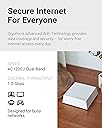
The Gryphon Guardian Mesh WiFi Router combines robust dual-band AC1200 coverage with cutting-edge cybersecurity and intuitive parental controls. Designed for modern homes, it offers up to 1,800 sq.ft. of reliable WiFi per unit, advanced malware and phishing protection, and a user-friendly smartphone app for effortless network management. Ideal for families seeking both performance and peace of mind, Gryphon Guardian scales easily to fit any space while keeping your digital life safe and connected.


| ASIN | B082YGNKJH |
| Antenna Location | Security |
| Antenna Type | Internal |
| Best Sellers Rank | #41,027 in Electronics ( See Top 100 in Electronics ) #188 in Whole Home & Mesh Wi-Fi Systems #305 in Computer Routers |
| Brand | Gryphon |
| Built-In Media | Gryphon Guardian router, 90 days of Premium Protection, 1-Year Hardware Warranty with Tech Support, 90-Day Money Back Satisfaction Guarantee |
| Color | white |
| Compatible Devices | Smartphone |
| Connectivity Protocol | Bluetooth, Ethernet, Wi-Fi |
| Connectivity Range | 1800 Square Feet |
| Connectivity Technology | Wi-Fi |
| Control Method | App |
| Controller Type | Android |
| Coverage | Up to 1,800 sq. ft. |
| Customer Reviews | 3.9 out of 5 stars 1,084 Reviews |
| Data Transfer Rate | 1300 Megabits Per Second |
| Frequency | 5 GHz |
| Frequency Band Class | Dual-Band |
| Has Internet Connectivity | Yes |
| Has Security Updates | Yes |
| Is Modem Compatible | Yes |
| Item Dimensions L x W x H | 4"L x 4"W x 1"H |
| LAN Port Bandwidth | 1Gbps |
| Manufacturer | Gryphon Online Safety, Inc. |
| Maximum Upstream Data Transfer Rate | 900 Megabits Per Second |
| Mfr Part Number | GRYG1-UK |
| Model Name | GRYG1-UK |
| Model Number | GRYG1-UK |
| Number of Antennas | 2 |
| Number of Ports | 2 |
| Operating System | Android |
| Other Special Features of the Product | WPS |
| RAM Memory Installed | 64 MB |
| Router Firewall Security Level | basic |
| Router Network Type | mesh |
| Security Protocol | WPA-PSK |
| Special Feature | WPS |
| UPC | 868739000452 |
| Unit Count | 1 Count |
| Voltage | 12 Volts |
| Wi-Fi Generation | Wi-Fi 5 |
| Wireless Communication Standard | 802.11ac |
| Wireless Compability | 802.11ac |
J**E
What I've learned...
So I've got teenagers. The teenagers drove me to this router. Prior to I had a Linksys with no complaints, followed by a Netgear Nighthawk, which was an outstanding peice of hardware, and the Netgear certainly had some parental controls, but it was a little clunky. As a level set I'm more than willing to fiddle with any electronic to get it to work. I have loads of patience and am the IT support for the house. In truth I like it that way and nerding out with the router is not a chore to me. So I buy the Gryphon and am pretty happy with the router. This also coincided with moving to a new home. Said new home is good sized and has 2 floors. The house is roughly 4300 Sq ft. My office ends up being right next to the router and I really did not have any performance complaints. My family though... Ugh. Complaints galore, and I had written some of it off as a new internet provider when we moved. As I said I continue to fiddle and change things hoping to get a better experience for all. What was frustrating is that the router seemed to put out the signal I needed at the edges of the house and while the speeds were not as fast as next to the router they were acceptable when not being heavily taxed. I finally came to the conclusion that I should add a mesh repeater as the system worked especially up where I did most of my work, but the complaints did not subside so my work was not done. I added one repeater which was quite easy. There wasnt a lot of fussing just scan a qr code on the bottom of the repeater in the app and you're off and running. After I added one it was a bit better....but Still getting complaints. So what's a guy gonna do? I decide to just go deeper down the rabbit hole. Adding a second and... Still complaints... Then eventually a third as I had grown tired of the complaining. I also came to the conclusion after speed checking every corner of the house and swapping around positions of the routers for several days in my spare time. Let me offer this peice of info also.... Sony PS4s have TERRIBLE WIFI ANTENNAS. I could not figure out why I couldn't get their machines to pull the speeds I could when testing on my phone.... Standing right next to the dang thing and I'm getting 200mbps more download speed. After some research I figured out that the PS4 unless sitting almost on top of the router is going to struggle to pull reasonable speeds. Do yourself a favor and just run an ethernet cable if you're in that position, or reserve yourself that you're going to have to add repeaters close to the PS4. That's free advice and it took me a long time to figure that one out. So besides all that I finally came to the conclusion is that this setup does not have great wifi signal out of the box, and you have supplement with the mesh system to unlock true performance. So after all my fussing what kind of speed am I getting? Cloat to the main unit I can pull 500mbps down and 450mbps up. Those aren't typos either. The hardware is legit after it's weak antennas are overcome. In the far corners of the house and yard I can pull roughly 100 mbps down and 125 mbps up. That compares to what it was before of 20ish mbps down and 30 mbps up. It's made a big difference. Lots of whining has gone away and now everyone can do anything they want and not worry about everyone else. Everyone can Zoom at the same time, while playing video games, streaming 4k videos, and uploading selfies to social media. So all that withstanding, what about the real reason I bought it? The parental controls are slick and simple! Want the kids to do their homework? Great just kill all the wifi to only their devices all at the push of a button. Want the wifi shutoff at midnight so they don't watch TV all night? Cool. Just set it up that way for that child. Kids going to "questionable" sites. No problem BLOCKED at the push of a button. When I was having complaints about the internet I had rounded up anything extra I could think of that would suck up bandwidth (Wyze Cams, Amazon Echoes, smart switches, light bulbs etc) nd assigned them all to a group in the app as a user. So when complaints started I could add bandwidth quickly with the push of a button by just suspending internet to those items. Assign static IPs with ease. We have a printer that loves to not marry up with the computers. Set that bad boy as static and never worry about it again. Assign whatever name you like to devices. In my house we have close to 100 wifi items to be assigned. Being able to identify by name (and it makes sense to me) is a God send. I was able to catch one of the kids in a lie because someone came over and hooked into our wifi and you can set it to ask permission to join. Mine is not set that way, but when all your devices are hooked up and suddenly a new one shows up... It's pretty obvious. Want 2.4ghz and 5ghz as a choice? Sure no problem. Want to not have to think about it and let the routers do the work. No problem you can do that too. The system really provides a lot of flexibility and performance once I finally got it all dialed in. It did end up being more expensive than what I could have done with a different setup, but I would not have had such a slick interface to deal with the kids. I am now very happy. The kids have been unhappy since it came in the front door....and I don't care! Lol. I hope you can make your teens unhappy soon too.
T**E
It was never stable or worked acceptably
MY BACKGROUND: I install stuff like this and related products for a living. I have owned a tech support company for over 15 years. THE GOOD: setup was easy and went well. I had to call tech support once during the process, and they were helpful. It does filter content THE BAD: from when I completed the setup the FIRST TIME (because, I re-did the initial setup SEVERAL times after that, more on that below) it would randomly reboot 2 - 5 times a week. The rebooting was even WORSE if we tried to use the built-in WIFI, so we mostly used a separate wireless access point that was hooked up to the router with a network cable. It was annoying but we lived with it. I told my kids to just pretend that they're using dial-up internet and someone picked up another phone extension in the house. After all that was how my childhood went, builds character. I called tech support about the rebooting and they said to update the firmware. Ok. Done. Still rebooting randomly. Sweet. Moving on though...the rebooting was the only issue (albeit common), until one day the device just went back to factory and lost it's association with my Gryphon account. Tech support manually rejoined the router to my account, but all the settings were lost, and when you're doing parental controls and security groups, there is QUITE a bit to lose. I set it back up again, and it worked for another week or so until it lost the entire account and configuration AGAIN!!! At that point, I re-did the setup, but the moment it finished the setup, it rebooted and reset everything immediately. I walked through the initial setup ONE more time to verify that it wasn't a fluke, but it just factory reset again the moment it completed. At that point, I just disconnected it and switched back to my old router. I have lost so many evenings and weekends on this product, it's infuriating. I'm glad this experiment didn't cost any more money, but the time lost was the real expense.
G**D
Excellent device, very customizable to most any family situation, app can be a little wonky at times
The router is great and works nearly 100% of the time, though there have been some glitches with the app such as when setting up schedules it will tell you there is an overlap when there isn't, but just a little bit of playing around with it to figure out which days and times to enter first to prevent the overlap error didn't take long to figure out. The app doesn't work exactly as it should every single time, but you learn to live with the little idiosyncrasies and it works well enough to do what we needed it to do. By little idiosyncrasies, I mean things like when you try to do a one-time change of the schedule by canceling just one block of time, it sometimes cancels the rest of the schedule for the day, but not always. What I love is the ability to customize internet access for each device in the house and have easy visibility of what devices are connected and what they are doing. Very easy to monitor kids internet access and prevent unwanted access for each person or on each device, and very easy to control in real time from your phone.
B**M
Use to replace/supplement your current router/wifi; be wary of refurb units
I've been using a TP-Link Deco M5 system for a couple years. Currently I have four Deco pucks throughout my home, all hardwired together (so not having to rely on wireless mesh). The Deco includes some decent parental controls and malware protection but it does not offer any enforcement of search engine SafeSearch or allow prevention of VPN connections. Wanting to add SafeSearch protection, I decided to purchase the Gryphon Guardian and experiment with it as a supplement to my existing Deco network. This allows me to continue to use the investment I already have in the four Deco pucks. I decided to save a few dollars by purchasing the certified refurbished Gryphon Guardian. It arrived quickly and looked physically fine. However, the power supply that was included was defective (output 1.9V instead of 12) so the unit refused to power on. Luckily I have a box of spare power bricks and was able to find a compatible one (12V, 1A). As I mentioned, I wanted to use Gryphon to supplement my Deco environment so I had envisioned two possible implementation scenarios. Both involved cabling the Gryphon between my master Deco and cable modem. From there I had to decide whether to keep the Deco in router mode or put it in access point mode. For ease of install, I decided to keep the Deco in router mode and see how that went. Sometimes having double routers and double NAT can cause issues with speed and some network functionality; but so far it's been fine. So, I am currently implemented by having both the Gryphon and Deco in a NAT/Router mode. From the Gryphon standpoint it only sees one client which is my master Deco. I have older kids and don't really need the ability to set parental controls on a device by device level. In my case, I'm fine with everyone getting the same parental controls and SafeSearch settings. If I needed granular ability then I would control it in the Deco or turn the Deco into AP mode so that Gryphon saw all the individual devices rather than just the master Deco. Anyhow, now on to my experience with the Gryphon itself. In general, setup was easy. All app drive like you'd come to expect with most modern home tech devices. Other than the bad power supply they sent me, I was able to get the system up and running in about 15 minutes. As mentioned, I'm using my Deco system, in router/NAT mode, behind the Gryphon. So, the Gryphon app saw one client (the Deco), and it was easy to set up parental controls and assign the client to that policy. In my testing, the Gryphon was able to block access to the sites I tested in each category. The Gryphon was also successful in enforcing SafeSearch usage on Google, Bing, and DuckDuckGo. Other search engine sites that I tried (Yahoo.com, Ask.com, Dogpile.com) were totally blocked because they couldn't enforce SafeSearch. I'm OK with that behavior in my case. As far as Wifi goes, I'm not using the Gryphon Wifi in my setup (continuing to use the Deco). But, over time, I may consider migrating to the Gryphon Wifi and buying more units for around the house. Many vendors have primary and guest wireless network options which isolate traffic for improved security. The Gryphon introduces a third which they label as an IoT network. This allows you to create a dedicated network for IoT devices (thermostats, cameras, sensors, etc). This is helpful because it keeps these IoT devices isolated from your home and guest networks which is great from a security standpoint. Also, many IoT devices require compromises on your network like disabling of fast roaming or band steering. Isolating IoT devices allows you to dumb down the network for them without affecting the rest of your devices. This alone may be enough for me to make the switch to Gryphon WiFi in my house sooner rather than later (and replace the Deco altogether). I did experiment with the HomeBound app on my iPhone a little and it seemed to work well. This app will keep a constant VPN connection back through your home network so that all policies and logging are enforced as if they were on the local home network. This is an interesting approach to this problem and a different way to tackle than I think most vendors tackle this need. At a high level, this VPN based approach, may significantly impact Internet speed performance of your mobile devices because they have to route back through your home network no matter where you are in the world. However, I can think of a number of positives to this approach as well especially if you are using tools/apps that are better served coming from the IP address of your home network or want some added security in public hotspot settings. I'm not sure if I'll continue to use the HomeBound app for my use case; especially at the additional annual expense. Pros: Easy to set up Can be used in a variety of ways to supplement or replace your existing setup. My Internet speeds do not seem to be have impacted; even in a double NAT setup. I'm getting my published internet speeds of about 350Mb down and 12Mb up. Seems to do a good job with Parental Control and SafeSearch enforcement. Hard to really tell if the security features are working well unless you go looking for trouble :) Cons: No ability to shut off wifi permanently (seems to be schedule based with 23 hours, 45 minutes seeming to be the maximum disable period.) No ability to fine turn parental control policies/categories of sites. You have to pick from 5 predefined "age groups" or select "unfiltered". You can however explicitly allow or deny certain sites within a policy. Be wary of the refurbished units on Amazon; mine came with a bad power supply. Extra fees involved with ongoing use of the enhance security feature and HomeBound apps are a downside.
L**Y
Decent hardware, software somewhat lacking
I will preface this by saying we DID return this item. The device is sound and operates well, and could have a decent future. However, right now, the parental controls are not ready for prime time. I did contact customer service with my concerns and were very receptive to recommendations. Some of them according to the CSR I talked to are in the works. But we needed results NOW, not a few months down the road, so yeah we returned it. However, I will be keeping an eye on them in the future, because some of their plans will make the device a well rounded security device if they come to pass.
W**L
Gryphon saved my son’s distance learning grades
So far gryphon is working better than I could have ever expected. My son is in 8th grade and I was having a tough time getting him to do his distance learning school work during the quarantine stay at home. I tried to use the ISP’s parental control and he was able to bypass it with a quick youtube tutorial where he found a MAC ID generator and kept getting online. I’m an IT professional so I knew what he was doing and I got tired and didn’t want to be the “Regulator” that everyone hates. Like at work I needed to delegate this work or automate this “project” because I’m busy in meetings all day then doing my work until the evening. Doing some research I found Gryphon and decided to give it a shot. Gryphon was very easy to setup and bring online. My son couldn’t hack through the gryphon and I even saw that he was trying to go to VPN sites, I guess that didn’t work for him either since I disabled VPN for his Gryphon profile. I love that he can’t go to other sites that are too mature for his mind and I don’t have to worry about that anymore. He’s finally all caught up on homework and the teachers are even commending him for his good work. He’s a really smart kid it’s just that he was too distracted by his friends and just playing games online instead of doing school work during school(homework) hours. He now asks me if he can get out of homework an hour early if he completes his work early, hey why not! I’m not the Internet Police Dad anymore now I’m back to being a Father. Fyi- I had to disable any new devices on the ISP’s router so he wouldn’t physically plug into it when I first got the Gryphon. One night I found him passed out next to the router jacked in with an ethernet cable, he didn’t sleep that night. He can’t do that anymore.. UPDATE 2024: My son graduated from high school!!! The whole house said that we graduated lol! Yes, he did it and I believe if it wasn’t for Gryphon he wouldn’t have passed the 10th grade. I’m not saying it was the fix-all. Numerous phone calls, meetings and emails with teachers. Checking his homework online and being his homework Project Manager. He did rebel at one point and went back to live with his mother but I was able to get him through a hurdle(10th grade). We speak a little more often now and talk about technology. He’s applied to college and financial aid ‘on his own’ and is starting college next month. He told me he has a new drive to succeed. Which really impressed me! I’m glad my son is back. In life, We always just want the best for our kids. Sometimes it may seem that we are being tough on them but in the end it’s in their best interest and for their benefit. And even though you may not see the benefits in the beginning, you will see them in time. Always be a good parent figure to them and be a good example because they are watching and listening to you even though it doesn’t seem like they are when they stay in their room all day. One more thing; if Amazon allows. Tip #1 - Start them on Gryphon filter or internet filter young so it’s natural to them. The later you start the more rebellion you may get. Tip #2 - I met an older lady once that had 3 sons who were doctors. I asked her how’d she do it? She said keep them very busy. Sports, school clubs, martial arts. The busier they are, the less time they have to mess up. We learn something new every day. Good luck and God bless!
N**N
Easy peace of mind
Before I got the Gyphon router I had a couple of simple requirements - I needed something that is easy to manage, safe and dependable. This device ticked all the boxes. Easy to manage: the app is simple, intuitive and responsive. Safe: you have #1 continual firmware updates to keep you at the latest vulnerability protection level at all times, and #2 real time, active malware filtering and protection that is also updated multiple times a week. I am not saying this is THE BEST and SAFEST solution out there, but it is pretty damn close at this price point. Very few people (tech-inclined) have the time or desire to make something better from open source software available currently, and if you rely on just plain old “buy our product and come to our website to see if we have blessed you with a firmware upgrade”, cough-Lynksys-cough, then... well, you might as well not rely on false sense of security. Anyway, the Gryphon devices are easy to setup, easy to use and simple and no-effort protection for your home network. Just stop looking for others and get it. Do it.
D**D
DOES NOT WORK. PARENTAL CONTROLS STINK
Parents need to know that this router is not a proper parental controls device. Kids/teens CAN and DO access VPNs in the Playstore, even if their access is set to block VPNs from the app. Even if you block download of any apps, they can still access all apps on Playstore and get them on their phone. They can access and download any apps you don't want them to have. They can access URLs and categories you have blocked. In the app, when you're checking their web browsing, it will look like their access is being blocked and you'll see that red Ghostbuster emoji mark which makes it looked like they were blocked, but don't be fooled -- they ARE still accessing it and Gryphon is messing with you. Don't feel safe. Make no mistake: this router is NOT a parental control router and it has many ways to be beat by any savvy kid and even people who aren't very smart. I tested it all on my own profile to make sure this was the case, and I could access all apps I had blocked without doing anything but trying. If you want to protect your kids from dangerous apps and predators and p0rn and any links that you don't want them to access, Gryphon is NOT the router for your family. Please keep researching. At this time, I am stuck using an outdated My Circle app which is linked to our Netgear router because even though it's a disabled parental control device (they aren't giving any service updates to it anymore), it works better and more thoroughly than the Gryphon does. If Gryphon actually gets serious about parental controls and giving parents features that will literally block kids/teens from apps and links we need blocked in the future, I may come back and check it out. But I found too many unacceptable breaches in my opinion to feel safe with it as the router of choice.
G**G
Wrong power supply for Australia, and set up help is too simplified, but otherwise basically good.
Wrong power supply for Australia. Set up help is too simplified - doesn't explain clearly the best set up to piggy back on your existing Wifi router - I had to deduce that from some hints. Associated App could be improved But actually does the Parental Control well.
S**D
Excellent parental control
Excellent router for parenting control. However the, plug provided did not work in the UAE and had to be returned
A**R
Unobtrusive technology that gives peace of mind for parents.
The Gryphon Guardian is amazing! If you're a parent especially, the Gryphon app gives you all the info on what your kids are up to online, and provides them with safety and clear boundaries, and for parents, peace of mind, though you still have to keep an eye on them. The screen/bedtime/suspend timetable works a treat once you've got your head around how to set it up, and how to change it..read the simple instructions several times, I made the mistake of thinking I could do it without but it's worth taking the time to get it right the first time round. I've also had quite a lot of difficulties with teenagers viewing inappropriate stuff - the Gryphon Support team have been so helpful to explain how to make it as safe as possible, no system can be 100% but the Gryphon goes along way toward it. When they bring in developed tech for preventing VPNs being used it would be better still. The time delay for getting support is at most a few hours, they're very good responding generally by email, and from the app you have direct access, which has been really helpful when I had questions, and I've had many! There's been no blips in coverage and only 2 essential updates needed when 2 security alerts flagged up because of open ports caused by teenagers trying to dodge parental controls! So, I'm very happy with Gryphon, would definately recommend it. Thanks Gryphon
J**D
Perfect to prevent malware and support more devices
This wifi routers is very nice, I can finally use at least 100 devices and more, without using the basic router of my internet provider! It blocks malwares, security threats and you can take it everywhere without having to re-install your devices everytime! Very quick for the technical support! Doesn’t wifi 6 yet, but I couldn’t live without it anymore!
N**M
User-friendly and great support
I bought this router four months ago for better parental controls and have been very happy with it. One router is enough to cover my 1600-foot bungalow up to the end of my driveway and backyard, no problem. Parental controls are much easier to customize than on my old D-Link. Also, recently my internet slowed down after a power outage. After determining that the problem was with the Gryphon, I got on the chat with them on their website and they solved my problem with a firmware update within 15 minutes. Great customer service!
Trustpilot
2 months ago
2 months ago