Buy anything from 5,000+ international stores. One checkout price. No surprise fees. Join 2M+ shoppers on Desertcart.
Desertcart purchases this item on your behalf and handles shipping, customs, and support to Kyrgyzstan.
๐ฎ Elevate Your Entertainment Experience!
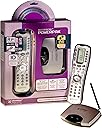
The URC RFS200 PowerPak Bundle includes the MasterControl RF20 remote and PowerBlaster, allowing you to control up to 10 devices with ease. With a learning option for custom commands and a macro feature for one-touch operation, this bundle is designed for seamless entertainment management. The included DVD guide ensures a quick and easy setup, making it perfect for the modern manager who values efficiency.
| ASIN | B000FL9E6U |
| Additional Features | Ergonomic |
| Battery Type | AAA |
| Best Sellers Rank | #464,797 in Electronics ( See Top 100 in Electronics ) #40,407 in Remote Controls (Electronics) |
| Brand | UNIVERSAL REMOTE |
| Button Quantity | 10 |
| Color | Gun Metal Grey |
| Compatible Devices | Television |
| Connectivity Technology | Radio Frequency |
| Controller Type | Button Control |
| Customer Reviews | 4.2 out of 5 stars 467 Reviews |
| Global Trade Identification Number | 00656787120105 |
| Item Weight | 7.68 ounces |
| Manufacturer | URC |
| Max Number of Supported Devices | 1 |
| Maximum Number of Supported Devices | 1 |
| Maximum Range | 10 Meters |
| Mfr Part Number | rfs200 |
| Model Name | rfs200 |
| Model Number | rfs200 |
| Number of Batteries | 4 AAA batteries required. (included) |
| Smart Home Compatibility | Not Smart Home Compatible |
| Special Feature | Ergonomic |
| UPC | 777779658809 656787120105 777786195090 |
| Unit Count | 2.0 Count |
| Warranty Description | 1 year parts, 1 year labor |
S**N
Excellent remote--especially for those who prefer to design their own configuration
Well designed, robust, and works like a charm. This remote will readily implement an intuitive configuration for your unique home theater setup, if you are willing to take the time to design it. It does come with ready-labelled presets on the configurable keys, and will populate a standardized configuration with the appropriate commands, once you put in the right code for your device from the supplied table. But, the real power of the RF20 is the ability to configure it in a way that is best for you and your home theater system. Its easy (and rather fun) to program--and the remote learning feature is fast to implement--but (as others have pointed out), it does take time to do, especially if you go the fully customized route. To address some quirks: 1. Others have correctly pointed out that there is an extra step needed to manually erase a button prior to reassigning it. The RF20 has a flash (non-volatile) memory; this step may be to help preserve it (just as it's better to reformat the SD card in your camera rather than just writing over the existing pictures). 2. The RF20 has a feature called "punch through" that allows you to dedicate a command to one home theater device (e.g., amplifier, cable box, TV, et.al.) regardless of which device the RF20 is currently set to control. For example, if your sound source is your amplifier, "punch through" will send that amplifier's volume commands only, regardless of which device mode the RF20 is in. This way, you can control the amplifier volume and the cable box channel while on the same screen of the RF20. WARNING: the RF20 has four sets of "punch through" commands--VOL, CH, PLAY, VOD--and each commandeers a collection of buttons (e.g., VOL= volume up/down and mute). The manual does not list all of the commandeered buttons for a given "punch through". Once you assign a "punch through" set, the subordinate buttons will no longer function as originally assigned, and manually erasing and reassigning them will not restore their function. I ran into this problem by trying to creatively assign a VOD "punch through" without knowing all of the buttons controlled by it. If this happens, you can restore functionality by reassigning the "punch through" for a piece of equipment back to itself (don't worry: the manual explains how to accomplish all of this). 3. The power-on macro can be customized so that you can turn on everything at once OR turn on individual devices, with a feature called "press and hold". When setting up the macro, you program a delay (as long as you like, in 0.5 second increments). This way, if you just press and release the 'on' button, only the current device will be turned on; but pressing and holding down the 'on' button for the assigned duration (e.g., 1 second) will activate the macro and turn on all of the assigned devices. 4. If your equipment is in enclosed cabinets or widely spread out on either side of your viewing screen, the Powerblaster is most worthwhile, and effectively distributes the commands to all devices without having to point the RF20. To be clear: the RF signal from the RF20 is ONLY used to convey the command non-directionally to the Powerblaster base unit. The base unit then reconverts it to an IR signal and relays it by wire to individual IR emitters, which are placed next to the IR receivers of the DVD player, cable box, or what-have-you. The RF20 is NOT designed to directly control devices which use RF remotes (e.g., ceiling fans). Buying the package saves you ~$12 over buying the RF20 and Powerblaster separately. 5. Finally (and the manual does not address this), you can assign individual commands to hard buttons (info, guide, menu, et.al.) while on the home ("MAIN") screen, when the RF20 is not set to mimic any one remote. You can use this feature to assign frequently needed commands without having to go back to that particular profile first. For example, I set the "guide" button to bring up the input screen on the TV, to make it easy to choose DVD, cable, etc. for viewing. Also, the "punch through" feature used to control volume did not include the volume and mute controls while the RF20 was on the home "MAIN" screen. Individually assigning them to the amplifier (using the "learning" feature) took care of this. In summary: the RF20 is a well-built hard button remote that, once configured, is easy to use. Configuring it is straightforward; although it does take time, you'll likely be pleased with the result.
O**Y
Great! But leave plenty of time for programming.
This really is a great remote- very functional and inexpensive compared to others especially when factoring in the RF power blaster. Once it is programmed, a flash memory retains the programming- so if you take out the batteries and keep it in a box for several months you need not go through the programming process again. As explained below, this is a very good thing. This remote handles everything I have- cable box/DVR, Pioneer home theater receiver, TV connected to the internet through an ethernet port, blu-ray/VCR (yes- they do make one unit that plays both!). The manual contains codes for each of the components. Entering the right code programs the basic features of each into the remote - once you find the right code. For many manufacturers, the manual contains numerous codes for each device; inputting each one in turn to see which works takes time. That done, you'll probably want to use the "learning" function of the remote to program some of the few buttons that don't program automatically, which is easy, but you'll go through the process for each button and for each component. The one-button on/off macros work well and are easy to program - but may require some tweaking - if you have compenents that do some automatic switching, (e.g. my blu-rau player will automatically switch the receiver to the proper input) you may have to reprogram either the remote or the components to get them synced up properly. In addition, unlike the Harmony remotes, programming the remote from the manfacturer codes does nothing to sync the components to each other - for example, the main menu shows a button for the cable box, but pressing that only changes the remote's functions to control the cable box - if you need to switch your receiver to the cable box input, you have to program a macro to do that as well. With multiple components, you need to program a macro for each one - which takes more time. The "punch through" function is a nice addition - the unit allows you to program certain functions -volume for example -that will remain synced to a button whether the receiver is set to control the tv or the cable box. Once set up, this saves you switching back and forth between settings. Setting it up requires going to each component and entering the macro - which takes more time. Then if you want to set up macros to do more complex things, say switch to an internet radio station that is several menus down on the tv - well, clear your calendar for an hour to set that up through trial and error. I spent the better part of a day - perhaps 5 hours altogether - programming the unit. If your needs are more than basic - and really, there's no point buying this remote over cheaper ones if they are - programming will take at least an hour and a half. The thing to remember is that, unlike the Harmony system, this remote requires you to do all the programming yourself. The good news is that, if you are willing to spend the time, you can program this remote to do just about anything. For example, you can set up a macro that will, with the press of one button, navigate through setting your receiver to play on your outside speakers, then automatcally tune your TV to play your Pandora "modern blues" station and turn up the volume. You can also rename the screen name of the button you program for this to "blues" or whatever else you want. And with the RF function, the button will work from your patio. Because of this, the remote is really handy once programmed. The manual says that it will accept macros up to several hundred steps long (though I shudder to think how long THAT would take to program). You can program it to navigate through menus as well as incorporate pauses into a macro - to accomdate a component taking several seconds to load content from the internet, for example - and literally to do anything that you can do with any of your components' remotes all automatically. This can really be a time-saver once the programming is done. The included "power blaster" RF unit also works well. As others noted, I needed only the main unit installed inside my cabinet to have all the compenents respond properly, even though there appeared to be no sight lines between that unit and some components. And the signal goes travels the exterior stucco walls of my house. One minor issue- those looking for something sleek to match cool looking components may not be able to overlook the clunkiness of the remote and its lack of a color screen. A great buy -just be ready to spend the necessary time to program it.
M**3
Great remote. Here's some tips...
Iโve been using this remote for about 6 weeks now. The main reason I got it was because my TV and components are on adjacent walls, and there is not always a direct line of sight to the components. My original plan was to get an IR repeater and just use all my OE remotes, but a friend suggested this instead. It cost about $30 more than the repeater I was looking at, but well worth it. I programmed / taught this remote, and put all the other remotes in a drawer. This is the only remote I need now. The RF capability allows me to use the remote from anywhere in the house and so far has worked without any problems. The range of both the remote itself and the RF blaster are very impressive. Much better than the original remotes. For example, I have the RF blaster in the component cabinet with a glass door. But the blaster still controls my TV on the adjacent wall. After playing around with this remote for a bit, hereโs the tips Iโd suggestโฆ 1) Use pre-programming firstโฆbut try SEVERAL of the codes. Using the pre-program method will take care of most of the basics (volume, numbers, etcโฆ). But donโt just stick with the first code that โworksโ for your component. Try them all, and then look at all the pages in the LCD. I found a few nice functions that the OE remotes did not have. For my Samsung TV, the RF20 had commands for discrete on/off, and shortcuts to functions (โฆsleep timer, PIP) that the OE remote did not have. The discrete on/off was key to the macros that I programmed. It also had some discrete input selections for my TV which were also important to the macros. From that point, use the learning function to teach the RF20 anything that was missed from the OE remote. And use the buttons where you can in place of the LCD. 2) Write it out first. I found it helpful to map out where I wanted the functions of the OE remote to be on the RF20โฆespecially for the LCD. You can group functions on the LCD in a way that is logical to you, put the most used functions on Pg 1, etc... I also found it helpful to have macros written out first. That way if something doesnโt work as intended and you need to make a tweak (like add a longer pause), itโs very easy to see what you did and make the corrections very quickly. 3) Use โPress-and-Holdโ macros. I have all my component buttons also set up with press and hold macros. If I want to watch cable TV, I press and hold the โCableโ component button which runs a macro that turns on the components I need, turns off the components I donโt, and sets the TV to the right input. I also have a press and hold macro set up to the Off button that turns off all the components in my system (but Iโm still able to turn Off components discretely if I need to by switching to that component and simply pressing the Off button). 4) If you have discrete on/off for all of your components, be sure to include ALL components in your power macros. Program the macro to turn On what you needโฆbut be sure to send the signal to turn Off what you donโt (if the component is already offโฆit wonโt do anything). Doing the macros this way will allow you to easily โswitchโ between your components. So if Iโm watching cable, and then want to watch a DVD, I press and hold the DVD component button which turns on the player and audio receiver, sets the TV to the right input, but also turns off the cable box (and any other component that might be on). Again, this only works if you have discrete on/off functions. Some reviewers have complained that this remote is difficult to program. I did not find it to be a problem at all. Just need to follow the directions. Also the remote I got was not dark gray as shown in the picture. Mine is silver, and the cursor button (the round ring) looks like chrome plating. I actually like it better than what's shown in the picture.
C**T
Harmony on a budget?
Like many others, I was in need of an all-in-one remote with RF capability so the unsightly mess (to the Mrs.) behind the cabinet doors could become an unseen mess. After much research and an unwillingness to shell out ++$$ for Harmony, I decided to give this one a try. I was not disappointed. PROs: -Relative ease of setup. I have a new (fall '09) Samsung Bluray, new (fall '09) Panansonic plasma, Comcast DVR, and old JVC receiver. All had codes that worked for the 80% solution. Customizing buttons is a breeze. Macros are not too bad. But for those who are not gadget nerds, it might be a frustrating process. -RF. Awesome if you've never used it. No longer have to worry about line-of-sight IR or range. I use just the PowerBlaster unit inside the cabinet, and it hits all the components--the IR extender wires are not necessary. -Quality. Feels sturdy. -Value. All this for $80 cannot be beat. CONs: -Limited customization compared to Harmony. You can't customize a "watch a DVD" button where all switching happens for you. You can customize buttons and "push through" (e.g. making the volume buttons control the receiver volume no matter what device you're controlling) and assign macros, but the programming and operation will require a decent level of familiarity with how the remote and devices work. Probably not very intuitive for the non-tech-savvy. -As other reviewers have pointed out, there could be frequency use issues with the RF. I think this might preclude the use of more than one of these per house, or could be an issue if really close neighbors decide to take advantage of this great deal. Neither apply to me, yet. -Batteries. 4 AAA. No recharge ability. -Aesthetics. Kind of an out-dated, clunky design. Definitely not as sleek as the Harmony models. A constant reminder that you decided to save money, if that sort of thing bothers you. Also, the backlight is red. Blue would have been a better choice, IMO. RECOMMENDATION: If you are looking for a value-based solution for your universal remote w/RF dilemma, you are good with your gadgets, and you are willing to sacrifice some of the functionality and coolness of a Harmony, then this is the unit for you. Finally, read the full instructions. Might save you from some having to undo some programming.
T**A
Coming from a Logitech Harmony One
I've had the Harmony One for about two years. It worked ok for me, but it was terrible for my wife, since she doesn't have the patience I do to point it at our 7+ av components for several seconds, given there is a lot of lag in order for the full sequence to commands to finish executing. And it was unreliable even when one has the patience to hold the remote for the time required in the direction required. If one of the devices isn't turned on or off correctly, it ruins the entire set up since you now have to put all the components back in sync--turn them all on or off. Given the unreliability of the commands reaching the components, I even spent more $ and bought the IR repeaters/extenders, but that just made it worse, since the components receive two signals: one from the remote, and one from the repeaters/extenders. The extender is really meant for av components that sit inside closed cabinets so the components only receive one signal, which was not my case. So I was at first hesitant to try out the FRS200, given it is less than half the price of the harmony, the design is not as polished as the Harmony (e.g., color, curves on the hardware, etc.), and I like the ability to use "Activity" buttons on the Harmony. I spent about an hour programming the remote so it does exactly as I need: one button to turn on all the required devices (e.g., to watch a Blu Ray: TV on, AV receiver on, Blu Ray player on), to set each device to the right settings (e.g., AV receiver set to BD, etc.). Unlike the Logitech product line, you have to use the remote to do all the programming vs. via USB on your desktop. But I found it not much more difficult than using the Logitech Harmony Remote Software. The manual isn't as detailed as it should be but I figured out what I needed to get done. You can program the remote to do anything you need as long as a command is accessible via a remote button (real or soft). You'll need to use the learn feature, which is extremely easy to use, to enable any remote commands that are missing from the standard set of buttons. Because there aren't dedicated "Activity" buttons as on the Harmony, I just programed it so that if you hold down the e.g., DVD button for 1 second, the macro executes and all the required devices turn on and are set properly. To turn them all off, just do the same. The 1 second delay is so that you can access a device's remote control buttons without triggering the macro to run, e.g., you're watching a DVD, but want to change a setting on the TV, so you go to the TV functions to do that. To go back to the DVD functions, you hit the DVD button, and you don't want the DVD macro to execute at that time (turn tv on, turn blu ray player on, etc.). You can also rename all the text labels on the screens, e.g, I have a "ROKU" and "APPLE" (as in TV). Now we have a remote that does everything we need, is close to if not 100% reliable in turning on and properly setting all the required av components needed for an activity. There is little or no unintentional lags of commands (vs. the Harmony). Best of all, we never have to point the remote at any particular device anymore. It's a habit I am happily unlearning after so many years of doing so.
P**N
Pure Crap!!!
This is not the first remote control I've ever owned but by far has been the most frustrating to try and set up. I just got a new 50" plasma and high def cable. Even the most basic cable functions like channel up and down don't work on this remote. Tech support's solution: "Go through the pages." In other words, if I want to change channels, I have to scroll through pages to where the "Channel + and - are. Are you kidding me?!!!! I just spent an hour trying to set up a macro. I called tech support who offered solutions that should've been included in the instruction manual, which, by the way, is very confusing. When I tried to use the macro for the DVD set up, the TV was still on the cable input. The tech support rep I called on the first go 'round said that I would have to select "Input" during the set up. Not wanting to use any more cell phone minutes, I tried that. It did nothing to correct the problem. Since I really wanted to be able to use this thing, I bit the bullet and called again the next day. I got a different tech who told me that you had to select the input with the TV remote during step three. Would have been nice if the first tech had told me this. The whole thing was so messed up, I reset it and started over. Now, it won't recognize the cable box at all! Tech support's answer: "There's no reason it shouldn't recognize it now if it did before." Thanks a bunch Einstein! I could've told you that! I bought this unit a few months ago so I would have it when I finally took the plunge and bought the new TV, so there's no sending it back. I feel as though I took my hard earned $85 and threw it out the window. I had to stop myself from enjoying the meager satisfaction of smashing this piece of _____ on the tile floor.
R**O
Good Inexpensive RF Remote
For the price (reduced to $80) this is a very decent remote if you need a remote with RF features. Again, it's value is VERY relative to its price. Its shortcommings are: The RF function is based on an open frequency, NOT programable between the Remote Control unit & the RF Receiver unit. This is important because if a next door neighbor is using a RF based remote he might start changing your channels and turning your Tv on & off. There is nothing that can be done to fix this or modify the Universal Remote. The only recourse is to buy the Universal Remote & Receiver that cost $300+, which is NOT a good value for the price. For apx. $350 you can buy the new Harmony model (replacing the 890), which is far more powerful, and easier to program & use. The LCD screen is smallish and can list 5 items per screen. You scroll through the screens to access components to control or to get to the functions for each component. Free up a LOT of time to program the unit. Programming the unit for macros seems a little confusing at first and takes some getting use to. Please note that I found nothing major or even moderately wrong with the remote, but it does have a few problems that I think affect how functional & easy to use it is. Major Positives are: Customer Service was reasonably easy to contact. The CS Rep I got was very friendly, knowledgable, and helpful. The button layout on the Remote is very good. Buttons are grouped together intelligently, especially for people using the remote for DVR cable boxes. All in all a decent unit for the price for someone needing RF functions on a limited budget. Hope this was helpful.
A**R
OK if your neibor doesn't have one too
I gave this a 2 rating because it only operates on one frequency/channel and causes issues if your neighbor also has one. I purchased this remote because all of our AV equipment is in a remote closet about 50 feet away from the TV/Living room. INSTALLATION was fairly straightforward. I am an electrical engineer/computer programmer by profession, so I did not find it too hard to program. I did find it challenging to teach my family how to navigate the remote. I did not take significant advantage of the programming sequences. The RF capability works great, and I was able to operate several inter-connected devices and my television. The IR stickers worked fine, but you need to pull up your component documentation to find the IR receiver for correct placement. PROGRAMMING Programming for your individual components was tedious (for this computer programmer). But it is no more tedious than any other low-cost universal remote. Their manual (with microscopic text) includes a table of codes for each component type+brand. You lookup your component/brand and then try each of the different 3-digit codes until you find the one that works best for your piece of equipment. It is usually not a perfect fit, and I was unable to exactly match the functionality of each of my remotes. Plan on spending 15-30 minutes for each remote, and then another 30 minutes adding the missing functions using the learning function. OPERATION Unless you program extensive sequences, don't expect to be able to explain how to use your system to someone that isn't VERY familiar with your component layout. The system operated fine, once you got a handle on how to use it. Again, this is where I would have benefitted from creating program sequences. to turn on my system, you select [Audio] then [On]... then select the correct input device (hdmi1, hdmi2, etc...) Then go back to main menu Then select [Cable] then [On] then go back to main menu then select [Television] then [on] The system supports a pass-through capability so that while I am in [TV] mode, I can still control channel changing on the cable box, and volume on the AV. That's a useful feature. NOW FOR THE DOWNSIDE It appears that my neighbor also has the same system. From Friday Night until Monday Morning, it seems we are always fighting each other over the control of our TVs! (remember that scene from Poltergeist?) One day, we found that several packages had been mysteriously ordered via our cable box. This was because our neighbor was controlling both HIS cable box and OUR cable box with the same RF20 remote. Bad news. WHAT DID I DO? I disconnected this device, and went ahead and purchased a Logitech Harmony Ultimate If you can afford the Harmony Ultimate, I would recommend this device instead. total setup time was about 15 minutes, and I experienced none of the downsides listed above.
Trustpilot
2 months ago
3 days ago