We remain fully operational. Our teams are working around the clock to ensure your deliveries continue safely.

DOWNLOAD THE APP


Customer Services
Copyright © 2025 Desertcart Holdings Limited
DOWNLOAD THE APP

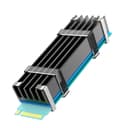
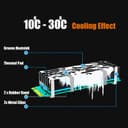


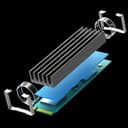

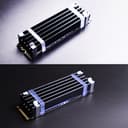

❄️ Keep your SSD cool, your rig sleek, and your workflow unstoppable!
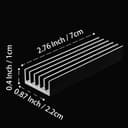
The GLOTRENDS M.2 Heatsink Kit is a precision-engineered aluminum cooling solution designed exclusively for 2280 M.2 SSDs in desktop PCs. Featuring a compact 22x70x10mm profile, it delivers a powerful 5-30°C temperature reduction using a high-performance thermal pad and flexible mounting options. This passive cooling system safeguards your SSD’s main control chip, enhancing performance stability and extending device lifespan—all with an easy, tool-free installation.


| ASIN | B07LCQLC8Y |
| Best Sellers Rank | 9,126 in Computers & Accessories ( See Top 100 in Computers & Accessories ) 107 in Fans & Cooling |
| Brand | GLOTRENDS |
| Cooler Heatsink Compatibility | 2280 M.2 SSD, PC Installation |
| Cooler Heatsink Material | Aluminium |
| Country Of Origin | China |
| Customer Reviews | 4.5 4.5 out of 5 stars (8,202) |
| Included Components | 1 x M.2 SSD Thermal Pad |
| Item Dimensions L x W x H | 7L x 2.2W x 1H centimetres |
| Item Weight | 0.02 Kilograms |
| Manufacturer | glotrends |
| Mounting Type | PCB Mount |
| Unit Count | 1.0 count |
Y**A
Very good for the price
Very good quality. Easy to setup and use. No issues
J**Y
Fits exactly, low profile and effective
Bought this for a second SSD that fits under my GPU fans and it fits in the gap well. Comes with a gel pad and clips to hold it all together and lowers the temp by a few degrees. Looks great and is fantastic value.
R**Y
Very tight fit for 14" laptops - does the job cooling wise though.
Ok, bought this for a Gen 4x16 NVMe drive that was hitting 92c in a laptop under load, it works, idle temps went from 45c down to 28c and load temps dropped to 71c from the 92c... Very easy to install and relatively good value. Now for the downside, you are going to struggle to fit this into a laptop because of the height. It just about fits into a ThinkPad T490 / T14 Gen 1 & 2 / P14s Gen 1 & 2 bottom case but when I say "just" I mean it, getting that bottom case back on is a struggle and you can feel the bulge where the heatsink is. I have decided not to use the heatsink in the laptop because over time this is going to put strain on the case and probably the motherboard. Instead I am going to install a Gen 3 drive in the laptop as they don't get as hot. So to some up my review, the product itself works, is good quality and does what it says on the tin, it is secure enough in a laptop but your laptop will have to have a thick case. I thought It would be no problem in the ThinkPads I mentioned above but every mm counts here lol. It is cheap enough though to just buy it and try it. I can use the heatsink in the future for other refurbs or in other devices so all good.
A**O
Simple, effective heatsink that fits perfectly in the PS5 slot
I bought the GLOTRENDS M.2 heatsink for a Crucial P3 Plus 1TB SSD, since using a heatsink is recommended when installing an NVMe drive in a PS5 due to the limited airflow in the expansion bay. As far as I can tell, it works exactly as it should. There have been no shutdowns, no slowdowns, and no signs of thermal issues since installing it. The heatsink fits neatly over the SSD and sits perfectly inside the PS5’s slot without any clearance problems and comes with all necessary fixings. Overall, it’s a simple, reliable solution that gives peace of mind when adding an SSD to the PS5.
D**0
Excellent functionality and value for money
I have used five of these heat sinks on multiple NVMe drives now, most recently a couple of Gen 4 drives - the Samsung 980 Pro and the WD SN850 - which runs hot, but all of them have been kept cool, and I’ve never seen any of them rise to above the low 50s, even under load. In terms of basic heat sink fundamentals they seem to tick the boxes as far as I can tell. They make good contact through the supplied thermal pad, their traditional finned design provides a large surface area, and their material seems to be thermally conductive enough to do it’s job well. Like any heat sink, in order to work effectively there must be airflow across it to carry the heat away. This shouldn’t be an issue in a modern well ventilated case, and anyone concerned about the performance of their drives and the effectiveness of their thermals should already have a good handle on this. Price wise, these are incredibly cheap for what they are. They’re well made, look nice, work well, and come with all the accessories you need for a successful installation. The cleaning wipes are a nice touch, as is the choice of two mounting options. I haven’t yet used the metal clips as I prefer to use the silicone bands to hold the heat sink onto the drive. Overall I couldn’t ask for more of a heat sink. I know there are more elaborate “beautiful” designs, and some that wrap around the rear, which may be necessary in some circumstances but I haven’t personally required that as of yet. My main concern is the temperature of the controller and these manage that perfectly.
A**E
Works well if using the high profile version
I was getting a lot of SSD SATA M2 temperature warning (>70 degrees) on my QNAP TS-322x NAS for the 3 M2s installed. (2 used as R/W cache). The heatsinks which came with the NAS were tiny and seemed to make no difference to the heat of the M2s when attached. so I opted to try out a couple of variants of the glotrends M.2 Heatsink to see if it would make any difference to the temperatures generated by the M2s. I got 2 high profile and one low profile heatsink as I had enough clearance space in the NAS to attach these. The cache M2 are both the same brand and model (Crucial CT250MX500SSD4 250gb). I put one high profile and one low profile on these cache m2s and ran some copy tests (30gb copied to multiple folders) which would give a good benchmark as the hardware was the exact same. I put another high profile on the remaining SSD m2 which was used for normal data storage. Once installed, I got a 15 degree drop in temperature when coping over large amounts of data on m2 -1 & m2-3 SSDs but no real difference on m2 -2. It looks like the high profile heatsink makes a massive difference as I’ve not received any temperature alerts on the NAS since these have been installed, but will need to swap out the installed low profile heatsink as I can’t see any noticeable drop in temperature as once it gets over 70. Overall a good product if you have the space for a high profile heatsink.
A**A
Works well. Low temps with the included heat pads.
I used this to add a second SSD to my motherboard for running newer games (they are really huge these days 😨). Includes different thicknesses of heat pad and 2 levels of containment to ensure good contact. Checked temps under load using Crystal Disk and I was really impressed. Especially as my 2nd SSD slot is under the GPU. Would highly recommend.
A**R
Works but clips aren't always suitable
Works fine with the elastic bands but the metal clips were no good as the chip on my ssd didn't extend the full length of the circuit board so when using the clips the board would bend.
O**R
My NVMe was running around 57 degrees Celcius regularly, and it was a bit concerning to see my normal HDDs running far cooler at <47 degrees Celcius max. I chose this heat sink because it had a large surface area and cooling fins, which is unlike most of the other flat sinks I see for sale. The price is fantastic and it's lowered my NVMe temperature by about 10 degrees. so happy I went to the effort of installing this!
L**L
pod obciążeniem spadek 6-8 stopni w idle nie ma zmian. Px700 pod obciążeniem przed 60 teraz około 52.
M**M
Simply nothing bad to say! My SSD stays perfectly cool, and installation was super easy. I mostly bought it because the original factory heatsink kept coming off, and this one has been totally worth it.
R**S
Works OK, and easy to install.
V**A
I have a samsung 970 Evo 500GB NVME M.2 SSD and it had temperatures of around 70 degrees during idle loads. I was afraid I would fry my SSD after the warranty period ended leaving me stranded without a boot drive. So I decided to get this heat spreader. It might seem expensive (which it is indeed) but considering the peace of mind that it provides Performance: Merely putting this on the SSD has reduced max temps to 50 degrees. That is a HUGE temp drop. I didn't expect that. Allowing air over it with fans reduces the temps even further to around 40-45 degrees. Now I have peace of mind. Considering Indian weather, I don't trust our electronics to last very long at sustained 70Degree temperatures.
Trustpilot
1 month ago
4 days ago