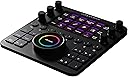
🎨 Master your craft with the ultimate creative control hub!
The Loupedeck Creative Tool is a sleek, 6.3-inch touchscreen editing console designed for photo, video, music, and design professionals. Weighing just 400g, it offers seamless workflow optimization through customizable controls, enhancing productivity across creative software on Windows. Its compact design and ongoing software updates make it an indispensable tool for modern creators.


| ASIN | B0837LKGL6 |
| Are Batteries Included | No |
| Best Sellers Rank | 116,318 in Computers & Accessories ( See Top 100 in Computers & Accessories ) 187 in Graphic Tablets |
| Brand | Loupedeck |
| Colour | Black |
| Customer Reviews | 4.0 4.0 out of 5 stars (788) |
| Date First Available | 17 Jan. 2020 |
| Guaranteed software updates until | unknown |
| Item Weight | 400 g |
| Item model number | LDCT |
| Lithium Battery Packaging | Batteries only |
| Lithium Battery Weight | 0.19 Grams |
| Manufacturer | Loupedeck |
| Number Of Lithium Ion Cells | 1 |
| Number of Lithium Metal Cells | 1 |
| Operating System | Windows |
| Product Dimensions | 16 x 15 x 0.1 cm; 400 g |
| Screen Resolution | 2048" or "4096 |
| Series | Loupedeck CT |
| Standing screen display size | 6.3 Inches |
C**R
Super piece of kit
Much better quality than the old Loupedeck Classic. Excellent functionality
J**R
Loupedeck CT for video editing.
As an editor (Premiere Pro) you’re always looking to optimise your workflow. Having used the Loupedeck CT for the last 3 months on a very intensive project, I couldn’t be happier with this control surface. The ability to configure the unit with multiple configurations, means you can group your most used options depending on what stage of the edit you’re at, assembly through to picture lock to colour grade. i’ve also found being able to define the dials incredibly useful, from zooming the size of the timeline, to adjusting the volume, to nudging a clip a frame at a time, all feel a lot more accurate than using the GUI. As somebody who uses a tablet rather than a mouse, it feels a lot more comfortable than using the keyboard. The unit isn’t cheap, but the time it has saved me has definitely offset the cost. I have no hesitation whatsoever recommending the Loupedeck CT for video editing.
D**C
Great controller- with some bugs to be addressed
This is a beautiful controller for pretty much the biggest creative applications on the market. Unboxing: beautiful experience. Almost Apple-like quality packaging. Build quality: feels solid and sturdy. All dials and buttons have a satisfying feel. The screen and illuminated buttons are nice and bright. Lightroom: very nice integration with the app. It is definitely the best implemented app for the CT. actually makes the workflow in Lightroom better as you are not distracted by using the sliders. Photoshop: I didn’t find any benefit using this with Photoshop. It’s helpful when zooming in and out of an image though. Final Cut Pro X: the integration is ok but there are many bugs to iron out. Sometimes the operations lag, or actions don’t happen when you expect them to happen. Audio editing is not well thought out as if you try and pull down the volume on an event you need to do it really slowly otherwise the application locks as it translates the dial movements as hundreds of clicks. The integration is definitely not right and it feels that it was a bit rushed. The good news is I am sure with software updates this will improve. Overall: really beautiful device that can help with you workflow once you learn it. At the moment more useful for Lightroom than Photoshop or Final Cut Pro but hopefully this will change.
J**Y
Transformational
This control surface really does have the potential to revolutionise your workflow. I work in the post-production business and rely on various, very complex programs to get things done. Loupedeck allows me the possibility to assign single, or multiple key commands to a single button or rotary knob. It doesn't sound like much on the surface (pun not intended), but I can tell you that this small investment has made me over 30% more productive overnight! They're right to pitch the product at creatives as the controls lend themselves to creative tasks; you can use the big scroll wheel to navigate a time-line in a video editing program. Or you can use the rotary knobs to zoom in or out of the same time-line. Multiple step actions can be done by the click of a single button - and no having to remember multitudes of key commands. I downloaded the design software before I purchased the control surface, and this allowed me to see the possibilities that were in-store if I were to buy the Loupedeck. Suffice to say, I purchased it as soon as I'd designed my first custom profile. If you have a need for this type of control surface, I believe you will too.
A**N
Terrible sluggish waste of time. Not fit for purpose
Total crap. Sluggish, badly laid out, poor quality lcd screen, terrible inbuilt layouts, can’t rest your fingers on buttons. I never leave reviews but thought this so poor for something so expensive that it had to be called out. Was using it for editing and after some considerable time setting it all up realised it was actually just a waste of money - a poor product in virtually every respect. You have to look down constantly, everything has a second delay from hitting any button or turning virtually any knob. Maybe it might improve with software updates, but it’s a year old already and if this is the stage they’re at then no. I bought a stream deck xl to compare against and found it 10x more useful as you could rest your fingers on shortcuts you use a lot. It doesn’t have knobs but not the end of the world. It’s a shame because it’s almost quite good. If the wheel, which isn’t very good as it’s so sluggish was placed above the keys it might have been better. I would have kept it despite it being sluggish and poorly laid out, and the designers clearly cutting costs by not having actual keys like streamdeck has, but for £470? no way. I can honestly say hand on heart stay away from this product and spend your money on a lens, a computer, a streamdeck xl (or two of them for that matter), but not this. If it was £250 I’d keep it, but £470 they’re ripping everyone off.
R**L
Ok, but sluggish and not as responsive as I'd hoped
Well built, but not as simple to use as I would have hoped / expected. I've previously used a Contour Shuttle and thought this would be an uprade. Sadly that isn't the case and am sending it back for a refund. The build quality is great, the configuration app is also nice .. but the integration between OS (I've tried this on both Windows and OSX) is problematic. I had also hoped to use this with Davinci Resolve and whilst the latest firmware adds support for Davinci as a 3rd party app, the support isn't complete. I tried it with Premiere and FCPX and had similar issues, both sluggish and just not as intuitive as I would have hoped. Nice, but not worth the price sadly
D**N
Speed up workflow and better editing.
If you edit a lot in Adobe Lightroom Classic or Premiere Pro CC then this will speed up your editing by up to 30%. Quality build and performance. Breezes through fast selection and photo grading as well as having those analogue disks for acute adjustments saving mouse clicks and moves and removing RSI. I love that it’s programmable to suit your needs and editing style.
R**T
Love using this
Best tool ever to help you with photoshop and Lightroom
G**Y
Ich bin hauptferuflicher Colorist und Fotograf und war schon länger auf der Suche nach einem Tool, das mir den Arbeitsalltag in beiden Bereichen erleichtert. Das Loupedeck CT erfüllt für mich genau das! 1) Die Verpackung Das Loupedeck CT kommt in einem gebrandeten Karton, in dem sich nochmals die sehr hochwertige schwarze Verpackung befindet. Das Unboxing macht sehr viel Spaß, da alles wie aus einem Guß angeordnet ist und sämtliche Inhalte bombenfest sitzen. Neben dem Loupedeck befinden sich ein hochwertiges, ummanteltes USB-C auf USB-C Kabel und ein Quickstart Guide in der Schachtel. Zusätzlich liegt ein USB-C auf USB-A Adapter bei. 2) Die Verarbeitung Ich war direkt von der hohen Verarbeitungsqualität sämtlicher Verpackungsinhalte angetan. Allen vorran das Loupedeck selbst, das wirklich erstaunlich gut verarbeitet ist. Die Knöpfe haben einen sehr guten Druckpunkt, die Knobs lassen sich sehr angenehm und geschmeidig drehen und druchdrücken. Die physischen Buttons sind gut ausgeleuchtet und bieten aufgrund unterschiedlicher Farben eine praktische Übersicht. Das gilt auch für die kontextsensitiven Buttons und den großen Drehregler, die sich allesamt gut ablesen lassen und zusätzlich bei Betätigung vibrieren. 3) Die User Experience Die Einrichtung des Loupedeck CT geht schnell von der Hand: Das Deck wird sofort per plug and play von Windows erkannt. Nach der schnellen Installation der Software (downloadbar von der Loupedeck Website), sind direkt praktische Funktionen verfügbar, die den Alltag auch direkt in Windows erleichtern. Sobald eine Software gestartet wird, ändern sich die kontextsensiviten Buttons und passen sich dem derzeit aktiven Programm an. Ich benutze hierbei die Adobe Creative Suite und Davinci Resolve. Die Funktionen des Loupedeck reichen dabei vom Erstellen von Masken in Photoshop, dem schnellen Wechsel zwischen Shots innerhalb meiner Timeline, bis hin zu alltäglichen Dingen, wie dem praktischen Shortcut zu meinem Email-Programm, um den Kunden über den Projektverlauf zu informieren. Besonders die Knobs kommen oft zum Einsatz. Fixe Anspassungen bei der Bildbearbeitung oder beim Grading innerhalb der Creative Suite gehen damit einfach besser von der Hand als mit der Maus. Außerdem lassen sich die Buttons mit Hilfe der Software mit anderen Funktionen individuell belegen. 4) Fazit Das Loupedeck CT erleichtert meinen Arbeitsalltag ungemein und sieht dabei noch sehr ansprechend und professionell aus. Wer ein Tool sucht, um seinen Workflow in den gängigen kreativen Programmen zu optimieren, ist hier genau richtig. Obendrein liefert Loupedeck regelmäßig Updates nach, die den Funktionsumfang erweitern. Daher gibt es von mir eine klare Empfehlung für das Produkt!
S**.
Consolle per l'editing molto ben fatta, esteticamente molto bella e di ottima costruzione. Le dimensioni compatte la rendono facile da posizionare anche su postazioni con poco spazio. La personalizzazione iniziale richiede diverso tempo e all'inizio ci vuole un po' a prendere confidenza con tutti i vari controlli impostabili ma una volta abituati il lavoro si velocizza molto! Nella confezione non è presente un vero e proprio manuale, che però si può trovare sul sito del produttore così come il software; entrambe non disponibili in italiano.
J**.
La recomiendo totalmente, es la segunda consola de marca que tengo, las 2 funcionan perfectamente, Cuando adquirí el modelo LIVE, tenía problemas y solia cerrarse el programa que estaba usando, pude darme cuenta que el problema venía de que el idioma del teclado estaba en castellano y las aplicaciones que suelo utilizar están en inglés, cambié el teclado por uno en Inglés, sin la Ñ, y no volví a tener problemas, por suerte pude colocar las dos entradas a los usb-c principales, quizas si consiguen algún adaptador USB-C con corriente, puedan solucionarlo también. Por último, la interface. He usado otras marcas de consola, por lo gral las aplicaciones que controlan esas consolas suelen ser muy malas, en LoupedeckCONFIG, puedes realizar muchas cosas, lo que más me gusta la posiblidad de retroceder o avanzar en el historial que vamos realizando (cmdZ o crtlZ). La recomiendo para profesionales de video y animación. Un saludo
G**2
Magic technology.
K**G
I have owned and operated a professional photography and video studio for 15 years. We have used sound boards designed for audio recording to perform similar functionality to the loupdeck up until a week ago.. My counsel of 8 years finally broke so I decided to try this. We used open source programs to set up our old system. It was a lot of work. However, The result was a nearly doubling the speed of editing without a sacrifice in quality. The reason we stayed on that platform was the programmability of each button to each of our photographers styles and workflow. This loupdeck CT has taken all these same benefits and put them into a excellent little device. It's built well. The preset functions are intuitive. Programing is easy. Even after nearly a decade of my mustle memory being use to my old setup I have found the transition to this setup great! I'm still slower than the old one but I can tell that will change fast and it's a matter of learning a little more. Rember when you get a device like this, it's built to perform a complex task everyone does a little differently. The learning curve will be hard. Don't get frustrated, it's like a musical instrument. At first you will be slow and it will sound horrible. But after time things will get better and once you get used to using it you will love it. Remember, your other hand hasent been doing much until you plug something like this is. You are able to move digital Lightroom sliders by hand and there are lots of them. Take your time. Like anything that is made to perform complex tasks you won't just go at 100% out of the gate!
Trustpilot
2 weeks ago
2 months ago