
desertcart.com: Wired Carplay USB Dongle,Android Auto, Mirroring,Smartphone Link Receiver for The Vehicle with Android System carplay Upgrade/USB Connect/SIRI Voice Control/Google Maps : Electronics Review: Not worth it don't buy - After a few months withthis device it has gotten worst and worst. It loses connection so often its not even worth trying to connect it. Tried it with multiple USB-C cables for my android device and it loses connection with all of them. Got a new phone and it still loses connection, so at this point it is clear this device is trash and not worth the investment. Just go with a head unit that supports Android Auto/Apple Carplay. DONT BUY THIS DEVICE! I wish I could get a refund for it. Review: Not perfect, but the best factory replacement for a 4Runner with CarPlay - I am giving this product 5 stars not because it is a perfect replacement screen for the 4Runner, but because it is the best one as compared with the other options on the market. Pros: - Vivid, high resolution touch screen display is larger or as large as any other on the market - Fit and finish is good, looks like a stock radio rather than an after market one - The head unit is very fast, boots up quick, loads apps almost instantly, and functions as a powerful android tablet. - Apple Carplay works great WHEN PLUGGED IN VIA USB. You absolutely must get the USB adaptor, sold separately, because the bluetooth carplay is complete garbage. It will drive you nuts trying to make it work consistently, so just do yourself a favor and get the USB adaptor. - Customer service is very responsive and eager to help solve issues. They probably spent 2-3 hours with me when trying to get the bluetooth to work (bluetooth on the unit does work fine for calls, just not very well for car play). - Sound quality is better than the stock head unit - Pretty easy to install myself, took about an hour or so. There are videos online that are very helpful, I recommend watching those. Cons: - The silver trim is not a perfect match for the Limited silver 4Runner trim. I am the only one who notices it, but it bugs me. - As mentioned before, CarPlay over bluetooth is terrible. Its much faster and reliable when plugged in via USB. Comparable head units like the one from Alpine ($1499) don't support bluetooth Carplay at all, so this isn't that big of a deal I guess. - My 4Runner has automatic climate control, and every time it adjusts, it pops up on the screen and blocks what I am trying to do. I have tried to find a way to turn this off but have not been able to. - Doesn't include the USB Carplay adaptor. In summary, if you want a large, modern looking screen that is fast and does Apple Carplay for your late model 4Runner, this is the best one. Its not perfect, but its way better than the factory one, and its cheaper than other options that are not as good.


| ASIN | B082KWHH2D |
| Customer Reviews | 3.0 3.0 out of 5 stars (838) |
| Date First Available | May 9, 2021 |
| Item Weight | 1.76 ounces |
| Manufacturer | ViFun |
| Package Dimensions | 6.73 x 3.74 x 1.06 inches |
C**Y
Not worth it don't buy
After a few months withthis device it has gotten worst and worst. It loses connection so often its not even worth trying to connect it. Tried it with multiple USB-C cables for my android device and it loses connection with all of them. Got a new phone and it still loses connection, so at this point it is clear this device is trash and not worth the investment. Just go with a head unit that supports Android Auto/Apple Carplay. DONT BUY THIS DEVICE! I wish I could get a refund for it.
J**N
Not perfect, but the best factory replacement for a 4Runner with CarPlay
I am giving this product 5 stars not because it is a perfect replacement screen for the 4Runner, but because it is the best one as compared with the other options on the market. Pros: - Vivid, high resolution touch screen display is larger or as large as any other on the market - Fit and finish is good, looks like a stock radio rather than an after market one - The head unit is very fast, boots up quick, loads apps almost instantly, and functions as a powerful android tablet. - Apple Carplay works great WHEN PLUGGED IN VIA USB. You absolutely must get the USB adaptor, sold separately, because the bluetooth carplay is complete garbage. It will drive you nuts trying to make it work consistently, so just do yourself a favor and get the USB adaptor. - Customer service is very responsive and eager to help solve issues. They probably spent 2-3 hours with me when trying to get the bluetooth to work (bluetooth on the unit does work fine for calls, just not very well for car play). - Sound quality is better than the stock head unit - Pretty easy to install myself, took about an hour or so. There are videos online that are very helpful, I recommend watching those. Cons: - The silver trim is not a perfect match for the Limited silver 4Runner trim. I am the only one who notices it, but it bugs me. - As mentioned before, CarPlay over bluetooth is terrible. Its much faster and reliable when plugged in via USB. Comparable head units like the one from Alpine ($1499) don't support bluetooth Carplay at all, so this isn't that big of a deal I guess. - My 4Runner has automatic climate control, and every time it adjusts, it pops up on the screen and blocks what I am trying to do. I have tried to find a way to turn this off but have not been able to. - Doesn't include the USB Carplay adaptor. In summary, if you want a large, modern looking screen that is fast and does Apple Carplay for your late model 4Runner, this is the best one. Its not perfect, but its way better than the factory one, and its cheaper than other options that are not as good.
B**X
AA Dongle works good on 6.0.1 OS
[UPDATED] I have a aftermarket YODY 10.1in screen headunit using Android 6.0.1/OS. The USB Connectivity is fast with no errors, Graphics were sharp, all the Apps with in AA worked well. How ever I need to find support to leave a message about two major things to improve upon the Android Auto dongle. 1. The WAZE voice Navigation and alerts was clipping in and out while the SiriusXM was playing, listening to radio.com, listening to my MP3 file music, stitcher pod casts, Etc. 2. The day/night/Auto screen display did not function correctly. In the day time night time mode was on. The setting in WAZE & AutoKit Dongle was set to auto. (The WAZE app on my phone the day/night function worked OK. For me if those two things were addressed it would get a 5 out of 5.
J**N
It didn’t work.
Well, I have it a chance. I read the reviews (the positive ones, anyway) and hoped that it would be just as easy for me. When I tried it, I downloaded the app (which wasn’t very easy since I’m using WiFi and had to park right outside my house to get the signal) and once the app installed, I plugged in the device and...nothing. I thought maybe if I downloaded form The Google Pau store, it would work but nope. Now the app doesn’t even load. It immediately crashes on start and I can’t use the app OR the dongle. $30+ and as one reviewer said it, ENOUGH! I sent it back. Back to the drawing board for me.
P**L
Works great, so far no bugs or glitches
I previously tried another one of these dongles that uses the driveplay app which worked but had a flaw that caused me to return it. The music would cut out when using certain apps and would not come back on. This one works flawlessly. The music comes back after talking to google or reading messages. Great way to add Android Auto to a cheap Android HU that didn't come with it. Makes me wonder why the factories in China don't make the HUs already with Android Auto. Right now you have to pay a lot more to get it in a name brand HU. I guess they thought the screen mirroring was good enough but the touch screen stopped working with Android 9.
D**R
Works very good if you use my settings For Android Phone
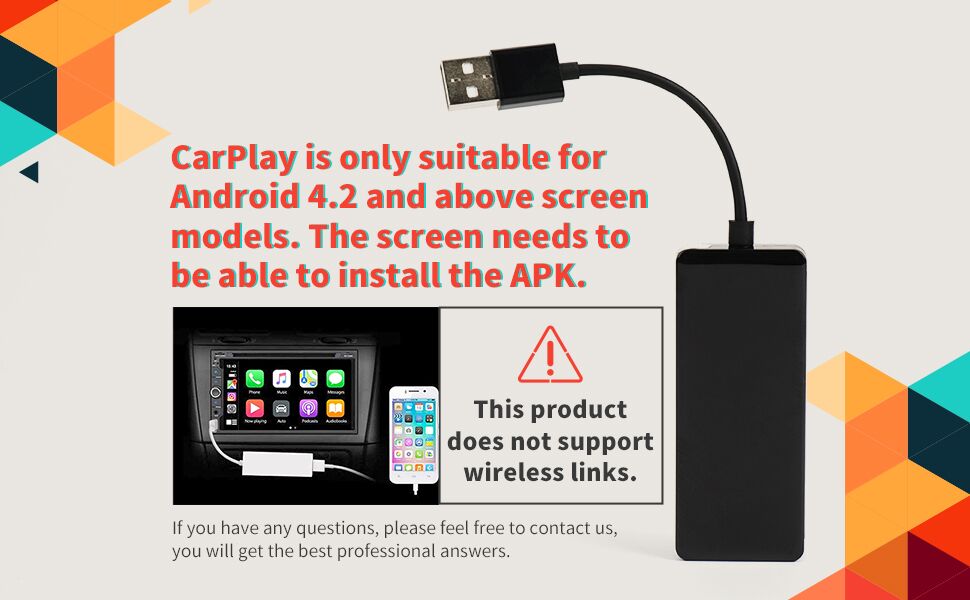
Download and install the APP first. Look for Green Icon AUTOKIT With your Stereo / head unit on , plug in the Module only ( not the phone ) to the USB input 1.Click the Autokit APP on the Head Unit screen, it should see your module. 2.Click on the settings ( gear wheel ) top left 3.For Working Mode , check either SPEED or FLUENCY only 4.For Android Mode , Android Auto will bring up your phones Android Auto app, but I found Mirror more usable, It mirrors your phone screen. The white ball top left is options , if you click it your options are: House takes you to phones Home Screen, Circle Arrow rotates your head unit screen, U arrow takes you to Head unit Home Screen. Left Arrow did nothing. To get rid of the black square / options click outside it. 5. Auto Start should be ON. 6.Back out of settings and plug in your phone to the module and wait until you get it linked. Note some cheap USB cables do not have communication wiring they are just for charging, Use the USB cable that came with your phone. The rest of the settings you can play with but make a note of your set up first so you can get back to default. Note on my unit I sometimes had to mute sound then unmute to get sound back when changing apps on the phone.
A**N
No me sirvió
K**.
Great product ..but no audio when i play music and cant open measage ..gps work and other apps Have to download hondahack on my vehicle just to install auto kit app
J**A
Llegó según lo planeado. Funciona muy bien, fácil de instalar.
J**S
No funciono.
A**E
No fue compatible con mi auto marca Jac SEI 4 Lastima estaba muy ilusionado de que iba a funcionar.
Trustpilot
1 month ago
1 month ago