📸 Scan smarter, not harder — your portable office essential!
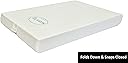
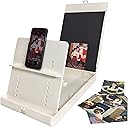
The ScanJig Document and Photo Scanning Stand is a rugged, adjustable accessory designed for phones and tablets up to 12.9 inches. Its patented angled design captures precise, glare-free scans without extra lighting or power. Lightweight and foldable, it supports fast, accurate OCR scanning of documents, photos, and books, while offering assistive technology features for accessibility. Ideal for professionals seeking a mobile, efficient scanning solution.


| ASIN | B00PKMHTXY |
| Best Sellers Rank | #134,495 in Office Products ( See Top 100 in Office Products ) #148 in Document Scanners |
| Brand | ScanJig |
| Color Depth | 8 bits |
| Customer Reviews | 3.6 out of 5 stars 183 Reviews |
| Item Dimensions D x W x H | 9"D x 14"W x 2"H |
| Light Source Type | LED |
| Manufacturer | Spectrum Business Solutions |
| Media Type | Document |
| Minimum System Requirements | Windows 7 |
| Model Name | ScanJig |
| Optical Sensor Technology | CMOS |
| Paper Size | 8.5 x 11 inches |
| Product Dimensions | 9"D x 14"W x 2"H |
| Resolution | Device Camera Resolution |
| Scanner Type | Document Photo |
| Standard Sheet Capacity | 10 |
| UPC | 742832415248 |
| Unit Count | 1.0 Count |
T**D
Once the initial set up was complete I found that this product was easy to use and does what it claims
It took me about 5-8 minutes to set up and position my device properly. It took another few minutes to learn how to use the cam-scanner app. Once the initial set up was complete I found that this product was easy to use and does what it claims. I could easily photograph documents and turn them into readable PDF's. It is a great product! I would highly recommend it!
R**D
Not a good buy
Overpriced, particularly if you buy the book scan addition. The entire set up is light and poorly constructed. It works best if you are just scanning one piece of letter-size paper, but for all the other kinds of scanning it is a bad buy. Using an i-pad makes the stand unstable because the i-pad has to be located off center. The book addition does not allow the use of the i-pad at all--which is noted in the manual but not in the advertisement of the ScanJig Pro. If you wish to scan anything else, such as a large sheet of paper or a ledger type book, the ScanJig is almost useless.
M**H
Bought the ScanJig Pro to improve my phone's document scanning ...
Bought the ScanJig Pro to improve my phone's document scanning. After spending a few minutes setting the unit up, I placed a sheet into position, put my phone into place and launched CamScanner. When properly adjusted there is plenty of leeway for making the scan. I have scanned 8x10 and smaller originals with success. Two issues: 1) I had to add a contrasting color to be sure to pick out the corners of the scan. 2) A costly solution, but one that works. Can't speak to the longevity of this as I've only had it for 2 weeks.
B**Y
Great Backup Scanning Solution for iPhone, Android, or tablet.
the ScanJig is about the size of a portable scanner and is well designed. this is an ideal option if you want to quickly scan documents without turning on your computer or dedicating a USB port to a scanner. I advise iPhone users to use the first or second set of holes for the shelf as instructed. The instructions are very thorough, and this device is a great accessory to any tablet or phone It works with KNFB reader. I recommend purchasing this device as a backup scanning solution or when traveling.
D**E
White color not a good fit when you need to capture the boundaries of full letter size paper.
I purchased this to capture documents printed on 8.5x11" white paper using Dropbox and other "mobile scanning" apps. It fails completely in that application -- the apps cannot reliably find the borders of the paper since there is little to no contrast with the color of the jig. I have contemplated painting the background black but the jig is also too narrow -- it seems that not enough of the black would be seen. The only positive note I can come up with is that the angle the paper is held at does seem to be a good one for minimizing glare. UPDATE: scanJig support contacted me after I wrote the review above and, after doing some testing with a setup similar to mine, they recommended turning off the Dropbox app's "Auto Capture" mode. Doing that I am able to find a setting can reliably capture all the text on a page -- but still not cannot reliably bracket the borders of the page (something that is important to me). Nevertheless, I can see how just that functionality would be useful to some and so I am upgrading my rating by one star.
G**K
First one arrived without the carrier support for the phone ...
First one arrived without the carrier support for the phone or tablet. When the replacement arrived, I found that the design requires that the tablets I tried with it, a mini iPad and a Nexus 7 had to lean too much to remain on the carrier and the lean created a distortion in the image. Unable to be fully square page.
A**R
Simply Perfect
I was working on a family history photo album that my Grandmother had put together years and years ago. There were many handwritten narratives with the photos that I didn't want to lose. I tried to scan the pages using a mobile app and create digital files to use in a Shutterfly photo book and print copies for all my family members. I was having such a hard time holding the phone in the correct and steady position to get a clean scan. I ordered this nifty tool...and all my problems went away. The adjustable up & down, forward & back little levers and options were a dream. Made the task SO MUCH easier...and enjoyable. Now my whole family has their own beautiful Family history book. Love the ingenuity of this product!!
S**E
Works really well
While this item is a little more expensive than some other options, it works really well and is a great alternative to buying a scanner.
Trustpilot
1 week ago
2 weeks ago