🖱️ Work Anywhere, Scroll Everywhere — The Mouse That Keeps Up With You
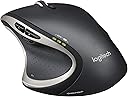
The Logitech Performance MX Wireless Mouse features advanced Darkfield Laser Tracking for precise cursor control on virtually any surface, including glass. Its rechargeable battery eliminates downtime, while the Unifying receiver connects up to six devices via a single USB dongle. Designed with an ergonomic sculpted shape and hyper-fast scroll wheel, it offers professional-grade comfort and efficiency for demanding workflows.


| Material | Plastic |
| Item Dimensions L x W | 5.1"L x 3.9"W |
| Unit Count | 1.0 Count |
| Item Weight | 147 Grams |
| Style | Modern |
| Color | black |
| Battery Average Life | 6 months |
| Range | 10.0 meters |
| Number of Batteries | 1 Lithium Polymer batteries required. |
| Power Source | Battery Powered |
| Hardware Platform | Laptop, PC |
| Button Quantity | 6 |
| Hand Orientation | Right |
| Compatible Devices | Laptop |
| Operating System | Windows Vista, Windows XP, Windows 7 |
| Connectivity Technology | Wireless, USB |
| Special Features | nv: Interfaces^1 x USB - 4 pin USB Type A | Movement Detection Technology^Laser | Features^Logitech Darkfield Laser Tracking |
| Movement Detection | Optical, Laser |
C**O
Best Mouse Ever!!! Well worth the money
I have been using this mouse for a week now and have not yet needed to charge the battery. I am 32 years old and work in an office. I have a laptop docking station at the office and use my laptop at home. I have been using this mouse a lot. 8 hours at work and about another 2 hours at home every day. I have used about 1/3 of the battery. This mouse uses rechargeable batteries and it is very smooth and comfortable in your hand. The page scroll wheel on top is very fast. It has a button you can click to change from a click based scroll like on a normal mouse or a smooth scroll, smooth scroll is like a wheel that keeps spinning and spinning. You can scroll down about 1200 lines of an excel spreadsheet when it is on smooth scroll. The only downside is I keep my two fingers on the left/right mouse buttons and I will bump the scroll wheel with it and it will move my place on a page. I normally always keep it on the click scroll, but the click scroll will still scroll through documents quickly just not as fast. You can also set up the buttons and customize then anyway you want to. The back forward buttons on the side of the mouse are really neat, I changed my setting to control my volume up and down since I am not really used to clicking a mouse to go back while on the internet. It also has a button where the bottom of your right thumb would be, I have it set to open all apps, like internet, excel and word and you can see everything you have open that way. You can even customize the left and right scroll wheel, what I did is if I am in excel and I have columns that are further to the right off the page I can click the scroll wheel to the right, just give it a little push to the right and it will scroll further to the right on my documents, the I can hit it to the left and it will scroll to the left, then I can roll the wheel down to go further down my document. It really is impressive having the ability to scroll up, down, left or right. Also you can customize the mouse ever further, you can make it app specific. You can set up certain functions for when you are just in excel or word or in outlook. You can have the clicks all do three different things depending on what program you have open. One thing I have set up in outlook is if I get an email and I want to google something that was emailed to me. All I have to do is highlight the word or words and click in the scroll wheel and my internet opens up to google with whatever I had highlighted being searched, yeah it is pretty awesome. It really is well built and you get every penny out of this, I did see some negative battery reviews on here and I have to tell you just dont believe them. The battery life is amazing. I feel like I will make it 3 weeks without a charge, and a full charge should only take 2-3 hours and you can still use the mouse while it is charging. Also I am a gamer, and this mouse is great for games. I think the weight of it is perfect, it works great for all those first person shooters. In closing I would say if you have the money and you are thinking about it, just buy it. You wont find a better mouse, whether you are a office employee or a web surfer or a gamer you will love it. Battery life is fantastic, everything about this mouse is amazing and to think it is just a wireless mouse. It really has changed the way I work and made things al ot easier on me.
M**O
Excellent mouse. I highly recommend this mouse.
What an excellent mouse. I've been using this mouse at work now for over a year. I love it. The mouse is heavy. Perfect. The feel is smooth and it just feels like quality. The battery life on this mouse is a bit disappointing. When I originally got the mouse I found that the battery might last 6 or so days. So you would start on Monday and get a low batter warning next Monday. This is assuming you don't use the mouse on the weekend like I did since this was used at work. I turned the mouse off everyday before leaving the office. But battery life was way below the 1 month Logitech mentioned. I did reach out to them and they did replace the mouse. I noticed the replacement mouse had an Eneloop battery. The old mouse had a different battery, I can't remember the manufacturer but it was not an Eneloop. Battery life was better in this case. Roughly 3 weeks but still below the 1 month I hoped for. I didn't bother Logitech about this because the mouse is excellent. I usually let it charge between lunch breaks so charging times weren't an issue. I cannot stress how amazing the scroll wheel is on this mouse. I now expect that any mouse I use can scroll like this one. I can switch from regular speed scrolling to super fast inertial scrolling at the press of a button. I don't coddle this mouse when using the button either. I just press it when I want to stop. Still works great. I loved this mouse so much that I got another one for home use. It's the standard I have for mice. My work mouse has a small grease spot from my index finger sitting on the same spot for over a year. And the logitech logo on the back of the mouse is fading. I look at that stuff with pride. This is a work mouse and it is excellent. I'm happy it works on glass. It is another feature I expect from mice. The forward and backward buttons are the buttons I use the most besides the obvious ones. I did program the Application switch button to the Start Menu for use with Windows 8. The mouse works great. I use it primarily in Windows but also use it on my Mac. I can't speak for how this mouse compare with the old MX because I did not have one. But I do recommend it whenever possible.
M**O
Battery!!!
As I started working on shiny surfaces, I found that my previous mouse (M550) just simply could not keep up. This mouse was one of rare ones advertising that it works on glass. And work it does. It is fantastic how well it handles any surface you can throw at it. You could move it over your butt and it would still go smoothly. It is a beauty. However, it is definitely not for those with small hands - this mouse definitely has some heft to it. Those using it on left will also find it impossible due to its asymmetrical design. However, if you are used to have mouse on right (and, let's face it, even left handed people usually have mouse on right) you will enjoy it. There is total of four additional buttons and I've found thumb button to be my favorite. Scrolling wheel with two different scrolling kinds is a nice idea but it doesn't work out of box for me. If you are used to Ctrl+Scroll for controlling zoom levels, every application will behave slightly differently and all of them will be way too sensitive alternating between minimum and maximum zoom level by a single indent move without any fine-grained control (even if you are not using hyper-fast scrolling). As I turned off smooth scrolling mouse started behaving normally but at the cost of jittery hyper-fast scrolling. It would be good to have smooth scrolling on during hyper-fast and off during normal scroll - let's hope that Logitech will do that in some future software update. Battery life of this mouse is dreadful. I've never had it last for more than 7 days and this with most of my work being programming with mouse just being used sporadically. If I've been gaming for whole week, I dread to think what would battery life be. Yes, battery is rechargeable in the mouse by using just a standard micro-USB cable and you can use it during charging but it is still not as comfortable as actually having mouse last a few weeks or, God forbid, a few months. Also note that this mouse DOESN'T come with any of nice things other people are mentioning. No, it doesn't come with wall USB adapter. No, it doesn't come with Eneloop battery (uses ReCyko). No, it doesn't contain USB extension cable. No, it doesn't come with any baggie for your things. Only thing you get are mouse and cable. Things that other mention did came with older version of Performance MX a year ago but they are not coming any more. All in all, it is really a good mouse with a fantastic sensor. It is not a perfect mouse by any stretch of imagination but there is really no other alternative full size mouse that can track as well as this one. PS: I am not suggesting you use mouse on your behind as this position is rather uncomfortable and unsuitable for longer work.
E**O
I will start off by saying that this mouse is an excellent option for someone who likes to be able to ...
I purchased my Logitech Wireless Performance MX computer mouse about two months ago, so I thought I would write a review to help all of you choose which product you are looking to buy. I will start off by saying that this mouse is an excellent option for someone who likes to be able to use the mouse to perform a wide variety of functions. The most important parts criteria I have identified regarding this product are: customizability, comfort, and battery life. Based on these criteria, I have given this mouse a score of four out of five. Customizable: One thing I like about this mouse is customizability. If you go to the Logitech support site, you will be able to download a program called SetPoint. This program allows you to remap almost every button on the mouse to function as anything you want. The buttons can be made to act as a button on the keyboard or perform any of a wide variety of functions, such as zoom or switch applications. There are two buttons that are not able to be reassigned. Comfort: This mouse has an ergonomic design that is very comfortable to use for long periods of time. I have used it for six or more hours nearly without stopping, and I had no feeling of discomfort at any point during the day. It is a pretty large mouse, so, if you have small hands, you may have trouble reaching a few of the buttons. Battery: This mouse is powered by a single AA battery. It will come with a rechargeable battery, but the one that came in mine does not hold its charge very long. If this happens to you, you may want to replace the included battery with one you purchase separately. I do like that the mouse can be recharged by plugging it into my computer through a USB cable. This allows me to continue using the mouse, even when the battery dies. While there are a few things I would have liked to be different, the positives vastly outweigh the negatives in functionality and use. The customization and comfort level this mouse boasts is very nice, and I think most of you would be happy with this product. I hope this has helped you make you decide which mouse to buy. Being able to recharge the battery while still using the mouse makes for great utility, and convenient use.
R**S
GREAT Mouse, Have 2
Best mouse I've ever used. I'm a full-time Graphic/Web Designer. This mouse fits my hand perfectly, feels so comfortable, and I absolutely love being able to customize the button functions. Other mouses, such as generic Dell mouses, or the ostentatious Apple Magic Mouse, will leave your hand cramping and just don't have the form and function that this mouse does. There are several different buttons (right click, left click, scroll wheel click, forward/back click, other function click) that can all be customized for however you need it to work. The Logitech center software that you download (I downloaded it anyway, I'm sure there was a disc with the software on it but I never use discs anymore so I couldn't tell you if it was there or not) makes everything so easy to customize. You can set it so clicks do different things, or even key strokes. For example, on a Mac you can't just hit back, it's CMD + [ while you're in the Finder. That's so stupid, who uses a bracket? With the software, it's set to do CMD + [ or ] when I do forward or backwards, but also works in browsers. It just simplified everything. It really does work flawlessly on multiple surfaces. For a while at work I had it on wood, but soon after got a normal mouse pad due to the dragging feeling of a plastic mouse on wood which comes with any mouse on wood. At home, my desktop is clear glass, but no issue whatsoever. Scroll wheel has two settings. It clicks like most mouses do, or it can do a free scroll for long pages/documents. You can switch between the two instantaneously by pushing the little black button directly below the scroll wheel. Pushing in the scroll wheel can also be customized. I set it to open a link in a new browser window when clicked. So again, as if holding down CMD + Left Click. It's kind of unfortunate that it has to be plugged in every night or else I get 1 bar of battery left the next day but at least it is rechargeable and still functional if charging. If you're looking for something with better battery life, Logitech just released an updated version with more functionality and is supposed to deliver up to a month of battery use. While I cannot attest to that, it's currently $30 more than this mouse, and a little more stylish too. It is right handed only. It's impossible for a left handed person to get any functionality out of it besides the right and left clicks. Otherwise, HIGHLY recommended. Worth every penny as far as functionality and productivity.
B**A
Very nice mouse; doesn't feel too large
MOUSE: This is a very nice mouse. It looks large and has an unusual shape, but I have at most medium size hands and it doesn't feel too big. The functionality is very good as a "basic mouse" with great laser control, etc. Frankly I rarely remember to use the special side buttons to do things like previous/last windows in a browser. It's still a very good, top end smooth mouse even with out using every possible bell and whistle. I use a laptop a great deal and this is the first time I've really bothered to like a mouse enough to bring on a hotel trip. BATTERY: I understand it has an extremely high quality or state-of-the-art brand of AA rechargeable battery. In a pinch you can use any AA battery though. I don't know how often it needs to be recharged - probably not more than every couple weeks. It gives you a "low battery" warning - a little PC popup - which supposedly comes on intermittently for nine days as its charge gets low, suggesting the full life must be a few weeks if the last phase of low-charge, is nine days. (Logitech experts note the prior Revolution mouse had a built in battery, which I assume would eventually get tired.) RECHARGING: Recharging is trivial as you just plug the supplied, or any, microUSB cable into the front. If you use a thin microUSB cable, even if you are computing during the charging phase, it is no more inconvenience than any good corded mouse. It gives three nice progressive (rolling) green lights on the side as it charges, progress-bar style. As far as I can tell there is no need to use the "off" button (I think it sleeps when not touched rather than running its battery down) but the instructions aren't clear. WIRELESS. It works with a very tiny wireless dongle. It doesn't come with much documentation but it stores a Mouse App in the system tray (lower right corner in Windows) which has a lot of information. Supposedly, if you get into the Mouse App, there is a "star" symbol tab option which gets you into the "Unifying Wireless" app. In the Mouse App, click "star" tab at left then click "Open Unifying Software" and it gives you instructions to connect with other Logitech devices (typically by turning them On and Off in the proper Unifying Software mode.)
C**N
Good, but lacking compared to ol' MX Revolution
My trusty MX Revolution of 6+ years had finally begin seeing signs of wear. Battery life was worse, but could have been replaced. The problem was some odd lag I was starting to see. So when this mouse went on sale, I jumped on it. It's comfortable. Looks nice. Plenty of extra buttons that can be programmed. The new receiver is great, specially if you have many Logitech products. I really like that you can charge it while using it. Something the MX Revolution lacked. Had to put it in a stand. And if all else fails, you can just drop a new AA battery in this one and you're back up and running. That's very cool. MX Revolution was a proprietary battery that couldn't be easily replaced (certainly not if your battery just ran out of juice). On paper, it looks like a great successor to the MX Revolution. But it's got drawbacks. Battery life is not nearly as good as the MX Revolution was when I first got it. I remember getting weeks, even using the mouse a lot. The Performance MX looks like at 1 week, we're needing a recharge. Not a major issue, but sad to see if go that wrong way. Seems they could have easily jammed another AA battery and about doubled the battery life. I am not a fan of the placement of the Zoom button. I am sure I will get used to it and adjust, but I am pressing it way too often when searching for the Back button. I found the extra horizontal wheel on the MX Revolution to be of more use than the Zoom button would be. The thumb down button is neat, so I will see how I can use it. Currently, I have it programmed as "Paste". The scroll wheel on top -- it's just garbage, compared to the MX Revolution. I am on the fence about having the manual button to release it to free spin, whereas the MX Revolution was software controlled. I am not too upset about that...the problem here is the "press left" and "press right" abilities on the new one are just crap. On the MX Revolution, there was a very, very tactical click and feedback when you pushed the scroll wheel on way of other. It was fantastic. You knew you had pushed the scroll wheel one way or the other. On this one, there's -zero- feedback. It's very mushy and it's just up to the program you're in to tell you if you've push the scroll wheel one way or the other. This is very unfortunate. Also, the scroll wheel sits up and is exposed more on the old MX Revolution, which aided in the usage of the scroll wheel's left/right click. The new one, it's not as exposed and makes it more difficult to use with the side of your index finger. Some adjustments could be made and make this mouse righteous again. I hope they do. I am just happy I didn't pay full price. Now to see if how well it holds up over the course of time...
R**Y
Best Mouse I Have Ever Purchased
SYNOPSIS I purchased my first of these in 2009 a couple of months after their release, and the second toward the end of 2010 so that I would have another one handy for traveling and going back and forth to college classes. Here we are in 2016 and both of my Performance MX mice are still working perfectly. DURABILITY Over the years I've used and abused them, thrown them in bags, dropped them on occasion, and put them through their paces ten times over as a graphic designer and web developer. I have used the rechargeable battery that comes with them, I have tried custom rechargeable batteries to get more life out of them, and unsupported or not I have had to run standard non-rechargeable alkaline batteries through them. As a guy who prefers a little length on his nails, I have caused premature wear in a few places, especially under the zoom button. This has simply worn away the rubber and has had no effect on the functionality of the mouse. Both mice have had the pads replaced once, and I'm getting ready for round number two. The pull tab under the battery is as good as new, and the mouse has never given me any problems with leaking batteries to ruin the battery compartment. All functionality of the mouse is as good as it was the day I bought it. BATTERY LIFE AND CHARGING Charging via a low-power USB port on my computer takes around four hours for a full charge (during constant and heavy use), high-power usb ports halve this time. To this day the battery they came with has proven to be the best battery to run in them. As a person who uses their mouse for eight hours a day, I get a minimum of two weeks off of a charge when I am diligent about turning them off at the end of my shift. DARKFIELD I have never had any problems with the mouse not being accurate on any surface, even glass. I spent a year on a glass desk with no mousepad and suffered no significant side-effects. I have on several occasions simply used my leg as a mousepad and the mouse performed admirably. I have only ever tried this mouse on one surface that it threw a fit over, and that was carpet filled with glitter. And even then it still worked well enough to be usable. CONS There is literally only one CON I can say this mouse has. When charging via the USB cable, the dongle must still be attached for the mouse to function (does not function as USB mouse when plugged in directly). This is so minor of an inconvenience that I'd long forgotten about it until I decided to write this review.
Trustpilot
2 weeks ago
1 month ago