We remain fully operational. Our teams are working around the clock to ensure your deliveries continue safely.

DOWNLOAD THE APP


Customer Services
Copyright © 2025 Desertcart Holdings Limited
DOWNLOAD THE APP


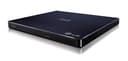
💿 Elevate your media game with LG’s sleek external Blu-ray powerhouse!
The LG WP50NB40 is a compact, external Blu-ray and BDXL drive featuring USB 2.0 connectivity, supporting up to 6X Blu-ray read/write speeds. Weighing just 9.6 ounces and measuring under an inch thick, it offers portable, versatile disc compatibility ideal for professionals needing reliable media access on Windows PCs.
| ASIN | B011327QXC |
| Additional Features | Blu-Ray Disc |
| Best Sellers Rank | #19 in External Blu-ray Drives |
| Brand | LG |
| Cache Memory Installed Size | 4 |
| Color | Black |
| Compatible Devices | compatible support for Windows 10 |
| Connectivity Technology | USB |
| Customer Reviews | 4.4 4.4 out of 5 stars (1,394) |
| Data Transfer Rate | 1 Gigabits Per Second |
| Enclosure Material | Acrylonitrile Butadiene Styrene (ABS), Plastic |
| Form Factor | Slim Portable |
| Hard Disk Interface | USB 2.0 |
| Hardware Interface | USB |
| Hardware Platform | PC |
| Item Dimensions L x W x H | 5.7"L x 6.1"W x 0.6"H |
| Item Weight | 9.6 ounces |
| Manufacturer | LG Electronics |
| Media Speed | 6000 |
| Mfr Part Number | WP50NB40 |
| Model Name | WP50NB40 |
| Model Number | WP50NB40 |
| Operating System | Windows 7, Windows 8, Windows 8.1, Windows Vista, Windows XP |
| Optical Storage Read Speed | 8X DVD-ROM/ 6X BD-ROM/ 24X CD-R/RW/ROM |
| Optical Storage Write Speed | 6X BD-R/ 2X BD-RE/ 8X DVD+RW/ 6X DVD-RW/ 5X DVD-RAM/ 24X CD-R/ 16X CD-RW |
| Read Speed | 3.6 Megabytes Per Second |
| Specific Uses For Product | personal, gaming, business |
| UPC | 719192634879 |
| Unit Count | 1.0 Count |
| Warranty Description | Contact Manufacturer |
A**S
Great blu-ray drive
Package arrived as described in excellent condition. Works great as far as I can tell and I’m satisfied with my purchase.
J**N
Negative reviews worrying you? Think again.
***Final Update*** Make MKV and Handbrake = the way to go when you want the best quality ripping. **Further Update** DOES NOT support 4k. **A little bit of an update** Great little device, you can't go wrong, unless your ONLY purpose is to RIP Blu-Rays and want to dish out another couple hundred for an ASUS 6x ripper AND have a CPU that can support that speed. Second counter to negative reviews: The longevity. Don't try to RIP multiple files at once, or yes, your device will last about 2 days. RIP only 1 file at a time. Third counter to negative reviews: Software. To RIP Blu-Rays you have 3 real choices of software: - 1st: Handbrake or VLC These are free but do not support encrypted Blu-Ray movies. - EasyFab Inexpensive for lifetime use, easy to use, simple interface, useful tools. Doesn't do HVEC (x265) encoding which is far superior to x264, doesn't crop videos, doesn't support latest NVIDIA's gimmicky hardware, and doesn't do 4k rips. - DVDFab Feels like pirated software with Wukong ( a Chinese deity that is like a cross between Satan and Loki ) as a logo and a clunky/bloated interface. However, this will encode in x265, does support NVIDIA's gimmicky hardware, does rip 4k, does auto iTunes tagging that is mostly correct, does auto crop that is usually okay, and does bypass any and all encryptions. The problem is, it's Chinese, their terms of service blatantly tells you they will sell your information to shady people, and it's hella expensive at 140 bucks. Best Tool for iTunes Tagging and DVD Rips: Hands down: Aimersoft Ultimate No other tool comes close. This is beyond comparison the best bang for the buck video software that is on the market. Excellent tools, useful options, clean interface, good support, and inexpensive for what you get. Just make sure you set in the preferences to convert only 1 file at a time, if you are RIPPING a DVD. Best video players for playing Blu-Rays - VLC is the open-source one that everyone loves - Gom is the one I like. Gom has annoying ads, but more than makes up for it in useful tools, customization and out-of-the box support for video and audio formats. A firewall solved my ad problem with Gom.
T**T
Writes 50GB BD Disks - not fast but without errors
This unit replace an identical one that worked for many years, but started having errors. The prior version of this BD disk writer had been used for many years to make backup disks of important documents that we store in a safe deposit box at our bank. This replacement model writes data disks without errors. It is not high speed, but that is why it can write over 100,000 data files in one copy job without errors. It is important to use two USB ports to provide sufficient power without errors, I find that a USB 3 link for the data port and a USB wall charger for extra power works best. Do NOT install or use the software that is included with the device. Use the built-in driver and disk writing app on your PC/laptop for writing and reading disks.
R**R
Be aware if you're using this for more than one Region....
If you are just using this as a Blu Ray Disc reader for your local region Blu Rays, it works great, and comes with software that you can use to play the Blu Ray Discs. As I am a software developer and have used a lot of different softwares similar to this in the past, I can't really speak on it's ease of use. I didn't have any problems with it other than the region lock issue I mention below. It does require 2 USB ports to run, so if you have a limited number of those you may need a hub to use the drive. The end that plugs into the disk drive is a Micro USB. If you are planning on using this for more than one region, the out of the box software will only let you change the region 5 times. In order to change the region the first time in their software (PowerDVD 18), I had to delete the region file, otherwise it would not let me change the region despite there being a settings menu to change the region (the region setting itself was grayed out until I removed the file). If you are more technical, you may be able to get around the change limit using registry changes or modifying the file that stores the Blu Ray Region. There is more information on doing that online. Side note, the software that the drive comes with is not the most recent version of the software. Mine came with PowerDVD 18 (along with some other software listed in the screenshot. I did not install all of the software available through the installer, so there are a few more options available.) It does also come with a firmware update, but that update cannot be applied while there is a disk in the drive, so if you use the disk drive to install the software, it will tell you it failed to update the firmware. You can also download the firmware update through their website, but not the software due to "licensing restrictions".
M**S
Worked with Win 11
Arrived refurbished, but drive worked well out the box with our Windows 11 system. Reading and playing worked flawlessly. It is fairly compact and compatible with this years worst software update.
C**L
Reliabl & fast while on a budget
Works beautifly and it's the job pretty quick for it still using USB 2.0!
A**S
Full of constant bugs, this is a worthless glitchy product
It randomly opens the tray and stops the burning process, and it also simply disconnects from my PC at random, also interrupting my burning. I was at work waiting for one of my discs to burn and nobody was here, I found the disc drive open for no reason and my burn was interrupted. Other comments have pointed out the compatibility issues, and the cord is far too short. But most importantly, it simply doesn't work. It also advertises as coming with a burning software but it does not. Do not buy this product under any circumstances.
C**S
Great Drive!
I bought this to rip 4k UHD movies for my personal collection. Please not that if you are buying it for this reason you will have to alter the firmware. but once you do it is a great drive and it has work flawlessly since purchase, it's not the fastest out there but it get the job done
E**O
So far so good. Can backup all media including 4k with an firmware update.
C**N
Incluye su software el cual mejora la calidad de imagen muy nítida de los discos blu-ray, no se traba en lo absoluto muy fluido, recomendado al 100%
A**R
You know it's becoming harder and harder to find these external drives made by a company you know and can trust. I paid a little more, but it works as intended with no problems and I feel good about it
J**H
works great and for personal use for ripping movies u own for a home server it does great u can install makemkv firmware if u want 4k rips. if u have scratched movies that are Blu-ray they don't rip as well if there more then 1 layer.
A**C
El software incluido es muy limitado en su función
Trustpilot
1 day ago
1 month ago