We remain fully operational. Our teams are working around the clock to ensure your deliveries continue safely.

DOWNLOAD THE APP


Customer Services
Copyright © 2025 Desertcart Holdings Limited
DOWNLOAD THE APP






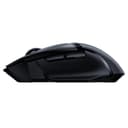

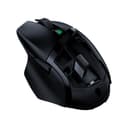


🎮 Dominate wirelessly with precision and power — the Basilisk X Hyperspeed is your ultimate gaming sidekick!
The Razer Basilisk X Hyperspeed is a premium wireless gaming mouse featuring ultra-fast Hyperspeed technology for near-zero latency, a 16,000 DPI 5G optical sensor for precise tracking, and an ultra-long battery life of up to 450 hours on Bluetooth mode. Equipped with six programmable buttons and durable mechanical switches rated for 50 million clicks, it offers customizable control and lasting performance for both intense gaming sessions and extended productivity.


| ASIN | B07Y8QWZDW |
| Antenna Location | Gaming |
| Are Batteries Included? | Yes |
| Are Batteries Required | Yes |
| Battery Average Life | 450 Hours |
| Best Sellers Rank | 102 in PC & Video Games ( See Top 100 in PC & Video Games ) 1 in Gaming Keyboard & Mouse Combos |
| Box Contents | [Batteries] |
| Brand | Razer |
| Brand Name | Razer |
| Button Quantity | 6 |
| Colour | Black |
| Compatible Devices | Laptop, Desktop Computer |
| Connectivity technology | Radio Frequency |
| Customer Reviews | 4.3 out of 5 stars 12,603 Reviews |
| Embellishment Feature | Logo |
| Enclosure Material | Plastic |
| Global Trade Identification Number | 08886419332824 |
| Hand Orientation | Right |
| Hardware Platform | PC |
| Item Dimensions L x W | 13L x 7.5W centimetres |
| Item Type Name | Wireless Gaming Mouse with HyperSpeed Technology, Optical Sensor 5G Razer, Long Battery Life, 6 Programmable Buttons |
| Item Weight | 83 Grams |
| Manufacturer | Razer |
| Model Name | Basilisk X Hyperspeed |
| Model Number | RZ01-03150100-R3G1 |
| Mouse Maximum Sensitivity | 16000 Dots per Inch |
| Movement Detection | Optical |
| Movement detection technology | Optical |
| Network Connectivity Technology | Radio Frequency |
| Number of buttons | 6 |
| Operating System | Windows |
| Pattern | standard |
| Power Source | Battery Powered |
| Product Features | Programmable Buttons, Wireless |
| Product Finish Type | Matte |
| Product Warranty | 2 year |
| Range | 450 inches |
| Special feature | Programmable Buttons, Wireless |
| Style Name | Basilisk X Hyperspeed |
| Theme | Video Game |
| Unit Count | 1 Count |
J**.
Not just for gaming
Don't let the name "gaming mouse" fool you. Anyone who uses a computer for long periods of time deserves a comfortable, quiet mouse, and this is the one. The design isn't too flashy but still incorporates the ergonomic curves you'd expect from a gaming mouse. It does lack the additional buttons and features you'd find in a high end mouse, but look at the price! Pros: - Very comfortable palm-hugging shape (RSI begone!) - Nice design that lends itself to productivity and gaming alike - Satisfying, consistent and quiet click mechanism - Excellent battery life - I leave mine on 24/7 and it still lasts months on end - Bluetooth and Wireless which keeps your desk clean and allows quick switching between computers - Significantly better and repelling palm grease than my previous mouse (from Logitech) - It's a bargain Cons: - DPI adjustment is done by a single button that cycles through options, rather than having dedicated up and down buttons - Scroll wheel can make a pretty nasty noise every now and then when changing direction - Pretty barren when it comes to extra features Should you buy this? If have a static desk setup, don't need anything fancy, but still care about your comfort, yes. There absolutely are other options in this price range from other brands, but after trying a few of them, I have decided this is king. I have bought a few of these and given them to family members, all of whom are equally impressed.
J**R
Ergonomic
I've been gaming with the Razer Basilisk X Hyperspeed, and despite it being Bluetooth, it's surprisingly good. The Hyperspeed Technology really makes a difference, offering seamless, lag-free gameplay. Its advanced 5G optical sensor ensures every movement is precise, crucial for both competitive gaming and casual play. The wireless design is neat, no more wires cluttering the desk, and the battery life is impressive, lasting weeks on a single charge. It's also comfortable to hold, which is great for long gaming sessions. Tips: Make sure to take advantage of the customizable buttons for specific game actions. Adjust the DPI settings to match your gaming style; it can make a big difference in responsiveness. Don't forget to check for firmware updates through the Razer Synapse software to keep the mouse performing its best. Overall, the Razer Basilisk X Hyperspeed is a solid choice for gamers looking to cut the cord without sacrificing performance.
V**S
Very good value but not without some issues
This was the first time that I have bought this brand of a mouse, and overall I am impressed. I read through the small pamphlet that was supplied with the mouse but I had to find the software that I needed to use with it myself, not mentioned or guided to a website within the manual. It is the "Razer Synapse" software which provides you with the settings needed. I am using Windows 10. With that installed you can then customise many aspects of the mouse functions, even using the button above the scroll wheel will adjust the DPI of the mouse in use. See my second photo showing the visual indication of your DPI settings when you press this. My first photo shows the back removed of the mouse and the single AA battery fitted. You can also find the USB dongle you will need for the Wireless support. Using the mouse is superb, very responsive with positive clicks that aren't too loud or needing much effort. They are positive tho and no false clicks have been observed. Setting up of the mouse with BT can be tricky, however much of this can be dependant on your BT transmitter and not just the receiver within the mouse. My motherboard uses BT but the range and connection issues means that I prefer the wireless option. BUT you need to use BT to update future firmware, if released. Checking and mine had the latest already. Initially I had a problem where this mouse failed to wake from sleep. Eventually, see photo 3, I discovered that I needed to disable sleep functions on the two shown aspects of the mouse within device manager, otherwise it would often fail to wake. A rare continuing problem, hence the four stars, is that the mouse will fail to respond. It will leave a stuck cursor on the scree. No particular reason that I can see and no pattern as yet to observe. If that does happen removing the wireless dongle does not help, only removing the battery and then reinserting it brings the function of the mouse back to life. That is a very rare event tho and certainly not a deal breaker for me. See photo 4 for a screenshot of the first page of the software used with the mouse. Many options are available in various tabs. Overall I do recommend this mouse, both the build quality and its function is great. I am happy with this purchase. I do hope that this review has helped you. happy shopping :)
K**E
Great mouse
Amazingly comfy mouse it feels like it's made for your hand, battery lasts a long time also
D**Y
Awesome mouse
This was the first Razer product I’ve bought, but have got a second one as a gift for someone based on how good it is. It’s very light and comfortable, works flawlessly on the desk surface with no noticeable lag. Can work on Bluetooth or using the supplied 2.4GHz WiFi dongle which is cleverly stored inside the device. The supplied single AA battery has lasted for 2 years of fairly infrequent use (using Bluetooth rather than WiFi), which is amazing- and I have never turned the mouse off- it goes to sleep by itself. All buttons are programmable; there are the normal left and right, the scroll wheel, a button behind it which by default changes the sensitivity, and 2 extra ones next to your thumb (you can program macros for them in the supplied software - ours are copy/paste) Only 2 points to be aware of- 1) it is definitively a right handed form factor. Not very friendly for lefties I’m afraid, but if you can use your right hand for the mouse, it is very comfortable. 2) No RGB lights. Some people want everything lit up, but personally, I’d rather have a long battery life and no cord.
J**Y
Great mouse for general use and casual gaming
I've had the mouse for over a year now and It's been absolutely great. The size of the mouse is for medium/large hands and it fits perfectly in my hand and the ergonomic shape is absolutely fantastic. The mouse has enough buttons for casual gaming (Minecraft for me) and is pretty precise (in my unprofessional opinion). It is on the heavy side so you probably don't want to use it for FPS games but for normal, non shooter games, it's great and very easy to control. The bluetooth connects instantly when you move the mouse and I've had no issues with that. The 2.4ghz dongle is also very good and essentially allows you to switch between two devices (one connected with bluetooth and the other with the dongle) by just changing the connection mode on the bottom. Battery life has been great and I rarely change out the battery. Great mouse for a great value, would recommend.
S**Z
Big Brand but Terrible Quality (And not the first time either!)
Razer gives their customers reward for writing good reviews and I suspect that’s where a lot of the BS reviews comes from. Because this really is a bad quality mouse. Firstly, it's a very generic looking black mouse with some LED lights. It’s not bad but nothing special in terms of design.Hand grip is actually quite comfortable, and the switches feels fine. But the wireless connection whether 2.4Ghz or Bluetooth is just so unreliable. It randomly cuts out despite having tried it on another PC as suggested by their tech support (Which took weeks to reply to me!) and also uninstalling and reinstalling. This is not my first Razer wireless product. Their keyboard had keyboard had similar problems which I though was just one off previously. Reading other reviews and forums, this seem to be a common Razer problem. I have also had problems with the scroll wheel problems which magically cure itself just as I am writing this review. No idea how long this will last.I didn’t do anything to fix the scroll wheel as I was planning to return this bad QC mouse anyway. So, I have no idea why the scroll wheel is now working.Maybe Razer’s components are just that temperamental.At this ridiculous price point, I really expect better reliability than that.
D**N
Best wireless mouse out there
Had this mouse a while now and it's amazing! It's been dropped ALOT and is still performing like brand new. Doesn't get scratched easily. Battery life is amazing! Very accurate and responsive for a wireless mouse and I do use it with the included 2.4ghz dongle which itself is tiny so massive plus there. But like many things it has it's quirks for instance sometimes it just wont connect and I have to unplug and plug the dongle back in or take the battery out and back in for it to reconnect and sometimes the DPI button gets stuck but that one is most likely from use.
Trustpilot
3 weeks ago
1 day ago