

Desertcart purchases this item on your behalf and handles shipping, customs, and support to Kyrgyzstan.
🎯 Dominate Every Game with Precision & Speed – The Tartarus Pro Advantage
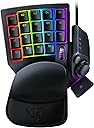
The Razer Tartarus Pro is a cutting-edge gaming keypad featuring 32 programmable keys with Razer's Analog Optical Switches that enable scalable input and adjustable actuation (1.5-3.6mm). It includes Rapid Trigger Mode for ultra-fast key resets, 8 quick-toggle profiles for seamless game or loadout switching, and dual-step actuation allowing two functions per key. Designed for serious gamers seeking precision, speed, and extensive customization, it offers a premium, ergonomic experience with RGB backlighting and USB-C connectivity.


| ASIN | B07YV8TY52 |
| Antenna Location | Gaming |
| Best Sellers Rank | 847 in PC & Video Games ( See Top 100 in PC & Video Games ) 64 in PC Gaming Keyboards |
| Box Contents | Manual, Razer Tartarus Pro, USB Cable |
| Brand | Razer |
| Brand Name | Razer |
| Button Quantity | 32 |
| Colour | Black |
| Compatible Devices | Laptop, PC |
| Compatible Operating System Family | Windows |
| Compatible Tablet Computer Models | AAUB P30 |
| Compatible devices | Laptop, PC |
| Connectivity Technology | USB-C |
| Connectivity technology | USB-C |
| Country of Origin | China |
| Customer Reviews | 4.2 out of 5 stars 1,552 Reviews |
| EU Spare Part Availability Duration | 2 Years |
| Enclosure Material | Plastic |
| Generation | 1st Generation |
| Global Trade Identification Number | 08886419360193 |
| Hand Orientation | Ambidextrous |
| Item Dimensions L x W x H | 20.2L x 15.1W x 6.4H centimetres |
| Item Weight | 362 Grams |
| Keyboard Backlighting Color Support | RGB |
| Keyboard Description | AZERTY |
| Keyboard Layout | AZERTY |
| Keyboard description | AZERTY |
| Language | English, English, English, English, English |
| Manufacturer | Razer |
| Manufacturer Part Number | RZ07-03110100-R3M1 |
| Mechanical Keyboard Switch Model | razer_analog_optical |
| Minimum Required Operating System Version | Windows 10 |
| Model Name | Tartarus Pro |
| Model Number | RZ07-03110100-R3M1 |
| Number of Items | 1 |
| Number of Keys | 32 |
| Number of Packs | 1 |
| Number of Sections | 1 |
| Power Source | Battery Powered |
| Processor Count | 1 |
| Product Features | Backlit, Programmable Keys |
| Product Warranty | 2 Years |
| Recommended uses for product | Gaming |
| Special feature | Backlit, Programmable Keys |
| Style Name | Tartarus Pro |
| Switch Type | Optical |
| Theme | gaming |
| UPC | 811659035301 |
| Unit Count | 1.0 count |
| Water Resistance Level | Not Water Resistant |
J**H
Fantastic Gaming Keypad, Comfortable and Highly Customisable
The Razer Tartarus Pro has completely changed my gaming setup. The build quality is excellent. It feels solid and well made but is still comfortable to use for long sessions. The keys are responsive and the analog-mechanical switches give a really smooth and precise feel that’s hard to beat. The customisation options are brilliant. I’ve been able to map all my most used commands and macros exactly how I want, and the Razer Synapse software is straightforward and easy to use. The adjustable wrist rest is also a nice touch and makes long gaming sessions much more comfortable. It’s compact enough to keep on the desk without taking up too much space, but still has plenty of keys for all the commands I need. The build, feel, and responsiveness all come together to make it a really premium experience. If you’re looking for a gaming keypad that’s high quality, highly customisable, and comfortable to use, the Tartarus Pro is a brilliant choice. It’s easily one of the best gaming peripherals I’ve owned.
M**C
Different from a normal keyboard..
I debated one of these for a long long time, hours and hours scouring the internet for reviews, but like anything you'll always get mixed reviews so I thought sod it, I'm just going to do it. Firstly I will say it is VERY comfortable, the way your hand sits on it is nice and plush underneath your wrist, I've only been using it two days.. I games with it for about 3/4hrs last night, I did find myself looking down occasionally, but that's just the muscle memory with my keyboard, I know over time I'll adapt to it, the buttons have a nice feel and with a short actuation point, my inputs register a lot quicker and you can definitely get smaller more precise movements with just a tiny bit of pressure, my desk isn't the biggest either, I have limited space, so to just have this with my mouse, gives me MUCH more room for mouse movements. As my mouse would occasionally hit the right side of my keyboard and sometimes get stuck underneath, overall I'm happy I got it, with some more getting used to, which will come over time. I know I made the right choice! Finally I just want to say I know Razer Synapse get's a lot of flack about it being below average. I personally own a naga trinity mouse too, and now this.. I haven't had any issues with disconnections or rebinding keys or adjusting anything at all.. whatever I've wanted to do in Synapse.. it's worked. Sorry for a lengthy review(I've just realised how long this is) It's a good Product!
O**.
Not perfect but oh my god...My gaming just go so much better!!!
I've had this item for over a week now, and my gaming/movement in CoD:Warzone is soooo much better, mostly because I now use the Joystick for movement. Literally won 15 Resurgence Games just yesterday when I used to win 2-3 at most. There is definitely a steep learning curve, and yes, I am still making mistakes trying to do things as I did previously when I used normal keyboard, but hey, I think its worth it! Now lets get real shall we? The product is BY NO MEANS perfect.... not even close! So I will just mention a few downsides that I see in it. 1. The layout: I don't know what monkey of a person did they have there on Razer that thought, YEAH!!! LETS PUT THE 4 KEYS OF THE BOTTOM AT A DIFFERENT LEVEL AND LETS MISALIGN THE ENTIRE LEFT COLUMN KEYS!!! THEY WILL LOVE THAT!!! Now, whilst those 4 bottom keys are not a particular problem for me since I only use the 15 keys above that, I do need to say that the intended place of the WASD keys (08,12,13,14) is tooo close to the palm/whatever rest, so when I first started using it like that I got cramps because my hand was in like a significant claw like position for long time... For that reason I ended up remapping some of the stuff I did to the level above (basically 1st and 2nd rows, rather than 2nd and 3rd....) And since I was going to learn new ways of doing stuff anyways, everything that I had on the number keys (1-2-3-4, etc), I put elsewhere, and now I've practically got used to it.... That is not to forget that I don't use WASD for movement anymore, so again, I kind of rearranged everything.... I now place my index, middle and ring on keys 07,08,09 and access all the surrounding ones with those 3 fingers, ocassionally 16 with pinky for crouching (the only key I am using from the bottom layer)... What I am getting at is that they should have just kept it equal everywhere.. the left column aligned and the bottom keys not at different level. 2. Sticking D-Pad: Yes, it is true! Your D-Pad will most likely stick from time to time, but I read that is actually not a hardware issue but a software issue related to Synapse, so supposedly if your don't use Synapse, you should not get it.... I myself was getting it for days and quite often that it became annoying to play with, but then I closed Synapse and haven't got it since for a few days now.... if it does come back, I might be asking for a replacement or something. Of course this would mean that you lose all the Synapse benefits there like analog keys, hypershift, macros, etc. .... so if it does impact you, then beware! 3. Thumbsticks: I've used Xbox controllers with various kinds of kontrol freeks and performance thumbsticks and obviously standard Xbox thumbsticks and I have to say, the thumstick in this thing is the most horrible thing ever... and the worst part is that I haven't found any suitable replacement.... That is not to mention that it does make me have my hand slightly more widely open than I would like to.... so yeah, beware with that.... 4. Slipping: I don't know if this is the case for everyone but in my case the gaming pad is constantly but very slowly slipping, as in changing its position, which requires me to often have to reposition it. In my case is mostly forward since I am always pressing the joystick forward to move. I should mention that I have my pad placed on top of an Endgame MPC 1200 Cordura, so it might be that other surfaces perform better, but like I said, in my case it slips!!! =( I will try to find a solution for it, but just wanted to put this as another negative point that might happen to you... Other than that, the product is very solid. Overall I am happy with my purchase and will definitely keep it, but will be on the look for those couple of things that might just make it so much better (Update in Synapse for Sticking and Thumbsticks :) 4/5 for this product for me... Good luck with your decision.
P**R
Functional keypad for gaming
I bought this as I was looking at keypads for years. I hesitated as I thought I was being frivelous, and now that I have splashed on it, I regret not buying it earlier! This keypad has changed to speed at which I can select functions in game (I play Eve online), I believe it gives me an edge as I dont have to look across a keyboard to select a function. This also becomes especially evident when I have to use more than one key binding, such as ctrl + Space. The only thing that I wish I had changed about my order, is having spent extra on the analogue version, which I feel I dont need. However, maybe one day I will work out how to get the best of that feature. Excellent ergonomic feel, no pain in wrist. Easy to program interface and key mapping. Very Highly recommended.
J**E
Literal game changing experience
I swear by these and I love them too ... they make PC gaming so much more fun and intuitive. Get one and you will never touch your A,S,D or W keys again.
S**S
Uncomfortable and erratic a big dissapointment
I have the Razer Tartarus V2 membrane version previously I had the older nostromo Razer model I bought the Razer Tartarus Pro because I thought it would be better than the membrane model. How wrong was I, the button press is a lot firmer and leaves my hand aching in all other respects it’s identical comfort wise. Performance was a major let down keys appear to clash when you are pressing them even with assigning single key strokes. Playing COD was a disaster and changing assignments or going back to default didn’t help after trying everything I gave up and went back to my Razer Tartarus V2 membrane sorted it straight away. Update I decided to purchase this again as my V2 version is getting tired. I paid £80 so much cheaper than normal and tried for at least two weeks to get it to work properly without success yet the V2 with the same Razer software works fine so once again I’m sending it back. I had hoped a firmware update or software update would have fixed it and stopped it clashing with other key strokes but no success. Shame but I’m now going to wait until the V2 is on special offer. Update November 25. It's my 3rd try with the Pro and still exactly the same problem software conflicts with key strokes in game and makes it conflict, yet I did buy another V2 to replace my old one and that works fine. I had hoped that they would have sorted the pro but no joy its a shame as optical buttons are faster and more able to be adjusted but not so with this it's a shame as it was a great price and worth another punt i thought, but I was wrong I'm sticking with the V2.
G**E
Great concept, poor implementation
This is a vaguely well-made piece of hardware with a great concept that was very poorly executed. There are 2 major flaws that led to me returning it within a week. The first and biggest flaw is the button layout; on a regular keyboard, the number keys are offset by about half a key. On this, there is no offset, making it very difficult/uncomfortable to hit those keys. The need to completely rewrite your muscle memory is a huge barrier to entry. The second flaw is the ergonomics. Aside from the top row being in line with the second and third, the placement is generally good (though I did find I wanted one more key at the bottom of the first column as this layout feels like it only goes down to shift rather than ctrl if comparing to a normal layout). The issues are related to everything around the thumb and wrist areas. I have fairly large hands, and it was still uncomfortable to try and hit the “spacebar” because of how far down it is compared to where it should be. Naturally my thumb fell onto around where the D-pad, which was actually slightly more aggravating because of how little pressure is required for that (those?) button(s) specifically. I ended up using the small round button for jump because it was that much more comfortable. Then the wrist rest can only adjust between small hand and biiiig hand, with no option to change the angle, so it ended up being pretty much entirely ineffective. The only thing that was slightly more beneficial over a regular keyboard was the scroll wheel, which is not sufficient justification for the price tag. If another version was released that offset the top and bottom rows of keys, did away with or moved the D-pad to allow for a more comfortable position for the spacebar, and improved the ergonomic customisation, I’d be very inclined to try it, but this version falls dramatically short of expectations.
D**N
Not for me (refunded)
The product itself seems like an ideal solution for gamers who hate full sized or even 60% keyboards. Construction feels solid with disappointing plastics, but generally overall the build was as I say, solid. I unfortunately had to return it however, as I just could not get used to the feeling of it. It feels like my fingers were arched more and almost more restricted. Due to the layout of the keys, I kept misclicking keys and overall it just wasn’t for me. I think it may be a better fit for someone with longer and skinnier fingers as you can literally customise every key to your needs and seems to be a good piece of kit, albeit a little overpriced.
D**Y
Tres bonne qualité !! Je recommande vivement 👍
A**O
Perfecto, muy útil y se puede personalizar
Estoy muy satisfecho con mi producto, lo personalize con keypads verdes para más precisión igual de la marca razer, lo uso para Albion Online y League of legends
B**E
J'adore !
Je suis habitué au Keypad gaming et j'étais en possession du Orbweaver de Razer (avec touches mécaniques) depuis bientôt 9 ans et il vient récemment de me lâcher. (Je peux dire que je l'ai vraiment séché pendant ces 9 années, je ne joue qu'avec ça.) Je suis donc parti sur le Tartarus Pro car il n'y a plus qu'une seule référence chez Razer maintenant (enfin sans compter la version normale et pro) Je n'utilise pas la double détection des touches du coup je me demande si c'est une bonne idée d'avoir pris la version pro.. Mais alors quel plaisir de l'utiliser ! Il est d'un confort extrême avec le petit "canapé" sous le poignet, les douches sont silencieuses et très réactives, la couleur est top et entièrement réglable, on peut ajuster la longueur du support pour ceux qui ont des grandes mains comme moi, et l'ensemble a un rendu vraiment premium. 2 petits défauts tour de même (mais minimes donc ne rentrent pas en compte dans ma note) : - je transpire de la pomme de la main avec cette version (contrairement à l'ancienne version Orbweaver où il n'y avait strictement aucune transpiration) et donc je l'essuie de temps en temps - il manque très clairement la touche "V" à la place de cette molette useless. Mais pour palier à ce problème j'ai bindé la touche "V" sur le clic molette ET sur la molette UP + molette DOWN. Du coup peut importe comment mon doigt arrive sur cette molette, j'ai ma touche "V" qui part. Attention tout de même : il faut un petit moment pour s'adapter à un Keypad. Mais après on ne peut plus s'en passer 🙂
K**R
Too big for giant hands and a pointless scroll wheel
Removing one button to have a scroll wheel is awful to me. I already have a scroll wheel on my mouse, I don't need a giant hard-to-press clutzy one stuck on my keypad. Also this controller is gigantic. I have absolutely massive hands and I can't reach the top row of buttons comfortably. Yes, I adjusted the hand rest and even took it off completely but no luck. I have used two previous iterations of this controller and they were all fine (except the rubber pads kept coming uglued on the hand rest). This one is the worst of all of them.
L**O
Really great for a couple years, then comes the problems
It's very comfortable and useful but after a couple years some keys and especially the "spacebar" key, or key 20 starts glitching quite heavily which isn't very nice. Sometimes it completely misses an input and other times it doubles an input. I wish there was some way to fix it because everything else about it is just so amazing but I've not found any such way yet.
Trustpilot
3 weeks ago
2 days ago