Buy anything from 5,000+ international stores. One checkout price. No surprise fees. Join 2M+ shoppers on Desertcart.
Desertcart purchases this item on your behalf and handles shipping, customs, and support to Kyrgyzstan.
⌨️ Elevate your workflow with comfort and precision — because your hands deserve the best.
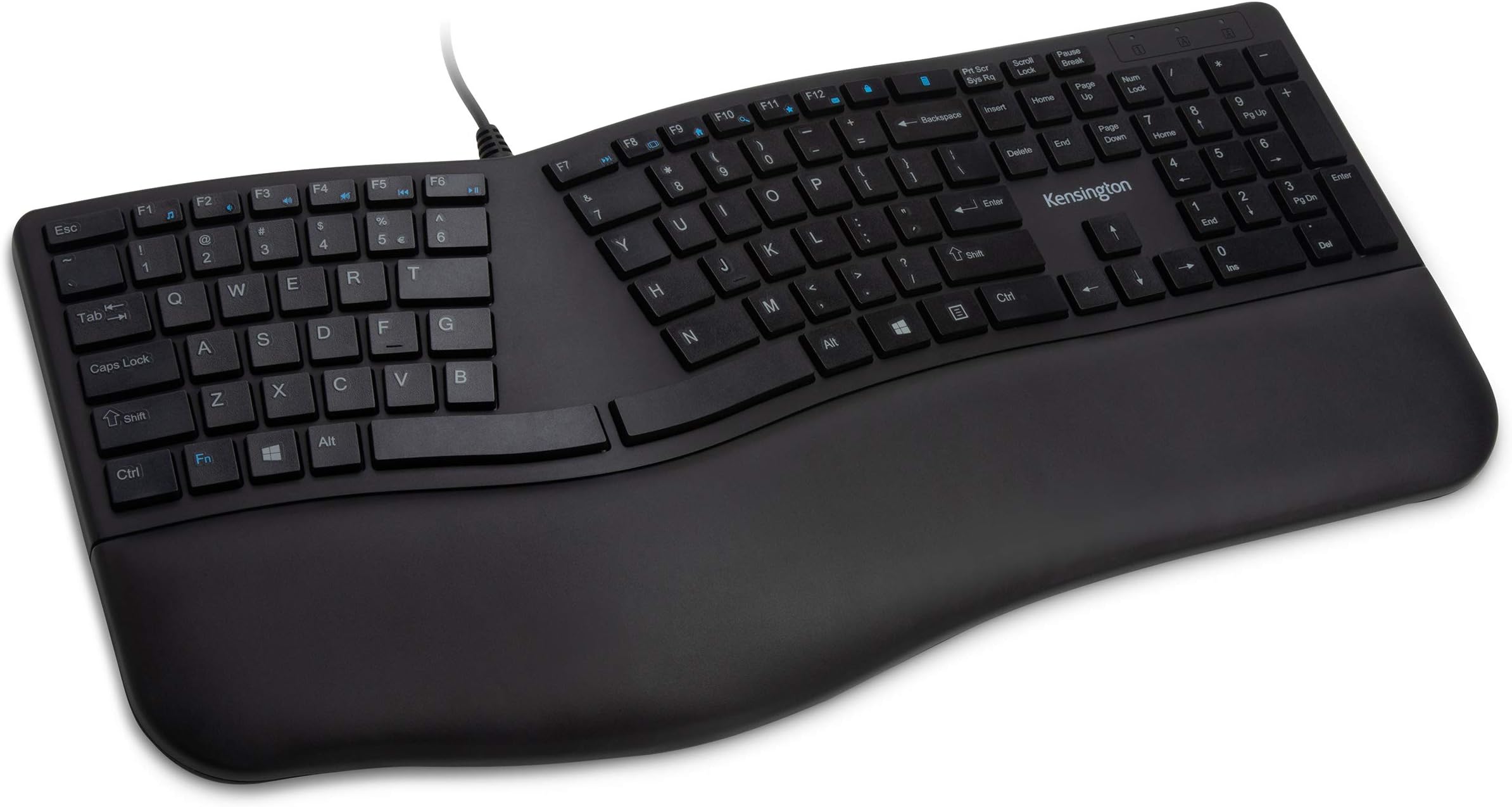
The Kensington Pro Fit Ergonomic Wired Keyboard (K75400US) features a 104-key QWERTY layout with a built-in cushioned wrist rest and adjustable reverse tilt for ergonomic hand positioning. Its spill-proof keys meet MIL-STD-810H standards, ensuring durability against fluids and cleaning solvents. Designed for quiet, smooth typing, it includes essential lock indicators and F-keys for enhanced productivity, connecting easily via USB for immediate use.


| ASIN | B07XGD9XJL |
| Additional Features | Wrist Rest |
| Antenna Location | Gaming, Office |
| Best Sellers Rank | #281 in Computer Keyboards |
| Brand | Kensington |
| Built-In Media | Built-in cushioned wrist rest |
| Button Quantity | 78 |
| Color | Black |
| Compatible Devices | PC |
| Compatible Operating System Family | ChromeOS, MacOS, Windows |
| Connectivity Technology | wired |
| Customer Reviews | 4.0 out of 5 stars 797 Reviews |
| Enclosure Material | Plastic |
| Global Trade Identification Number | 00085896754008 |
| Hand Orientation | Ambidextrous |
| Is Electric | Yes |
| Item Dimensions L x W x H | 2"L x 19"W x 10"H |
| Item Weight | 2.2 Pounds |
| Keyboard Backlighting Color Support | Single Color |
| Keyboard Description | Ergonomic Wired Keyboard |
| Keyboard Layout | QWERTY |
| Manufacturer | Kensington |
| Mfr Part Number | K75400US |
| Minimum Required Operating System Version | ChromeOs 134, Mac OS 14 Sonoma, Windows 11 |
| Model Name | Pro Fit Ergo |
| Model Number | K75400US |
| Number of Keys | 104 |
| Number of Sections | 1 |
| Power Source | Corded Electric |
| Recommended Uses For Product | Gaming, Office |
| Series Number | 75400 |
| Special Feature | Wrist Rest |
| Style Name | Ergonomic Wired |
| Switch Type | Linear |
| Theme | Ergonomics |
| UPC | 085896754008 |
| Unit Count | 1.0 Count |
| Warranty Description | 3 Year |
| Water Resistance Level | Water Resistant |
S**E
Excellent
The keys are nice and soft, the calculator key is above the backspace rather than the lock key above the backspace which is ideal (I'd rather accidentally pop up a calculator than lock my computer), and the arrangement of the keys is ideal. My only suggestion for improvement on this keyboard is to use mechanical (brown? - the ones that are quiet and with minimal actuation pressure) switches, and to widen the wrist pad on the left side because the left hand hangs off the edge. This model is slightly wider than the cherry keys model which is even worse in this aspect, but hey, why not try widening it a little more so it gets the whole hand. I'll emphasize that the az, sx, dc, fv, and gb alignment is so nice. The keyboards that stagger these keys are far more inconvenient to type on. The funny thing is there are no keyboards on the market that have mechanical key switches and this type of keyboard alignment along with this keyboard layout. If someone made that keyboard, it would become the best keyboard in the entire world, and I have a feeling few people would take notice until maybe 10 years later. At which point it would become discontinued right as it was becoming a living legend. Because that is how the market for perfect keyboards works.
E**O
Lot of good here. A few points of concern.
It's ok. The main issues are 1. It's pretty flat for an ergo keyboard. It's very easy to get your hands on the wrong keys compared to something with a bit more depth to it. Was expecting more height. 2. The presence of the calculator button is terrible. Accidentally hitting that triggers a launch of the calculator app wherever you are, and for the OS I'm using, that can't be disabled. On the upside, it's pretty quiet and the keys are responsive. It has the inverse T arrow keys and 3 wide 2 tall arrangement of insert/home/page up... keys.
D**M
I love this keyboard
I tried two other keyboards before this one. and I was bracing myself to have to buy a super-expensive one, just to get something I liked. But this one is near perfect. I love the soft, almost-silent touch of the keys. The previous keyboard I tried had squishy keys that actually fatigued my hands by the end of the day, due to the effort needed to push them. On this keyboard it feels good to type. I also like that the caps lock light is in the upper right corner, not on the key, which means I can see it without moving my hand (this was a problem with one of the other keyboards I tried). The split between F6 and F7 threw me off for a bit, but I've adjusted (the old Microsoft ergo keyboard split between f5 and f6, so I had to adjust to the different positions). Aside from that, all the keys are in the right place and I'm pretty good at hitting them without looking. I like the spacing and layout of the arrow keys. This keyboard doesn't try to do anything fancy with the layout, which means it looks plain, but the keys are all in the right place. If I had to complain? I'd rather there be no keys at all above the backspace key. It's easy to aim too high and hit the calc or the lock key instead of backspace. A little extra space between the numbers and the F keys might be nice, as well. But it's rare that I punch the wrong key. Maybe a little more padding on the wrist rest -- this one isn't as cushiony as the others I've tried. I'd also like pop-out feet at the top and bottom of the keyboard -- this one only has them at the bottom, which seems like the opposite of what most people would want. But I'm very comfortable typing with it, the way it is.
L**A
Recommend
Good quality, good for ppl with prolonged typing everyday! Good for proper wrist positioning!
K**R
Great price, quiet, BUT too-tight F# row & badly-placed Calculator key
This was my pick ~Nov 2025 for a replacement quiet-typing full-size keyboard. I considered everything else I could find for ergonomic, quiet/chiclet-style keys. It's *pretty* good and a great price, quiet as advertised, responsive, and needed no drivers. But use has led me to some frustrating snags. The major thing I overlooked was the lack of gap between the number row and the top row F keys / Insert-Delete block. By that I mean it's identical to the gap between all the other main-key rows. I never realized how much my touch typing relied on a wider gap in those. With this Kensington, I CONSTANTLY hit the Calculator shortcut key above Backspace, and often overshoot into the F keys when hitting numbers. I had to use a 3rd-party app to forcibly disable the calc key due to how disruptive it was to have Calculator constantly launching mid-thought. Now I have to choose...do I find another KB that meets everything this one does, or do I find some custom key caps that can help my fingers better detect the edge of the main key set? Hitting random F keys or Printscreen/Ins/Del is still disruptive. Also, after <20hrs of use, the home rows already started fading. I use the Dvorak layout, so my time on the home keys is 4-10x that of QWERTY users, but still its durability should be much higher. The Dell chiclet style I had before this lasted 6 or 10 years and I never noticed any fading. Only reason I didn't just do that one again when needing replacement was the lack of ergo split was really getting to my wrists. Also of note but I *think* not Kensington's problem: It doesn't work with my Dell Thunderbolt dock. This dock is also iffy with my mouse and laptop in other ways. Those other glitches work with a couple simple steps, but the keyboard has never responded when connected thru it. I'm hoping a firmware update will help.
S**9
Insensitive keys and causes wrist pain after only an hour use!!!!
My Microsoft Natural keyboard died and was out of stock so I decided to give this Kensington keyboard a try thinking this a name brand. What a mistake! This keyboard is trash quality. The keys are very insensitive requiring hard presses to work and the design SUCKS altogether! My wrist will hurt after less than an hour of use each time. China made ergonomic keyboard with much cheaper price worked better than this piece of junk. Now have to throw this in the trash and buy another ergonomic keyboard.
K**E
If you have discomfort in wrists, try it!
I conduct workstation office ergonomic evaluations as part of my job responsibilities (since 2017). I’ve learned a lot over the years about injuries, products that can help to reduce discomfort, and ones that miss the mark. I think the Kensington Pro Fit keyboard rates a 9 out of 10. The profile is low, wrist supports are softly padded, keys are quiet, and it positions the hands in a more neutral posture (hands & wrists at a slight angle). It has stands (underside) that flip up in the front to provide negative tilt (a more widely accepted solution for alleviating wrist discomfort) rather than in the back like nearly all other manufactures (which over time can CAUSE wrist pain due to wrist extension). There is no “one keyboard suits all” in this world. But for the majority of the clients I work with, this keyboard has helped a lot of people improve comfort while typing. If you don’t take frequent mini-breaks at least every hour, to do gentle stretches (wrist rotations, flex up/down), your wrists and forearms won’t survive 8-9 hours of “abuse” (typing/data entry) 5 day per week. Remember - some times the solution is simple: raise your chair height 1-2 inches, and try a split keyboard like the Kensington Pro Fit.
F**5
Keyboard is too small
I realize I just missed the 30-day return window. This keyboard feels small. I know it's at least an inch narrower than my previous keyboard, and I still haven't adjusted to the narrowness. I'll be getting a new keyboard. The build quality is fine, though very basic functionality. My wife (who has the same keyboard) complains she keeps hitting the calculator button accidentally (it is next to the back space button). I don't recommend this keyboard unless you have small hands maybe?
F**Z
Tuşların Yazıları Siliniyor
Yaklaşık beş ay içerisinde çok kullanılan tuşların yazıları silindi, iade ettim, iadem kabul edildi.
A**.
buen teclado
creo que es buen teclado, al menos ya no me duelen las muñecas desde que empecé a usarlo
A**A
Best keyboard I have ever used
I absolutely love this keyboard it's perfectly ergonomically shaped for me I'm a 5 ft 2 female and my arms are proportional to my body so if you're about my height that you just keyboard Maybe suitable for you. It keeps your arms in perfect natural resting position so when you're typing you feel extremely comfortable the keys are placed in logical sense location for where your hands would naturally go and the extra features on the keyboard are a bonus
D**N
good keyboard but stopped working after 5 months
worked pretty well for about 5 months but then the top row of keys suddenly stopped working and even after a clean out, still wouldn't work. Might just my one that had problems. It was under warranty and I got a refund. Performance was good until it stopped working.
A**R
Overall Great!
Super quiet keyboard! My ONLY complaint is that I am having issues with the "L". Perhaps I have a weak right pinky but I am consistently missing the L's in typing. Never had this issue with any other keyboard.
Trustpilot
1 week ago
4 days ago