

๐ค Speak, Stream, and Shine - Your Entertainment Awaits!
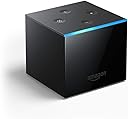
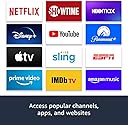
The Fire TV Cube is a cutting-edge streaming device that combines hands-free voice control with 4K Ultra HD content access. With Alexa built-in, you can manage your entertainment and smart home devices effortlessly, all while enjoying a vast library of channels and apps. Designed with privacy in mind, it ensures a secure streaming experience.
R**R
Best Fire TV Device / Echo Yet!!! ๐คฏ๐คฏ๐คฏ
I ordered my Mom the 50" Toshiba 4K Fire TV (1st model), because of the new technology & integration to make it easier on her (she's 68). Ever since she's owned it it's had issues with slowness (honestly it was simply under powered for what it was doing), quirky things etc. (Completely expected in a 1st Gen product). When I saw the new Fire TV Cube go on sale for $89.99, it peaked my interest! So, being a techno geek of epic proportions, I dug into the tech specs of both the Toshiba Fire TV & the new Fire TV Cube. The hardware difference is dramatic to say the least! So, I started thinking, there's nothing wrong with the 4K display features of the Toshiba TV, the problem is the essentially a 1st Gen Fire TV Stick integrated in. Also, she has a 3rd Gen Echo in the living room that she uses for the lights, getting info etc. If I get the new Fire TV Cube I resolve several issues & greatly improve everything. It exceeded all my expectations by far! I simply plugged it into HDMI 1 & went through the Cube's guided setup. Since I selected the "link to my account" when I purchased it, setup was beyond easy. In less than 5 mins, it had joined the Wi-Fi, auto setup the switching of the Toshiba TV to the correct HDMI port, setup the remote to control the TV too & optimized the Cube for the best possible display resolution, color depth, audio output etc. All I had to do was install the apps we use (Hulu, Netflix etc) & boom! Done. Not only is it blazing fast with everything it does, it makes everything so much easier. Now Mom just says "Alexa, turn on the TV" & it turns on the Toshiba & changes to HDMI 1. Then she says "Alexa, go to Fox News" & it opens Hulu (we have Hulu+Live) & turns to Fox News. She can tell it to turn up or down the volume etc. Additionally the Cube is a full blown Echo too! So she can still control the lights etc just as before (I removed the 3rd Gen Echo Dot so the only Echo around is the Cube). Another cool feature is, since we have a Nest Hello Doorbell & Alexa works with Nest, she can say "Alexa, show me the front door" & the view from the Nest Hello Doorbell fills the TV screen! She can also control the Nest Thermostat with it as well. It's voice recognition is outstanding, it actually hears much better than the 3rd Gen Echo Dot that was sitting on an end table next to her chair, only the Cube is across the room on the bottom shelf of the TV stand! I was in the kitchen (our kitchen connects directly behind our living room, so think of it like an extension equal to the size of the living room, so essentially double the size) & the Cube still heard me just fine & I wasn't talking very loud either! Amazon has hit a massive home run with the new Fire TV Cube & I honestly highly recommend it! I'm an Amazon fanboy, I pre-ordered the 1st Gen Echo, got an Echo Spot, Echo Dot 3rd Gen, Echo Dot 3rd Gen with Digital Clock, Fire TV Stick, Fire TV Stick 4K, 50" Toshiba Fire TV (the 1st model), Fire HDX, Amazon HD Music subscription, Prime Member for years now etc. Needless to say, I know Amazon products very well! ๐ *Disclaimer: I do NOT work for or have any affiliation with Amazon, nor does any of my family or friends, other than being regular paying customers. I have NOT received, nor been offered anything for this review. I was NOT asked in anyway, shape, nor form to write this review. This review is 100% legitimate, honest & my own thoughts, opinions and/or experiences. Please note that I have left reviews for OTHER NON-AMAZON companies and/or products before as part of an evaluation program. However, I ALWAYS state that disclosure in the review clearly. 03/05/2020
T**S
Almost flawless design.. Amazon has done it again.
You know I have quite a few Amazon devices and I must say that this is far superior to the fire stick. I really enjoy the hands-free controlling of the TV and it basically operates like an echo device the the only thing that I would like to express on this for Amazon to change would be the speaker itself is very crappy much like the Gen 1 echo speaker. It is an actual cube that measures approximately 3 1/2 in in all dimensions. I'm like the echo, it has one bar light on the front top of it. The app storage is much better than the fire stick I do highly recommend this to the fire stick because you can just put more on it and it does seem quite a bit faster. In addition there has been some miscommunication that I have read in regards to the physical outputs which I would like to clear up. This does have a micro USB, an infrared, an HDMI, and a power plug in the back of the unit the top of the unit is exactly like the echo and has the four buttons mimicking the echo the IR connector is for incorporating use to control an infrared device like a VCR or Blu-ray player or cable box anything that uses IR. Although this is included I do not think it's necessary if you install Kodi with the amount of free channels that are provided. Many people try and sell jailbroken fire cubes for almost double the price I do not recommend them as if you want to do it yourself there are videos on YouTube that are stupid simple. There will cause no harm to your device. What I do recommend is that you get the OTG adapter and hook up a hard disk drive for added storage. It is very simple to do and will allow you to transfer your home movies for playback on a full TV. In addition to this by holding the home button on the Alexa remote, it will bring up a menu where it will allow you to mirror a device such as a phone. I find this useful once in awhile for sharing video with others in my home streaming directly from my phone. I am currently using this with the sengled pulse audio speakers utilizing the pulse link adapter. To use the setup successfully your television must have a audio out via RCA jacks or headphone jacks so that you can plug the connection into the pulse link unit. If your television does not have any of these controls it will not hook up to this system conveniently. It can be done via Bluetooth however, you will need to disconnect the system every time you want to control the lighting which I find is rather inconvenient.
Trustpilot
1 week ago
2 months ago