![[2 Packs] Replacement Keyboard Stickers on Non Transparent Black Background for Any PC and Laptop (HEB)](https://m.media-amazon.com/images/I/31M-Q+2HYoL._AC_SL3840_.jpg)
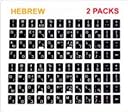

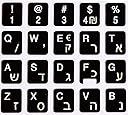
๐๏ธ Type in Style, Stick with Confidence!
Upgrade your keyboard with our high-quality replacement stickers designed for any PC or laptop. Featuring a waterproof, silk-coated finish, these stickers are easy to apply and remove, ensuring a seamless transition to a fresh look without any sticky residue. Perfect for professionals looking to enhance their workspace aesthetics.
| ASIN | B07NHJR4JG |
| Additional Features | Waterproof |
| Brand | TICKY TACKA |
| Color | Heb |
| Compatible Devices | Laptop |
| Customer Reviews | 4.2 out of 5 stars 1,563 Reviews |
| Enclosure Material | Polycarbonate |
| Item Weight | 9.07 g |
| Manufacturer | TICKY TACKA |
| Material | Polycarbonate |
| Pattern | Letter |
| Special Feature | Waterproof |
| Theme | Alphabets |
| UPC | 653590410485 |
R**N
Exactly what I needed to "Refresh" an older Keyboard
I have what was called a "gamers" keyboard. Actually, it doesn't have real mechanical switches but it still has a decent feel and I like it. When the letters started wearing off I even attempted to contact Rosewill about replacement keys with no luck. When I saw these I figured for the price I'd give them a shot. I realize I can not vouch for Durability since they have been installed about 5 minutes as I type this. I will say they fit perfectly and appear to have strong adhesive so I suggest you use a decent pair of tweezers to get them in position before pressing them down. If it bothers you, the letters are centered in the sticker and the factory keys have the letters more toward the top of the key. The stickers are slightly more shiny than the stock keys in my case. I believe someone asked if the letters "F" and "J" had the cut out on the bottom and they do in my set. This is to allow the slight protrusion on my keys to allow finger placement on the home keys. The only issue was the item wasn't even shipped until the actual promised delivery date but it was delivered on Sunday morning one day late.
V**E
nice being able to see the letters on my keyboard.
I have an HP sk-2061 keyboard. It works really well and has a good range,especially compared to their newer models. The newer models of this keyboard I got would just intermittently for now reason what so ever stop working and thew it in the trash. So I got my old sk-2061 keyboard out of the closet and tried using paint markers, but the paint wears off quickly. I ordered these keyboard stickers almost a month ago and they are still sticking to the buttons. Except for the W and that's probably because I didn't clean that too well before sticking it on there.
F**E
Works well
I purchased these not even 2 weeks ago. They are very nice, stick pretty well. I haven't had any issues, but I just started using them. I will try to remember coming back a little later to give an updated review.
R**P
English Keyboard Stickers
I bought the 2-pack English Keyboard Stickers, and the product is very nice. The sticker numbers and letters are centered in the middle of the sticker. On some computer keyboards, the characters are not centered in the middle of the key, but towards the top of the key. When the sticker is placed over the worn key, it is centered toward the middle, and is obvious when looking at the keyboard. This is just a visual thing, but it would be nice if the sticker's characters are centered toward the top of the sticker. The product is otherwise very nice and affordable, as opposed to buying a new keyboard just because the characters on the keys are worn out.
A**A
Haven't had them that long and the letters are already "smearing"
The idea initially is good... the original key letters wear off so you stick a sticker replacement letter on the key. However, I type a lot. I mean a lot. And after applying them, "most' of the letters are still legible. The "E", the "S" and the "N" however, are completely worn off already, and I can tell, through usage, that those that haven't worn off have slid a little from their original placement, or are wearing off around the edges, so the keyboard looks like it has stickers on it with white edges. Yes, they give you a second set of stickers, but they are identical, and therefore will last exactly as long as the first ones. Overall, like I said, good concept... needed, to be sure, for someone like myself who regularly wears letters off keyboards, but they don't last long enough.
J**A
Realy nice
These keyboard stickers were nicely packed and looked high quality. They are a little smaller than my keys and more shiny, but that is OK, because they make my keys look like new!. Before putting them on the worn out keys, I cleaned each key with alcohol to remove any grease from my fingers. So far, they are sticking very well. This is a good value product! I am adding another review, over a year later, because I am pleased with their quality. They stick very well, and do not fade. I bought them a second time, for an additional computer keyboard!
J**I
GARBAGE!! They start sliding within a VERY short time!
These are JUNK! Within a short time they start SLIDING all over the place. I bought these in FEBRUARY and by mid-April I had to switch to a different keyboard because so many were sliding. And by around mid-May THAT one was having sliding problems! I LITERALLY just got done SUPERGLUING 11 of them back onto the keys on ONE of those keyboards! (You pull them off easily, turn them over, scrape the adhesive off, put a VERY SMALL drop of superglue on the KEY, and then place the sticker in the glue and QUICKLY move it around SLIGHTLY.)
O**D
Just what I needed and priced right too.
I had some washed out keys on a laptop keyboard, so instead of trying to get new keys, because there are 100s of different keys and keyboards, I just replaced the whole keyboard with these very well made Keyboard stickers. I was surprised at how easy it was to put them on, tip: Clean your keys with a Blue Dawn or some type of heavy duty degreaser soap and a damp microfiber cloth, and then just before you put the key stickers on, go back over the keys with Alcohol and finally dry dust them again with a fresh clean microfiber rag before you start.
Trustpilot
2 weeks ago
1 month ago