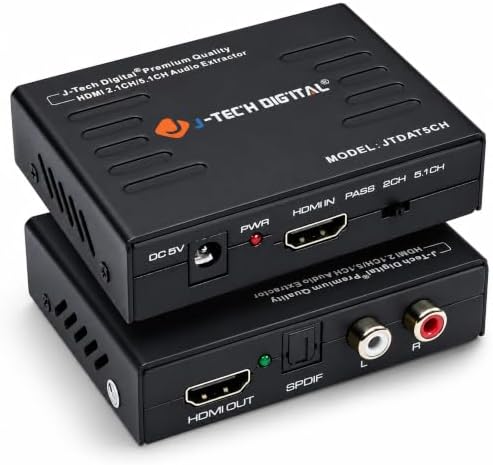






J-Tech Digital HDMI to HDMI ARC Adapter with CEC and Optical TOSLINK Audio Output, 5.1 Channel, Black
Product ID: 151208373
Details
- BrandJ-Tech Digital
- Interface TypeHDMI
- Mounting TypeCable Mount
- Number of Channels5
- Number of Pins38
Desertcart purchases this item on your behalf and handles shipping, customs, and support to Kyrgyzstan.
This device extracts the digital audio signal from the HDMI input and converts it to 2 channel analog stereo output or 5.1 channel Audio outputs. To improve our customers experience, we posted the following three methods if you experience no sound from output. 1. The EDID Option Switch: Switch the EDID Option buttom in the front, change it between 2CH, 5CH or pass. 2. Turn Off Dolby Digital Plus: TOSLINK (SPDIF) does not support Dolby Digital Plus, you need to turn off Dolby Digital Plus function, then the sound can go through the extractor. a: desertcart Fire TV or desertcart Fire TV Stick Settings Display Sound Audio Dolby Digital Output Dolby Digital Plus off b: Apple TV Settings Audio Video Dolby Digital on c: Chromecast Chromecast plays the contents from your video source, please make sure to turn off the Dolby Digital Plus on the video source through the play devices. 3. Do Not use HDMI to DVI or HDMI to VGA cable, will result in no audio come out. Instead, please use HDMI to HDMI cable.


| ASIN | B00BIQER0E |
| Audio Output Mode | Stereo, Surround Sound |
| Best Sellers Rank | #552,765 in Electronics ( See Top 100 in Electronics ) #1,230 in Audio & Video Adapters |
| Brand Name | J-Tech Digital |
| Compatible Devices | Television, Projector, Blu-ray Player, Gaming Console |
| Country of Origin | USA |
| Customer Reviews | 4.4 4.4 out of 5 stars (5,626) |
| Interface | HDMI |
| Item Weight | 0.01 Ounces |
| Model Number | JTDAT5CH |
| Mounting Type | Cable Mount |
| Number Of Pins | 38 |
| Number of Channels | 5 |
| Number of Items | 1 |
| Number of Packs | 1 |
| Part Number | JTDAT5CH |
| UPC | 654367438947 |
| Unit Count | 1 Count |
Trustpilot
2 weeks ago
1 week ago