


Desertcart purchases this item on your behalf and handles shipping, customs, and support to Kyrgyzstan.
🖱️ Elevate your workflow with the original vertical mouse—comfort that commands attention.
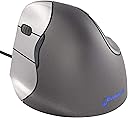
The Evoluent VM4L is the pioneering left-handed ergonomic vertical mouse designed to reduce wrist strain by promoting a natural handshake posture. Featuring 6 customizable buttons, 4 on-the-fly pointer speeds, and a sculpted shape tailored specifically for left-hand use, it connects via wired USB for seamless plug-and-play compatibility across Windows, Mac, and Linux systems. Trusted by professionals and ergonomists alike, this mouse transforms long hours at the desk into a pain-free, productivity-boosting experience.


| Additional Features | Ergonomic Design |
| Antenna Location | Indoor |
| Asin | B00427OTEU |
| Best Sellers Rank | #795 in Computer Mice |
| Brand | Evoluent |
| Button Quantity | 6 |
| Color | Grey, silver |
| Compatible Devices | Personal Computer |
| Connectivity Technology | USB |
| Customer Reviews | 4.3 4.3 out of 5 stars (608) 4.3 out of 5 stars |
| Enclosure Material | pointer speed |
| Global Trade Identification Number | 00852153014218 |
| Hand Orientation | Left |
| Hardware Platform | PC, Mac, Linux |
| Included Components | 1 package |
| Item Type Name | Evoluent vertical mouse 4 Left-handed VM 4L |
| Item Weight | 248 g |
| Manufacturer | Evoluent |
| Mfr Part Number | FBA_Evoluent VM4L |
| Model Name | Evoluent Vertical Mouse 4 Left Hand Ergonomic Mouse |
| Model Number | VM4L |
| Movement Detection | Optical |
| Number Of Batteries | 1 AAA batteries required. |
| Operating System | Linux, Windows 7, Windows XP |
| Pattern | Single |
| Power Source | Wired USB |
| Range | feet |
| Style Name | Wired |
| Theme | Computer Accessories |
| Unit Count | 1 Count |
| Upc | 852153014218 |
| Warranty Description | manufacture warranty |
User
A no-compromise left-handed ergonomic mouse
I like this mouse better than the Logitech MX 610 Left-Hand Laser Cordless Mouse, which it replaced. The unusual sideways orientation of the Evoluent looks strange, but it took no time getting used to. It promotes a very relaxed and natural hand and wrist posture. It looks like your fingers are lined up vertically, but in reality, your fingers are positioned in a gentle arc and your hand is turned inwards by a few degrees. Your thumb rests in a chrome-looking divot.The Evoluent 4 design has a bottom "lip" that prevents your pinky finger from rubbing against the desk. I can confirm that it works beautifully and adds to the overall comfort. It helps you to position your hand correctly. I also find that proper chair height (in relation to your desk) and wrist support is essential to keeping the arm and wrist straight. It also has a very long cord, approximately 6 ft.Your index, middle, and ring fingers align with buttons 1, 2 and 3. Between buttons 1 and 2 are a scroll wheel (with notched movement). The scroll wheel can be clicked as another button. Above and below the thumb are two additional buttons that could be used for back/forward functions in your favorite browser, bringing the total button count to 6, and they are all programmable under Windows (a non-WQHL-certified 32-bit and 64-bit Windows driver are included in the box on a small (mini) CD. The purpose of the drivers is to assign custom actions for the buttons. You can even assign actions to a combination of the thumb and finger buttons when pressed simultaneously. Mouse sensitivity is controlled by its own dedicated rocker buttons located where it cannot be accidentally pressed.Note: Even though the Evoluent Windows drivers warns you to uninstall any previous mouse drivers to "prevent conflicts," I ignored that and kept my Logitech drivers (SetPoint). Both mice work fine. I can actually still access the SetPoint drivers through a tab in the Evoluent drivers setting page. Nice.The Evoluent's sensitivity is indicated by 4 LEDs located at the top of the thumb divot and correspond to four hard-wired sensitivity settings. The lowest sensitivity is around 400cpi, while the highest feels like around 2000cpi (these are my estimates obtained by comparing it with other mice; it is not specified by Evoluent). I operate it on the 2nd-lowest setting, which is about 800cpi. The nice thing is that the sensitivity function does not require special OS drivers, so it works right out of the box on any computer and any OS. The mouse even remembers the last sensitivity setting used when you unplug it. The sensor is an eye-safe infrared laser. Even though it is not sold as a "gaming mouse", the Evoluent 4's sensor performs as well as gaming mice in both speed and tracking under high-acceleration. That is more than I can say for the MX 610.There are no Mac OS drivers supplied by the company, although third-party drivers exist for reprogramming the buttons (links are provided on the Evoluent product page). On Mac OS X, I did not install the third-party drivers, so I could not assign any special functions for the buttons. Out of the box, the button under your index finger is mapped to the "left button" (primary on a right-handed mouse). Button 3 under your ring finger is mapped to the "right button" (secondary). Button 2 (middle finger) brings up the Mac OS X dashboard, and the top thumb button triggers Exposé. The bottom thumb button and the mouse wheel button do nothing.The mouse is light enough and sensitive enough to push around with just your wrist; you don't have to move your whole arm. You can even steer it with just your thumb and finger tips. This is the secret to its comfort. It encourages you not to grip the mouse with any tension. You don't need to. With conventional mice, even ergonomic ones like the Logitech, I eventually find myself gripping the mouse with just the ring finger and thumb, and that creates tension and fatigue within an hour of use.The downsides are minor. The buttons don't require much force to click. While I like the light touch, it's sensitive enough that just reaching out and wrapping my hand around the mouse will sometimes result in unwanted button clicks. This is not a big problem, but I have noticed a minor increase in accidental clicking since I began using the Evoluent. Maybe I am still getting used to it. I can pick up and reposition the mouse while resting my fingers on the buttons without clicking those buttons, so it is not hair-trigger sensitive.Also, the dark gray part of the mouse where your palm touches is covered in a "soft touch" coating. While it feels nice, this type of coating is not very durable in the long run and will start to breakdown after several years, becoming tacky to the touch, or it can rub off at the points of frequent contact. This is probably why the pamphlet in the box warns not to use solvents or cleaners on the mouse, only a damp cloth. I wish companies would stop using this coating.Its unusual appearance also makes it a great conversation piece.Bottom line: if you're thinking about buying this mouse, buy it!
User
Eliminated awful pain!
Seriously, these mice have LITERALLY - LIT. ER. ALL. Y. changed my pain levels. I have Lupus, but before that, I had 3 surgeries total between both wrists. Carpal tunnel and De Quervain's.I started hobbying in carpentry about 10 yrs ago. It only took about 3 yrs before I had troubles. I never thought I'd love such an expensive, frustrating hobby so much but I do. Healing from those surgeries made me realize it's a vital piece of my mental well-being. Buuut I also have to go to work and be an accountant. Before I could do THAT, I had to go to school for 5 years. Do you see where I'm going with this?So 5 years pursuing my degree, where colleges are still using furniture from the 70s. To be fair, it's 2026 and we STILL manufacture desks and chairs so your arms go numb, so I guess I can't be too hard on the 70s, huh?I invested a lot in my ergo needs - a really expensive keyboard that looks like it's from outer space, custom made chair from - you'll love this - the 70s. Ha! Revamped it to suit my needs. Standing desk, a tiered foot stool for a leg-up on different levels, AND an ergo mouse. Or, mice. Because I swear I've bought them all. The muscle belly in my right forearm would BURRRRN. And I mean the kind of burning where it feels like there's a lighter under your skin. The kind where you wanna claw it off to escape your own body. Feels like ice and gives you goosebumps it hurts so bad. And I did PT for a yr with the max amt of the electro whatever things they had me wear afterward for like 2 hrs. I had multiple injections to no avail. Changed mice, to NO avail. I researched my brains out to figure this out and I have to take a sec to digress here - who is shaking hands at the angle these mice are allegedly manufactured for?! Seriously!! "Handshake" position - what?! I shake hands up and down, not at some wonky 30° angle or whatever the "norm" is for all the other mice on the market! Shake someone's hand right now. Seriously, do it. Is your palm facing OUT, or out and DOWN? If it isn't the first one, you need to go figure your life out. You gonna navigate a mouse in that position all day every day for 50 yrs?! Good luck with that.I have been using my left hand dominantly for certain things, for about 6 years. I can write numbers really well, programmed my keyboard for a left 10-key and became efficient on that years ago, and I do a lot of operating my power tools left-handed. Therefore, I got 2 of these. A right and left. I wish the left were cordless, but it wasn't worth not having the option just because it was corded. It has been about 6 months. I use both mice equally in my day. I navigate from my elbow or shoulder, NOT my wrist. These mice are absolutely WONDERFUL. Just...no words. The muscle belly in my right forearm has only flared up ONE. TIME. And it was NOTHING like it used to. And to clarify, this was previously happening every. Single. Day. Almost every second I was using a mouse, for YEARS. Let THAT sink in if you're still hesitating.I have them both at work, and in my career, I attend conferences out of town, meetings where I take minutes - I tote my whole setup. These mice are bulky - idc. They go with me. It doesn't matter if I only needed to use a mouse for 5 mins. I have already experienced repeatedly that I can no longer navigate a computer for even that amt of time, using a regular mouse or mouse pad, without severe burning. These things are so comfortable, I can easily navigate from my elbow because their bulk allows me to actually rest my wrist WITHOUT DRAGGING IT ON THE DESK! No one is making mice like this you guys! Your wrist isn't elevated with those other products - I was looking at stupid arm thingies that clamp to your desk so the skin on my arm could quit going numb from rubbing all over the desk! When you have problems, you can't rest your wrist on a pad and navigate FROM the wrist. That's probably how you GOT the problems to begin with because we AREN'T supposed to be DOING that. AND, if you really just sit in a resting position with your alleged ergo mouse, your wrist is PRObably slightly tilted UP. WRONG IDEA, mouse-making people!!This dude - he's a flipping genius. I am SO glad he didn't give up when everyone told him this was a stupid idea because people like me would be seriously screwed. Do. Not. Hesitate. I looked EVERYWHERE. Spent hours and hours reading reviews, omG did I ever. This mouse is it. It has literally solved a HUGE threat to my career longevity.
User
Great Mouse With One Very Minor Design Flaw
I purchased the left-handed Evoluent VM4L VerticalMouse 4 (wired) and I am loving it so far! The footprint is a bit wider than a standard mouse and I have a limited mousing area due to my keyboard tray but it still works fine. My first day using it, I lost count of the number of times I knocked it off of my desk because of its height! A standard mouse, you just shift your hand to the left and mouse on. With this mouse, your hand has to go slightly UP and over to the left to get your mouse on haha. By the end of the day though it was burned into my muscle memory.One minor design flaw that I noticed: the pinky button extends all the way to the bottom lip of the mouse and if I could get a dollar for each accidental click this mouse would have been free. In my opinion, the pinky button should be cut ABOVE the lip to avoid accidental clicks. I had to disable the pinky button because of this, and it is now useless to me.I also noticed that I have to press down firmly (again, using my pinky finger to anchor on the bottom lip) to get precision mousing. I've tried pressing my thumb firmly against the thumb rest for precision mousing but that didn't work out too well. I also tried changing the pointer speed but it boils down to having to apply slight downward pressure for accurate mousing. I'm thinking of buying the Logitech left-handed mouse as a point of comparison.Despite these minor issues, this is a really great mouse and it has helped relieve my finger pain.
User
Excellent replacement for my 13 year-old ergonomic (giant) mouse
Though I still sometimes click when I only am meaning to move the mouse, over all it is a great mouse. I bought the left-handed version as I was starting to have pain in my right hand - I am prone to carpal tunnel in both hands, and have to be careful, but my right hand is more sensitive. With my work from home set up, my 13 year-old ergonomic mouse was too tall work with the sit/stand desktop I bought, and it requires too much space to maneuver it even with my smaller-sized ortho-linear keyboard.This mouse has five buttons and a scroll wheel. The software allows for customization, though I haven't really needed it, and it works fine with my Windows 10 work-issued computer and my personal Mac computers an 2012 and a 2021 M1. it is corded and I merely plug it in to which ever computer I need to use at the time.Quality and build seem great and I have no complaints after two months of heavy use. I like the horizontal scroll feature and the pointer speed option. It is very comfortable to use, fits my hand well, and I haven't have any pain. I looked at cheaper and less vertical ergonomic mice. I decided to stay with a true vertical mouse as whenever I have had to even temporarily use a less vertical or a more traditional mouse, especially right-handed, it aggravates my carpal tunnel issue.Depending on budget I may get a right-handed one so I can switch up or have one at the Center, when I am no longer in a WFH situation.
User
Evoluent VM4 Vertical Mouse
*UPDATE - Nov 20, 2014:* After using this mouse (actually, I purchased two - one for my desktop and one for my laptop), I am happy to say that they are still working perfectly and I am extremely happy with them. The glossy finish has worn off a bit, but I actually like it even more because it is easier to grip. However, for those interested in esthetics, when the glossy finish wore off in various places where my hand touches the most, it is still a very similar color to the original, so at a distance, or at a glance, it is hardly noticeable.When I first received the Evoluent VM4 Vertical Left-Handed Mouse, it took some time to get used to it. Specifically, my forearm was quite sore and I didn't think that I would be able to use it. However, I stayed with it and the soreness went away in about two days of using it. I assumed that I just had to get used to it. From that point on, I was extremely happy with it.In fact, I purchased a second one to keep with my laptop so that I didn't have to keep swapping between my desktop and laptop. Upon receiving the second one, I was totally used to the first one and infinitely happy with it. However, it surprised me that my forearm was again a little bit sore and I had the same trouble as when I had the first one.The only thing that I could think of is that I must have worn some of the "slipperyness" off of the mouse after a day or two because I was able to grip it better when picking it up when relocating it on the mouse pad. Don't get me wrong, when I say "wear off," I don't mean that I saw any noticeable wearing of the finish. It must be a very subtle wear.So my advice would be to stick with this for a day or two and not give up on it.I primarily got the mouse for its ergonomic and comfort reasons. However, I was pleasantly surprised with the ability to program the buttons for various tasks. The directions also show you how to download the latest software from the website so that you can program the buttons and it was very easy to install and find on their website. Note that if you don't download the software, you can still use the mouse, but you can't reprogram the buttons. It will basically act like a typical two-button mouse with wheel.Just to give you an idea of how I programmed the buttons, (if you refer to the documentation to see the "button numbers") buttons 1 and 2 are just like standard left and right clicks. Button 6 I use as Copy and button 5 as Paste. I programmed the "wheel button" to minimize the desktop because I open multiple programs at once very often and it's an easy way to get to the desktop. I disabled button 3,which is the lowest one, where your pinky finger will rest. I disabled this button because when I tilt the mouse to reposition it (so the pointer doesn't move on the screen), I kept clicking this button. I was using this as "Cut," but I couldn't stop clicking this button when tilting the mouse, even after getting use to the mouse. So I simply disabled it.One thing that I was worried about was how the wheel would scroll. Quite frankly, I hate using a wheel that does not click when scrolling it. This wheel "clicks" when you scroll it. It does so in a perfect way; not too hard to click, not too easy. So I was extremely happy with the feel of how the wheel scrolls.In summary, don't get worried about the fact that I said that it took a day or two to get used to. This is obviously an expensive mouse, but I love it enough where I had to get one for my laptop (and to have an extra if needed). I fully recommend this mouse.
User
Reduced pain and numbness in just days. Best mouse ever!!!
Well worth every penny! I work from home and have rheumatoid arthritis. I also mouse with my left hand. Ongoing wrist pain and repetitive ganglion cysts had me looking for solutions other than a regular mouse. I looked for weeks, read reviews and thought I could get by with a cheaper version. Big mistake. This mouse is worth it, don't waste time on cheeper versions.There is zero drag, movement is very, very smooth. It is very sensitive, you don't have to move it around very much. Once I got the driver installed, all the features really popped out, in a good way. I love that the middle button for the fingers can be the "double click." And the thumb isn't just sitting there, either. The grip angle is perfect for comfort and stabilization.Using multiple fingers significantly reduced strain on my joints, reducing my pain. Adding a padded wrist rest has increased the benefits. Two weeks of use and my pain is better, my cysts are going down and my hand fatigue at the end of the day is almost mik.I'm getting another one for my home computer, and getting one for my son as well. Please don't change the design too much in the future, it's pretty perfect right now!
User
Unusable
Updated review: (2-star)Pros:- Excellent button layout, loving the third mouse button- Beautiful design, feel and finish- Overall feels great in the hand; ergonomicCons:- Terrible sensor - actually quite terrible for gaming, productivity- Horrible lip at the base of the mouse, inhibits comfortable movement, lifting of the mouse- No on-board memory for button remapping is inconvenient- Size and shape of the mouse makes mouse-lifting movements clunky, bad for gaming, productivity- Mouse wheel could be a bit more robustThe cons outweigh the pros, particularly at this price point. No longer recommended.Previous review: ( 5-star )Takes some getting used to, but after hours of time and patience, now I refuse to use another style/brand of mouse.I keep it at the highest DPI setting. Using it for work and gaming. Software customization options are good. Buttons are very responsive and feel great.Loving it so far. My hands and wrists feel so much better since using it. After using it for several weeks, highly recommend.Will update review after longer use.
User
Jury still out on this one..
I've had it for about 2 weeks and I've got mixed feelings. I'm a right handed s/w developer, and had to switch to a left mouse 10+ years ago, so I'm an experienced left handed mouse user. This is my first 'lefty' mouse, I'm just used ambidextrous ones and trackpads till now.Pros:- it's different. Since I use computers at work and at home, and laptops and desktops, having a different mouse is important so that no one part of your wrist gets overused.- the vertical position does generally feel less stressful than the horizontal position I get with an ambidextrous mouse.- the design seems pretty good, and the grip feels ok.Cons:- it 'feels' heavy. It's not heavy, but it feels that way. Someone else pointed out that on the occasion, which happens often enough, when you need to pick it up and move it (cause it's next to the keyboard and you need to 'move to the right'), it's kind of uncomfortable, and it feels bulky or heavy cause it's kind of hard to grip and lift.- it feels big. Maybe this will just take some time, but I definitely don't feel like i have the fine motor control I have with other mice.- I don't have a gel wrist support or anything supporting my wrist right now (I do have a chair w/ armrest supporting my elbow though). I think the lack of a wrist rest is a problem with this mouse. The 'top' of my left wrist when holding this mouse (right next to the base of my thumb) hurts after a while. It's possible this is because I have a slightly wrong angle or no wrist rest). I am buying a wrist rest, and will try to report back after that.Update after a few more weeks of use:- ok I was able to get reasonably comfortable with this mouse after another week. I ended up realizing that the position was slightly lower than it should be, in part because when I use my mouse I tend to put my elbow on my chair's arm rest which elevates it slightly. I ended up putting a thin book and pad under the mouse and now it seems to be in a more aligned position, reducing or eliminating the wrist strain. Now I do get some discomfort in my index and middle fingers after clicking the buttons a lot, but I don't think that's too far out of the ordinary. In any case, I was able to program the extra buttons which has helped. The middle button opens a new tab in the browser which is nice, then I programmed one of the thumb buttons to close a tab, and the other to go back. This makes it a pretty nice web browsing mouse since I don't have to move my hand off the mouse or even move the mouse much to browse.Update after a few months of use:so the one thing to be aware of about this mouse after a lot of use, is that while the vertical position of your hand reduces strain on your tendons, you actually lose something in terms of clicking. In particular because you are pushing the buttons sideways instead of down, you no longer have the advantage that gravity gives you of having the weight of your fingers falling down on the buttons. This is a subtle difference, but if you use the mouse a lot you will begin to notice it.
User
Langzeiterfahrung (über 10 Jahre): Meine absolute Rettung bei Handgelenksschmerzen
Ich schreibe diese Bewertung aus der Perspektive von jemandem, der dieses Maus-Modell (die Evoluent VM4L) nun schon seit über 10 Jahren täglich nutzt. Bei diesem Exemplar handelt es sich bereits um meine zweite Maus, nachdem die erste nach einem Jahrzehnt intensivster Nutzung (und unzähligen unbeschadeten Stürzen von meinem Schoß) in Rente gehen durfte. Die Qualität ist einfach überragend.💡 WARUM ICH SIE GEKAUFT HABE:Wegen einer schmerzhaften Sehnenscheidenentzündung an der rechten Hand musste ich mein komplettes Arbeiten am Schreibtisch umstellen. Ich bin auf die linke Hand gewechselt und habe mir diese vertikale Linkshänder-Maus mit USB-Kabel geholt. Das war die beste Entscheidung für meinen Schreibtisch-Alltag!🛑 1. ERGONOMIE UND PASSFORM (DER WICHTIGSTE PUNKT):Der Unterschied zu einer normalen, flachen Maus ist enorm. Durch die vertikale „Handschlag"-Position werden Unterarm und Handgelenk nicht mehr verdreht. Die Entlastung ist spürbar, selbst nach stundenlanger Arbeit am Laptop. Ich habe mittlere bis große Hände und die Maus passt wie angegossen. Ein tolles Detail: Es gibt eine bequeme Ablage sowohl für den Daumen als auch für den kleinen Finger, sodass die Hand nicht über das Mauspad schleift. Das glatte Plastik fühlt sich dabei angenehm an.🖱️ 2. EINGEWÖHNUNG UND TASTEN:Wer Angst vor der Umstellung hat, den kann ich beruhigen, die Eingewöhnungszeit war bei mir sehr kurz. Man gewöhnt sich sofort an die natürliche Haltung. Die Tasten sind perfekt erreichbar, ohne die Hand verrenken zu müssen. Es gibt 6 programmierbare Tasten (wofür man einen Treiber benötigt), die ich allerdings nicht nutze. Von den vorprogrammierten Standardtasten nutze ich am liebsten das Scrollrad (das übrigens angenehm leise klickt) und die untere Taste, die dem klassischen Rechtsklick entspricht.🧳 3. GIBT ES NACHTEILE?:Das einzige kleine Manko ist die Mobilität. Da sie ergonomisch geformt und recht groß sowie klobig ist, eignet sie sich nicht ideal dafür, sie ständig in der Laptoptasche mit auf Reisen zu nehmen. Ich vermisse sie im Urlaub daher regelmäßig.🎯 MEIN FAZIT:Wer Probleme mit den Sehnen, den Gelenken oder einen sogenannten „Mausarm" hat, sollte nicht zögern. Der Preis mag auf den ersten Blick hoch erscheinen, aber das Preis-Leistungs-Verhältnis ist unschlagbar, wenn eine Maus im täglichen Einsatz so langlebig ist und gleichzeitig Schmerzen verhindert. Eine klare Kaufempfehlung für alle Linkshänder (oder Rechtshänder, die umsteigen müssen).
User
Expensive but very nice for my
Wunderbar. Expensive but very nice for my hand
User
Helps reduce RSI
Helps reduce my RSI - but the only thing I don't like is the 3 buttons. Wish they had just stuck with 2.
User
Buono
Non ho esperienza su mouse verticali. Questo era uno dei pochi. Abbastanza comodo, dopo mesi di utilizzo ancora mi ci devo abituare al 100% sopratutto con programmi che richiedono molta precisione. Prezzo non bassissimo, ma per mancini non ci sono tante alternative. Comoda la possibilità di cambiare la sensibilità.
User
Util y comodo
Es comodo y util, el unico detalle es el tamaño un poco grande sobre todo para guardarlo, pero la comodidad lo compensa
Trustpilot
2 weeks ago
2 weeks ago