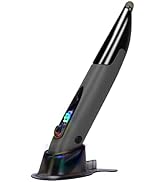
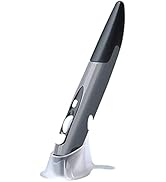
🖊️ Elevate your workflow with the pen mouse that fits your lifestyle and your pocket.
The lychee Wireless Optical Pocket Pen Mouse is a sleek, pen-sized wireless mouse featuring adjustable DPI (800/1200/1600) for precision control, a 33ft effective wireless range via 2.4GHz USB receiver, and ergonomic design for comfortable use. Compatible with Windows, Mac, Android, and more, it requires a single AAA battery (not included) and offers plug-and-play convenience, making it ideal for professionals on the move, presentations, and compact workspaces.


| ASIN | B07R9Z42YB |
| Additional Features | Wireless |
| Antenna Location | Laptop |
| Are Batteries Included | No |
| Are Batteries Required | Yes |
| Best Sellers Rank | #680 in Computer Mice |
| Brand | lychee |
| Built-In Media | 1 * Pen Mouse, 1 * USB 2.4GHz Receiver, 1 * Mount, 1 * English Manual |
| Button Quantity | 4 |
| Color | Grey |
| Compatible Devices | Laptop, Personal Computer, Tablet |
| Connectivity Technology | USB, Wireless |
| Customer Reviews | 3.9 out of 5 stars 828 Reviews |
| Enclosure Material | Plastic |
| Finish | Matte |
| Global Trade Identification Number | 06921279287494 |
| Hand Orientation | Ambidextrous |
| Hardware Platform | Tablet |
| Item Dimensions L x W | 1"L x 0.6"W |
| Item Weight | 29 Grams |
| Manufacturer | Lychee |
| Model Name | 6921279287494 |
| Model Number | 6921279287494 |
| Mouse Maximum Sensitivity | 1600 Dots per Inch |
| Movement Detection | Optical |
| Movement Detection Technology | Optical |
| Number of Batteries | 1 AAA batteries required. |
| Number of Buttons | 4 |
| Operating System | Windows 10 |
| Power Source | Battery Powered |
| Range | 33.0 feet |
| Special Feature | Wireless |
| Style Name | Modern |
| Theme | pen mouse |
| Unit Count | 1.0 Count |
S**N
This works great just for scrolling & clicking too
I use this pen mouse for a personal life hack I discovered. For my right hand I use a vertical handshake mouse to move the cursor around. For my left hand, I hold this pen mouse upside down and use my left thumb for scrolling and clicking. I covered the red LED with a small piece of tape so the cursor won't jump around. If you heavily utilize the mouse all day, you should definitely try this technique, especially if your hand gets sore after a while. This mouse also works just fine when using as directed. Sometimes the cursor may jump a little, but overall it works perfectly fine. I already purchased a second pen mouse as a backup because, honestly, this pen mouse feels very cheap and I've gotten so used to this mouse for my method at work, I have another new in the box for when this one breaks. But so far it's lasted at least 6 months, and it still works and clicks and scrolls like the first day I got it. And by the way it takes a single AAA.
Z**E
AAA battery needed
Once you get the hang of it, it's a great mouse to have. Small enough to fit in your pocket, works fine with my cell phone for work purposes. Only thing I wish it had was a spot to put the adapter inside. You'll need a AAA battery too
J**E
Like the flexibility
It's still new but working great so far. Sits comfortable in my hand. I like the flexibility I have when presenting.
A**R
Stopped working after a few weeks. The replacement too!
Love it! But it stopped working after two weeks. I ordered a replacement. Died as well... The pen would just flash once when switched on and then would do nothing (no lights either) and yes, I did check batteries. I loved it! But it just broke after like 3 weeks or so.
J**R
Comfortable, fairly sturdy
I don't expect this mouse pen to last me years -- it is a stopgap solution for me. The included base quickly stopped being able to keep the mouse pen upright, which means this thing took several tumbles onto hard surfaces before I got out of the habit of trying to use the base. The mouse pen itself continues to work just fine. I have not had to clean lint out of the bottom. I have not seen as much as a scratch appear after it has fallen on ceramic tile, on a hardwood desk, on the desk and bounced off to then fall onto the ceramic tile, and on cement. I have also shoved it into a thinly padded inner pocket in my computer bag and had the full weight of the laptop wind up laying atop the mouse pen; no strain marks on the seams, no separation, no damage to the buttons, no functionality problems. I wish the top had a clip so I could attach it to my sleeve when I am busy typing, or else that the tip had a hole formed in it through which I could clip a lanyard. I am right-handed, and this mouse pen was definitely designed for right-handed use. However, when I switch it to my left hand, I have no trouble pressing the side "right click" button without disrupting my hand position.
M**C
Almost liking this pen, but...
...the right-click button is right where my thumb wants to go, so I end up holding it at an angle that doesn't meet the mousepad, or my grip on it is too delicate to avoid hitting that button, and I lose my grip. Also, the body is slippery, I'm going to have to glue on some non-stick stuff so my hand will grip it better. Gonna try another pen with the right-click is further down. Oh well, the search goes on; my carpal tunnel is becoming a problem, so I'm looking at other options. I was actually using this all day yesterday to test it out, and it's definitely better on the wrists than a regular mouse, I'll keep it around as a backup, for sure.
F**S
Great Mouse For Ergonomics!
Great mouse for people with repetitive motion injuries. The Pros: -Works just like a mouse -Buttons are well-located -Pen weight feels perfect when battery is installed and in use (really light when empty) -Sturdy construction The Cons: -No middle-mouse wheel click! Basically, it's a two-button mouse -Maybe not the most comfortable shape for a pen -Coming from a Wacom Tablet, you want to believe this has tilt and pressure functions--it's a mouse, it doesn't Purchase for drafting in CAD and pixel art, as I spend a lot of time with a mouse. The price was great, and looked like a better option to a vertical mouse, give our background in the arts. It works great; installation was automatic and easy in Windows 10. CAD's a little weird having to use the pan command since there's no middle mouse wheel click for the pan command, but you get used to it quickly. Pixel art works great! This mouse is perfect for it! 3D work takes a little getting used to, but Blender works fine (if you're not going to use the visual triad to orbit and pan on the upper right hand of the modeling window, you'll need to activate 2-button mouse emulation in the preferences--then this mouse works great!). In 3ds Max you'll have to use a lot of Ctrl+P and Ctrl+R, and Alt+Z. Overall, recommended if you want a more comfortable way to work on you PC over long sessions. If the company making this adds a middle mouse wheel click, it would be perfect
S**R
This pen mouse is a must-have for anyone who wants a convenient
This pen mouse is a must-have for anyone who wants a convenient and accurate way to navigate their computer. The 2.4GHz USB wireless connection is incredibly reliable and provides a smooth and seamless experience. The adjustable DPI settings of 800/1200/1600 are great for customizing the sensitivity of the mouse to match my preferences, making it perfect for both precise digital art and everyday computer tasks. One of the best things about this pen mouse is its ergonomic design. It fits comfortably in my hand and allows for a more natural and intuitive way of navigating my computer. The compact size and portable design make it easy to take with me wherever I go.
Trustpilot
2 months ago
2 months ago