Capture the Moment, Stream the Future! ๐ฎ
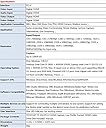
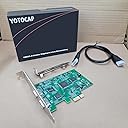
The YT-294 PCI-E 4K Video Capture Card is a powerful tool designed for seamless video capture and streaming. With support for 1080P 4K HDMI input and output, it allows for high-quality recordings at 60fps. Its UVC compliance means no driver installation is required, making it compatible with a wide range of software and devices, including gaming consoles and PCs. Ideal for content creators, educators, and professionals, this capture card is a must-have for anyone looking to elevate their video production game.
| ASIN | B07TRVKC2Y |
| Brand | YOTOCAP |
| Built-In Media | Capture Card |
| Compatible Devices | Television |
| Customer Reviews | 4.2 out of 5 stars 63 Reviews |
| Hardware Interface | USB 3.0 |
| Included Components | Capture Card |
| Manufacturer | YOTOCAP |
| Mfr Part Number | YOTOCAP Capture Box |
| Model Number | YOTOCAP Capture Box |
| Operating System | Windows 10 |
| Platform | Linux, PlayStation, Windows |
| UPC | 796862919481 |
| Video Capture Resolution | 1080p |
T**M
WOW!!!
Now I would be able to write a BOOK about this product! Don't let ANYONE tell you that all EXPENSIVE equipment is what you should look at when purchasing needs! This VERY AFFORDABLE unit here WORKS PERFECT!!! From the initial moment of it being installed in my computer I hooked my Sony AX33 to it via HDMI and BOOM! Instant on! Now I will have to be honest and say that there is a slight delay/lag yet that is NORMAL as well as acceptable because the picture is perfect! I also tested my Nikon D3200 and the same perfect result! All the expensive $300 to $1000 equipment?? NOPE! I HIGHLY recommend this unit! Thank You Sirs!
T**L
Simple Plug N Play
Works great with OBS Studio 64 bit. Drivers are autoinstalled through windows 10, the card shows up as a camera in device manager. You can go into OBS studio and set it as a "Video Capture Device" and you're good to go. It's a really painless process. i'm using it to capture video from an Oculus Rift. I can't use it as an intermediary for capture but what i have been able to do is duplicate my displays on the source device, output that video via hdmi out of source and into the YoCap card. I just capture and output the monitor display rather than the hdmi but it's what I need for spectating Echo VR. It's definitely heavier resource wise for my source computer to render another display but it's the best work around for the lowest latency.
B**N
No-frills capture card - WORKS GREAT!
In many cases - cheaper equals CHEAP - but NOT HERE! This card is just as good as any model that is 4-10X higher in price. No frills - no manual, no software - no nothing - just a card in a box - but it was perfect for my needs! We use it with OBS for live streaming church services - and we PIP our projection screens in the broadcast it it needed no drivers, no software nothing! OBS used it right away and it brings in full 1080 HD with no issues! HIGHLY RECOMMEND!
M**L
Works great in Ubuntu; cannot get it to work in Windows
I bought this card to capture analog videotapes via a scaler, to create archival files. The computer it is installed in (custom build: MSI Z370 SLI Plus motherboard, i7 8700 CPU, 64 GB RAM, 18 TB RAID storage) dual boots into Windows 10 (x64, Pro, version 1909) and Ubuntu (20.04) partitions. I simply cannot get this card to work in Windows. It appears in the device manager without any errors or warnings, but none of the three capture/edit packages installed (Premiere Pro CS3, Da Vinci Resolve 15, and OBS Studio 25.0.8) can see it as a capture device. VLC sees it, but crashes as soon as I try to play from it. In Ubuntu, however, it's great. OBS saw it immediately, configuring the various video and audio capture options was straightforward, yet versatile, and it captures beautifully in 1080p60, with no lost frames. I don't feel that I can give this more than three stars, because for me at any rate, it simply doesn't work using the most widespread operating system in general use. I'm very happy with its performance in Ubuntu, but it's advertised as being Windows-compatible, and appears not to be.
P**.
Plug and Play without Sound
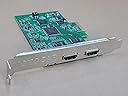
This card behaved like a true plug & play video capture device, and was immediately recognized as the main camera on a HP workstation. (I did install drivers before installing the card.) The card also shows up as a sound source. However, as many customers experienced, I did not get the sound to work with my Sony ILCE-6400 camera. This didn't bother me, since I never planned to use the camera's microphone as my sound source. So in the end I had the solid PCI-based HDMI input that I wanted.
C**S
Amazon & YOTO CAP not willing to refund me for a defective product
This worked long enough to get past the allowed return date. Once it failed I contacted Amazon for a refund and was told it was past the date to return. I then contacted YOTO CAP for a refund and they are not willing to reimburse me. I'm leaving this negative review until they refund my $$$. I will update this review once they refund my $$$.
R**O
Four installed in my pc and working good
Good product for an inexpensive solution. I got four cards in my computer three with Aida cameras and one with a Avipas ptz, using OBS to stream church mass and they work good. I noticed one camera flicker sometimes but I have not yet isolated the source of this problem, not happening often enough to be a real issue. Trying now to use OBS virtual camera but create a conflict with one of the cards. I donโt know yet how to resolve the conflict so I can use at the same time the video of the five cameras (four capture cards plus the obs virtual camera)
T**Y
Cheapest PCIx card I could find, works great the OBS and SLoBS DOES NOT CAPTURE AUDIO IN EITHER
Using as a secondary input capturing one of several GoPro5 Black's HDMI output for livestreaming. Works reliably, does not seem to capture audio (when I had a Roku stick or GoPro Hero 5 connected for testing) there are USB adapters available for less money which do that. In my application, that is not an issue though. If you just want to capture video and keep your USB available (perhaps for more capture devices), it's a good choice. If you want audio too, https://www.amazon.com/PUTELTAL-Capture-Dongle-Recorder-Streaming/dp/B0818M8TW1 does the job. LET ME SAY THIS AGAIN TO BE CLEAR EVEN THOUGH THE SELLER SAYS OTHERWISE, THIS CARD HAS BEEN UNABLE TO CAPTURE AUDIO FROM HDMI AFTER SEVERAL ATTEMPTS. DO NOT EXPECT AUDIO TO WORK.
Trustpilot
1 day ago
3 days ago