


Desertcart purchases this item on your behalf and handles shipping, customs, and support to Kyrgyzstan.
🚀 Elevate your display game with flawless 4K clarity and rock-solid connections!
The Cable Matters 6ft DisplayPort to DisplayPort cable delivers ultra-high-definition 4K video at 60Hz and supports high-fidelity digital audio. Featuring gold-plated latching connectors and robust shielding, it ensures stable, interference-free connectivity for monitors and projectors. Engineered to UL Style 20276 standards, this DisplayPort 1.2 cable is perfect for professionals and gamers seeking reliable, premium performance.
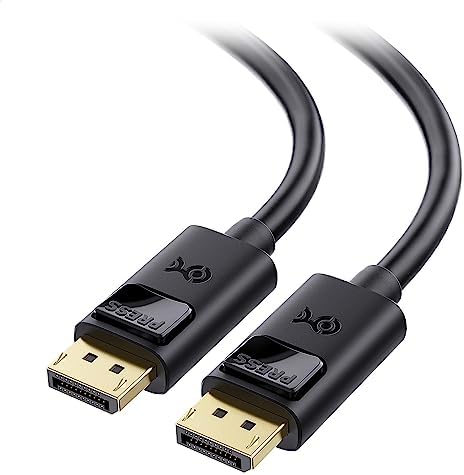


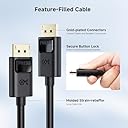


| ASIN | B005H3Q59U |
| Best Sellers Rank | #2,056 in Computer Cables & Interconnects |
| Brand | Cable Matters |
| Brand Name | Cable Matters |
| Cable Type | Display Port |
| Color | Black |
| Compatible Devices | Monitor, PC |
| Compatible Phone Models | No Compatible Phone Models |
| Connectivity Technology | DisplayPort |
| Connector Gender | Male |
| Connector Type | DisplayPort |
| Customer Reviews | 4.6 out of 5 stars 8,755 Reviews |
| Data Transfer Rate | 8.64 gigabits_per_second |
| Ethernet Cable Category | Cat 5 |
| Frequency | 144 hertz |
| Global Trade Identification Number | 00738435980344 |
| Indoor Outdoor Usage | Indoor, Outdoor |
| Item Length | 1.83 meters |
| Item Shape | Round |
| Item Weight | 4.8 ounces |
| Manufacturer | Cable Matters |
| Model | 102005-6 |
| Model Name | FBA_102005-6 |
| Number of Items | 1 |
| Number of Pins | 20 |
| Other Special Features of the Product | DisplayPort 1.2 |
| Outer Material | Polyvinyl Chloride (PVC) |
| Part Number | FBA_102005-6 |
| Recommended Uses For Product | connecting computer to monitor or projector for work, gaming, or streaming purposes |
| Special Feature | DisplayPort 1.2 |
| Specification Met | CE |
| UPC | 738435980344 |
| Unit Count | 1 Count |
| Warranty Description | Limited One-Year |
K**A
Good product
on time as described and working
V**D
They're working so far; no complaints. Also did a lot of research on cable jacket information.
Haven't had an issues with these cables thus far. I plugged them in, tested them, tested the buttons to make sure they remove smoothly; make sure not to yank them before pressing the removal lock buttons. I'll update if I run into any issues. That said... I did some research, and I wanted to make some things things known. 1.) Model 102005, Cable Matters 4K cable (that's this model) has 28 AWG wires according to my correspondence with the company. 2.) The labeling on this cable jacket is "E474198-E" "AWM Style 20276" "80^C 30V VW-1" 2a.) AWM Style 20276 is the UL style/ as dictated by Underwriters Laboratories, which lays out the standards and procedures for manufacturing and labeling of the cable. 2b.) E474198-E is the UL Manufacturer code. I don't know what the "-E" on the end means but that is assigned to Donguan Arin Electronics Technology Co Ltd. 2c.) 80^C (Degrees) is the maximum rated temperature of the cable; 30V is the maximum rated voltage of the cable; VW-1 means it's compliant with UL's VW-1 Flame Test (aka Vertical Wire Flame Test). 3.) Cable Matters makes another cable, Model 102025 sold on Amazon, which is their "8K" cable model. They said that the 8K cable has 30 AWG wires, which in AWG means that 30 AWG is thinner than 28 AWG (Used by the 4K cable). 4.) Model 102025 (the 8K cable) is VESA DisplayPort certified for their 3, 6, and 10 ft length variations, as listed on the official DisplayPort website (Model 102005, the 4K cable, is not). 5.) Model 102025's jacket labeling is "AWM E321484" "Style 20276" "80^C 30V VW-1" 5a.) Since I explained Style 20276 and the temp/volt/flame ratings above, I need not explain them again. 5b.) E321484 is the UL Manufacturer code listing for Shenzhen Anpubaoguang Electronics Co Ltd. 6.) I asked in my correspondence with Cable Matters what the mechanical differences between the Model 102005 and 102025 were, as they look almost identical and the only difference in their advertising is one of the cables is advertised as 4K and the other advertised as 8K, including the cable construction diagram. While they told me the AWG (for some reason the 8K wires were thinner than the 4K wires), they could not elaborate further on any mechanical/construction differences between the cables. Should you buy the 8K cable? ¯\_(ツ)_/¯ Without more information (or testing) I remain skeptical of any difference between the two cables, other than the 4K cable and the 8K cable are manufactured by two different companies, and that Cable Matters decided to certify their 8K cable with VESA Displayport, however decided not to certify their cheaper 4K Cable. Both cables are constructed to UL Style 20276 specifications, so they're similar, but those specifications allow significant variation. At the end of the day I'd say go with the cheaper cable unless Cable Matters can demonstrate or explain specifically why the 8K cable is actually better, in mechanical terms. I hope this helps someone, though while this review contains a lot of information, it unfortunately cannot draw many conclusions other than skepticism. At least we now know what AWG the wires inside the cables are.
J**.
Gold Plated DisplayPort to DisplayPort 6 foot cable, and other unrelated problems
At this time I am not able to give a review concerning the Gold Plated DisplayPort to DisplayPort 6 foot cable. I am still trying to correct issues to the HP ENVY Phoenix 810-135qe CTO Desktop PC (ENERGY STAR)that was bought as a (CTO)customized HP ENVY Phoenix 810-135qe CTO Desktop PC. Everything that was agreed upon with the Customer CTO agent to be customized unit. I was specific, I had detailed everything I wanted done, he assured me that it would be done. HP didn't send the DisplayPort to DisplayPort, had to buy from Amazon.com. The didn't send the Audio cable either. I bought the HP ENVY Phoenix 810-135qe CTO Desktop PC which when delivered wasn't customized. I even called Customer Support, they told me to get back with the Sales Agent who sold me the HP PC. I have been on the telephone during the night, I called during the day, even during the wee morning hours. No luck at all. I have only bought two computers in the past 50 years. An Apple/2E, and this HP PC. Computers in the past 50 years I built from the ground up. Do the math, I am 71 years old. The last computer I began building was in 2006. During that time I kept with the updates for hardware, and software. Last December the motherboard died. To make it short, I am still trying to doing the near impossible, with a piece of junk into a working computer. I am still looking for questions to be answered from HP Customer support, some I figured out on my own. The other questions will have to come from HP Customer Support, along with their help, at the same time I won't be holding my breathe. I hope that HP's customer sales agent has nightmares, if you hear the name "Jerry" hang up on him. Jerry came off as a Veteran, and being a Vet. myself I felt comfortable that he was covering my back, so blame me in trusting. Bottom line is I will not buy from HP online ever again. ***** I should make this clear, just to be fair. I was on the web site of Amazon.com when I was looking for a Computer. The HP ENVY Phoenix 810-135qe was on Amazon.com which re-directed me to HP's Web site. I was dealing an HP customer sales agent who's name is Jerry. I still stand by what I said about the HP ENVY Phoenix 810-135qe, it is a piece of junk put together by HP. I have always had faith in Amazon in the past. The the HP ENVY Phoenix 810-135qe CTO Desktop PC (ENERGY STAR)that HP sent to me is still dead in the water, I still can not get help from HP's Customer support. As for the Gold Plated DisplayPort to DisplayPort 6 foot cable I just finished testing it on another computer. As for the cable I have to give it 5 stars. It is very well built, the connections fit tight. I had to buy the Gold Plated DisplayPort to DisplayPort 6 foot cable from Amazon.com. Shipment was sent on time as Amazon said in an e-mail. I will still buy from Amazon, at least they do what they say they will. Amazon has never let me down whenever I make an order. So I Apologize to Amazon, and to all the employees that work hard who makes Amazon who they are Today. Please excuse my actions, I was just frustrated at the time when I first wrote the review. - John W
E**I
Works with no graphic issues
Works as it should; bought this to replace another brand’s DisplayPort cable that I’d bought new but had constant flickering issues with. This cable has no flickering issues, and supports my 3440x1440 monitor just fine. I’m not sure if it’s because of the locking functionality that this cord has and the other brand’s didn’t, but I’ll be using this type from now on.
C**N
First cable didn't work so they sent me a new one.
This is an updated review of the Cable Matters DisplayPort Cable 6'. When I first bought this cable a couple months back the first thing I had noticed was that it immediately did not work. The cable would cut in and out displaying "displayport no signal" on my monitor. The only way to fix this cable was to bend it and if I had so much as touched it the display would cut out again. After much trying I came to the conclusion that the cable just didn't work so I wrote a one star review on amazon. After about a week or so Cable Matters reached out to me and offered to send me a new cable. So I took them up on their offer and after a short email to them they sent the new cable out to me with no questions asked except where I live and the serial number on the original cable. After about a week of waiting I received the new cable and hooked it up and off the bat there was a night and day difference between the old and new cable. The new cable actually worked as intended, which was kind of a surprise to me as I thought there would probably be a 50/50 shot of it working and maybe Cable Matters sent another bum cable but that was simply not the case. I was very pleased with their customer support and would the new cable a perfect score as it functioned as intended and was very cheap to boot but I can't give the product as a whole a perfect score as the hassle to write the old review and there was time lost dealing with the broken cable. Overall while it was a pain to deal with the original cable Cable Matters support made up for where it lacked in other places.
S**A
Great customer service, replaced cable with consistant output loss
This is not a great cable - on my Dell UW3145 running at 80Hz, it would sporadically, but consistently, flicker between normal output and no output (black screen). I struggled for a while to figure out what the problem was, dropping the resolution and frame rate to see if it was monitor bound, and I was about to look into RMA'ing my graphics card before I decided to try using a different DP cable. Simply switching the cable out for another worked, and I now have a perfect output, unhindered by the annoying output drops. I'd stay away from this cable if you're looking for a DP cable - I only wish I had figured out it was a bad cable while it was still within the return window - what a waste of $10. The only reason it gets 2 stars is because it did somewhat work, so long as you could deal with losing all visual output for ~10 seconds every 30 seconds-10 minutes at random. EDIT: I was contacted by Cable Matters soon after writing this review, and they're sending a new cable my way soon. I'll update this review after I try it. EDIT2: So, I made the replacement cable my main cable again for a few weeks to see if I'd have any issues. My AMD drivers gave me issues about a displaylink failure. however my display still ran uninterrupted at the full resolution and refresh rate, so there didn't seem to be an issue. I was still going to dock this cable a bit for that, but after I switched back to my previously issue-free cable, it gave the same warning, so it must be a driver error. I'm happy to bump the score up to 5 stars for a working cable & good customer service.
B**N
WARNING: Totally killed my MacBook.
I'm using mine to connect a Dell U2713HM to a 2016 MacBook Pro. It works just as expected, although getting it to that point took a lot longer than I expected. After some research, I discovered that this particular monitor (and probably some other Dell monitors) can be finicky if you don't follow the steps in the right order when you set it up for the first time. My advice if you have one of these monitors: Completely power-down your monitor first. Unplug it. Hold the power button down for 5-10 seconds. Then plug it back in and power it on. Then start up your Mac. Only after it's booted up, should you plug in the display cable. There's a handshaking process that occurs, that went badly for me the first time I plugged the cable in (due to not fully resetting the monitor first) that caused the Mac to not recognize the monitor correctly, and no amount of reboots would fix it.. The fix for me was to hold down shift while booting up the Mac, booting it into a mode where it could re-recognize the monitor. Anyway, long story short, reset your monitor first, and connect the cable after your Mac is booted up. If it doesn't recognize it correctly, try booting into safe mode by holding down shift on boot up, and then retrying.
A**Y
Thicker than I expected, but not overly stiff
This cable is a lot bigger than I expected it to be, but still remains very flexible. I use this cable to connect my work laptop to my Dell 23" monitor when working from home. The cable needed to be flexible because it runs about a foot to the back of my desk and then takes a 90-degree turn downward to get out of sight (I hate seeing cables on my desk). This bend in the cable has introduce no degradation of video quality and doesn't appear to have caused any damage to the cable or jacket either. Because I work from home only one day per week, this cable is plugged in or unplugged at least twice per week. After a few months of this light abuse, the connector is still in excellent shape. At first, I had to get used to the push-button release, as I'm used to using HDMI cables which don't have any sort of latches. Despite some accidental abuse there, the connector still connects with a satisfying click and holds the cable firmly in place. Video quality through this cable is excellent. I've run a number of tests on it and don't see any noise or artifacts, and the colors on the Dell monitor are as faithfully reproduced as they are with the DVI cable I've had connected to my gaming desktop for years. I can't speak for any longer distances as I don't own those cables, but the 6-foot cable is great. All in all, this cable feels like a high quality cable and has excellent video quality. Highly recommended!
C**E
Perfect
I'm using Ergotron WorkFit-S and connecting dual 23.5" LCD monitors with my ThinkPad docking station via two displayport cables. The problem encountered before was sometimes the monitors showed a black screen and reported no displayport signal when raising or lowering keyboard and monitors. After replaced the previous Sawa-Supply displayport cables with these ones the problem SOLVED. It's really important to choose the correct displayport cable!
M**O
good quality
Good quality!
V**S
produto de excelente qualidade
Inicialmente comprei um produto mais barato de marca desconhecida, meu monitor de 144hz ficava piscando sem parar. Então decidi comprar um produto de qualidade porém sabendo que o preço seria consideravelmente maior, mas garanto que valeu a pena, o monitor apresentou a qualidade de imagem que deveria entregando os 144hz, não tive mais o problema do monitor piscar. Recomendo!
Z**E
Exactly what I paid for
Paid for a cable, a cable arrived. Amazon wants me to leave a review so here we are. Will it plug into your display? Yes. Will it change your life? Maybe. Only one way to find out.
D**.
Increible
Este cable DisplayPort a DisplayPort con seguros ha hecho que mi vida sea mucho más fácil y cómoda. 🔒 Los seguros en los conectores son un toque genial. Finalmente, puedo decir adiós a la molestia de que el cable se suelte por sí solo cada vez que muevo mi pantalla. Esto ha marcado una gran diferencia en mi rutina diaria. 📏 Aunque es un excelente cable en muchos aspectos, echo de menos que fuera un poco más largo. A veces, la distancia entre mi pantalla y la fuente es un reto, y un cable más largo sería perfecto. 🏆 Cabe destacar que este cable ha estado en uso durante un año y sigue funcionando como nuevo. Su durabilidad y calidad son realmente impresionantes. No ha mostrado ningún signo de desgaste. En resumen, este cable DisplayPort ha sido una adición valiosa a mi configuración de pantalla. Los seguros son un salvavidas, y su durabilidad es destacable. Si necesitas un cable de alta calidad para tu configuración, este es una excelente elección, aunque quizás quieras considerar la longitud en función de tus necesidades específicas. 👍🔌😄
Trustpilot
4 days ago
3 days ago