๐จ Elevate your creative flow with Wacomโs ultimate desk armโbecause your art deserves the perfect angle.
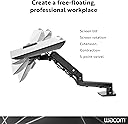
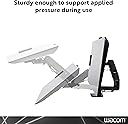
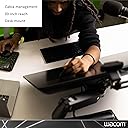
The Wacom Desk Arm for Cintiq 24 and 32 is a robust, flexible mounting solution designed to enhance comfort and productivity for professional creatives. It supports large Cintiq displays up to 32 inches, offers 360-degree adjustability, and extends across 30 inches of desk space. Its heavy-duty construction ensures stability during intense drawing sessions, while the easy clamp and hook design enable quick installation and space-saving desk organization.


| ASIN | B07KGXCDKR |
| Active Surface Area | 30 inches |
| Best Sellers Rank | 249,283 in Computers & Accessories ( See Top 100 in Computers & Accessories ) 469 in Drawer Organisers (Stationery & Office Supplies) 2,434 in Tablet Stands |
| Box Contents | Wacom Flex Arm Desk Clamp Extension Arm Spring Arm Mounting Braket Quick Start Guide Bag of Parts 6 M 4 x 12 flat Philips head screws, 1 M 4 X 8 Portrait/Landscape lock screw (Hex) 2 M 6 x 14 Pan head hex screws for pivot quick attachment 2 1mm thick washers for pivot quick attachment 1 L-shaped hex driver for set screws 1 T-shaped hex driver for arm tension adjustment 1 T-shaped Philips head drivโฆ |
| Brand | Wacom |
| Brand Name | Wacom |
| Colour | Black |
| Compatible Devices | Cintiq Pro 24 (DTK2420K0, DTH2420K0), Cintiq Pro 32 (DTH3220K0), Cintiq Pro 27 (DTH271), Cintiq Pro 22 (DTH227) |
| Connectivity technology | Standalone |
| Customer Reviews | 4.7 out of 5 stars 322 Reviews |
| Display Type | LED |
| External Testing Certification | Nรฃo aplicรกvel |
| Global Trade Identification Number | 00753218986450 |
| Item Dimensions L x W | 52L x 50W centimetres |
| Item Type Name | Wacom Flex Arm (ACK62803K) |
| Item Weight | 7.62 kg |
| Manufacturer | Wacom Technology Corporation |
| Manufacturer Part Number | ACK62803K |
| Model Name | Desk Mount |
| Model Number | ACK62803K |
| Model name | Desk Mount |
| Native Resolution | 1920x1080 |
| Network Connectivity Technology | Standalone |
| Number of Items | 1 |
| Operating System | Windows, macOS |
| Operating system | Windows, macOS |
| Pressure Sensitivity | 8192 Levels |
| Pressure sensitivity | 8192 Levels |
| Product Features | Flexible |
| Screen Size | 30 Inches |
| Special feature | Flexible |
| Specific Uses For Product | personal, gaming, business |
| Target Audience | Teacher |
| UPC | 753218986450 |
J**L
This Flex Arm is Absolutely Necessary
I'm a multimedia producer who does a lot of animation, video and drawing. I bought the Cintiq Pro 24" in 2022 but I didn't use it much because it was too big and I couldn't get the right angle on my desk or on the shelf next to my desk. I almost sold it because i refused to spend another $300+ dollars on an accessory. Then when I saw I could make payments to ease the pain of paying more for the tablet I decide to get the Wacom Flex Arm and it changed everything. Now I use the Cintiq every day, all day long. With the arm I can get it into the perfect drawing position and I also take advantage of the 4k resolution and bringing it as close as possible for seeing details in my video and motion graphics. The Flex Arm is absolutely essential for this reason. The construction is solid. It's really heavy so you'll need a desk that can handle the weight. I use a music production desk that can support 300 lbs so I have no problems with that. You'll see in the photos I have the arm clamped to the side of my desk and it works great. The other thing that has helped my daily workflow is being able to move the tablet out of the way when I'm not using it and I can also store it at 90 degrees so my cats don't jump on the screen at night when I'm not using it. It was also much easier to assemble and install than I thought it would be. I was able to do it all myself since they have a heavy duty hook design on the main mount so you can hook it on to the mount and hold it there while you turn the screws to fasten it. I've heard complaints of wobbling when drawing with the arm. I don't have a problem with that. It does slightly wobble but the tablet and the arm are so heavy it doesn't affect my drawing. I think the people who use other brands and a VSA mount get more wobbling. The Wacom Flex Arm is definitely the way to go. I'm very happy with this purchase.
B**E
Don't hesitate. Positives outweigh the negatives by a healthy margin.
This thing has made using the Cintiq pro 24 soooooo much nicer. It is easy to set up, but you definitely want a desk that is solid enough to handle such localized force & weight. I have a cheap Ikea sit/stand desk and I suspect it is *just* enough in terms of sturdiness. There is no warping or flexing visible, but I would hate to REALLY test that with a 32. Adjusting the tension made this arm exactly what my workspace needed. I can use the cintiq with great comfort, using only minor pressure to rotate it or adjust it. And when I don't need to paint/sculpt, I can swing the cintiq up and to the side to use it simply as an additional monitor. My desk is totally uncluttered. I don't know what else needs to be said. This was worth the money and I am totally content. Build quality seems exceptional. It shipped out and arrived in less than 24 hours. Fantastic!
E**E
Fantastic piece of equipment
Fantastic piece if equipment, has made a significant improvement to my studio. desk setup. Very easy to setup and assemble.
A**R
A Wacom arm for a Wacom tablet
This arm is pricey yes, but for the Wacom brand itโs the best one for their tablets when you factor in it comes with the adapter for their bigger models and gives you ample free range for movement unlike the more rigid stands you can buy. My Wacom 24 pro is safe and secure and instructions on how to instal it are clear and itโs fairly easy to instal. You can tighten bolts within the arm to make it more rigid or loosen them to move around the tablet with more ease. Then tighten them again once you have it in the perfect place. The clamp is fairly thick and heavy and goes quite a ways into the desk you clamp it on so I would not recommend you using it on a glass top desk. Follow the instructions and a second person would help in The installation process but it can be done alone (as I did). Overall the arm is pricey yes, but it is holding up a 3000 tablet in my case and I know that I wonโt worry about any of the components failing. A small investment for some piece of mind in my opinion for a very costly piece of equipment!
K**E
Easy to mount to desk, super sturdy build
After buying my Cintiq Pro 24 I debated for a few weeks about if the flex arm would be right for me. I had a really inefficient setup that required a lot of awkward lifting and shuffling to get my Cintiq from where I was storing it (in the thin foam sleeve it was packaged in, turned around and propped between my heavy desk and wall to keep the cat off of it) to where I was using it (the bottom propped on the edge of my keyboard drawer with the legs propped on my desktop). I knew I wanted the flex arm, I was just really uncertain if there would be a way to rig it to my desk, which has a 4 inch verticle panel along the back. I contacted Wacom and it turns out they also didn't think there would be a way, and suggested I try to find an ergotron mount instead. After looking at photos of the desk mount, it turns out there IS A WAY TO MOUNT IT! Basically all I had to do was drill two holes in the back panel of my desk (well, really I had to drill 4 since the first two were too low) and buy two longer 14mm bolts (the included bolts are about 1/2inch, I ended up needing 1 1/2inch, definitely stick with a hex bolt too as the underside of a desk might be awkward to reach for a screwdriver) . I've included some photos of my rigged mount so if anyone is curious if their desk can accommodate the flex arm, it can! The flex arm is super sturdy and stable! I've heard a lot of people say theirs wobbles around but when I got mine set up I almost couldn't move any of the joints. Each joint has a hex bolt somewhere that can be used to tighten or loosen the joint and I had to loosen the vertical arm a substantial amount before I could drop the Cintiq down into my lap. For anyone curious, there is absolutely a tightness level that allows you the move the Cintiq from a stowed position to whatever drawing position you use without wobbling around. The flex arm is super stable, but also will need an equally stable desk; the mount weights a ton! I'm not knocking any stars off my review for the extra work to mount it because it was not an inconvenience to me and I truly believe you get what you pay for in quality. I know the price point isn't accessible to everyone but I stand by Wacom's products 100% and have for over a decade. If you want quality that lasts, spend the money.
Trustpilot
1 week ago
2 months ago