We remain fully operational. Our teams are working around the clock to ensure your deliveries continue safely.

DOWNLOAD THE APP


Customer Services
Copyright © 2025 Desertcart Holdings Limited
DOWNLOAD THE APP


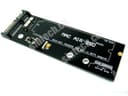

💼 Unlock your vintage MacBook Air SSD’s potential—because your data deserves a second act!
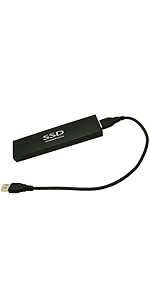
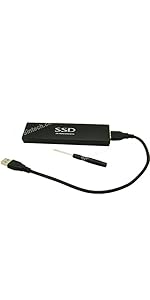
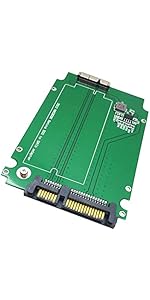
The Sintech 18pin to SATA Adapter with USB3.0/Type C cable is a precision-engineered solution designed exclusively for 2010-2011 MacBook Air SSDs (models A1369, A1370, A1377). It converts proprietary Apple SSD connectors into standard 3.5" SATA or USB external storage, enabling fast data transfer and easy recovery. Compact and power-compatible with 3.3V and 5V devices, this adapter is a must-have for professionals seeking to reclaim valuable data from legacy Apple hardware without hassle.



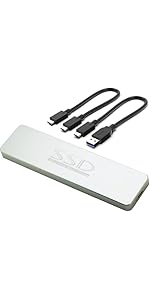


| ASIN | B00KZIA1VK |
| Best Sellers Rank | #323 in SATA Cables |
| Brand | Sintech |
| Color | For SSD From 2010-2011 Year |
| Customer Reviews | 4.5 4.5 out of 5 stars (211) |
| Date First Available | June 18, 2014 |
| Hardware Platform | Sata |
| Is Discontinued By Manufacturer | No |
| Item Dimensions LxWxH | 5.19 x 1.69 x 0.47 inches |
| Item Weight | 2.39 ounces |
| Item model number | PAUB23+25A |
| Manufacturer | Sintech Electronic |
| Product Dimensions | 5.19 x 1.69 x 0.47 inches |
B**T
IT WORKS!!! OMG IT WORKS!!!
This is EXACTLY what I needed and it works perfectly and was super easy to set up. My old laptop, a 15 inch retina MacBook Pro that I bought in July 2012 finally died last week. I was watching a YouTube video and the screen just went black and it wouldn't turn back on. I tried everything within my power (well, with google and YouTube at my disposal of course) like booting in Safe Mode, in Recovery Mode, in Transfer File mode or whatever it's called, and nothing worked. I'm way out of the Apple Care warranty, and a local Mac repair shop wanted $70 just to look at it, then anything else they did would be extra. As far as I can tell it's not a software issue but a hardware one, and even a used logic board is like $260 and I'd have to do the install myself. I'm long overdue for an upgrade, but I kept using this computer because it just kept going, but it's not worth putting a bunch of money into it at this point. There were a few gigs of stuff I wanted from the hard drive though (most stuff is backed up to an external drive and the cloud but not everything), so I wondered if there was a way to turn a laptop hard drive into an external drive that I could extract data from, like a USB stick or something. And it turns out you can! And this adapter is exactly what I needed. (By the way the website/YouTube channel Apple Dollars was super helpful to me in this process, check it out!). I already had one of the special screwdrivers to get the hard drive out, which was actually really easy. And once this was delivered it took like 2 minutes to plug the drive into this adapter, then plug the adapter into my Mac mini desktop, and I got all the data I needed! This adapter has 2 usb plugs, I gather you have to plug both in for the extra power to actually get your old hard drive to wake up or whatever. Anyway, I'm not a computer expert but I'm not afraid to open up the laptop and try stuff, and this worked perfectly. And for like $19 it's totally worth it. There are a ton of adapters like this one depending on the type and year of your laptop, so if this isn't exactly the one you need keep searching! Totally worth it and now I have a 256GB external drive to play around with. The actual adapter was mislabeled, it says 8 + 18 pin on it (you can see that in the pic) and before I plugged in my hard drive it said "For MacBook Air only" on it. But I have a MacBook Pro, not air. But it must have been incorrectly labeled or something because it totally worked for my MBP, which is a proprietary 7+17 pin type (or 24 pin). Anyway, I almost went to Amazon immediately to request a return, but then I put the hard drive on top of the adapter and it looked like it would fit, and I tried and voila! It worked! So just be careful. The outside packaging is labeled right, just not the actual adapter, but I don't care. This saved me a ton of money and I got all my data so I'm 100% happy. And I don't get anything for writing this review by the way. I bought this for full price because I needed it and I'm thrilled that such a product exists and worked so easily. I'm just trying to be helpful and use my decent reviewer number to try and provide reliable, honest reviews. Again, check out apple dollars (dot com), click on Troubleshooting and then Data Recovery. No, I don't work for them lol. That site/YouTube video was just totally instrumental in my process so I thought I'd pass it along.
~**T
Worked Great
Bought this to get the data off a 256GB SSD from a mid 2012 Macbook Pro Retina 15 A1398 MC975LL/A that had a bad logic board. It shipped fast, was a good price and did exactly what I needed it to do. It would have been a nice little bonus if the SATA to USB cable that came with it worked on other drives, but none of the ones I tested worked. In any case, I'm happy with my purchase.
J**4
Good Adapter
Let’s me use my old MacBook Air SSD as a SATA drive. Provides the drive with pretty good speeds also, nothing really to complain about here! You can use it either internally or externally.
J**V
Does the basics
A blue and red LED on the SATA connector light up but nothing else happens. Tried 15 different SSD’s and nada. Update, few days later. A new one was sent that does work. Just took a few days to receive the new one. It gets the job done but please know this is only for drive testing or data recovery! At most this adapter provides 40MB/sec read and write. The drives can handle a few hundred MB/sec so if this was USB 3.0 it would actually be useful as an external drive as well. With the current speeds however, this only has specific uses.
M**S
Fit well, didn't work. UPDATE: It works!
This adapter fit perfectly for my MacBook Air SSD, but when I connected it to another computer via USB, no external drive appeared. I don't know what's wrong, but it doesn't help me recover my data. UPDATE: It works! I'm changing my review to five stars. I fixed my problem by connecting the adapter to a laptop with the same OS as the OS on the external SDD. Very cool.
L**N
Worked for my MacBook Air (late 2010)
I upgraded the SSD in my MacBook Air and used this to make the old SSD into an external drive. Works excellent. I was able to hook it up to my MacBook after installing a different hard drive and was able to use migration assistant to transfer files without issue!
L***
It works with SSD of Macbook early 2013.
Macbook has startup faulty. Attempted to use for MBP ssd data extract. But cannot read out the data. So I have to find data recovery company to do the tricks that cost $500+ with success.
S**O
Package arrived on time
Excellent product, it works perfectly.
V**V
Worked perfectly and allowed me to salvage data from an old macboook memory card.
P**S
Worked perfectly to adapt a 2011 MacBook Air SSD into an optical drive bay adapter in a 2012 MacBook Pro. I was able to restore an image of the current macOS install to the drive by using Disc Utility in Recovery mode, imaging directly from the OS install drive to the 2011 Apple SSD. The system then needed the NVRAM cleared to make the drive the default boot drive. I didn't really need the USB 3 to SATA adapter but it works fine.
J**A
Excelente adaptador , lástima que no hay ninguna carcasa / enclosure para protegerlo No cabe en las carcasas SATAIII USB para 2.5"
P**E
If you’re using e Windows computer you have to download an APFS program
I**N
This enabled me to rescue files split across a fusion drive from a late 2012 iMac that would no longer boot (using this with the SSD and a separate enclosure for the 3.5” SATA HDD, and with both simultaneously connected via USB to a new Mac).
Trustpilot
1 month ago
3 days ago