We remain fully operational. Our teams are working around the clock to ensure your deliveries continue safely.

DOWNLOAD THE APP


Customer Services
Copyright © 2025 Desertcart Holdings Limited
DOWNLOAD THE APP

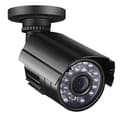
🔒 Secure Your Space, Anytime, Anywhere!
The szsinocam Wireless Security Outdoor IP Camera offers high-definition 1080P video surveillance with advanced IR night vision capabilities. Designed for outdoor use, it features an IP66 waterproof rating, ensuring reliable performance in various weather conditions. With smart motion detection and remote viewing options via smartphone, tablet, or PC, this camera provides peace of mind and security for your home or business.
| ASIN | B07S7PLX9B |
| Alert Type | Motion Only |
| Antenna Location | Security,Monitoring,Surveillance |
| Batteries are Required | No |
| Brand | XGTON |
| Compatible Devices | Tablet |
| Compatible devices | Tablet |
| Connectivity Protocol | ONVIF, Wi-Fi |
| Connectivity technology | Wireless |
| Control Method | App |
| Controller Type | Android, iOS, iPadOS |
| Customer Reviews | 3.7 out of 5 stars 7 Reviews |
| Effective Video Resolution | 1080 Pixels |
| Field Of View | 80 Degrees |
| Form Factor | Dome |
| Indoor Outdoor Usage | Outdoor |
| Indoor/Outdoor usage | Outdoor |
| Light Source | Infrared |
| Manufacturer | XGTON |
| Material | Metal |
| Mount Type | Wall Mount |
| Network Connectivity Technology | Wireless |
| Night Vision | Night Color |
| Other Special Features of the Product | Night Vision |
| Photo Sensor Technology | CMOS |
| Power source | Corded Electric |
| Recommended uses for product | Security,Monitoring,Surveillance |
| Room Type | Office |
| Special feature | Night Vision |
| UPC | 746362830380 |
| Unit Count | 1.0 count |
| Upper Temperature Rating | 60 Degrees Celsius |
| Video Capture Format | MP4 |
| Video Capture Resolution | 1080p |
| Water Resistance Level | Waterproof |
| Waterproof Rating | IP66 |
| Wattage | 6 watts |
| Wireless Technology Type | Wi-Fi |
J**N
looks great and works well
The camera looks great and works well...Set up in about 15 minutes and the quality day and night is very good.Instructions very clear... The camera is very well built and feels solid enough to work as an outdoors camera. The quality of this camera is amazing,clear enough to see faces and read number plates... The camera doesn't come with a memory card, so I bought and installed a 64 Gb one. Now the camera works fine and it saves the images on the memory stick...
V**Y
Lot's of problems
Cannot adjust vertical angle, only horizontal, very short indoor NOT outdoor power cable provided. Motion Detection doesn't work as constantly takes pictures every few minutes despite setting motion detection area to an area with no movement (shrubs, trees, etc.), doesn't allow you to configure the schedule of recording as returns Error 400: Bad Request, doesn't save videos in avi format as per instruction manual and therefore cannot playback videos on PC or macbook (all files have no valid extensions used by any media player), cannot save images to SD card as returns Error 400: Bad Request, interface doesn't have an option to playback media files as per instruction manual, absolutely terrible product - don't waste your money!
S**Y
A great improvement on older PRC webcams
This was easy to connect to my router from a desktop (as opposed to a previous webcam, which demanded a smartphone that I do not have), and so far has performed well. I have not yet tested range or night vision, but so far seems very good value. As for security, I'm not qualified to comment, but a recent Which? article came down quite hard on the security (or lack of) of Chinese webcams.
A**M
Video camera doesn’t work
Very poor quality Chinese And hay presto doesn't work so now I have to waste my time sending it back
T**Y
Great camera
These are great cameras for the money although they do have a couple of niggles i.e. they can be confusing to set up and the PC access does not work on an Apple MAC, (as far as I can ascertain). In saying this I'd still buy one. The way I approached set up: 1. Downloaded the CamHi ap on my android phone, easy 2. Connected the camera to power, waited a minute while it booted up, (you can check it's working by covering the lens and you'll see the white LEDs come on) 3. Connect the camera to your router with an ethernet cable, you'll see the small green light flash on the camera ethernet connector, (the largest of the 3 connectors) 4. Go to the CamHi ap and select add camera 5. Select search cameras from LAN, you should see it list the camera which is defined by a string of letters and numbers 6. Select the camera, it will say connecting (in green text) and then on line (in blue text) 7. Go to settings (little wheel symbol on the right) 8. Select WiFI settings, click on Wifi Manager and select your WiFi network and enter your password. 9. Disconnect the ethernet cable and you should now be able to connect over WiFi and see a picture of whatever it's pointed at Now install the camera where you need it, power it up and bingo! What I have found is that we recently switched to fibre with a new router, to get the camera working again I had to repeat this process. Note 1: In the instruction booklet it says you will be able to see the camera listed on your phones list of WiFi networks, I did try this and it did appear once disappeared and I could not get it back, I do have a WiFi range extender although with or with out it on I still could not see it listed; hence the approach I've out lined above which I hope may help a few people. Note 2: I cannot get the camera to catch video to the SD card as it appears to constantly trigger, I've searched Google etc. and the setup is shown on YouTube although not on the phone ap but on a PC which appears to use a different programme to the ap, I can't try this at the moment as I have an Apple Mac not a Windows based PC.
Trustpilot
2 weeks ago
3 days ago