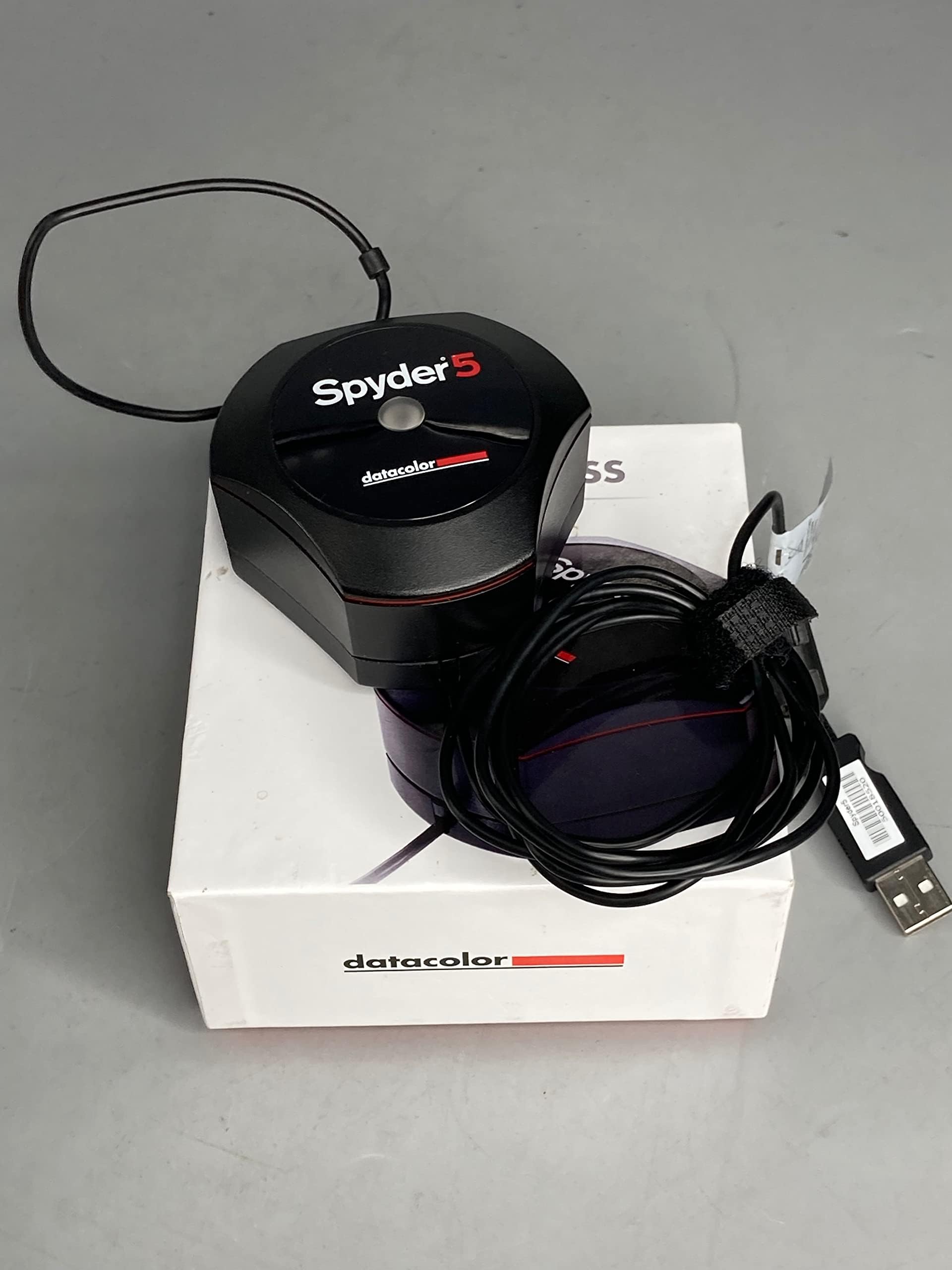
Spyder5EXPRESS – Designed for Hobbyist Photographers (S5X100)
Product ID: 13773043
🌗Ambient light monitoring
📊Display performance analysis
⏱️5-min fast calibration
Desertcart purchases this item on your behalf and handles shipping, customs, and support to Kyrgyzstan.
🎨 See True Colors, Edit with Confidence, Print Like a Pro!
The Datacolor Spyder5EXPRESS is a fast, user-friendly color calibration tool designed for hobbyist photographers and creatives. It ensures your laptop and desktop displays show accurate colors by calibrating in about five minutes, factoring in ambient light for optimal brightness. With features like before-and-after comparisons and multi-monitor analysis, it minimizes print errors and streamlines your photo editing workflow, making your digital images look exactly as intended both on screen and in print.


| Best Sellers Rank | #361,377 in Electronics ( See Top 100 in Electronics ) #1,134 in Motion Detectors (Electronics) |
| Customer Reviews | 4.2 out of 5 stars 885 Reviews |
L**G
Very easy to use, and seems to work well, if not perfect.
The problem I had previously was that the two laptop screens have strong color cast. When I connect my laptop with my monitor, it color doesn't match at all. I'm no professional graphic designer, but I take pictures regularly, and has always had the doubt that however the color look on my screen, it will look different on another viewer. After calibrated with spyder 5 express, which only takes 5 mins on me, and maybe 15 mins in total, the color cast is all gone. There is still a very slight color difference (hue, saturation) between 3 screens, but I attribute that to the display quality itself. Now the white color looks the same. It might still looks different on someone else' screen, but if theirs get calibrated as well (which I believe all professionals, and most prosumers do), the difference should be minimum. One thing to notice is how the software interact with windows 10. Initially I switched to my laptop monitor view only, calibrated it, then switched to monitor display only, calibrated it, then I switched to the extended mode. Windows 10 only use the color profile for the monitor display, and therefore, the color on the laptop display was still off. So I calibrated the monitor display again, but in the extended mode. Now they are the same. I suspected that there is some configuration in windows that would allow you apply color profile to each display directly, but I didn't spend the time figuring it out. The calibration process was fast enough that I just did it again. Overall, I'm very happy with the product, and will recommend this to other people.
P**L
Spyder5 Express
I have two desktops and two laptops at my home. I started this venture when I sent in photos to be printed out in a photo book and the pictures came out horribly. Low contrast, low brightness and just terrible. I had a copy of one of the digital photos that I had sent to be printed and decided to check it on all of the screens. Well, it looked different on every screen and only looked good on the computer screen that I had used to edit and upload pictures for printing. Calibrated all using the datacolor software and was quite happy with the results. I felt it did a real nice job with the screens I calibrated. A heck of a lot better than what I had. I then decided to test how close all the screens were to being equal by testing each screen with a test digital photo. Although close, there was still some differences but again, not too bad. Three of the screens looked pretty good and one of the laptops was not good. I calibrated the laptop two more times with the same poor results. I bought the laptop for my wife and it is only about 8 months old and not even used all that much. Anyway I ended up researching my issue and found a lot of useful info as well as a lot of confusing info. I came back to Amazon site to read read reviews that had been posted by owners of the Spyder5 Express. I noticed that several reviews complained that the datacolor software was just ok but there was a lot better software available. The popular Software was DisplayCal and Argyll which work together. DisplayCal is the GUI while Argyll is the software that does all the work. I figured what do I have to lose and I tried it. It was amazing and the laptop that was very poor, popped back to life again after running the calibration procedure. The calibration procedure takes about two hours but is well worth the time since all of my screens now look even better since I did recalibrate them as well with this new software. I was totally impressed how it brought the problem laptop back to life. In my opinion, the Spyder5 Express works good using the recommended software but works fantastic using DisplayCal and Argyll software. DisplayCal and Argyll are free by the way!! The site does ask for donations and I for one will certainly make a donation because of the fantastic product they have. I am extremely happy with my computer screens now. Now what I see on my screen is what I should see when I get my photos professionally printed.
A**P
Works great, but it is S L O W !
About the size of a demitasse cup, it controls your screen (via easily downloadable software) and generates a profile such that what you see on the screen is what will come out of a properly set up printer. I used it on 2 computers. The first one had a decrease overall in screen brightness, and the second computer had an increase; in both cases colors seemed a bit more subdued. Works well, with one caveat: The software takes a very long time to install itself. On several occasions, it seems to have stopped installing, and the screen has time to go into sleep mode. This made me abort the installation first time after 20 minutes. The second, I just let it run and went to dinner. It finished installing. The calibration process requires that in a not overly brightly lit room, you dangle the device such that it makes contact with the roughly triangular outline "place sensor here" area. You start the calibration, and the screen changes color, but sometimes looks like the computer is hung up (have faith!); takes a long time. Better to start the run before you go to lunch!
M**M
Great entry level color calibration!
I wanted a cheap way to calibrate my two monitors to a similar color pallet. This does a great job of that, and it is super easy to setup. I am a graphic designer, and it is important to me to have consistent color across both screens. It was a little dark for my liking using the automatic calibration with the software provided, but I realize that it has to be darker to replicate how colors will print. However, I do a lot of web design as well, so my solution to this was to make my primary screen brighter after I celebrated the screens, so that the colors match better, but I also get a screen that gives a decent idea of how colors will print, versus how colors will look on the web for most. I have a pretty good color pallet, and considered using an alternate software with the hardware provided as recommended by some of the other power users. I felt like it was good enough for now, and am not yet going to go that route. Great price, great product, and after all my research going in, I am glad I went with this product.
A**R
Inconsistent results
I have used the spider utility on three separate monitors and it seems as if I have different coloring in all three of them. My thought was if they were all calibrated with the same utility/program then the colors should be consistent. One is an external monitor I have connected to my laptop (so I use two screens at once) and there is a difference between those two screens..... I believe both of my laptops are calibrated correctly but there may be a compatibility issue with my other monitor (it is an Acer, so not the best quality). For my laptops i would give this four stars as I do feel it does an adequate job albeit a little expensive for what it does, and for my other monitor I’d rate it a 1.
R**B
Works great with Linux and open source DisplayCal software
Excellent! I use to use a Spyder 2 back in the day and I wanted a calibrator that was a little more current. Enter the Spyder5express to the rescue. I am on linux (Ubuntu) and this calibrated both my external display and laptop screen. I didn't even use the Spyder software, which you download from the manufature's website. DisplayCal calibration software (also available for Windows and Mac) is in the Ubuntu software center. It is easy to use, and asks for the Windows Sypder software (.exe) file you downloaded from the manufacture. It extracts the calibrator's profiles from the software. After that, you follow the easy prompts. It takes about an hour per monitor, but is so worth it. Excellent device and linux ready!
A**T
Want a real difference? Get the Spyder 4 and software that actually works. Proofing with ICC profiles matters most overall.
*** UPDATE 4/29/2015 *** I returned the Spyder 5 Express, received the Spyder 4 Express, setup up Argyll + dispcalGUI (Datacolor software went straight into the trash), and a calibrated, and THERE WAS A CLEAR DIFFERENCE!! Calibrating your monitor does matter, using a calibration device matters, but MOST IMPORTANTLY the calibration software matters, and the Argyll + dispcalGUI is FAR SUPERIOR to the OEM Datacolor software provided for the Spyder 4 Express and Spyder 5 Express. I'm excited to see how much my prints might improve since I already thought they were great using the steps in my original review. Here's how to setup and calibrate using Argyll + dispcalGUI. 1) Do not install OEM software 2) Download Argyll (http://www.argyllcms.com/) and dispcalGUI standalone version (http://dispcalgui.hoech.net/#download) 3) Set C:/ path for Argyll folder 4) Install Sypder4 usb driver (http://www.argyllcms.com/doc/Installing_MSWindows.html#WIN8) 5) Run dispcalGUI then Menu > File > Locate Argyll CMS executables > point to c:/Argyll/bin 6) Menu > Options > enable Show advanced calibration options 7) Configure Advance options like this (http://www.modelmayhem.com/forums/post/870355/1#post17806610) 8) Run measurement tests and adjustment settings 9) Run calibration (in High speed since Medium speed took 1.5 hrs) then save and apply profile *** ORIGINAL REVIEW 4/16/2015*** I have never calibrated my laptop's monitor in the approximately 2 years I've had it. My commercial prints were coming out too dark, so I purchased this product. The improvement it provided was negligible, much to my surprise and disappointment. The process of getting photos printed with accurate colors involves more than just calibrating your monitor. This is what I have learned: 1) Reduce the brightness of your monitor to approximately 50% then use "Calibrate color" (just search for it), the built-in Windows utility. 2) Download & Install your commercial printer's ICC profile. Sometimes it might be available on their website but you'll probably have to call them and ask what brand & model their photo lab machine is then use Google to find the appropriate ICC profile file (local stores of the same chain seem to have the same models, ex: Walmarts close to where I live all use Fuji Frontier DL 600's) 3) Soft proof your photos in Photoshop using that ICC profile (View > Proof Setup > Custom). 4) Save your photos in the sRGB color space (check with your printer to confirm this). 5) Lastly, but not as important as the previous steps, you can try to print a hard proof on your home printer that will attempt to simulate the final product from your commercial printer, (File > Print > Color Management: Photoshop manages colors; Printer profile = your home printer > Change Normal Printing to Hard Proofing: Proof Setup = appropriate ICC profile) If you'd still like to get a calibration device then I'd say go for the Spyder 4 since it's less than half the price and the results probably won't be much different. I'm returning this. Argyll + dispcalGUI is widely said to better than any OEM software, but it currently only supports the Spyder 4, so I can't tell if just changing software would give me better calibration results. If it's superior hardware that you desire then get a calibrator from X-Rite which are said to be more accurate, longer-lasting, and have native support from Argyll + dispcalGUI. After following the steps above my prints came out perfectly at Walmart. Save files for viewing on the web as sRGB which is ideal for most monitors. Others can even download your photo and get prints that are fairly close in color accuracy as well. Hope this helps! *** Resources *** Download Argyll http://www.argyllcms.com/ Download dispcalGUI http://dispcalgui.hoech.net/ Setup Argyll + dispcalGUI http://www.modelmayhem.com/forums/post/870355/1#post17806610 ICC Profiles http://www.drycreekphoto.com/icc/ http://forums.adoramapix.com/entries/228224-Color-calibration-and-custom-correction
L**D
Calibrated my Linux desktop and my Windows 7 laptop.
I got the Spyder5 Express in yesterday and preceded to calibrate the displays on my Ubuntu Studio Linux Desktop and my Windows 7-64 Laptop. There are no instructions on how to use this, so you have to go to the Datacolor website. The website is printed on information in the box. All directions are on the website. You must register the unit before you can download their software. (Note: The only difference between the various units seems to be the software.) 1st, I calibrated my Linux desktop computer monitor. I installed DispcalGUI, which is DisplayCal3. This program downloads and installs additional software from the Datacolor website for this unit. After going through the basic information, everything else is automatic until it finishes. The software does extensive testing and took 2.5 hours to test and calibrate the monitor on my Linux desktop. Be sure your screen-saver is turned off. Something that I forgot, so I had to babysit it. (You can't get to the screen-saver controls while DisplayCal is running.) 2nd came my Windows 7-64 Laptop. After registering the unit and downloading the Windows software, I ran into some hardware registration issues. Namely, you are not supposed to plug it in to your computer until the software tells you to.... I also ran into a mild issue with the software database. Their software has nearly all of the manufactures and models listed in it. My Toshiba laptop was not listed. For that matter, Toshiba was not listed. I simply used the Generic manufacture. But after the software was installed on the Windows laptop, the hardware was recognized, and the basics were covered, the software went through a quick monitor check and started the calibration process. This check and calibration process was nearly all automatic. The Windows check and calibration software took 10 minutes. It does not do an extensive set of testing on Windows Computer Monitors. You will need the serial number of the unit to register it. You will find this number on the bottom and inside of the box. The instructions say that Datacolor software can calibrate 2 monitors at the same time which are hooked to your computer, including TV's used as monitors. The Datacolor license allows you to calibrate up to 5 computer display monitors.
D**.
Software basico e apparecchio eccellente
Ho acquistato lo Spyder 5 Express per calibrare il mio monitor 4k Samsung LU28E590DS. Il prodotto arriva in una confezione assolutamente adatta ed ergonomica, un cubo, al cui interno si trova lo Spyder con il suo cavo usb, una serie di manuali e fogli di garanzia. L'installazione è assolutamente tranquilla, consiglio di scaricare dal sito Datacolor direttamente i driver aggiornati, che comprendono anche il programma di calibrazione. La procedura di calibrazione è molto semplice, guidata passo passo, e la differenza si vede al termine sin da subito, anche grazie ad un sistema che mostra il prima e il dopo la calibrazione. Per completezza però consiglio l'uso di DisplayCal, programma freeware e open che gestisce la calibrazione molto meglio. Ha bisogno di un attimo di studio delle procedure, e la calibrazione stessa dura molto di più, comprendendo diversi passaggi, che vanno dal ritocco di parametri del monitor quali luminosità, temperatura, contrasto etc, all'analisi dei colori e quindi la vera e propria calibrazione. Io ci ho messo un'ora e mezza (mentre il programma Datacolor poco meno di cinque minuti), però lo consiglio per avere un'affidabilità maggiore del profilo di calibrazione creato. L'uso di questo programma permette di effettuare una calibrazione più accurata pur avendo un colorimetro entry-level, quindi lo consiglio a chi, come me, è appassionato amatore di fotografia.
C**C
Buenisimo (Usado en Cintiq, Monitor FHD y Television 4k)
Es la mejor opcion si te dedicas a la ilustracion y concept art, y no quieres tener detalles con los clientes porque ven los colores completamente distintos. Es bastante barato y facilisimo de usar, en mi caso lo use para calibrar una Wacom Cintiq 22" HD, un monitor Acer 24" FHD y una television (LG 43" 4k) que uso como monitor de referencias/general stuff.
M**!
Simple and Effective.
I bought the Spyder 5 Express. There isn't any difference in the sensor and if you decide later you want more options you can upgrade to the other software, although in all the years I have used Spyders I have never once used the other settings so decided to save money buying the express. Setup consists of tapping in a web address on your browser and following the instructions. It's really well done actually and there are even guide videos although you won't need them. The web page tells you what to expect then downloads the software which then resides on your PC. You are given a code that effectively ties the software to your specific calibration unit. That allows you to install the software on other PC's and calibrate all your screens. Should you get a new unit though you have to repeat the process to get a new key. The software will not work with ANY unit, only the one you bought. Sooner or later it will ask you to place the sensor on the screen. I needed to lean the screen back to get it to stay put, which is unfortunate. I guess you could use a ruler or something to lean against the sensor to hold it in place. The counter-balance weight isn't really a weight any more. It used to be heavy. Now it's really light. I ran off to get the weight for my old Spyder 2 which is an actual weight. It doesn't really matter though since you have to lean the monitor back anyway. Which brings me to a fatal flaw! If you have the monitor attached to the wall you may not be able to lean it back in which case it's a problem. I resorted to a piece of bamboo to press it against one monitor. There is a standard photo thread on one side of the Spyder. I guess that means you could screw in a mono-pod type arrangement to lean it against the monitor. The Express is very simplistic in that it asks hardly nothing and just wanders off and does everything automatically. You don't have to touch the monitor controls which means that all of the calibration is through a monitor profile on your operating system. In fact you don't need the Spyder application once the profile is established. One kind of bug I found in the operation is if you have multiple monitors and one or more are Display Port. You ideally want to minimise ambient light so you turn off any monitors except the one you are calibrating. Except, if its Display Port, Windows realises you turned it off and re-configures your desktop, which causes Spyder to have a fit. I just had a small soft towel handy to throw over the Display Port monitor rather than switching it off. The downside to the simple calibration is that it doesn't adjust the monitor controls so if you take the monitor on to another PC it is totally un-calibrated. My old Spyder 2 actually told you to adjust the monitor controls to get the best picture before it created a profile so if you took the monitor to another PC it was at least partially calibrated. The good news is of course there is nothing to stop you calibrating the monitor on the other PC. Something that I had never noticed before, was just how long it can take a LED monitor to warm up. It really can take up to 30 minutes, and I was initially very confused the day after I calibrated the monitors that they didn't match at all when I first powered them on. Sure enough about 30 minutes later they were a perfect match again. When Datacolor tells you to leave them on for 30 mins before calibration, really, do just that, you may be amazed how much of a difference there is. Oh, one complaint, the cable is about five feet long. Too short Datacolor! It wouldn't reach my PC!! So yes, get a USB extension cable ready, just in case. Datacolor should work on, though, is presentation. Overall you come away feeling you spent a lot of money on not a lot of goodies. I really think they should pad the software out with optional information. Something to just make you feel you got value for money. Another point is that there is no information about how it setup windows to use the profiles. For some video cards I found it literally did nothing because it didn't configure Windows correctly for that video card. I had to manually set the profile before it worked. More info please Datacolor! Anyway, all in all, even in it's cheapest configuration it seems expensive, but it is worth the money. Especially if you have several monitors, this really is essential to get them matching each other.
W**L
Adjusted monitor colors accurately
The Spyder5Express worked as expected. The software to run the device was easy to find and install. Once the software was installed the device calibrated the screen in a few minutes and create a profile file for the screen. I have 3 monitors and was able to calibrate all 3. After calibrating the screens moving the same image to all three monitors it looked very similar. Prior to calibration the image looked completely different on each monitor. I now know when I do photo editing on an image I am seeing what it will actually look like when printed using a proper printing profile. For the price it is a great tool!
J**L
Bien meilleure que la Spyder 3 et parfaite avec DisplayCAL
D'abord, précisions une chose importante: la sonde (matérielle) proposée par Datacolor sous les appellations Elite, Express et Pro est exactement identique. C'est une "Spyder 5". Point. En clair, ces trois produits utilisent le même appareil, il n'y a que le logiciel qui change. Et ça tombe plutôt bien, car le principale problème de la gamme Spyder est justement lié au logiciel proposé par le fabricant. Car si celui-ci est rapide et relativement facile à utiliser, il est également d'une précision et d'une utilité plus que discutables. Personnellement, j'utilise cette Spyder 5 avec le logiciel gratuit DisplayCAL (facile à trouver et il est en français), qui est considéré aujourd'hui comme l'un des meilleurs pour l'étalonnage des moniteurs. Son utilisation n'est pas totalement intuitive, mais vous trouverez beaucoup d'explications sur le Net qui vous permettront de vous en sortir. Un étalonnage avec DisplayCAL prend en principe entre une et trois heures (oui, c'est assez long), mais le résultat est généralement irréprochable. Attention: pour employer la Spyder 5 avec DisplayCAL, il vous faudra télécharger un pilote "Argyll" afin qu'elle soit reconnue par le logiciel. Pas de panique, le fichier d'installation le fait en principe automatiquement. Jusqu'à aujourd'hui, j'utilisais une sonde Spyder 3 pour calibrer mes trois moniteurs (2 PC, 1 Mac), et j'ai toujours été assez satisfait du résultat obtenu... même s'il fallait parfois recommencer plusieurs fois l'étalonnage pour avoir quelque chose de correct. Avec la Spyder 5 - plus sensible et qui intègre un capteur de luminosité ambiante - les résultats sont nettement plus homogènes, quelle que soit la plateforme. Ce n'est peut-être pas une sonde colorimétrique professionnelle haut de gamme, mais elle a de quoi satisfaire les photographes exigeants et les artisans de la vidéo (dont je fais partie). Matériel tout à fait recommandé... associé à DisplayCAL.
Trustpilot
1 month ago
1 month ago