✍️ Elevate your iPad experience—write, draw, and create without limits!
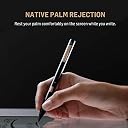
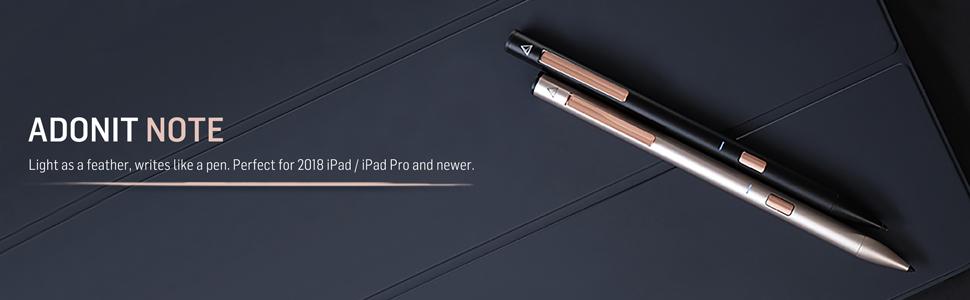
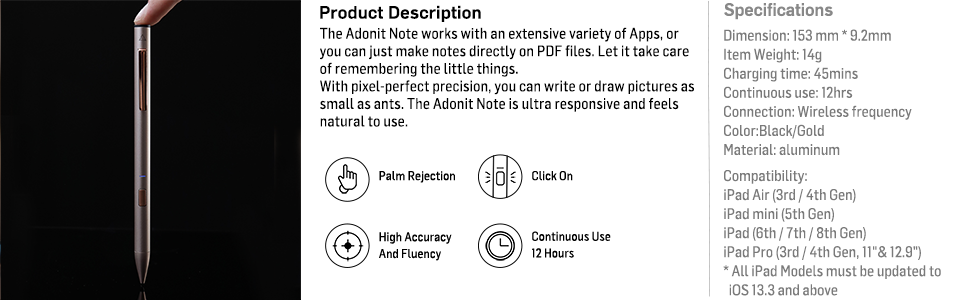
The Adonit Note (Black) is a premium aluminum stylus designed for a wide range of iPad models, featuring a precise 1mm tip, natural palm rejection, and effortless no-Bluetooth connectivity. With up to 12 hours of continuous use and a quick 4-minute charge, it’s built for professionals and creatives who demand accuracy and convenience. Compatible with hundreds of iOS apps, it’s the sleek, reliable alternative to pricier styluses, backed by a 12-month warranty and crafted for durability in Taiwan.


| ASIN | B07R9HPSYN |
| Are Batteries Included | Yes |
| Are Batteries Required | Yes |
| Battery Average Life Standby | 12 Hours |
| Battery Description | Lithium-Ion Polymer |
| Best Sellers Rank | #200,700 in Cell Phones & Accessories ( See Top 100 in Cell Phones & Accessories ) #3,828 in Styluses |
| Brand | adonit |
| Built-In Media | Adonit Note*1, Micro-USB Cable*1, User Guide*1 |
| Charging Time | 3 Hours |
| Color | Black |
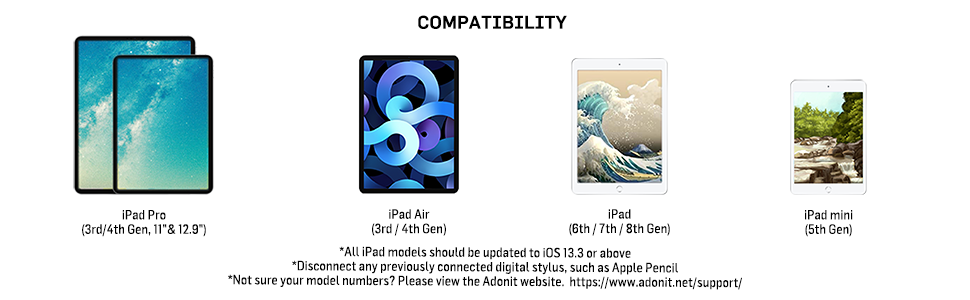
| Compatible Devices | iPad Air (3rd / 4th Generation) iPad mini (5th Generation) iPad (6th / 7th / 8th Generation) iPad Pro (3rd/ 4th Generation, 11" & 12.9") |
| Compatible Tablet Computer Models | Apple iPad (6th generation), Apple iPad (9th generation), Apple iPad Air (3rd generation), Apple iPad Air (4th generation), Apple iPad mini 5, Apple iPad mini 6 |
| Customer Reviews | 4.3 out of 5 stars 1,380 Reviews |
| Enclosure Material | Aluminum |
| Global Trade Identification Number | 00847663023379 |
| Item Dimensions | 0.36 x 0.36 x 6.02 inches |
| Item Weight | 3 Grams |
| Manufacturer | Adonit |
| Material | Aluminum |
| Mfr Part Number | ADNB |
| Model Number | ADNB |
| Number of Batteries | 1 Lithium Polymer batteries required. (included) |
| UPC | 847663023379 |
| Unit Count | 1.0 Count |
| Warranty Description | 1 year warranty |
S**O
Great Apple Pencil and Logitech Crayon alternative
I have only had this for a day, but I’m really enjoying it. I have the second gen Apple Pencil for my iPad Pro, and a Logitech “Crayon” for my iPad mini 5 and the iPad Pro. I use the styli for note taking and annotations, not for drawing. The Crayon and Note don’t have the same feature set as the Pencil, but since I don’t use them for drawing, I don’t miss those features (except the double tap to erase). I really wanted one stylus to use on both my iPads (the second gen Pencil does note work on the mini). That’s why I got the Crayon. It works fine, but it’s fugly looking, feels awkward in the hand, and it takes a prolonged press on the on/off button to turn it on/off. The Note looks great, connects and disconnects instantly with a quick press of the button on the barrel, feels great in the hand, and, importantly for me, has a clip on it for your pocket, or, in my case, clipping it to the cover I have on the iPad Mini. I’m always afraid I’m going to lose the Crayon. They all write about the some, with very little latency and similar feel across the glass. I really love how easy it is to turn on/off the Note, the pocket clip, the feel in the hand, and the price. Can’t beat it!
J**Z
Great alternative to the Apple Pencil
I was looking for something a little cheaper to the Apple Pencil for my 2019 iPad Air as I'm not an illustrator or designer and wanted a simple, but accurate stylus to write notes and for simple sketches. I did some research and found that Adonit was releasing a new stylus to compete against the Pencil and Crayon. After watching some reviews, I decided on the Note for ease of use (just turn it on, no Bluetooth needed to connect), there's a great feel like you're holding an actual pen (with palm rejection) and accuracy with little to zero latency from what I've noticed. It also looks stylish in the black version I got. There are a few downsides if you're looking for something more. There is no pressure sensitivity. Again, it's really for note-takers than artists. There's also a micro USB port (not a big deal for me). And lastly, the placement of the power button can get in the way at first when you grab it and turn it on, but a simple adjustment in your hand and it's out of the way. Again, not a big downside for me because all the pros outweigh the cons for what I need it for. In summary, it's a great stylus for half the price of the Pencil, but it provides a lot of value in its simplicity if you need a good note-taking stylus.
C**A
Very good stylus with palm rejection
I was looking for an alternative for the Apple pen, mainly to take notes on my iPad Mini 5, that I use in small Cessna 172s cockpits. One main feature I was looking for was the palm rejection. This one works perfect, no need to pair it and super fast on/off operation. Using it for notes, I do not need any pressure or tilt sensivity, for me it is even better not having this features, so my notes are consistent even when I have to take them on cramped spaces or with turbulence in the airplane. The power button is a bit odd, but I never hit it during normal use, so it is not a big deal in my opinion. The only very stupid thing about this pen is the crappy Mini-USB connection...I understand the USB-C might be too bulky for a pen (it is only a design problem...), but a Lighting connector would have made much more sense considering this is a product only for Apple devices. It is not a big problem, but you need another cable (included) with you.
S**C
Works great
I was quite amazed that it worked so well on my Ipad Mini 5. It is perfect for my purposes, which is almost exclusively jotting down notes and some simple diagram drawing. Initially I was a little nervous since when I first used it on Note, I got a message that only an Apple Pencil could be used on Note. However, after it was recognized, apparently in a few seconds, it worked fine and has worked without a problem since. Personally I have had no problem with the on/off button being in an awkward position. I guess I don't hold a pen in the same way some others do. It just feels so natural. Tapping twice for Notes works great. You have to enable it in Notes in Settings. Honestly, it is so much better than the Logitech Crayon from the point of view of price and feel. I had to return the Logitech Crayon I ordered since the refurbished product lacked the cap (in addition to everything else other than the Crayon itself) and was slightly damaged at the top end. The Crayon also felt incredibly cheap in hand. If I ever go the Apple approved route again, which I don't foresee, it will be with an Apple Pencil 1 refurbished by Apple, which sells for $85 when available.
M**K
quality stylus for half the price of apple
For half the price of an official Apple Pencil you get a quality product. I also appreciate the swappable replacement tips, which are easy to install. I use my iPad for digital art and for taking notes in class and it's worked great for those purposes, just as well as the Apple brand. The only features it lacks compared to the Apple pencil are tilt detection and pressure sensitivity. My only complaint is that the flashing low battery light gets annoying, but I suppose it needs to be that way to get you to charge it. I would've also appreciated USB-C instead of micro usb.
A**E
Frequent missed strokes and erratic page behavior due to flawed palm rejection hardware.
The main purpose of this purchase is of course to write on the iPads that it supports. However, if it works like a broken pen with frequent missed strokes, erratic page behavior (e.g. eccentric sudden page movements/jerks/fast scrolls) due to some issues in their palm rejection technology, etc, then this stylus is rage-inducing and unproductive, especially for a post-graduate student trying to solve his already frustratingly tough stochastic differential equations. Another issue with this stylus is that when using it on my app (Notability), it frequently causes another issue that somehow triggers the long taps even though I have already lifted up my pen. This causes my writings to become some jumbled mess as the app thought I was trying to draw some shapes. I would have to say it's the stylus' fault since I have not heard of others having such issues with the app. So I would suggest giving this stylus a miss. Maybe it's just a luck of the draw that I got a faulty stylus, but for this price, you might want to look at the Logitech Crayon. It's simply not worth the frustration you had to put up with when using this stylus. I have just emailed their help desk in an attempt to initiate a refund and we will see how that goes. I will probably update this as it progresses. EDIT: Amazon gave me a refund and since it was past the return window, I got back 80% of the item's price. Since returning it, I got myself a Logitech Crayon and this erratic page jumps/behavior and frequent missed strokes are non-existent; goes to show that it's an Adonit engineering/technology flaw which isn't too surprising since they weren't licensed with Apple's pencil technology so they probably tried reverse engineering it but quite apparently, it's not perfect. So my advice: If you are going to use the pen for long, get either the Apple Pencil or the Logitech Crayon since the latter is an official Apple partner to produce a cheaper Apple pencil for the education market. If your digital ink usage is very limited in time (e.g. just the occasional notes in a business meeting or continuous usage less than 45 mins), then perhaps this would be adequate.
C**V
Great stylus, poor design feature
The stylus is great. It immediately synced with my Ipad Air 4th Generation and has worked reliably ever since. I have only had to charge the stylus once a week, and I use it almost every day. However, the power button is poorly placed. Even after a month of using the stylus, I continually hit the power button while writing with it. I am going to switch to a different stylus because it is bothering me so much.
N**1
UPDATE on my purchase: Extremely easy to use + palm rejection pen
July 2020: After using this pen every single day for the past 10 months, I would say only buy it of you SPARINGLY use it. I guess with my consistent use the tip just doesn't write very well on my iPad, and it cost $15 do 3 replacement tips, which will probably all stop working at some point. Thus I suggest you just bit the bullet and get an Apple pen with warranty. September 2019: Extremely easy to use pen that was worth it’s price. I plan on getting a newer iPad (than the 6th gen I currently have), so I didn’t see the point of paying $100 for the older generation Apple pen when this one does everything I need it to do. No this one does the job well. It’s easy to write notes in class and have my palm on the screen at the same time. That is all I ask of it.
M**R
GO FOR IT!!
I’ve been using this amazing stylus on iPad (7th Generation) for 2 months now and I can positively tell that this stylus is the PERFECT REPLACEMENT for Apple Pencil (1st gen). Things I loved about it: • Palm Rejection works fine: EPIC for drawing and taking notes • On/Off button: Saves battery somewhat. • Charges real quick. • Precise and Accurate Things that might bother you: • No battery indicator to tell the remaining battery percentage unlike Apple Pencil. • Uses microUSB as the charging port. Not lightning or C type. • NO WARRANTY That’s all folks! :)
J**M
Perfekte Alternative zum Apple Pen!
Wer, wie ich, keine 100€ übrig hat für einen Apple Pen hat mit dem Adonit Note Stylus die perfekte Alternative gefunden! Der Stift kommt in einem schönen schwarzen und rosegoldenem Design. Er liegt perfekt in der Hand und lässt sich durch den An-/Ausknopf leicht bedienen. Ich nutze den Stift in Kombination mit meinem iPad 2018 und der App Good Notes 5 für die Uni. Der Stift wird inklusive Ladekabel geliefert (ein USB Kabel, es wird kein Adapter für die Steckdose geliefert, aber den hat man üblicherweise sowieso zu Hause). Die Akkulaufzeit ist sehr gut und das Aufladen geht schnell. Allgemein kann ich diesen Stift nur jedem empfehlen der eine Alternative zum Apple Pen sucht und dabei Geld sparen möchte!
A**D
Better than
Used on iPad Pro 11 ,Amazing for taking notes and doing basic graphics work and compared to the apple pen It’s a great value for money, it feels more like an actual pencil in terms of weight and feel when compared to the apple pencils 2. Doesn’t have the same gesture, magnet or wireless charge but I do prefer this over it. The charging is an issue for some people but honestly me being a university student, I haven’t face any issues
A**R
¡Excelente pen!
Sin duda creo que ha sido de las mejores compras que he hecho. Le da una nueva vida al iPad y me ha permitido dejar las agendas de papel. Las agendas las obtengo de etsy.com (vendedora forLittleLion) y con esta pluma funcionan a la perfección. Según mi exhaustiva investigación, la única diferencia con el original de Apple (aparte de costar menos de la mitad) es que no reconoce la inclinación de la pluma. Si vas a dibujar y esto es un factor, quizá sí convenga invertirle a la original. Yo la uso para escribir principalmente y me funcina perfecto. La pila le dura unos 10-12 días, usándola diario para planear y para notas de reuniones algunas 3 veces por semana. Algunos pueden encontrar como una desventaja que el botón se presiona de manera muy fácil (y así la apagan accidentalmente) pero igualmente fácil se vuelve a encender. Tengo 13 meses con ella (agosto de 2021) y sigue funcionando como nueva, no le noto baja en rendimiento de pila. Se me ha caído y la punta está algo doblada pero no afecta nada el funcionamiento. Venden 3 puntas, creo que a 400. Como dice en las características, no tienes que hacer nada más que presionar el botón para que el iPad la identifique y, por lo tanto, las apps también. Todas las ven como si fuera el pencil de apple. ¿Has intentado doble toque con la pluma (encendida) en la pantalla de bloqueo del iPad? Te lleva directo a las notas. La app por excelencia para usarla es GoodNotes 5, que hasta puede servir para alguna presentación.
M**A
Fantástico
Me lo compré para el iPad Pro y va genial, fue encenderlo y listo. Muy cómodo, muy bonito y bastante más económico que el original. 100% recomendado. Yo tengo el original y este y no me arrepiento de tener los dos.
Trustpilot
2 months ago
1 month ago