We remain fully operational. Our teams are working around the clock to ensure your deliveries continue safely.

DOWNLOAD THE APP


Copyright © 2025 Desertcart Holdings Limited
DOWNLOAD THE APP





Buy anything from 5,000+ international stores. One checkout price. No surprise fees. Join 2M+ shoppers on Desertcart.
Desertcart purchases this item on your behalf and handles shipping, customs, and support to Kyrgyzstan.
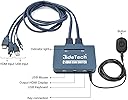
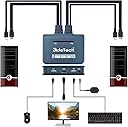
desertcart.com: JideTech HDMI KVM Switch 2 Port with Cables, Selector Switcher for 2 Computers Share One Monitor, Keyboard, Mouse and USB Peripheral Support 4k×2K@30hz Resolution : Electronics Review: Don't be alarmed; just reset it like the product page says - Teleworking full-time due to the pandemic wasn't too shabby. My 32" Dell monitor [1] has dual HDMI inputs and built-in speakers [2] and I had it connected to both the Win10 Dell work laptop and the new Win10 Lenovo personal desktop. I keep the laptop open to use its screen also and the built-in keyboard plus a personal wireless trackball (small USB dongle); the desktop had a wired keyboard and mouse using the monitor as a hub. But switching was a pain. Going through the monitor settings via the tiny corner buttons was bad enough, but I also had to move the trackball dongle since I detest normal mice and only keep it for the missus. This switcher saved the day! When I first hooked it up, it didn't want to work at all. But after checking this desertcart product page and seeing the "hold button to reset" instruction, all of a sudden it worked PERFECTLY. Both computers are happily outputting to the monitor (or thinking they are) via the switcher, and both the monitor's USB hub and trackball USB dongle are feeding the computers in turn. One button really DOES switch everything with little delay. Also, with so much tech crammed into this corner of my home office [3], it's wonderful not having yet another wall-wart power brick around [4]. To be fair, here's the main drawback: the manual is gibberish. Time will tell if the device itself holds up, and I'm sure SOME folks have issues right off the bat, but it seems to be working fine for me. With the ease of this, it's going to be a hard sell to get me to go back to the office! Notes: [1] Yes, THIRTY-TWO INCHES. It self-reports as a "Digital Television", but I've tried using a cheap 32" TV as a monitor and the scaling was all off and the picture was fuzzy. This one looks great, even going through the switcher. [2] I do have separate speakers from decades gone by when computer audio had decent quality: Boston Acoustics, powered 2.1 system with hardware volume control. Thick, high-quality cables (and a fat power supply, but also auto-off). Great sound from any source. I don't mind moving the plug for that around as necessary; most often I run it from my phone, not the computers. [3] Let's see: two lamps, paper shredder, desk printing calculator, screwdriver charger, work laptop, work phone headset dock, speakers, desktop, 3 external hard drives (audio/video storage + backups), main monitor, extra monitor for the desktop to display a calendar and clock 24/7, Qi charging pad for phone, home gateway (DSL modem, Ethernet router, Wi-Fi hub), Vonage box, house phone charger, 61-key Casio keyboard, Canon printer/scanner/copier. (Did you count? That's 20 AC plugs more-or-less within arms' reach.) [4] Some folks say that "PC1" needs to be left on because "PC2" won't power the switcher alone. That's just fine--I made PC2 the work laptop that I shut down every night, and the desktop (PC1) stays on 24/7 doing Folding@Home to help bio-research. But wait... UPDATE: I wrote this review on Friday afternoon. On Sunday morning there were township-wide power issues and the desktop (PC1) powered off. I turned on the laptop (PC2) on Monday morning for work and the switcher came on with it -- sure, it defaulted to PC1, but one button push was all I needed; it remembered the video settings perfectly with no issues. So anyone who says PC1 HAS to be the power source is wrong (as long as PC2 is actually supplying power via USB; maybe that's their issue). I just can't find anything wrong with this HDMI/USB KVM switch! Review: Simple Plug & Play - I'm really pleased with the JideTech 2-Port USB HDMI Cable KVM Switch Video, Cables & USB Peripheral Sharing Support 4k×2K@30hz Resolution. Everything works perfectly. Graphics, wireless keyboard and mouse. The wireless headset works also. It only has 2 USB ports so I added a USB 3 hub that works. I'm also able to read files on both computers from a 32GB USB flash drive. An additional bonus. Now a little about me & how I'm using the switch. I bought myself a mini PC to work with during the winter months. I only have one 29 inch monitor & plugging and unplugging was a pain. This particular KVM switch had good reviews. The electric comes from a USB connection, another positive. I contacted Amy at the support email and she got got back to me within 24 hours to answer my questions. Both desktop and mini PC are running windows 10 with on board graphics. I like a clean desktop. The 2 pictures show how I was doing my 1st testing & how it's out of sight & tidy today. The graphics is working fine on U-tube, browsers & word/excel. With the USB flash drive plugged into the switch, I'm able to load files from the desktop computer, switch over to the mini computer, and then transfer the files, to the mini without having to relocate the USB drive. This little switch packs a lot of features for the price. Plus it has a one year warranty. I'm not a very technical person so the fact that it's so easy to use, means I'm really pleased with the purchase.


| ASIN | B07QM6ND7R |
| Actuator Type | Push Button |
| Brand Name | JideTech |
| Circuit Type | 2-way |
| Connectivity Protocol | Hdmi |
| Connector Type | Hdmi,usb |
| Contact Material | Plastic |
| Contact Type | Normally Open |
| Control Method | Remote |
| Controller Type | Push Button |
| Customer Reviews | 3.9 3.9 out of 5 stars (1,439) |
| International Protection Rating | IP54 |
| Item Dimensions | 6.5 x 5.63 x 2.2 inches |
| Item Weight | 0.1 Pounds |
| Manufacturer | JideTech |
| Material Type | Polycarbonate |
| Model | JD-21UHB |
| Mounting Type | Surface Mount |
| Number of Positions | 2 |
| Operation Mode | Manual |
| Switch Type | Push Button |
| Terminal | Button |
| UPC | 710670417939 |
| Unit Count | 1 Count |
B**H
Don't be alarmed; just reset it like the product page says
Teleworking full-time due to the pandemic wasn't too shabby. My 32" Dell monitor [1] has dual HDMI inputs and built-in speakers [2] and I had it connected to both the Win10 Dell work laptop and the new Win10 Lenovo personal desktop. I keep the laptop open to use its screen also and the built-in keyboard plus a personal wireless trackball (small USB dongle); the desktop had a wired keyboard and mouse using the monitor as a hub. But switching was a pain. Going through the monitor settings via the tiny corner buttons was bad enough, but I also had to move the trackball dongle since I detest normal mice and only keep it for the missus. This switcher saved the day! When I first hooked it up, it didn't want to work at all. But after checking this Amazon product page and seeing the "hold button to reset" instruction, all of a sudden it worked PERFECTLY. Both computers are happily outputting to the monitor (or thinking they are) via the switcher, and both the monitor's USB hub and trackball USB dongle are feeding the computers in turn. One button really DOES switch everything with little delay. Also, with so much tech crammed into this corner of my home office [3], it's wonderful not having yet another wall-wart power brick around [4]. To be fair, here's the main drawback: the manual is gibberish. Time will tell if the device itself holds up, and I'm sure SOME folks have issues right off the bat, but it seems to be working fine for me. With the ease of this, it's going to be a hard sell to get me to go back to the office! Notes: [1] Yes, THIRTY-TWO INCHES. It self-reports as a "Digital Television", but I've tried using a cheap 32" TV as a monitor and the scaling was all off and the picture was fuzzy. This one looks great, even going through the switcher. [2] I do have separate speakers from decades gone by when computer audio had decent quality: Boston Acoustics, powered 2.1 system with hardware volume control. Thick, high-quality cables (and a fat power supply, but also auto-off). Great sound from any source. I don't mind moving the plug for that around as necessary; most often I run it from my phone, not the computers. [3] Let's see: two lamps, paper shredder, desk printing calculator, screwdriver charger, work laptop, work phone headset dock, speakers, desktop, 3 external hard drives (audio/video storage + backups), main monitor, extra monitor for the desktop to display a calendar and clock 24/7, Qi charging pad for phone, home gateway (DSL modem, Ethernet router, Wi-Fi hub), Vonage box, house phone charger, 61-key Casio keyboard, Canon printer/scanner/copier. (Did you count? That's 20 AC plugs more-or-less within arms' reach.) [4] Some folks say that "PC1" needs to be left on because "PC2" won't power the switcher alone. That's just fine--I made PC2 the work laptop that I shut down every night, and the desktop (PC1) stays on 24/7 doing Folding@Home to help bio-research. But wait... UPDATE: I wrote this review on Friday afternoon. On Sunday morning there were township-wide power issues and the desktop (PC1) powered off. I turned on the laptop (PC2) on Monday morning for work and the switcher came on with it -- sure, it defaulted to PC1, but one button push was all I needed; it remembered the video settings perfectly with no issues. So anyone who says PC1 HAS to be the power source is wrong (as long as PC2 is actually supplying power via USB; maybe that's their issue). I just can't find anything wrong with this HDMI/USB KVM switch!
D**N
Simple Plug & Play
I'm really pleased with the JideTech 2-Port USB HDMI Cable KVM Switch Video, Cables & USB Peripheral Sharing Support 4k×2K@30hz Resolution. Everything works perfectly. Graphics, wireless keyboard and mouse. The wireless headset works also. It only has 2 USB ports so I added a USB 3 hub that works. I'm also able to read files on both computers from a 32GB USB flash drive. An additional bonus. Now a little about me & how I'm using the switch. I bought myself a mini PC to work with during the winter months. I only have one 29 inch monitor & plugging and unplugging was a pain. This particular KVM switch had good reviews. The electric comes from a USB connection, another positive. I contacted Amy at the support email and she got got back to me within 24 hours to answer my questions. Both desktop and mini PC are running windows 10 with on board graphics. I like a clean desktop. The 2 pictures show how I was doing my 1st testing & how it's out of sight & tidy today. The graphics is working fine on U-tube, browsers & word/excel. With the USB flash drive plugged into the switch, I'm able to load files from the desktop computer, switch over to the mini computer, and then transfer the files, to the mini without having to relocate the USB drive. This little switch packs a lot of features for the price. Plus it has a one year warranty. I'm not a very technical person so the fact that it's so easy to use, means I'm really pleased with the purchase.
W**.
Inexpensive and gets the job done
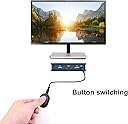
The two port HDMI KVM switch from Jide Tech is inexpensive and does the job it was designed to do. This is a no frills manual KVM switch. It has 1x HDMI port for your monitor and 2x USB ports for a keyboard and a mouse. There are two cables to go to each computer with 1 HDMI plug and 1x USB plug. Switching between computers is accomplished with a wired remote button, so the actual port does not need to be within reach. Pros: Inexpensive Small foot print Remote switching Easy to install No loss of picture quality Cons: Switch button has stuck a few times preventing me from switching computers. No keyboard shortcut to switch computes. Switch always defaults to computer #1 even if it is off. If you turn on computer #2 you have to manually switch to it. All in all it’s a good little KVM switch. I’ve been using it since mid March 2020 when my employer sent us to work from home due to Covid-19. I have an older system and had to get DVI to HMDI adapters for to it. I would give it five stars but the lack of a keyboard shortcut to switch computers and the defaulting to computer #1 even when it computer #1 is off, cost it a star.
J**G
Update! the USB connection fails constantly
I was hoping to use this KVM with my new Ultrawide monitor. When I connected it, the resolution was wrong, and I could not get it to work. I returned the item under the assumption that it would not support the 2560x1080 screen resolution. JideTech reached out to me and asked to find out if the device was defective. I told them that it was not defective. It just did not work with my monitor resolution. They then asked if I would try a virtual monitor reset by holding the button down for over 5 seconds; the two LEDs on the KVM switch will be on, then off, then on again over 3 seconds. So they sent me a new KVM switch, and I followed the instruction they sent me; reset the virtual monitor, connected my computer, and it worked. Both my work Windows 10 computer and my Macbook pro detect the Ultrawide screen and display correctly. Thank you, Jidetech, for reaching out to me with the instructions on how to get this to work. Also, if you are worried about it having a blue button, both of the ones I had had a nice black button. --UPDATE-- Well, I am sad to say after approximately 7 months of use, the USB connection to my mac drops out and quits working (a lot). No idea if this is fixable, but it makes the unit very unusable.
F**.
I just connected as per instruction and the switch was working without any issues. I had to press the reset button for 5 seconds so the switch could adjust to my display, one time operation. Very happy with the product
L**N
No issue at all -just plugged my 2 laptops - the old one Vaio and the brand new HP Elite to my Monitor/Keyboard/Mouse and - started to enjoy the switch from laptop to laptop with the single push og the button .
J**1
J’avais acheté ce système en solution de dépannage et en fait ce système est plutôt bien par rapport à d’autres articles du même type que j’avais déjà achetés. Bon rapport qualité prix.
A**R
Took a while to deliver but it worked as advertised. Great buy!
S**R
Ne fonctionne pas à tous les coups sur les anciennes machines. Et puis le bouton pour changer de machine, c’est en plastique de mauvaise qualité. À jeter! J’ai juste gaspillé de l’argent.
Trustpilot
1 week ago
1 month ago