Desertcart purchases this item on your behalf and handles shipping, customs, and support to Kyrgyzstan.
✍️ Elevate your touchscreen game with precision and style!
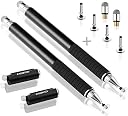
The MEKO Stylus Pen is a premium 2-in-1 touchscreen tool featuring a clear disc tip for exact input and a durable fiber tip for everyday use. Made from stainless steel and aluminum, it offers a natural pen feel without plastic parts. Compatible with all capacitive touchscreens including iOS, Android, and Nintendo Switch, it comes with multiple replacement tips ensuring long-lasting performance and exceptional value.


| ASIN | B00N1BRWLA |
| Best Sellers Rank | #3,841 in Cell Phones & Accessories ( See Top 100 in Cell Phones & Accessories ) #105 in Styluses |
| Brand | MEKO |
| Color | *Black/Black |
| Compatible Amazon Tablet Models | Amazon Kindle Fire 1st Generation, Amazon Kindle Fire 2nd Generation, Amazon Kindle Fire HD 2nd Generation, Amazon Kindle Fire HD 3rd Generation, Amazon Kindle Fire HD 4th Generation, Amazon Kindle Fire HD 8.9 3rd Generation, Amazon Kindle Fire HDX 3rd Generation |
| Compatible Devices | All touchscreen devices, All iPads iPhones Andriod Nintendo Switch 1/2, All other brand tablets ,touch screen computers, and smartphones. Compatible Devices All touchscreen devices, All iPads iPhones Andriod Nintendo Switch 1/2, All other brand tablets ,touch screen computers, and smartphones. See more |
| Customer Reviews | 4.5 out of 5 stars 30,361 Reviews |
| Enclosure Material | Aluminum,Plastic,Rubber,Stainless Steel |
| Item Diameter | 9 millimeters |
| Item Dimensions | 5.5 x 0.35 x 0.35 inches |
| Item Weight | 19.87 g |
| Item dimensions L x W x H | 5.5 x 0.35 x 0.35 inches |
| Manufacturer | MEKO |
| Material | Aluminum,Plastic,Rubber,Stainless Steel |
| Mfr Part Number | C-MK21Disc-BB |
| Model Number | LYSB00N1BRWLA-ELECTRNCS |
| Unit Count | 1 count |
A**A
Excellent Accuracy, Quality, and Value!
I have been using this stylus for almost 7 months now. I use it constantly for my job, and they have worked beautifully! With the different ends, you have options for how you input your information, which is great. The disk end is great for drawing and signatures. Yes, it's flat, and it will take you a moment to adjust, but it's worth it. Not only is the disk end very accurate, but it can *swivel* which allows you to hold the stylus naturally while keeping the disk flat against your device screen. I mostly use the mesh end, and it is the best stylus tip I have ever used. First of all - and *very* important for me - is this: The tip doesn't "stick" to the screen. Cheaper styli you might get at Best Buy or Staples are a sort of rubber or silicone. It doesn't take me long before that cheaper end is tearing off, rendering the stylus useless. The Meko mesh tip, however, is a metal mesh. Not only doesn't it tear, but it also doesn't stick to the screen at all, which makes it much more accurate and responsive. Secondly, that mesh tip is durable. In the time I have used it, I have chosen to replace only one mesh tip. I didn't even have to, I just decided to because it was looking a little frayed. It was still working perfectly! One last thing to consider: Value. Staples sells a universal stylus for about $9 each. They work well enough at first - and I've used many of them - but they would always rip within one month, usually less. If I had used them over the past 7 months, I would have spent at least $65. Now look at the price of the above product. I am still using them. Nothing is perfect, and I did run into a problem with the Meko Stylus I purchased. Their customer service, however, stunned me with their quick responses, and their quick, painless resolution. Nothing is 'perfect', but you can see 'perfect' from where you'll be standing once you are holding a Meko stylus in your hand!
F**Y
A great pen for doodling on-the-go! Great for mobile devices that don't support active styluses.
I'm having a fantastic time with this little stylus! It's a capacitive stylus, which means it mimics finger touch. So there's no pressure sensitivity. The little transparent disk allows you to see the fine point on the screen so you can see where you're drawing. The disk also helps the screen detect the points position and the disk swivels to allow the pen to tilt comfortably when you use it. It's pretty accurate but my linework has little hooks upon first contact because the screen is adjusting to the position of the pen whenever I lift and place it on the screen. Zooming in closely when doing linework will make this less noticeable. The line quality will depend on the quality of the touch screen on your device. Older devices struggle with diagonal lines. I'm using Clipstudio Paint (Android, Free version) on Pixel 8a phone. The MEKO stylus gets along fine and has no issues when I draw diagonally on the screen. If your device is newer, check to see if it's compatable with an "Active Stylus" and shop for that instead! They tend to have palm rejection and pressure sensitivity capabilities. To get around the lack of pressure sensitivity with this pen, I highly recommend investing in a BLUETOOTH numeric keypad. You can bind all your drawing shortcuts to it, including "Increase/Decrease" brush size. Draw with one hand, use shortcuts with the other! The keypad I'm using is an "Inland Pad 19 Tri Mode Numpad" ($39) I'm really impressed with this pen. I also like the build quality. It's a little heavier than a Wacom Intuos/Cintiq stylus. It feels great! I'm really pleased and look forward to doodling more!
J**D
Doesnt seem to work on different apple devices
If you’re buying this pen specifically for RuneScape mobile, I imagine many people are, I wouldn’t bother. The blunt or rounded point of the pen isn’t bad, it still requires a bit of pressure to get a response out of it but it’s okay. The pinpoint part of the pen is awful. The pen itself is very nice and feels good, but it really has no use outside of writing on the screen. The pinpoint has no response to tapping on the screen and is very hard to get a response out of at all. Dragging is about the only time the screen will pick up the pinpoint side of the pen. The round point has a decent response but is still not responsive enough for being practical. If you’re using this pen for writing or things that require dragging on the screen, it’s probably okay, but still a little annoying. If you’re going to be doing a lot of tapping as well as dragging, I wouldn’t bother. A stylus may be a bad buy in the first place, not just this particular pen. I had a $5 stylus that seemed to function better than this though. So many reviews were 5 stars so I decided to give it a chance but it’s quite the let down. I tried every extra pinpoint provided to see if they were any better, as well as both pens, but they’re just as bad. Maybe I’m not using the pen “right” and if I figure it out or get used to it I’ll amend this review, but the instructions say it’s ready to go without instruction so I assumed there was nothing to it. Anyways, I’ll continue to try it out and maybe use it for activities outside of gaming, whenever that is, but for what I bought it for it’s dissapointing. Edit, Updating from 2 stars to 4: I’ve decided to amend my review a bit but the still mentioned above is still a problem. I use an iPhone 7s but I tried the pen on my iPhone 6 and it works amazingly for whatever reason. Maybe it’s the screen protector on the 7 giving trouble, but my 6 has a protector too so idk. I also tried it on an iPad and the pen had a poor response on it as well. Idk what the problem is, and why it works so well compared to the 7, but hopefully I can get it to work somehow. I may peel off the protector and see if that helps or mess around in settings. 7’s do have a pressure sensor in the screens but I tried using different amounts of pressure as a test. Anyways, this pen is great when it works but you may have trouble with it due to problems I still have yet to figure out. Anyways, it’s a well built product and performs well when it does perform so 4 stars.
A**5
Amazing! Worth every penny and then some!
My husband had a Samsung Note 4 for work at one point, which I would commandeer to draw on the awesome sketch program it had on it. The S pen is a wonderful thing. He left that company and had to return the phone. I recently got a Galaxy Tab A 9.7, but sadly without that lovely little docked pen. I then went on the search for a precision stylus and spent several weeks searching for form and function that was also a reasonable price. I read countless reviews of Bluetooth battery powered styli, and the non-battery counterparts. All claimed to be the best until I got to the reviews and often enough the hype and the price just didn't seem to pan out for them. Then I happened upon this little sparkly gem in the similar products section that Amazon so smartly includes on product pages. I was actually about to purchase a completely different stylus and by chance looked down. The price was in the range I was looking for. This was my first try on precision styli and didn't want to break the bank on something I may not like. Then I read the description. Then I got down to the reviews and I was sold. I too am beyond ecstatic about this purchase. These are FANTASTIC! They have an excellent weight in your hand which leads to a luxurious feel along with the nice padding on the precision end. The ease of changing from one type of tip to another is lovely and the protection that this gives the tips is equally as nice. Then you notice that you get 2 styli with tips already installed AND 2 fabric wide tip replacements AND 4 precision tip replacements. It is a deal that would be foolish to overlook, even if you were skeptical of something. They also throw in this neat little velvet screen cleaner that gets all the gunk off the screen so your lines don't skip around as you write or draw. Oh, and that little bonus can be washed for extended use! I could not be happier with this purchase.
S**3
Love it!!!
Love them!!! They work really well with very sensitive tips and cute color.
M**Y
Quality Screen Pen
Very happy with this purchase. Arrived as promised and had a quality feel from the start. The tip is perfect and glides easily on the iPad screen.
K**R
it works on a Samsung tablet
To be honest I've not used it a lot. However, it worked fine when I tested it. You only have to make sure your hand isn't touching at the same time.
S**N
Better GET MEKO! Expensive Stylus don't measure up.
I recently purchased an IPad Air and was looking for a really good stylus to use. I'm transitioning off of a Samsung Note tablet, so my expectations on being able to write with a Stylus on a tablet were pretty high. I didn't want to pay the premium price for the Apple Pro just to use the Pencil, so I figured I'd pay the pay the premium on a stylus. Immediately, I researched and found Adonit to be well reviewed. So, I ordered the Adonit Pressure sensitive which ran me around +$70. I thought it worked poorly (I used Goodnotes and Pen Ultimate). Even if it were cheaper for $10, I still wouldn't keep it. This was returned. Staying with the brand and again based on the reviews, I ordered Adonit 2 (+$30). While this worked better than the Pressure Sensitive, I knew a $2 stylus would work better. I know my expectations started high based on my experience wiht the Note, but this was ridiculous that it didn't complete my letters and forced me to write in script so it would be able to pick up the words. At the same time I ordered Adonit, I ordered the MEKO. I figured I needed a basic stylus in the meantime...and for the price, I couldn't go wrong. It also came in a box of 2, which appealed to me since I could give pink one to my daughter and use the black for myself. Wow. The precision by using the disc-side was impressive for a pen I didn't need to "charge-up" or link in an app. This worked better than the 2 previous stylus I tried. The lines were smooth and both apps were responsive. The feel was great as well - felt very durable. Didn't have any issues with palm recognition sabotage. I plan to use this on the go forward - either as my main stylus or in the short term as I'm still under the assumption that these pricey stylus out there have to be better. The disc was easy to get used to. And it comes in a nice display box with a bunch of extra discs and tips. Well done MEKO! If you are on the market for a really good stylus like I am/was, then you should get this as a permanent or temporary solution. This will allow any stylus you might want to buy to measure up against this MEKO.
D**B
Impecable. Fiable, excelente producto
Absolutamente genial. Es el tercer par que compro. Se ve super elegante, tiene el peso justo, en la mano el tacto es fabuloso y tiene mucha precisión. Tiene varios repuestos lo cual es un valor añadido. Lo gasto a diario para manejar el smartphone y estoy encantado con este producto.
ع**.
فوق الممتاز
المنتج ممتاز، ويعمل بشكل جيد جدا، الحقيقة أفضل قلم للكتابة والرسم بسهولة ويسر. لا تتردد في شرائه
J**S
Good price.
Good quality, excellent price.
E**E
EXCELENTE, simplemente excelente.
a ver, no son perfectas, pero se sienten muy bien, tienen una buena calidad de armado, un peso correcto y no se si soy yo, pero tambien tienen una buena precisión. son discretas, sencillas y bonitas, la verdad es una buena compra. Ya ni hablemos de su presentacion, viene en una caja negra muy bonita. muy recomendadas.
T**4
Stylo capacitif.
Très pratique, taille et forme d'un stylo courant. La pointe fine est très précise et sa plaque transparente permet de ne pas rayer l'écran tactile. Je recommande sans réserve pour un prix très très raisonnable.
Trustpilot
5 days ago
2 months ago