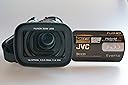
🎥 Capture Life in HD - Don’t Just Watch, Relive It!
The JVC Everio GZHD7 is a high-definition camcorder equipped with a 60GB hard disk drive, three 1/5-inch CCDs for superior image quality, and a Fujinon 10x optical zoom lens. With features like optical image stabilization and Focal Assist, it’s designed for effortless video capturing, making it perfect for both amateur and professional videographers.
| ASIN | B000MANFIC |
| Antenna Location | Camcorder |
| Are Batteries Included | Yes |
| Brand | JVC |
| Built-In Media | Camcorder |
| Camcorder Type | Video Camera |
| Color | Black |
| Compatible Devices | TV, Computer, Smartphone |
| Connectivity Technology | HDMI, USB |
| Customer Reviews | 3.6 out of 5 stars 26 Reviews |
| Digital Zoom | 200 x |
| Display Resolution Maximum | 920000 |
| Effective Still Resolution | 1.71 MP |
| Exposure Control Type | Manual |
| Features | Anti-Shake, Infrared, Low Light |
| File Format | mpeg,mpeg2 |
| Flash Memory Type | SDXC |
| Focus Type | manual-and-auto-focus |
| Form Factor | Compact |
| Global Trade Identification Number | 00046838030413 |
| Has Image Stabilization | Yes |
| Image Aspect Ratio | 16:9 |
| Image stabilization | optical,optical image stabilization |
| Item Weight | 1.47 Pounds |
| Lens Type | Zoom |
| Manufacturer | JVC |
| Maximum Aperture | 8 f |
| Maximum Focal Length | 33 Millimeters |
| Minimum Focal Length | 3.3 Millimeters |
| Model Name | GZHD7 |
| Model Number | GZHD7 |
| Number of Batteries | 1 Lithium Ion batteries required. (included) |
| Optical Zoom | 10 |
| Photo Sensor Technology | CMOS |
| Screen Size | 2.8 Inches |
| Sensor Type | CMOS |
| Shooting Modes | Manual |
| Supported Audio Format | MP2, MP3 |
| Supported Image Format | JPEG |
| UPC | 046838030413 |
| Video Capture Format | MPEG-2 |
| Video Capture Resolution | 1080i_hd |
| Video Resolution | 1080i_hd |
| Water Resistance Level | Not Water Resistant |
| Zoom | Optical, Digital |
K**R
The unmatched quality leaves Sony and Canon in dust
First of all let me deny all the idiotic reviews that keep copying one another that this camera produces inferior video. This is 3ccd baby produces unmatched quality footage with perfect color separation, great sharpness and smooth operations. Technically speaking this camcorder is way over the category it was placed in. HD7 has a Fujinon PRO lens with 3(!!!) AS EL elements and it has consistent 1,8-1.9 aperture all across the range while Canon and Sony are 3 on the tele end. I also deny any credibility to "reports" that claim its weak low light performance. I own vx2100 that is THE BEST low light camera for any price below $5000 and this hd7 is very near. The optical image stabilization works very well, it is not supposed to suppress all shaking but for what it is billed it produces! I have absolutely no problems with it. In fact the image stabilization in this JVC keeps up MUCH BETTER than Sony VX2100! I linked two cams and shot the same footage with both. JVC wins easily and unequivocally. I edit with FinalCut and using the free utility I downloaded from Internet all the footage is ready for edit in two minutes. The 60Gb of the drive makes a superb storage. To mention this camera has all the belts and whistles of full scale pro or near pro camcorder and if you know what you are looking for it is a steal for the money. Not to mention that it is pleasure to hold camera, quality made and convenient to operate. Well, this camera awarded "Best expert camcorder of the year 2007" by META(!!!), so if you you are looking for a camcorder under $2000 it is a best you can get. You can get slightly better one for $3000 but it will not be so nicely compact and ready for the action. I was stunned to see how competition tries to discredit superior product by pouring fake review supported by morons. Do not use software included with the camcorder. Download free MPEG StreamClip that is SUPERB program! For a full Professional review and complete instruction how to use it with Final Cut go to digitalcontentproducer.com and look for first and second parts of the review on this camcorder, it includes complete illustrated instructions! I use in Final Cut and I do not use FireWire with this camcorder at all! I download full resolution footage via usb2 just like described in aforementioned review and footage is very quickly and without conversion in full quality is available is for editing (it can simply unwrap it in the same format as it is on the hard drive of gz-hd7). I can't comment on iMovie as I do not use one. But for Final Cut it is a snap. BTW, also allows shooting events (like plays for example) that last longer that cassette allowed). If you buy a camcorder to enjoy convenience, great image quality and boundless creativity it is the best thing you can buy.
M**M
Exelent But be aware (gift comment)
My first impulse when I saw it and read about the features was to buy it, then a friend showed me the bad reviews and i ended buying a different one (Panasonic HDD)... this last one is great but i am an enthusiast and I'm used to have more control over my Cam (exposhure, sensitivity, backlight, sound recording rate, etc... that JVC everio GZ-HD7U has) so.. i ended bying it (Everio HDD)... Good things -I like the idea and flexibility of this 'new media recording system' HDD (LOVE IT). NOTE: for those concerned about HDD versus tapes, tapes get old and after afew years can't read it or recover (i'm not saying it is bad, i love my Sony D8 that in some manner is still superior to these HDD cams generation) NOTE: need place where to save your shooting, get a Terabyte! -The quality of the image is superb, magnificent, excelent... better than any... o yes, i do video editing on 5 different formats... and this is it! (Good for everio) -Good manipulation and control features, much, much better than the majority of other brands... but be aware it means more responsability on your hands, so learn more, study more about cam video possibilities, manipulation and controls... sorry but i like it this way... -Compare to others, JVC everio has Very good sensitivity to low light situations if you know how to use the MANUAL controls for diafragm, exposhure, sensitivity settings... you'll get better results if you learn MANUAL mode than leave it all to AUTO mode... can't be lazy! -Much better hardware features and conectivity than others in this range (USB, fire wire, AV, S-video, componet, HDMI and microphone) NOTE: fire wire (ilink or 1364)not compatible with many video capture & editing software... yes i got in contact with JVC support and could not give me a straight solving answer... nore the software support that comes with it! Any way you'll end up using more your USB, AV, S-video and HDMI than the other two connections. -JVC everio has a shoe to connect accesories (others don't) -Sound recording quality its good, better than others... Be aware -Steady cam? well it's not bad or so umbelivably terreble as many say... the trick is to USE YOUR TRIPOD... or lean to a fence, wall, column, etc, try not to walk arround to much when video shooting, if you use only your hands with this cam you need to start thinking like a pro cameramen, hold it very still, if you could use both hands, better... NOTE: i understand that the technology on this cam is very good for getting amazing good quality film that the steady cam system fall behind... not that is not good... (for example: other cams SEEMs to have better steady cam, but it is a trick, because they are handling a much LOWER RESOLUTION - lower quality image... you see?) so be more carefull holding your JVC everio while filming... have this in mind and will be ok. Not so good things (sorry i have to say) -For those that would like to edit your video from JVC everio, brother & sister, this format ".TOD" is a pain in the A, can't have a codec to handle it... I finally got in touch with JVC (yes again) who could not give me an answer, they send me to the software that comes with it who made me buy an actualisation for Windows Vista but did't work, then said i needed a new software, that a bought but didn't work either... (i solved the problem using a pro editing software... and works terrific, wou! love it) For those who use Fire wire (ilink or 1394) -Fire wire incompatibility to many software aplications and interface.. only one way connectivity - OUT (what happened to IN?) Very Bad! -what happened to 'AV in' connection? (amazing my old VHS and cheap web cam has 'AV in', i can connect a TV, VHS, directly to it but JVC did leave this feature out, incredible!) - (so the other brands, say what?!) Conclusion: -if you need a Camcorder you just want to take out of the box and go... i wouldn't recomend this JVC everio... get a simpler one... on this JVC everio you need a little bit of more knowledge than the average person to really get the 'meat' out of this JVC Camcorder... so maybe this could be a reason to very bad reviews from customers for this pruduct... but at the end the quality with JVC everio is superior than the ones in the market at this point (9 march 08) when i say market i mean what you regularly see on the majority of stores when you walk in and what actually is there to buy... not professional spetialized stores. The technology for camcorders generation at this moment is still growing, and on these HDD camcorders of different brands, it still has to get better... it is not good enough for me at this moment (i'm not a pro as i said before)... needs to get better spetially on the area of connectivity and software that comes with it that should support this media ... Hope this help.
D**H
Great value
Great vakue
J**Y
Looks Professional, Performs Poorly
It looks like a very professional camcorder, and at an original price of over $1,000, you'd think you'd be paying for high-quality, HD footage. The fact that it was once sold for over $1000, blows my mind. Even at $500, this camcorder just doesn't meet the high expectations it brings along with it's look. For starters, the Optical Image Stabilizer might as well not work. Before I bought this camera, I was so sure I'd never need to use the OIS, and that a tripod will suffice. I was very wrong to make this assumption, since even a slight twitch of the hand on the tripod arm will be visible with this camcorder. On the good side, however, the audio is very professional. Second, the 3CCD chip is completely off balanced. With a very red-hue image, there are no obvious signs that there are 3CCD chips within the camera. The professional lens-hood does well to mask the truth behind the picture. Which brings me to the next biggest issue. This camcorder shoots and saves video onto .TOD files. TOD files are absolutely unheard of in the editing world. Final Cut might take them, but rendering is a pain. An ownership of this camcorder is purely for aesthetic purposes. This camcorder should perform much better for the price and look, but, seeing as how JVC punched out much better HD Hard Drive camcorders since the release of this camcorder (2007), I can't be too harsh against the company.
J**G
Three Stars
Nice 1080i general purpose video camera & cheap these days.
I**N
I disillusioned
While it is a good camera to serving 13 months of use I was totally dead, you will burn the card board Ivan Alonso
B**B
Amazed
I opened up the box and scanned thru the manual right quick to see how to put in the battery and start it charging as I went back and continued more detailed review of the controls. I didn't spend more than 15 minutes doing that. Later, the battery was charged and I picked it up and started recording the family guests in our house. After a short recording, I went into hook it up to the tv with just a s-video connection and voila - I was amazed at how clear and intense the picture was. I ordered an hdmi to hdmi cable and was really amazed with that picture. My wife picked it up and had not read anything about it and just asked me how to use it and in just minutes she was video recording our cats all over the place with some beautiful clear recordings. Neither of us have used video recorders in years. We have an old camcorder with the mini-vcr tape that you take out and put into an adapter, but we got tired of using it. The JVC is way better and easier to use than those things. That's all we've done with it and there's much more to play with on it. We are just amazed.
L**R
JVC GZ-HD7 Overall Very Good
I purchased this camcorder in May of 2007. I took a two week road trip and found the anti-stabilization to be very lacking. To over come this, I purchased a Velbon fluid head tripod, a Manfrotto 560B Monopod, and the GlideCaM 2000 Pro. Now the images I shoot are very pleasing to the eye. One of the primary reasons I purchased this camcorder was it had external audio inputs at microphone level. I have also purchased a Sennheiser shotgun microphone as well as the Sennheiser wireless camera set. I also purchased a "V" adapter that mounts on the shoe of the camcorder to accommodate the Sennheiser wireless receiver and shotgun microphone. I now have professional clarity audio on my recordings. The Everio software that comes with camcorder is a must use in my experience to convert camera footage from on board hard drive to be able to edit MPEG2 1080i footage with my Sony Vegas 7.0 nonlinear editing software. I have three Dell P4 desktops that are not able to play high def footage as the files are too large for these computer to play them without choking. I recently purchased an inexpensive HP dual core AMD 64 running Vista computer and it seems to do the job for me out performing the three other computers I have. I am amazed at the quality this little camcorder delivers. The automatics seem to work pretty well. It seems to work very well in low light as well as bright outside light. The auto-focus seems to do very well also. I have not used the manual features as of this posting. I have recently joined the [...] high def contributers. I have one video test recording I made on Saturday April 26, 2007 posted at [...] and I will upload another video I shot this week while on vacation. Yesterday I took the JVC GZ HD 7 camcorder to Descanso Gardens with the fluid head tripod, monopod and professional audio for a test run. I produced a movie file in Power Director (Software that came with the camcorder) and am now editing in Sony Vegas 7.0. I am impressed how well this camcorder performs for what I am wanting to do. I hope also to include another video of the footage I shot yesterday at the [...] site. Final thoughts: I would buy this camcorder again. If you want professional results, be prepared to invest in additional equipment if you want very good results. 1080i video requires a computer with sufficient horsepower to process large files. High def 1080i video is about four times more information per frame than standard def NTSC video. The really great item about this camcorder is I do not have too buy video tape or worry about a tape clogging in the field. Do look for the videos I have posted at [...] all shot with the JVC GZ HD7 Camcorder. Kindest and sincerest warm regards, Lisa J.Kassner Los Angeles CA
Trustpilot
3 weeks ago
3 days ago