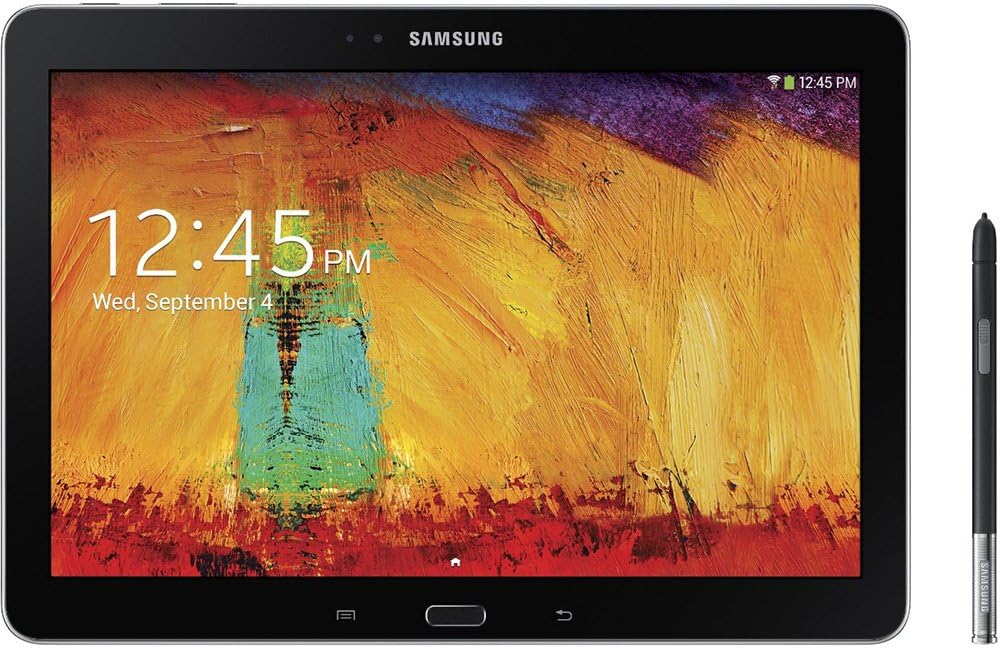
🖋️ Elevate your productivity—where creativity meets power in your hands!
The Samsung Galaxy Note 10.1 2014 Edition is a professional-grade tablet featuring a stunning 10.1-inch 2560x1600 WQXGA display, powered by a 1.9 GHz Exynos octa-core processor and 3GB RAM for smooth multitasking. Its standout feature is the integrated S Pen stylus, offering precise note-taking and creative control. Lightweight at 1.2 pounds with a premium leather-like back, it runs Android 4.3 Jelly Bean with Samsung’s multitasking enhancements, making it ideal for professionals seeking a versatile, stylish, and powerful tablet experience.
| ASIN | B00F3SOJ7O |
| Age Range Description | Adult |
| Aspect Ratio | 16:10 |
| Battery Average Life | 2537 Hours |
| Battery Cell Type | Lithium Ion |
| Battery Power | 2 Watt Hours |
| Best Sellers Rank | #383,504 in Electronics ( See Top 100 in Electronics ) #4,752 in Computer Tablets |
| Biometric Security Feature | Face Recognition |
| Brand | Samsung |
| Built-In Media | Stylus |
| CPU Model Speed Maximum | 1.9 GHz |
| Camera Description | Front, Rear |
| Cellular Technology | 4G |
| Color | Black |
| Compatible Devices | S Pen |
| Configuration | 16GB Black |
| Connectivity Technology | Wireless |
| Customer Reviews | 4.2 out of 5 stars 2,175 Reviews |
| Display Resolution Maximum | 2560 x 1600 Pixels |
| Display Type | LED |
| Front Photo Sensor Resolution | 2 MP |
| GPS Geotagging Functionality | GPS |
| Generation | Android 9 |
| Global Trade Identification Number | 00807320195726 |
| Graphics Coprocessor | Exynos 5 Octa |
| Graphics Description | Integrated |
| Hard-Drive Size | 16 GB |
| Hardware Interface | Bluetooth, MicroSD |
| Human-Interface Input | Touchscreen with Stylus Support |
| Item Weight | 1.2 Pounds |
| Lithium-Battery Energy Content | 2 Watt Hours |
| Manufacturer | ???? |
| Memory Slots Available | 1 |
| Memory Storage Capacity | 16 GB |
| Mfr Part Number | SM-P6000ZKYXAR |
| Model Name | Galaxy |
| Model Number | SM-P6000ZKYXAR |
| Model Year | 2013 |
| Native Resolution | 2560 x 1600 pixels |
| Operating System | Android 4.3 Jelly Bean |
| Operating System Family | Android |
| Other Special Features of the Product | Stylus Support |
| Photo Sensor Resolution | 8 MP |
| Processor Brand | Samsung |
| Processor Description | Samsung Exynos |
| Processor Speed | 1.9 GHz |
| RAM Memory Installed | 3 GB |
| RAM Size | 3 GB |
| Rear Facing Camera Photo Sensor Resolution | 8 MP |
| Screen Size | 10.1 Inches |
| Set Name | Samsung Galaxy Note 10.1 2014 Edition |
| Size | 16GB Black |
| Specific Uses For Product | personal |
| Style Name | Tablet |
| Supported Audio Format | AAC, AMR, FLAC, MID, MP3, OGG, WAV, WMA |
| Total Usb Ports | 1 |
| UPC | 807320195726 803982825384 887276966663 |
| Unit Count | 1.0 Count |
| Video Capture Resolution | FHD 1080p |
| Video Processor | Samsung |
| Warranty Type | Limited |
| Wireless Compability | 802.11bgn |
| Wireless Technology | Wi-Fi, Bluetooth, GPS |
A**R
Go paperless with Samsung Galaxy Note 10.1 2014 Edition (32GB, White)
Update 8/16/2016: I have now had the Note 10.1 2014 for 2 years and 8 months, and am still buying accessories, because it's in regular use. I've never considered owning a different device and try to take extra special care of my Note 10.1, because I would hate to not be able to replace it. Encryption - Top Performer I have been encrypting the device since mid 2014, and it has never taken a performance hit. The same cannot be said for all of the cell phones I have gone through in the last two years - many of which I dumped due to encryption caused performance issues. The Note 10.1 2014 has stood the test of time when it comes to handling encryption like a pro. Minor Downsides The are only two downsides I've encountered: S Pen Design One is the S Pen, in that it's size and the location of the button eventually grew rather obnoxious. I still use the S Pen and it functions flawlessly, but I never fail to hit the button when I don't want to, which can cause some serious issues when I'm in the middle of a fast-paced meeting and trying to take notes. I've recently ordered a larger S Pen stylus from Samsung that I have rather high hopes for. I would really like to go back to using this device in my work day. SECURE Note Taking Apps The other downside is app related. I've had some set backs in finding a note taking app that I felt comfortable using for my work tasks. I had been using EverNote for a while in my previous work, but when I found they were collecting a great deal of information (location, etc.), I grew weary, as privacy and confidentiality is important for my current work - hence the encryption. Since I had that experience with EverNote, I have been hesitant to use a cloud note service, which has greatly limited my ability to use the Note 10.1 2014 like I had been. Instead, I took to taking notes in emails, which was a work-around, but never was a solution. I'm still looking for a secure note app or option that I can have confidence in. I fear I'm too far ahead of the game on this issue and will have to wait a few decades to see this concept come to fruition. I still use the Note for Netflix and other video watching or for other entertainment purposes. Since my experience with the Note, and it's handling of encryption, I've switch to Samsung for my cell (Note 4), and my husband has also switched for his cell (s7). Samsung has really won us over. Update 5/6/2014: I have now had the Note for 5 months. I have been using it almost daily, especially in my work life. Samsung has finally pushed out the KitKat firmware update and all my lag-type issues are now gone! I am THRILLED. I knew it being a new product when I purchased it that there would be some issues to work out. Samsung has come through like I hoped they would. I have left the rest of my review as it was originally. However, please note, I would not want to give it 4.5 stars any longer. Samsung's amazing product and it's follow-through with firmware updating has definitely earned it a full 5 star rating! Original review: I have had my Note 10.1 2014 for two weeks now and it is everything that I wanted it to be, and more. I had been waiting to buy a tablet, because I wanted one that would help me go paperless. I didn't want one just to surf the web, watch video, or to do all the things on it that I can already do on my smart phone. I wanted more from a tablet, and specifically that was paperless ability. If that is what you want in a tablet, this is the one for you, too. Other key requirements for me were multitasking ability and stylus usability. The multitasking works pretty well. I'm a huge picture-in-picture fan, and now I can do it on my tablet. Phenomenal! There is no better stylus than one that is fully integrated into your tablet like the SPen is with the Note(s). You can use the stylus instead of typing on the (horrible like all others) tablet keyboard, to write instead of type and have your writing converted to text. This is by far my favorite thing about the Note. I *hate* using tablet keyboards, and now I don't have to! Note taking: I take all my notes for meetings, calendar entries, phone call messages, everything that I would have previously used a pen and paper for, now on my Note 10.1. It has required a lot of trial and error to figure out what app I wanted to use the most, which worked best for my needs. Learning curve for the device: I have been spending a lot more time on Android forums, specific to the Note 10.1 2014, finding out features I was not figuring out on my own. I watched a lot of youtube tutorial videos when deciding on whether to get the note, and knew there were features used in those videos that I could not figure out. There is a learning curve with this device. You have to be willing to put in some effort to really get everything out of it. Not pure Android: I also used forums to discuss changes that have occurred since updating the tablet upon arrival (Android 4.3, Kernel 3.4.39-2040736). Some features are lost or glitched after updating the device, and while that sounds bad, it hasn't been a huge issue. The awesome Ripple Effect that was present on the default lock screen when I first got the Note is now gone and no longer an available feature. This is a disappointment, because it was a neat feature that, simply put, made the display look amazing when unlocking the screen. Obviously, this is just cosmetic. Another issue I'm having is with unsetting a default that I accidentally set. When you navigate web pages or apps sometimes you're prompted to use another app, say for viewing a photo outside your browser for example. The Note will ask you if you want to "always" use the app you choose or if you want to use the app "just once". I found out the hard way that "just once" is the better option, because if you choose "always" for an app, that can cause some issues that no "Default app cleaner" app can fix. This is also not a huge issue, because in my situation it's causing another cosmetic detail issue (I can't change which app I use to crop wallpaper or lockscreen wallpaper photos now), but it is still a minor annoyance and could cause other more irritating issues had I not learned the lesson quickly and on a minor thing. All of these things are software update bugs that should or will probably be worked out over time. Other things related to this not being pure Android is the relative slow loading speeds. I wouldn't call the device 'laggy', but there is a noticeable delay whenever you try to load anything. And I do mean anything. It's the norm, and a lack of delay is the rare exception. These days, this is not something people tolerate well. I have been using computers for almost 20 years, and have experience with days when systems were *extremely* slow. I think I have more patience for a slower system that others do, which is part of the reason why I went ahead with this device. I knew and expected it to be a little slower. You should too, or you might find yourself a little irritated. It isn't an extreme thing, but it is noticeable. These issues are always a risk you run when you get away from pure Android. If you have any concerns about software bugs like this causing you too much frustration, you should consider a Nexus or an iPad, as they are 'pure OS' experiences. This is Android with the Samsung software slapped on top of it. There's going to be a few bugs along the way. Not to mention it just came out two months ago. As an IT professional, I should have known not to update so quickly after getting the device, but also I am more tolerant, because my expectations are rational. Overall: If I could give the Note 10.1 2014 a half a star less, making it 4.5 stars, I would purely for the slower functioning and glitchy updates, but I went into the purchase expecting those things, and for that reason I gave it a full 5 stars, because it is meeting all my expectations and exceeding them in other areas. Anything more than what I've got right now would be perfection, and we all know that's not realistic!
M**G
The best Android tablet available right now
It's been about two and a half weeks since I bought the Galaxy Note 10.1 2014 edition (I'll just call it the Note for the rest of the review). I'm a college student and was looking for something to replace my aging laptop. I was originally looking for some sort of ultrabook or 2-in-1 laptop, but I finally thought that a tablet might suit my needs better, seeing as I already had a full desktop in my room. I wanted something that I could use for notetaking in class, writing reports, and general web stuff (Facebook, Twitter, Youtube, etc). Looking through all the options out there, I finally narrowed it down to getting an iPad Air, Surface 2, or this Note tablet. They all had their respective pros and cons, but I finally settled on the Note. It seemed perfect for what I needed it for. It has the S-Pen for taking notes, and since it was a Galaxy like my SIII phone, I was already very familiar with its features and app selection. It also comes installed with Polaris Office, which would allow me to work on office documents. Now I'll begin to touch on some various aspects of the device in detail, and say whether they are a strength or weakness of the device: Pros: -DISPLAY: The screen is 2560x1600, which is a 16:10 aspect ratio. It's brilliant and looks just as great as the Retina displays on the iPad. Not much more to say. -SOUND: There aren't many devices out there that have double speakers for stereo anymore, so this was great to see on the Note. Everything sounds clear and loud, from games, to music, to Netflix movies. -PERFORMANCE: This device has dual quad-core processors. One to run low-performance applications, and one to help run more demanding ones. It also has 3GB of RAM, which I don't think I've ever seen in any other mobile device. The Note seems to do just fine on every game I've thrown at it, even the highly-detailed 3D ones. The processors really help with the tablets multi-tasking as well. You can run two apps side-by-side on the screen, and even open up more with the Pen Window feature, and it handles it all pretty well. -ACCESSORIES: My favorite part of the Note is definitely the S-Pen. I've taken a lot of notes with it over the past couple of weeks, and it's just as easy to do as using traditional pen and paper. Except that I don't have to worry about sharpening a pencil or running out of ink of course! The S Note program that comes preinstalled on the device is wonderful. Every note you take can be exported and stored by Google Drive, or you can save them as PDFs. Or you can have the program turn every bit of handwriting into normal text, which it does remarkably well assuming your writing is somewhat legible. I should note that while the pen is great for taking notes, it doesn't beat out using a keyboard for writing longer documents like essays. For that you'll probably want a bluetooth keyboard, or an adapter to plug a USB keyboard into it. Cons: -UI: This is a rather minor weakness of the product. The default UI on the device is Samsung's TouchWiz. While it's nice to use if you're used to it on your Samsung phone or other device, it isn't known for being the most snappy of launchers. So straight out of the box, even after the initial firmware updates, there was still some of the dreaded "S Lag" present. The interface wasn't as quick or smooth as it should have been given the amount of power this device has. But never fear, for there is a very easy solution to this! And that solution is using a 3rd party launcher. I personally use Nova Launcher, and eventually bought the Prime version after using it for awhile. The S Lag virtually disappears, and the Note performs as smoothly as it always should have. -BATTERY: Okay, the battery life isn't really bad per se, but it is definitely worse than most iPad products I've seen. Even with fairly light use, you're going to want to charge it overnight if you plan on using it the next day. That isn't really a problem for me, as I always charge my devices at night anyways. What is more of a problem, however, is how slow the Note charges. Unlike the Note 3, the Note 10.1 does not have a USB 3.0 charging port. This really limits the rate that the battery is replenished. For example, one day I was using the tablet pretty heavily and by the evening it was down to around 10% charge. I wanted to watch a Netflix show before bed, so I connected it to its charger so I didn't have to worry about it dying on me in the middle of the show. But even with the charger connected, I guess the processor was working hard enough playing my HD video that the battery was *still* draining. Not really a huge issue I'd say, since I rarely have the charge get that low during an average day of use, but it was still surprising to me. Conclusion: Sorry if the review seems a little fanboyish and perhaps long-winded. But I seriously am loving this tablet so far. It fits my needs perfectly, and I'm so glad that I went with the Note over the competition. It is pretty pricey, but it's not really any worse than the high-end iOS or Windows tablets out there. I don't see how you could go wrong with it. P.S. If anyone has any questions about the device and/or my experiences with it, I'd be happy to answer them :)
R**M
Good Tablet, Want it to be faster? Continue to read....
I was excited to get my first tablet, I've been looking at getting one for years. This year I decided to save my Christmas and birthday money to buy one. So I came to this. The tablet came 90% charged, which was really surprising to me. I never had any device come more than 50% charged. Upon using the device I noticed the screen turning on was slow. I believe Samsung made this as design, and I'm sure there is a way around it if you dig deeper into the system after you root it, but I rather not go that deep. Clicking the home button had a delay when exiting apps. This is because of the S-voice and the magazine feature. Disabling them made it a whole lot faster. But I ended up freezing those applications after I rooted the device, which made the tablet even faster in return. After rooting the device and freezing all the bloatware that it comes with the tablet became a lot smoother and faster. There was no more of that unsmooth pattern unlock which made you mess up, no more battery draining, no more random speed drops, etc... It just became the tablet it should be. I considered returning it before I rooted it because of the performance issue. But now it's not a problem. (Did you know Amazon bans for too many returns? I prefer to keep my returns low.) But of course when you root your device you will void your warranty, which is pretty stupid. They should allow rooting since their the ones that slow down the tablets by putting junk software on it that no one uses. Totally worth it though! One problem is if you have a Anker portable charger. The tablet will not charge on the 2A port, only the 1A port. Unsure why. My Android phone works fine on both ports. If you use the tablet on the 2A port then it will start randomly clicking on the screen somehow. Luckily it's not a phone as it tried to make an emergency call on an application! The screen itself is a fingerprint magnet. Prepare to clean it often. Very often. My Galaxy S4 get's less prints than this tablet. However, the screen is very nice and very sharp. For me anyway. My dad has problems seeing it without glasses. Sound is good, you won't have any problems hearing it. I keep it at max most the time and is pretty loud. You will want to turn it down during the night. This is the list of apps you can safely freeze if you root your tablet. AllShare Cast Dongle S/W Update AllShare ControlShare Service AllShare FileShare Service ANT HAL Service [ANT is needed for usb devices like Endomondo etc. If you don't have it you can disable it] ANT Radio Service ANT+ Plugins b2b.hrs.android.lib Backup BlurbCheckout BusinessWeek+ ChatOn com.sec.android.app.wfdbroker com.sec.enterprise.knox.attestation com.sec.knox.events.manager FlipBoard Google Play Magazines Group Play Help KLMS Agent KNOX (29.1.1 KB) KNOX (4.18 MB) Knox Notification Manager KNOX Store My Magazine My Magazine Here & Now Phone S Finder S Translator S Voice Samsung Account Samsung Apps Samsung Apps Widget Samsung Backup Provider Samsung Calendar Sync Adapter Samsung Cloud Data Relay Samsung Cloud Quota Samsung Contact Sync Adapter Samsung Content Agent Samsung Hub Samsung Link Samsung SNote3 SyncAdapter Samsung Syncadapters Samsung Video Samsung WatchON SamsungAppsUNA2 SamsungHub Updater Screen Saver Share music Share Video Story Album Story Album Widget TouchWiz Home [make sure you have another launcher installed!!!] TripAdvisor VideoEditor VideoPlayer YahooFinance
A**O
Better Than Expected
I've had this Tablet for over a week now and have to say that I am blown out of the water by its performance and what you can do with it! To be fair, there were a few laggy areas when I first got it (day after launch) but those have since been cleaned up by 2 samsung updates. This thing is smokin fast now. I don't really use the "My Magazine" app that people are complaining about so I don't have an opinion on that one. But everything else that I use it for is amazing. I really enjoy the web browser that came with it too. I never use chrome or dolphin now. So far what has really blown me away is the split screen where you can have two apps open at the same time side by side. I really love this and do it often. Normally when I split, I have the tablet in portrait mode and have youtube in the top windowpane and the internet browser in the bottom windowpane. But on top of that in each windowpane can have multiple apps that you can switch with independently. I also love the fact you can have a windowed app (select few) that you can move around on the screen while you do others things. For example, I have my bank app up and want to figure out my finances for the next 2 weeks so I use the Spen to open a windowed version of the calculator and just start crankin away. It's awesome! Honestly I don't use the Spen that much for drawing and didn't really buy it for that. I bought it for the beefy specs, build quality, and high resolution screen and have not been disappointed one bit. It is nice to take a screen capture and be able to write notes directly on it though. One thing I think a lot of people are not taking advantage of is an app that comes pre-installed called "WatchON". It is a samsung app that uses the IR blaster as a universal remote control for all your devices that use a remote. In the tutorial you set up your tv model the cable you use, the make of the cable box, and voila you have a powerhouse remote experience. Let me tell you I use this every day now. So I open the app to the "guide" section and it shows everything that is on tv like your cable box guide. You then select what you want and it changes it on your tv! It's just nice to have a channel on and just peruse though the guide and select what you want without dealing with the cable box guide. You can star your favorite channels and switch between them with ease. Volume up,down, source, and many other options at your fingertips. I also have my AV receiver that I use for sound set up and it knows to use that for the volume, the channel for the cable box, and the power for the tv. Brilliant! On top of all of that, if you have a newer tv with WIFI direct you can click a button to connect the tablet with the tv and choose to watch whatever is on the tv on the tablet! I was blown away when I stumbled upon that feature! Alert: this app is awesome on football days when you want to switch through the many games that are on at the same time! I'm rambling on here but also you can mirror your tablet to your tv (with wifi direct) and it shows what you see on your tablet on your tv. I played the new Madden game on it and it was flawless. All in all this is a great tablet and I am very happy with my decision even though it was about $100 more than I wanted to spend. It is worth it though. The software you get with this compared to a clean android experience makes it worth it. I really think if i went to a nexus device from this I would miss all the features and Spen abilities. That is how I know the extras are worth it. I will update this review as things change for the better or worse but right now I am thrilled :) -------------------------------------------------------------------------------------------------------------------------------------------------------------------- Update 1: Well, I have had this tablet for just over 3 weeks now and it has successfully integrated itself in my daily life :) I thought it would be odd for a while considering I came from the HP Touchpad with android installed. The HP touch pad has a more square aspect ratio (like the ipads) whereas the Note 2014 is more "Wide Screen". I am happy to say that I am totally comfortable with the Note 2014 after just 3 weeks. :) I even use it in portrait mode mostly and it feels natural and great. Over all I still love this tablet and it is performing very well. I've been through 3 over-the-air updates from Samsung and it gets faster and faster with each one. The only problem I had with the tablet was that it took a second or two to wake from sleep via the power button. The 3rd update seems to have fixed this mostly but there still are times where it will take a second...one Mississippi...there we go :) But honestly its not that bad. I use the MoKo case for it that I got on Amazon. It has the smart cover that wakes it upon opening so I don't notice a delay that much if there is one. Other than that I am still very happy with this tablet. I'm glad i did my research and waited for this one. Something I didn't really touch on in the original review are the speakers. They are very nice and I love that there are two of them for stereo. They sound very good as well. The HP Touchpad had some pretty good speakers (shockingly) and I feel this tablet is on par which is good and above average in my opinion. In conclusion, I am still very happy with my purchase even taking in account its price. I knew I needed at least 32GB internal storage so it was $600 or nothing :) Keep the questions coming and I will try to answer them as quickly as possible. Later! ---------------------------------------------------- UPDATE 2: Holy Cow 1 Year Edition!!! I am not sure who will be reading this at this pint in the product's life cycle but I will update my original review regardless. So it has been a year. Many things have happened but one thing is for sure. I still love my Note 2014. I felt the need to come back and add this because it is kind of rare for a product to continue to meet and exceed expectations. Also I have noticed it is still the top review which blows me away because that has never happened to me on amazon or any other consumer site for that matter. I just wanted to let everyone know that I sill love this tablet and it is still going strong. There is not much more to add to my original review really. I know how fast paced the mobile tech world can get and I am pleased to say that this tablet is still excelling within my usage. No defects. No glitches. No problems at all. I would love it if samsung would update it to Android Lollipop in the near future but I know that would be months off. Its ok though because it is performing well. I think I would be in the category of tablet power user so I have many many hours on this thing. Read "news junky". So I am still happy with my purchase even though it is much cheaper now. For new tablet users I will just say; use bookmarks. Bookmark your favorite 10-15 websites in your preferred browser and have your favorite apps on the front home screen and you will be good to go! I absolutely love to use this tablet during college football for info and comments during the many games. Love "Thuuz Sports" app, "CFB" sub-reddit, and the many forums that comment about your favorite team for play by play fan commentary. Makes Saturdays that much more enjoyable! For those who are reading this in consideration of buying this 3rd market I just want to say: Buy from a reputable seller and the tablet will take care of the rest! It's really nice. One year in and I'm still loving it. I like to update my tech in any given usage but I feel this product will satisfy my tablet needs for another 2 years. So in my opinion it is a great after market choice. That's it! Just thought I would update my "blast from the past" review! :D
J**H
This tablet is not for everyone, but those it is for will be blown away
This tablet has entirely streamlined my educational, professional, and personal productivity. I will preface this by saying I chose this tablet (as my very first tablet of any kind) after 5 WEEKS of research and hours and hours of reading the manual, watching video of reviews, unboxing, customization, how-to's, tips and tricks, and specific software guides. I had the nexus 10 in my amazon shopping cart when I first came across this tablet. I will nowhere in this review compare this to an apple device- I have never and will never own one- personal preference, I wholeheartedly believe iOS is sufficient or ideal for a lot of people's use, just not ever going to be for mine. As background, I am in an international DVM program whose laptop just crashed and all 600+gigs of my life were backed up but now only floating in cyberspace so my requirements were a little heady for a tablet- a) deal with extensive editing and review of PDFs, PPTs, DOCs, XLXS, etc 14-17hrs a day (terms range from 21-24 credits, 4-5hrs of lecture straight, 3-4 hrs of lab with no access to outlet in many labs). Also when I say edit I don't just mean take notes on I also mean incorporate text, figures, etc from textbooks, websites, and other documents. b) Be a textbook reader and rarely a e-book reader (novels for fun!) Need to access my extensive kindle library, plus some google books and a few Elsevier/pageburst textbooks. Also this needs to be something I am comfortable and accepting of to literally study off of, enough to give up my previous preferring to only study off of paper/actual printed out notes c) Allow for flawless email, web chat, skype video and text, some web browsing, and file transfer... all on an absolutely horrible school wireless and LAN setup, unpredictable power availability, etc. d) Streaming and downloading of podcasts, video, MRI, CT, radiographs, and ECG's e) Be portable to the clinic and the farms for patient-side transcription, recording, etc f) Get me through the 5-6hr flight and all the airport time! g) Occasionally watch videos/listen to things for fun h) Most importantly, due to a dominant hand injury, multiple surgeries, and continued required hand therapy/rehab, I am currently able to write again but not to type with that hand. I therefore wanted a tablet that was stylus intensive- not just for notes, but for navigation, etc. THIS is what made me give up that wonderful squeaky clean android OS of the nexus 10! (I still thing that is probably the best thing for people that want an android tablet but don't NEED a stylus) So my tablet arrived flawless and flawlessly. The display is beautiful, if anything the screen is too bright- I'm aware my eyes are light sensitive so this won't match with the majority of people but if I do turn my brightness on at all I don't believe I've ever gone above 15%, though I'm sure there will be some case videos poorly and darkly shot that I may need to in the future. i) at least temporarily, replace my laptop and download and have as much of my backed up laptop files as possible The tablet was quickly populated with the apps from my HTC phone and google account. The account set up for everything was quick and easy. The initial 2 updates were completed with no adverse signs. Navigation was great, no lag, and I quickly cleared out the stock widgets, set up my panes, and then went into settings.... I activated Developer options and did some customization and disabling there, but most of the disabling I did in app manager, device, and controls. There are very helpful guides out there if you're not sure which apps are safe to disable as well as a "Guide: Longer Battery Life- How You're Being Robbed on XDA that takes you step by step in maximizing your tablet. It was not created at the time when I cleaned up mine but it would've helped greatly! Here is the gist. The tablet comes crammed full of software and capabilities that I don't need or want. The My Magazine app, a lot of the touchwiz stuff, the eye movement sensors(smart screen), the hand gesture stuff, reading mode, voice control, motions/palm motions, all of that is just a constant battery drain and I will never use them. They were disabled and the vibration feedback for everything was also turned off. Battery Report: This tablet was shipped within the US twice, and was brought internationally on a plan 4 days later. It was accidently left on the ENTIRE time for about 8 days with six apps up on standby. It arrived with 18% battery left. I use it for 15-17hours a day and end up having to charge it 2-3hrs per about ever 24hr period to get it back to 100. I can use it while it is charging and it will still positively charge during use. USE FOR A STUDENT: It has replaced textbooks, laptop, printer, scanner, and painstakenly editing and customizing notes and making documents for me. Disclaimer: as someone who used to be able to type 130+ words per minute, I'll make perfectly clear, if you prefer to type and plan on typing a LOT tablet touchscreen keyboards SUCK. This is a fact of life. You can get used to them, you can get proficient at them, but you'll still probably hate it and you're going to need a physical keyboard case/add on if you do a lot of typing of documents or emails. Now, this tablet is made for a stylus. This is not just a peculiarly edged simple piece of plastic that you can buy for just about any touchscreen device and kind of use as a writing device. This is the s-pen, a WACOM and this device and stylus is designed to maximize the experience so you are writing or drawing digitally with an experience just like on paper. Examples- the harder you press the more solid and thicker your pencil/pen/brush/highlighter/calligraphy/etc line. The button on the stylus brings up air command which can be super helpful and it also allows quick screen shots. The stylus allows for fine website navigation that allows you to open drop down windows etc as mouse would. It also offers things a real pen/pencil cant- selective erasing, and selection for drag/drop/copy/paste of ANYTHING to ANYWHERE. You're typing notes and see a great figure and text on a website, you can freehand or rectangular circle what you want and put it into your document. Then you can resize/edit. It's great. I've been using the Snote app for everything thus far, I have made short futile attempts with Lecture Notes and Evernote but I couldn't really get anywhere. I'm not going to give up on then, I just need to research them more to see if I can eventually get them to do what I want and then I can compare them to Snote. USE FOR A PROFESSIONAL: So far, this has been wonderful. I can seamlessly take notes, look up references, voice record my exam findings, and awkwardly as only a tablet is, take video and pictures of patient's during an exam for later review. (Extremely helpful during lameness and neuro exams for the file). Collaborative documents through Polaris office and google drive is exceptional- as fast as a laptop and more portable, and better screen size than a smartphone. It runs better than the school computers for running presentations off of onto projectors. I can also have students I tutor digitally sign- literally our weekly sheets and submit them via email with one step- completely negating the awesome printer and scanner I brought down here. USE FOR A CONSUMER: I find this tablet beautiful for watching movies and videos and the sound is great. In a classroom of 50 people chatting between classes I have no problem hearing the speakers among the hub but there are completely valid reports that even cranked the sound might get lost a little if you're in a very loud close crowd. Sound improves with earbuds but the initial audio set up app (basically a hearing test and then a customized audio scheme for you) was startling when it compared the stock/base line settings to what it came up with for ME. USE FOR AN ARTIST: I'm still learning and adapting, I'll never turn to this instead of actual physical art supplies and paper but it is fun and I can really see myself doing more digital than before. It has been especially nice for graphic design, photoshopping, etc. USE AS A LEFTY: no issues except see below for one thing that affects both right and left handers... ISSUES: 1) One day after about a week of ownership, my battery was in the upper 80's, I was taking some notes and about 2hrs later I looked at the status bar and it was 29%. I went into Battery in Settings, and the s-pen interface was responsible for 80% of the battery use. I shut down and then restarted and it's never happened again. Similarly the Android OS did the same thing at a later instance but again it was a one time thing and in both cases the battery recharged speedily after and stayed charged. 2) Snote- I have had weird episodes where an import fails, or it force closes itself repeatedly when I try to rename or change the cover of one particular document. After this erratic behavior occurred twice in three days and completely clearing and restarting Snote from scratch (everything backed up and replaced on my Samsung account) to no avail, I did a factory reset. The last ¾ of my ownership have seen no such problems any more. I will warn you that if you wipe out S note and you start from scratch in it and re-transfer all your SNote files back in, if you have a lot of really big files, it can take a really long time to re-populate. 3) The menu/return and physical home button- occasionally based on the desk I'm at, if my arm isn't supported and my wrist is resting fully on the edge of the tablet, these buttons will get pressed while I'm writing. Its purely an annoyance and doesn't affect the writing or do anything but I definitely have to reposition if I find I'm getting lazy on holding my wrist up at these desks. Wrap up: I only use in landscape, it's just like writing on a portrait piece of paper except you can also zoom. I got used to writing on the tablet and the tiny stylus very quickly but there are compatible Samsung styli of various widths and sizes out there as well. I thought about waiting for the new 12.2 whose screen is literally a full piece of paper landscape, but I realized this is perfect for me and more portable than the 12.2 will be (this thing can just squeeze into one of the pockets on one of my lab coats. I was planning on having to use the Nova launcher to avoid any lag but truly, this tablet was a speed demon already and I eventually got Nova solely for the customization ability and cleaner interface. It allows me to avoid more things I don't use and I didn't lose ANY of the software I do. Bottom line, RESEARCH! PREPARE! And there will STILL BE A LEARNING CURVE! But it will be based on discovering unexpected cool features instead of on frustration). If you won't heavily use the stylus, don't spend the money on this tablet. If you're just curious if you could "get into a stylus" try one out first but prepare first so you can use it to the full advantage while you're there. Also, I came from NO tablet and no Samsung/Note experience and there are changes between the previous model and this. You don't actually lose much but things are moved around and different. Don't be scared to optimize it, I'm not talking rooting, though adventurous forays into that terrain have finally arrived as well. In conclusion I love it, it has made things so much more efficient for me, I get a lot DONE with it and it's basically all I have to carry around. I purchased the 32gig tablet plus a 64gig Sandisk XC which installed and worked like a charm. There are annoyances that come up but any issue I have had I have been able to fix. I have everything safely backed up on Carbonite and there's a million ways to sync all of your accounts if you chose (note some of this may be unnecessary or frequency can be dialed back too) It performs and looks beautiful and I am still learning. EDIT: FLASH PLAYER: This tablet absolutely supports flash. Youtube and embedded flash worked right out of the box, however, to watch my amazon video's etc, I just downloaded the following file- I cannot post the actual link but it's a drop box file. Install this and make sure flash is enabled in your browser settings/plugins and it will work in the stock browser, Dolphin, and Mozilla. Some people also recommend having your browser set to View Desktop site. Edit 12/15/2014: Please see my comment under product question- "Can you use amazon prime video on the galaxy 10.1 2014 ed? asked by Judith C. Love on November 14, 2013" for instructions and the direct link for flash file Edit 02/2017: My tablet got slammed by careless sleep-deprived brain addled 4th year vet students and the screen got shattered in the upper right corner. Still useable, not any real issues but concern about the little chips and cracks gradually loosening and only being held together by the screen protector I was itching to replace due to scratches but now couldnt, left me with the desire to replace as I was 4 months out of my extended warranty. Call it coincidence but literally as I powered up the replacement, this original tablet FAILED. The screen doesn't illuminate. At certain angle/light you can see it's on but there is no way for me to see well enough to unlock the screen and at least access over 3 years of my life on the original tablet. I am 99% convinced this is secondary to the trauma/screen break, and I had nearly everything backed up via Carbonite on the original except for the past few months of random downloads. Still, I am grieved and wanted a moment of silence. Yes we had great times together but I am truly sad and a bit devastated because the replacement came with OS updates that I had been actively refusing to install for the past year. Thus, my new tablet in short, I can't stand. It's the same make and model except offers 4G which I don't use but it is unbearably slow (cant load my pdf vet school notes worth a damn- it's faster for me to find a computer, login to carbonite back up, download the enormous file and open it on the computer than to scroll through the pdf on the tablet one page per 10 seconds loading. It's truly unbearable. All the updates and changes are awful and its so slow despite me instantly ditching touchwhiz and using Nova Launcher. Moment of silence for my beloved original, maybe one day science will advance enough for me to communicate with you without a working screen so that I can have you back. Laughingly, the one OS update I did do that slowed you down, turns out, compared to the ones that followed, you were still almost the speed of light comparatively.
M**1
Missing Features!!!
The product itself is functioning but I am missing some of the features that is supposed to come with this tablet. Specifically, no option for the lock screen control to wake up with "Hi Galaxy" command, camera filters, and some of the camera modes. Since I did pay a couple hundred for this thing I don't see why they should be missing at all...extremely disappointed. It took me so long to save up for this tablet too. I was excited to get it until I ran into these issues... I just finished talking to the manufacturer and they helped resolve the issue but it was done through great pains. Short story is I had to do TWO factory resets to get it to work. Long story... I first contacted the manufacturer through live chat. The guy was completely useless. He kept claiming that my version of the tablet does not support those features. So I stopped talking to him. I contacted Amazon- very sweet people- they offer to exchange me a new one, free return shipping, if my other attempt at solving the issue with the manufacturer fails. I contacted them again and at first she claimed the same thing. But after 15 minutes of convincing her, she directed me to a factory reset to which I did. The camera features was available now but the wake up function was still unavailable. I was directed to do another hard factory reset. This solved the problem. This process took over 3 hours since everything is wiped out. And you have to wait a while for things to be restored if you had backed up everything. Conclusions, it is a great tablet if everything had worked in the first place. Considering also that this tablet is new (or was supposed to be new, I am not so sure now since this issue arose) I gave it 2 stars. But since everything worked out, I changed it to 3 stars just because I had to go through that ordeal. Hopefully, everything will be OK now. I would hate it if I have to yet again do another factory reset. -------------------------------------------------------------- UPDATE -------------------------------------------------------------- I am VERY disappointed in my purchase. SNote does not function. I should have checked SNote instead of assuming that it will work. Every time I import PDF files into SNote letters are missing specifically "g"some "i" but most often it is the "g". I went to a Samsung representative, call/live chatted with Samsung support more than 5 times, and sent my tablet in to be "serviced" to no avail. Quite frankly this is pissing me the hell off. Why sell me a f****** defective product.....
J**I
Powerhouse Tablet that Fits All My Needs
I purchased two of the Galaxy Note 10.1 2014 Edition (Wi-Fi only version) on November 27, 2013. One was for myself and one was for my fiancee. We're both digital artists, avid readers, lovers of technology, and were in need of a portable device with a screen larger than 5". Having compared several tablets, I was intrigued by this version of Samsung's tablets based on a number of things - most notably: familiarity with Samsung products (we both use Galaxy S4 phones), the awesome specs and wacom-powered S-Pen capabilities. Major website reviewers at the time were saying that based on price, this tablet was gimmicky and an unnecessary purchase for those not in need of a stylus. Seeing the powerhouse specs of this device, consistent performance in reviews, and knowing the stylus was exactly what I wanted - I chose this one. I'm glad I did. Having read and watched several reviews online, I knew what to expect with some of the odd physical design choices. I've had several month to adapt to this tablet and by now I feel like it's absolutely worth putting that kind of time into adjusting to it's quirks. I'll first run through the negative aspects, the positive aspects, and how we adjusted to said quirks. THE QUIRKS ==================== 1) HOME KEY NEGATIVE: The tablet seems to expect you to hold it in landscape mode (horizontally), as the physical Home button is located bottom center. Which of course means that if you change the orientation to portrait mode (vertical) the button is generally right where your thumbs is going to land on either side. This is further compounded by the fact that the Settings and Back (capacitive) buttons are to the left and right of the Home button. At first I found this to be very very awkward. I've read other reviewers who were so frustrated they returned theirs because they couldn't stand it. Indeed my fiancee went through the very same feelings, as did I. However, I gave it some time and after a couple weeks of constant use I became quite comfortable with holding the unit and it's not even close to a problem. I think of it now as a learning curve. My fiancee solved her issues with the button by investing in a tablet cover that acts as a stand, but also has a hand-strap at the back... which helps her not to have to hold the unit by the sides. POSITIVE: Now that I'm accustomed to holding this tablet with the Home Key placement. I use the tablet as effectively as any other device I own. I rarely run into any "accidentals". My fiancee doesn't use her tablet as often as I do, and thus isn't as studious about holding hers a certain way. Thus she does get some "accidentals", but she's getting used to it as the days go on. 2) SCREEN GLARE NEGATIVE: There's a lot of it. This is a high-gloss, premium glass screen. If you expect to have heavy lighting overhead (especially fluorescent ) you're going to spend a lot of time seeing the lights above you or looking at your own reflection at certain viewing angles. The screen's brightness however is fantastic, so moving it up to full will help some. The best answer however is to just slightly change your viewing angle. You can do this as your holding it, or invest in a tablet cover that has a multiple angle stand. Once I was aware of the glare I worked around it and like, the last issue was a minor learning curve. POSITIVE: The glare may be a bit rough, but the quality of the picture on the screen is beautiful. Online reviews say comparatively the screen is more washed out, but I've not noticed. Watching movies, gaming, drawing, using apps, browsing the web... all of it looks incredible. Because of this it really makes you want to adapt your usage to account for the screen glare just because the payoff is the gorgeous quality of the 10.1 realestate. 3) CHARGING SLOT NEGATIVE: The Micro USB charging slot is perhaps the most goofy, senseless design element of all (and one I still find myself wishing was different). It's directly under the physical Home key, on the bottom edge of the device. Holding this while charging becomes an interesting juggle with that cord jutting out. Terribly uncomfortable experience while laying on your back in bed while charging, or even while sitting up to play a game. Add to this the fact that some games force horizontal orientation, and you're going to expect to be irritated when your battery needs a charge. While I haven't found any great solutions to this, it isn't so bad if you're holding it in portrait mode. As an aside, if you're not paying attention in dim lighting it's easy to try to shove your charging cord into the IR Blaster on the exact opposite end. The blasters even in the same shape as the charging slot... but thankfully it does no harm apart from making you feel like an idiot that you weren't paying attention. POSITVE: There isn't anything positive to say about the design placement, sadly. But the slot works well, the tablet charges (albeit slowly) up just like any device. The charger is the same as any other early 2014 Samsung device, so you can use your S4 charger to charge the tablet. and lastly: my fiancee (who is not a power-user) hasn't mentioned this as an issue at all. ==================== Those quirks sound intense, but remember I'm giving you a very detailed account of my personal thoughts and experiences, and there are a lot of reasons to look past them. We're going to get to those now. I'll take the same format as the above where applicable for the good things, though I'll begin each with a short description on why I like these features. 1) S-PEN / STYLUS I use Wacom technology every day to create art for both business and personal art. Wacom is my go-to for all things stylus, and that they paired with Samsung to give you an authentic, high-quality stylus experience is just phenomenal. I both need to take notes and be able to draw on the fly, so this is my second main reason for purchasing this device. NEGATIVE: The stylus is rather short and very, very light. As a man with large hands it's kind of strange to hold something so dainty. The button on the stylus to call up the Air-View features is all-too-easy to press while using it, however this is also a problem with full-size Wacom tablets. Where the Samsung S-Pen fails is that this stylus is rectangular, so there's no option to simply roll the buttons away from your fingers as you can with a normal Wacom art stylus. Suggestions: I've read you can simply get a metal pencil holder to extend the length of the stylus - though I haven't tried this yet. I've also read that the new Note Pro 12.2 has a redesigned stylus - though I haven't looked into compatibility and shape yet. POSTIVE: The stylus works great! There's no leading or drag, it glides smoothly over the screen. The cursor on screen (which can be toggled off an on) is pin-point accurate at virtually every angle and regardless of the above, it gets the job done with seemingly no effort. That the stylus is conveniently stored in the upper right corner (landscape) of the device is awesome. It's easy to access and easy to put away. It snaps in firmly and I never worry about it falling out. The Air-View features are mostly very useful and worth leaving on. See a different review for more on Air-View. PERFORMANCE This is the first deciding factor for me. I needed a tablet that was going to perform lag-free... partially for preference but also for performing art. You can't draw effectively if your machine is lagging, and I wouldn't have the patience for it. But on paper at least, it looks fantastic. NEGATIVE: None. POSITIVE: The paper was right. I glow with confidence everytime I pick this tablet up because I know it's going to be a champ. I've never once encountered stuttering or lag of any kind no matter how much I run on this thing. I've pushed it with multi-window, overblowing apps in the background while running a heavy one in the foreground, and I've gamed to death with high-resource graphics-intensive games. It's been 5months with this tablet by now... and no issues whatsoever. It's always buttery smooth. Any issues I've run into have been poor internet connection on my end, or software glitches in the app I was using. I do give my tablet an intentional restart every couple of weeks. I don't know that I need to, but it hasn't hurt. SCREEN SIZE Having never owned a tablet before, I wasn't sure if 10 inches of screen would be too large or too small. I took the gamble if only based on all the other items on my list of "must haves". NEGATIVE: It takes getting used to if you've never held something this large before. This was a double issue for my fiancee who has smaller hands. For her, she finds she loves the screen size for some things (reading and shopping especially) but prefers the smaller screen of her phone for others. Much of this has to do with typing - which I might add I agree with her. Coupled with adjusting to holding it, typing is rather laborious. You end up moving your whole hand rather than just your fingers. However, the default Samsung keyboard and Swype both have options to shrink the keyboard (more phone sized), and split the keyboard (to type thumbs only). For me, these actually give quite a bit of typing relief. Alternately you could invest in a compatible Bluetooth keyboard. I purchased a tablet cover which came with one and it was easy to set up, easy to reconnect, and felt very close to a laptop typing experience. POSITIVE: 10 inches of screens has turned out to be the perfect number for me. It's generous for web browsing, a huge blessing for games, excellent for business and personal notes and office documents, and spot on for drawing. It was only just big enough to enjoy watching tv shows, but due to my want for a full cinema experience I would probably not watch a movie on this. For those who enjoy watching movies on their mobile device - you'll love it. If my picky attitude can enjoy a TV show on here you'll probably scoff at me and revel. On art: For my first art experiences with this tablet, I took it with me on a week long cruise and was happy I did. I didn't have to bring the entire backpack of my art supplies I was accustomed - just this one lone very convenient tablet. I completed four impressive works and, short of a Wacom/Windows hybrid tablet, it proved to be nearly everything I need for mobile art needs. Lack of needed software prevents me from performing my business art on this device, but for conceptual work and personal art this is a killer device. For business: As I understand it, this device can be hooked up to projectors old and new and used functionally for lectures and the like. While I haven't personally tested this, I've read a great many reviews from business people explaining how they have and that it was great for it. FEATURES This tablet actually has a crap-load of features. Not many of them feel like bloat, either. Your usual Samsung line, of course, but also Autodesk Sketchbook, EverNote, and Action Memo to name a few. The Air-View features are also 98% useful for screenshot note taking and editing. I'm going to skip the positive/negative on this one, because there's still several features I haven't used, such as handwriting-to-text translation. However my overall experience with every feature and setting in this app has been wonderful. Your normal slew of Samsung's latest line of misc. features is here. Air-gesture, Smart Stay, Smart Pause, Smart-Scroll, Multi-Window, Screen Mirroring, Power Saving Mode, etc, etc! So many in fact that it may take awhile to remember all of your settings. I'm 5 months in and I'm still finding new things about optimizing my experience. Although it won't ever replace my tried and true TV remote - the IR blaster is cool, and screen sharing with my smart TV makes for a fun experience.This is an optimum device for Chromecasting, thanks to the screensize making the UI so easy to access. I much prefer it for this than my phone. TIP: Make sure you Software Update your tablet as soon as you get it. I did right out of the box and I had nearly 5 updates waiting for me. It's now on auto-update for those and I'm anxiously anticipating Kit-Kat to give even better performance. SOUND QUALITY OVERALL: With the external speakers It's just okay. Speakers are in the back and often get covered up. When using a cover I often have to move the flipped cover away from the back to better hear audio. This is improved when the covers is used as a stand as the sound bounces back... but like any mobile device the speakers aren't as ace as just using headphones. Headphone experience is killer. Samsung's integrated software for improving headphone sound is magnificent. Music and other media sounds superior even with just your included Samsung ear-buds. I highly recommend getting your audio this way - however it's not a complete fail on using the external speakers. BATTERY LIFE OVERALL: Battery life is one of those things every mobile device struggles with. I'm a pretty heavy tablet user, and in just a few hours of drawing, gaming, and movie watching, I'll have the battery down to about 30%. I can assume about and extra hour or so past that depending on what I'm using. But it's just as easy to plug it in and power use, which has become my usage habit when home. My fiancee, who I'd deem a moderate tablet user, gleans a full-day+ out of hers before deciding it needs a charge. On standby alone it will last around a day and half. Considering the size and quality of this screen, and that it's fairly light for it's size, I really think this is good battery life. Power users like myself may want to look into an external battery extender... as this battery cannot be removed. DURABILITY OVERALL: With its size, weight, squarish shape, and glass screen... this is an accident waiting to happen. Don't misunderstand, it feels very durable to hold, but like all mobile devices these days the ever present fear of dropping is most certainly here in this tablet. I definitely recommend a case for drop protection - even at home. Keep in mind that the front is all glass, and while the back does offer some grip for your hands, its back will slide across a tablet or nightstand faster than a hockey puck give the opportunity. There are a lot of great cases out there for this device. My fiancee and I both prefer different cases for different reasons. I'm using the official Samsung Book Cover, because it's slim, protects the corners, offers multiple angle stand, and is very light. She prefers a case with a hand-strap on the back to assist in holding, with a multiple angle stand-cover, and business card/pen holder. We both also have alternate cases with Bluetooth keyboards for travel - though we rarely use them. Have questions? Don't be bashful to ask.
J**T
Weird Mix of Frailty and Excellence
I have had this tablet for over two years, and with some major reservations which I will detail here, I'll say this is not only the best tablet I have had, but one of the best computing devices (in terms of screen, speed, software design, and info management routines), ounce-for-ounce, that I have ever had. That said, the Achilles heels of this device are a) the connectors for the battery and screen b) the battery itself. This tablet, if shocked at all--and I mean dropped lightly from a coffee table onto a carpeted floor-- will likely lose some of its LCD connections and cast shadows on the screen. The good news is, this is reparable, but the fix may last only until the next mild shock. The screen can be fairly easily popped out of its case and the connector, which depends on a tiny clamp that holds a ribbon connector in place, about 0.1 inches of it, can be reset. I have done this at least four times over two years, as mild shocks or even travel in a backpack can cause this issue. Worse, though, is the battery. After about 18 months, the battery began to drain quickly if I ever used a web browser. For some reason, web browser use expended much more battery reserves than video-watching. Sometimes the battery would drain about 30% in less than ten minutes. I have replaced the battery with a generic item I got on ebay, and this seems to have fixed the issue, but I will update this review after a few weeks. The good news is this that the tablet is easy to "operate" on, but the bad news is, tinkering operations are necessary. The case needed to be more protective (an old Nook HD+ that I have is built like a tank, in comparison). The Galaxy has a fairly flimsy plastic shell obviously chosen to cut a few grams off of the weight. My advice to Samsung: fix/ secure the silly-flimsy ribbon connectors; accept a few more grams of weight in the name of a better case. But let me reiterate, if you are looking for a tablet, that this is still (in 2017!) not a bad option, as the trend has been to go to lower-res screens on new ~$250 tablets, and this screen is great, the info management routines are good (it multi-tasks well) and its pen is very nice. I only use it for occasional pdf mark-ups, but it is a clever and intuitive pen. Samsung could do worse than simply upgrading this whole design a bit. I ----------------- The replacement battery has been re-charged over about 40 use cycles at this point and is doing fine. The battery life is back to nearly what the device was when new, which is good, but not superior. Bottom line: a replacement battery bought on ebay (and I got a fairly cheap one) can fix the problem. Nice to have this tablet back. -----------------update in 2020: I have say this tablet is still going, and has a great screen and speed by contemporary standards. Tablet development hit a plateau several years ago, so this *2014* model is still better than many mid-priced tablets.
R**B
Great device
Ordered this tablet to replace my netbook. Great screen and good performance. Usual poor Samsung bloatware pre-loaded (they should stick to hardware). Not managed to get connected to my PC as a flash drive to transfer files. Easier to type on the keyboard than I expected. Waiting for Samsung to bring out a new keyboard which hopefully will provide additional battery life. Charging takes a while. Supplied with an American plug and UK adapter., bulky prefer an adaptor with interchangeable plugs.
A**S
Great battery life.
Bought it to play my favorite game, which is no longer updated after android 5.0. It works perfectly. I turned of wifi, Bluetooth, everything, only play the game, the battery last pretty long.
U**R
En panne après un an
La tablette ne charge plus après un an
M**T
Great tablet
The best thing about this has to be the screen. The colours are vibrant and the images are just so sharp. But everything else is great too; the S pen is very useful, the processor is very quick and it is actually very thin and light. My only slight points of frustration are the physical buttons and the speakers. The bottons just get in the way of using the tablet and they really should be on-screen like they are on most tablets. The speakers are okay, but the sound quality isn't great, feels a Samsung after thought. Apart from that i cant think of any reason why you shouldn't buy this tablet.
B**T
Five Stars
Best looking, performing tablet I've had
Trustpilot
1 day ago
2 weeks ago