We remain fully operational. Our teams are working around the clock to ensure your deliveries continue safely.

DOWNLOAD THE APP


Customer Services
Copyright © 2025 Desertcart Holdings Limited
DOWNLOAD THE APP


⚡ Upgrade your desktop’s heartbeat with Crucial DDR2 power!
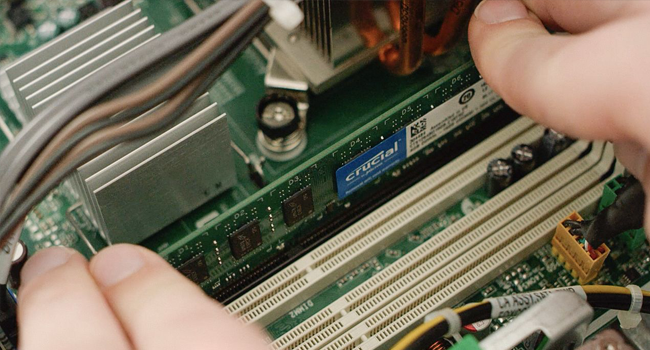
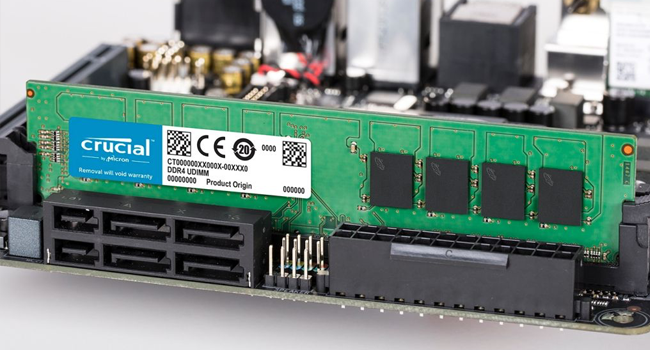
The Crucial 4GB Kit (2x2GB) DDR2 800MHz CL6 Unbuffered UDIMM is a high-quality, reliable memory upgrade designed to boost older desktop systems. Featuring 240-pin standard modules, it delivers smooth multitasking and faster responsiveness with easy installation. Trusted by thousands, this kit extends the life of legacy PCs with proven durability and consistent performance.






| ASIN | B0011A4UZE |
| Best Sellers Rank | #1,079 in Computer Memory |
| Customer Reviews | 4.6 4.6 out of 5 stars (1,033) |
| Date First Available | November 1, 2004 |
| Is Discontinued By Manufacturer | No |
| Item Weight | 1.12 ounces |
| Item model number | CT2KIT25664AA800 |
| Manufacturer | CRUCIAL TECHNOLOGY |
| Product Dimensions | 5.28 x 0.31 x 1.23 inches |
R**D
Works Perfectly; No Hassle
I bought this product approximately a year and half ago. Once I received it, I popped it in the empty slots in my PC, fired it up, and waited to see what error would be displayed so I could start fixing it. Fortunately, I was very wrong! My computer is a Dell E510 that came with (a very under-powered) 512MB of RAM and Windows XP Media Center Edition (2005), making this computer somewhat aged. I slid these two sticks into the two empty slots and simply left the "stock" 256MB RAM sticks in there. My primary operating system at the time was Ubuntu 10.10, which showed a fair bit of enhancement when multiple windows were open, while Windows XP actually became *usable*. These sticks have worked perfectly fine with Windows XP, Ubuntu 10.10, 11.04, 11.10, and now 12.04, along with Fedora 14+, a few versions of OpenSUSE, and many other Linux distros. The only caveat is that my system is 32-bit, which means that I can only truly utilize approximately 3.5GB of the now-4.5GB present, although that's not by fault of this product, and is somewhat rectified by installing the PAE Linux kernel. In any event, this product has not only stood the test of time (I would say 1.5 years of use is plenty of time in computer years), but has also stood the test of diversity. Not only does this product meet my expectations, but it surpasses them, and at the cheapest price I could find at the time, too!
H**H
Perfect, does what it says
Update 12/5/2016: It's 3.5 years later and this memory is still going strong. No issues whatsoever. I love Crucial/Micron RAM! ----------- [ORIGINAL REVIEW: 7/21/2013] It's perfect. It does what it's supposed to. Made my glacial 1gb system way faster, more responsive and multitasking is a breeze now. It's like a whole new machine. I inserted it, turned it on, and it just works. One week later, zero problems so far. A fantastic value, highly recommended for anyone who wants to resurrect an old computer before dropping several hundred on a new one. Incredibly easy, you could train a monkey to install it.
N**1
Great product and price!
Saved $30 versus the Crucial site and free shipping (did check their site for my specs and details on compatible replacements). I was upgrading my video card, so figured while I was messing around in the tower I could upgrade my 6 RAM to 8. It was very difficult due to the positioning in my tower, had to do a 90 degree bend to go around some permanent fixtures and access my motherboard. Look inside before you decide to do this if you are a novice like me. Also work in a very, very well lit room. Mine was not, I didn't have them fully installed as a result of not being able to see clearly, and so had some fun computer problems until I did install them correctly. I fixed the issue by being in a well lit, sunny room and now my computer works spectacularly, no halts or stops to boot or load. Now to fix my internet connection....
D**O
More Memory is Better
My Crucial 4GB Kit (2GBx2) DDR2 800MHz... arrived in just a few days. I used the compatibility link they had with the item description to insure that it would work with my computer, very handy. I installed the memory, using my trusty wrist strap and ran Memtest for 10 hours, no errors. I've been using the memory for a couple of weeks now and so far, my Win7 32-bit machine boots faster by 2 min. and my HD has not triggered any thermal alarms (from all the paging it used to do). This was certainly an overdue, worthwhile upgrade...almost like getting a new computer.
L**E
Performed as expected; solved a problem
This memory performed as expected, and solved a problem for me. I had 4 gigs of memory in my Windows 7 machine, but I began getting memory errors about a year ago. The 4 gigs was in two 2-gig pieces, but they were from 2 different manufacturers. I finally found time to do some testing. What I determined was that either 2-gig piece would run fine alone, but together they created an error. From that I concluded that I had an incompatibility issue trying to run memory from 2 different manufacturers. I decided to solve the problem by buying and installing 2 identical pieces of memory. I did that and the problem went away.
B**B
Best Way to Improve Performance
If your PC is slowing down with larger files or more complex applications/programs/large photo files/etc., then the quickest and most cost-effective way to improve performance is to increase the amount of internal RAM in your computer. Don't just add 1GB, go for a LARGE increase and you will be very satisfied. Check your computer's specs for how much RAM you can use. Depending upon the operating system or motherboard, you might be limited to only 4GB while others might be able to use 8GB. So Google to find your computer's memory capacity. Be aware that most pc's are shipped with smaller capacity memory cards installed in ALL of the slots (usually 4) so don't count on using what you have installed ('cause you're going to have to discard some of that to make room for the newer, larger capacity memory boards you are adding); rather, consider using all four slots with new memory. That is, say you have 1GB of RAM now. It is probably made up of four (4) 256MB cards that take up all of the slots. So, if you want to go to 4GB you cannot order 3GB of additional memory because there will be no slots to use. Instead, order four (4) 1GB memory cards, remove the four cards that are in there now and install the new cards in the four slots. Installation is a breeze - you can do it. Remember to unplug the PC power cord from the back of your computer or from the wall socket BEFORE you start. Then, before you open the computer case, touch a metal part of the case so that there is no buildup of static electricity on you. If you have some static it can harm the memory chips when you touch them. Everything was flawless; selection, ordering, shipping, delivery.
S**N
Took about a week to ship. Pulled out the old sticks and put these puppies in and was done in less than 5 mins! My only concern would be the package it was shipped in. It was just in a bubble wrapped envelope. It would be nice if something sturdy was put around the RAM to prevent bending. Mail couriers aren't always the gentlest. Otherwise, great product!
J**S
RAM to a computer is like a bone to a dog, cream to a cat or super strength lager to a gentleman of the road. More is better and, given sufficient quantity, makes everything go along very nicely. This Crucial DDR2 is not one of those exciting memory products with cooling fins, colourful designs and a name more suitable for a dodgy sports car or something worrying from Anne Summers. It is very unexciting, exactly as it should be. You stick it in the slots, close the case, and your PC works as desired for years and years. I bought this to upgrade an old PC which had 2GB of good quality PC2-5400. Replacing it with 4GB of PC2-6400 brings a very obvious improvement, especially when running image editing software or other apps which cache large amounts of data. The PC no longer swaps to disk even under load so this is a major improvement. It also lets me allocate a bit more system memory to the PC's integrated graphics so I can play silly games with better settings. I see that some reviewers feel the price is too high but actually it's pretty decent for good quality RAM. Using cheap RAM, as often found in generic or home built or own brand PCs, is an invitation to unreliablity and instability and almost never the bargain it can seem. More RAM is probably the best upgrade available for many older PCs and I think this Crucial product is of good quality and reasonable value.
D**I
La verdad quedé muy satisfecho y muy contento con mi nueva memoria. Necesitaba aumentar la capacidad RAM de mi PC pues ya es muy vieja y es dificil encontrar DDR2 que este a buen precio y de buena marca. Realmente recomiendo CRUCIAL ampliamente porque podría decirse que es "Plug n Play" como dicen solo inserte y listo; mi equipo ahora vuela, si noté bastante la diferencia en la velocidad de arranque y el uso de software demandante. Si tienes una PC que tenga entre 10 y 8 años y requiere de memoria RAM no dudes en adquirir esta marca en cualquiera de sus presentaciones sobre todo en Kit de doble memoria para que no batalles con cuestión de incompatibilidad.
C**7
Sembrava fosse già troppo tardi trovare ancora oggi sul mercato nel 2020 delle buone memorie ram DDR2 di marca, appartengono ormai al passato, invece eccole qui. Ho ordinato 2 kit da 4 gb per estendere al massimo la mia memoria ram su un vecchio HP Pavilion del 2007. Ottimo prodotto, funzionamento irreprensibile, imballaggio accurato e installazione molto pratica. Con l'app Crucial Tscan scaricabile dal sito ufficiale è possibile individuare con esattezza tutte le memorie RAM ed SSD disponibili e compatibili per il tuo pc, senza possibilità di errore, basta copiare ed incollare il codice per ordinarle su qualsiasi piattaforma E-Shop, Amazon compreso, naturalmente.
T**K
Two dead ram modules, one prevented booting and the other had errors.
Trustpilot
5 days ago
2 months ago