Buy anything from 5,000+ international stores. One checkout price. No surprise fees. Join 2M+ shoppers on Desertcart.
Desertcart purchases this item on your behalf and handles shipping, customs, and support to Kyrgyzstan.
๐ Upgrade your NAS storage game with QNAPโs dual NVMe expansion โ because speed waits for no one!
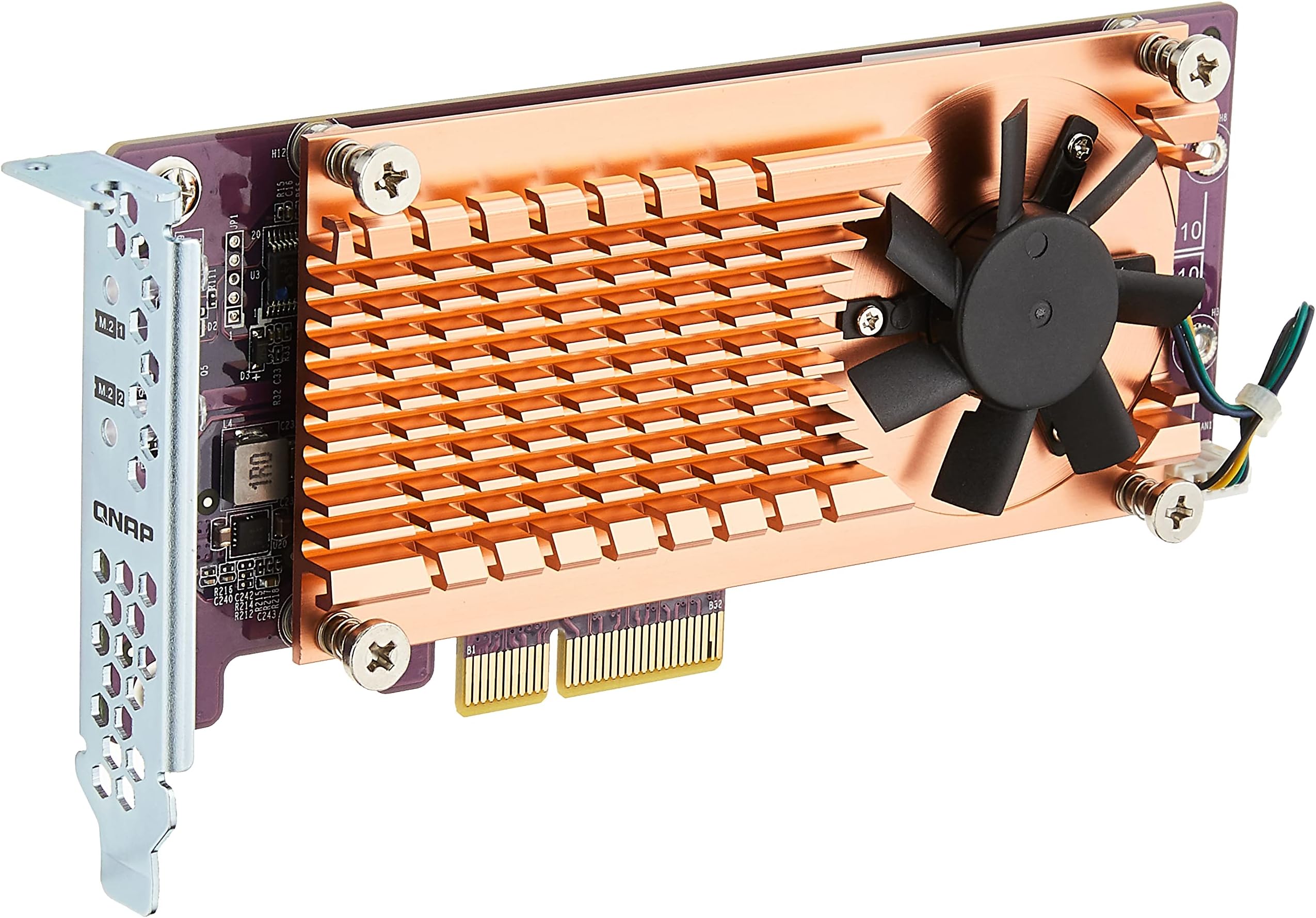
The QNAP QM2-2P-244A is a dual M.2 22110/2280 PCIe Gen2 x4 NVMe SSD expansion card designed for seamless NAS integration. It supports two high-speed NVMe SSDs, comes bundled with three bracket types for versatile installation, and guarantees reliable performance with official QNAP compatibility. Ideal for professionals seeking to boost storage speed and capacity without compatibility risks.
| ASIN | B07CTD5ML5 |
| Best Sellers Rank | #747 in Internal Solid State Drives |
| Brand | QNAP |
| Built-In Media | Network Expansion Card |
| Compatible Devices | QNAP TS-1263U 12-Bay NAS Enclosure, QNAP TVS-682T 6-Bay NAS Enclosure, QNAP TVS-1271U 12-Bay NAS Enclosure, QNAP TS-431XU 4-Bay NAS Enclosure, QNAP TVS-863 8-Bay NAS Enclosure, QNAP TVS-663 6-Bay NAS Enclosure, QNAP TVS-882T 8-Bay NAS Enclosure, QNAP TS-253B 2-Bay NAS Enclosure, QNAP TS-470 4-Bay NAS Enclosure, QNAP TVS-863+ 8-Bay NAS Enclosure, QNAP TS-531P 5-Bay NAS Enclosure, QNAP TVS-871 8-Bayโฆ |
| Customer Reviews | 4.1 4.1 out of 5 stars (393) |
| Global Trade Identification Number | 00885022014842 |
| Hardware Interface | PCI |
| Item Type Name | Qnap Dual M.2 22110/2280 Pcie SSD Expansion Card (PCIe Gen2 X4), Low-Profile Bracket Pre-Loaded, Low-Profile Flat and Full-Height Are Bundled |
| Item Weight | 5.6 Ounces |
| Manufacturer | Qnap |
| Model Number | QM2-2P-244A |
| Operating System | not_machine_specific |
| Style Name | M.2 PCIe NVMe |
| UPC | 885022014842 |
| Warranty Description | 1 Year |
S**S
Works great. No issues.
Works great. No issues. Just make sure you get the right drives and for the right NAS. Itโs a perfect fit for my TS-653D
B**Y
Expensive but works
Purchased this so I could add NVMe's to my QNAP TS-453D. Build quality is excellent and installing the NVMe's was painless. Since it's QNAP brand my NAS recognized it right off the bat. As for price, compared to many other brands, this is expensive. For example, I purchased an SSD expansion card for one of my older PC's for $20 on Amazon. So why did I go with QNAP brand? Well, to be honest, I almost didn't. However, I read plenty of reviews about other brands where people were having issues with the NAS not recognizing the card or failing to work after a NAS firmware update or mysteriously stop working for whatever reason. Rather than deal with all that, I went with QNAP brand. If you don't want any issues or are to lazy to read hundreds of compatibility reviews for other brands to find one that works, than buy this.
J**N
Works with QNAP TS-453b
I purchased this add-in card to use with my QNAP TS-453b NAS enclosure. I also added a WD NVMe M.2 256gb memory module in one slot for cache acceleration. (System does not require them to be used in pairs, and can be different capacities.) Please note, the QM2-2P10G1T uses up to 2 of the faster Gen 3 NVMe M.2 drives. QNAP sells a different model that supports older non-NVMe M.2 modules. The card itself has a thermal sensor located in the middle of each card slot to monitor the M.2 SSD memory temps. I have tested this with a Cat7 cable attached to a 10Gbe switch and both confirm the full 10Gbe connectivity. My only gripe, though not high enough to deduct a star is the tiny fan on the heat sink does occasionally run (though very randomly for a minute or so) and makes more noise than the otherwise very quite case fan. It was a little noticeable, but far from unbearable. I would almost consider disconnecting the fan itself as the heat spreader seems more than adequate to cool the card.
T**M
Feels a little overpriced but worth it for a QNAP NAS
Recently purchased a QNAP TS-453be and then realized after setting it all up that it was using the data drives to store the OS and applications. I didn't care for that, and wanted the OS separate and on fast SSDs. I'd notice a considerable slow down in the Plex interface because of the database running on the RAID group rather than an SSD. I could have gotten an expansion enclosure and installed SSDs in there.... That would have been a more expensive and space consuming option. Sort of would defeat the purpose of buying the QNAP, so I decided to go this route. If you look at the QNAP site, it say the TS-453be is compatible with a large number of QM2 M.2 Expansion cards. You have to look closely to understand the differences in them. They're basically just SATA vs NVMe m.2 support and then the version + number of PCIE channels. I chose the QM2-2P-244A because that's all the faster the TS-453be could support. Getting a faster card would have wasted even more money... I wanted to get a non-QNAP card, but found out that QTS doesn't necessarily allow third-party cards to use SSDs for the same types of storage devices. Rather than risk I couldn't put the OS on it, I splurged for the QNAP card. Before installing I made sure to backup all my settings in QTS and my Plex database/config (that's really all I'm using right now). Installation was a breeze. Just a couple screws in the chassis and it slides apart. Installing the m.2 drives was interesting because you have to put spacers on the board to make sure the chips have good contact with the heatsink. Before starting it up, I pulled all my data drives out of the enclosure. The QNAP then had to be set up just like it was new. However, when I was done the OS and Apps were running from the SSDs. The SSDs I'm running are: Silicon Power 512GB NVMe M.2 2280 PCIe Gen3 x4 TLC SSD Team Group MP33 M.2 2280 512GB PCIe 3.0 x4 with NVMe 1.3 3D NAND Neither of these drives is listed on the QNAP website as supported, and if you read QNAP's info they give a big warning about making sure they listed the SSD as supported. However, these work perfectly fine. I'm having no issues with them at all. I chose them because they were the cheapest at the time (and actually had better warranties than a lot of the bigger brands), they have high MTBF, and use different memory chips. Figured out after ordering they use the same controller chip... I was trying to get 2 identically sized drives that used different memory chips and controllers so that RAID 1 made sense to use. Two identical SSDs in RAID 1 does make some sense, but since SSDs aren't mechanical drives they'll probably die at the same time so it's better to go with different drives (not the case for other RAID levels). The interesting thing about running this way was when I put my data drives back in. QTS scans the drives for volumes and then makes duplicate shares for them. It's kind of a mess to clean up, but it's easier if you just create new shares, transfer your data into those, and then delete the old ones. After lots of trial and error I ended up creating symbolic links so the new share locations just pointed back to the old ones. This allowed all the locks, logs, and caching to remain on the SSDs. Running with Plex on the SSDs has made a world of difference... The pictures load so much faster now. It's back to like it's running on my more powerful desktop again. After all that I found out that Synology has a NAS nearly identical to the TS-453be but with 2x M.2 slots built-in (and accessible without disassembly). It hadn't shown up in my capabilities search when I was selecting a NAS box, so I didn't even consider before. It's more expensive than the QNAP, but after adding the QM2 card it wasn't... Sorry I don't remember the model number of it, but just a fair warning if you're considering the TS-453.
J**N
I like this card, but I think I would need to use a faster than 10Gbd NIC to get full speed from it. I have not yet tested it in my PC, but I wish I would have experimented with it there before installing it in my NAS. Then I would have a better sense of what it is capable of. I am getting about 1000 GB per second read and 1200 GB/sec write speeds with 4 high speed SSDs installed.
Z**N
Super
N**N
The board itself is fine, however the QNAP compatibility chart of suitable drives is questionable. I couldnโt get my (supposedly compatible) Crucial drives to work - despite plenty of support from QNAP. In the end I resorted to Samsung drives - which just worked! I used 2 x 1Tb drives and getting a good improvement in speed as a result.
P**O
La he puesto en un TS-453B y con cable directo a mi Pc que tiene una tarjeta de red 10Gb y va como un tiro. Ha multiplicado por diez la velocidad del NAS.
H**O
Asombrosa
Trustpilot
2 weeks ago
2 weeks ago