Desertcart purchases this item on your behalf and handles shipping, customs, and support to Kyrgyzstan.
🎨 Elevate your digital art game—precision, portability, and power in one sleek tablet!
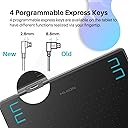
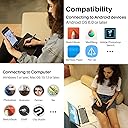
The HUION HS64 OSU Drawing Tablet is a beginner-friendly, ultra-slim graphics tablet featuring 8192 levels of pen pressure sensitivity and a battery-free stylus. Compatible with Windows, Mac, Linux, and Android devices, it offers a 6.3x4 inch active drawing area and 4 customizable hotkeys to optimize your workflow. Lightweight and portable, it’s perfect for artists, designers, and educators seeking professional precision without the bulk.


| ASIN | B07NZ4DQP8 |
| Active Surface Area | 6 x 4 inch |
| Additional Features | 8192 Pressure Sensitivity, Battery-free Stylus, Extra-Slim, Programmable Press Key |
| Best Sellers Rank | #27 in Computer Graphics Tablets |
| Brand | HUION |
| Built-In Media | Battery-free Pen, Pen Nib/Pen Nib Clip, USB Cable, USB-C Adpter |
| Color | Black |
| Compatible Devices | Desktop, Laptop, Smartphone, Tablet |
| Connectivity Technology | USB |
| Customer Reviews | 4.5 out of 5 stars 12,252 Reviews |
| Display Type | LCD |
| External Testing Certification | Não |
| Global Trade Identification Number | 06930444801175 |
| Item Dimensions L x W | 6.5"L x 7.87"W |
| Item Type Name | Computer Graphics Tablets |
| Item Weight | 4.8 ounces |
| Manufacturer | ShenZhen Huion Animation Technology Co., LTD |
| Mfr Part Number | 6930444801175 |
| Model Name | HS64 |
| Model Number | HS64 |
| Native Resolution | 1920x1080 |
| Number of Items | 1 |
| Operating System | Android 6.0 and above, Linux(Ubuntu), Mac OS 10.12 and above, Windows 7 and above |
| Pressure Sensitivity | 8192 levels |
| Screen Size | 6.3 inches |
| Special Feature | 8192 Pressure Sensitivity, Battery-free Stylus , Extra-Slim, Programmable Press Key |
| Specific Uses For Product | Drawing/Learning/Teaching/Design |
| Target Audience | Art Student, Artist, Content Creator, Designer, Teacher |
| Unit Count | 1 count |
| Warranty Description | 1 year warranty |
D**N
Had old 610 po and Wacom 13hd, get this instead its worth it
Originally I bought a huion 610 pro, the old original version, it was one of my first tablets with nothing to compare it to, it was nice and efficient to use to learn as a digital artist, nothing noticeably annoying using it. There was one issue with the port disconcerting if you don't make sure to put in the cord the right way into the tablet, no brainier but make sure to always look at the port on the side of the tablet and your cord to make sure its face the right way. The new version has an almost identical port but seems alot sturdier I wanted to try something more advance as I grew more confident, that's when I bought the 13 hd. Iv'e had a wacom 13 hd for over 2 years, while it was nice to have a screen at first bringing it out with all the cords to plug into my laptop then outlet was a annoying inconvenience that piled up every day, also making sure to make sure the connection to the port didn't bend so it woudn't have issues was a pain (had to use warranty after a few months). That's when I remembered the old hunion tablet I bought and didn't see the difference in drawing on a screen or a regular surface, I honestly prefer looking at my laptop screen while drawing, making the hundreds of dollars I spent on a cintique feel irrelevant. Looking online I found that the version had increased with it upgraded in every regard. The old tablet required you to charge the stylus, this one does not. While it does have a slight cheep plastic look to it, I actually like it has its very light compared to the cintique or old 610 pro pen, the grib does have a grib like material to grab as well. I do see a difference in the pressure sensitivity, im able to make out very tiny detailed strokes I coudn't even do with my freaking wacom 13 hd. Hell I don't think even the newer version of the cintique tablets don't even have the same pressure sensitivity as this does. It also has noticeable tilt support as well? Plug in the usb cord to the pc and that's it. Perfect size if your taking your laptop with you to a cofee shop and need to use the small table. Literally roughly the size of a printer paper, I feel it's the exact perfect size anyone would use, no better bigger or smaller. People have said that brands other than wacoms are cheaper in lasting when I can say thats untrue, I had to buy another old 610 pro a long time ago when I was being dumb and jammed in the cord to the port the wrong way, the second one I bought right after I still have to this day (5 years) which makes it the oldest tablet I have, the only reason im not using it is because of the newer superior version, and even if I had issues I would have to go through over 10 of them to be the same price as wacoms products. Very satisfied. Basically to sum it up: Takes all the things about the old 610 pro and makes them way way better Perfect size for portability/laptop users(13 hd had me doing exercises plugging the dang thing in every time) Better than the 13 hd in every way, and having a screen is a preference not even come close to the convenience this offers Durable as heck, if you do something dumb and have to buy another its still worth it, and don't feel bad you could go through a dozen and it still would be more cost effective then a high end wacom product.
M**.
This tablet is AWESOME!
I've been wanting a drawing tablet for several years to use in photoshop but the only brand I knew anything about was Wacom and the price just made one of those out of the question. When I heard about Huion and started reading and watching reviews, I decided to give them a try. I bought the H610 Pro V2 because of its drawing surface; 10X6.25 inches, and the fact it has tilt function on the pen. I do a lot of pencil drawing and the tilt makes shading with the pen just like shading with a pencil. I'm using an older computer with Windows 7 home premium and at first I couldn't get the tablet software to install correctly. Part of the driver would install but the part that actually operates the pressure and tilt funtionality, plus the tablet interface where you set up the tablet, failed to install. I could use the pen to do rudimentary drawing and painting much like using a mouse but that was it. I contacted Huion support and they were extremely helpful. After a few tries of the usual things that can affect the installation of the software, they actually wrote me a new driver. Which didn't work either at first! While they were off for the weekend, I kept working on it. Here's what I finally had to do to get it going: I did a system restore to remove any trace of the tablet software, then I ran windows update THREE TIMES to make sure I had all the important updates. (Turns out there was ONE update I was missing.) Once windows was updated, I rebooted, installed the newest driver Huion had sent me, restarted, and the software installed...most of the way. I plugged in the tablet, and it STILL wouldn't work. I unplugged the cord from the tablet, plugged it back in, and lo and behold, the rest of the driver installed and I now have a beautifully functioning tablet! So far, I've used the tablet in Krita and Photoshop and it works exactly as it's supposed to. I can't compare it to a Wacom because I've never owned one and it's been probably 15 years since I tried one. I just know if you don't have something to compare it to, you will love this tablet. The problems I had during install was purely the fault of my ancient computer - not the tablet. Krita, by nature, takes a LOT of resources so it's pretty slow on my computer. Once again, NOT THE FAULT OF THE TABLET. In Photoshop, it's no different than using a mouse in regards to speed of operation with what I've used it for. I find myself almost wishing I had bought a smaller one right now until I get used to it because I'm used to making much smaller hand movements with the mouse, but in time, I know it'll feel more natural. Just make sure you have room for it on your desk because it takes up a fair amount of space. The bottom line is, I love this tablet! Huion support worked with me every day to try to resolve the problem. If you're using an older computer like I am, make sure all the updates to windows are applied. I think Huion is a valid alternative to Wacom in terms of usability. Only time will tell how durable it is and I've only had it a few days. I'll try to update this review in a few months when I know more. If you've read this far, thank you for your time, and good luck with your new tablet.
R**N
Great for online tutoring
Although I haven't used it for art, I have found it to be an excellent tool for online tutoring. The tablet is easy to set up and works well with my Windows laptop. The battery-free stylus is very responsive and has 8192 levels of pressure sensitivity, making it great for precise drawing or writing. I also appreciate that the tablet comes with a glove, which has been especially helpful for me since I tend to have sweaty hands. The glove allows me to use the tablet without leaving smudges or marks on the screen. Overall, I would highly recommend the HUION HS64 drawing tablet for anyone who wants an affordable, yet high-quality option for digital art, painting, and design. It's also great for online tutoring or taking notes during meetings. The tablet is lightweight and portable, making it easy to take on the go. I'm very happy with my purchase and would definitely buy from HUION again.
T**F
So Long Wacom, and Thanks For NOTHING
Jumped on the price when Wacom decided my still-functional Intuos Pro was obsolete (the dreaded "we're no longer supporting this driver, time for you to upgrade) and rendered it unusable. Was a little anxious because the Huion is lighter weight than the old Intuos Pro, but the buttons are a lot better designed. Installation took a little fiddling with the driver downloads, which according to other folks is pretty common; but got the right one downloaded and got the settings for pen pressure relatively settled. Breaking this in has been really fun; no stalling, no skipping, no driver issues! The pen is roughly the same dimension as Wacom's so my old arthritis grip fits it (very important if you're gonna be using this or any other drawing tablet for extended periods). Absolutely LOVE that you can change the orientation of the pad itself without any issue, AND that it came with 8 replacement nibs in the stand (I think the last time I bought a Wacom it only had six--rude). The drawing area is decent, and it has a better texture than the new Wacom models (no nib-shredding "paper" texture here, thank goodness). I did get a cover anyway for it because I USE my tablets. I've had it for a couple of weeks and honestly? I'm impressed, and I'm glad I've made the switch. Including an illustration I've finished using this tablet.
J**I
Very good quality for a very low price.
This is a great graphic tablet for the price. I recently purchased another brand, very popular brand, as a gift for my little sister and I have to say that even though her graphic tablet was more money than mine, I believe mine is a lot better and I should've gotten two of these instead. I wanted to add a picture of something I drew to help support my review but, unfortunately, I have lost quite a bit of my artistic ability over the years and am trying to use this to get back into the habit of drawing with my wife (she sketches daily). I don't want to really get into anything spec-wise since you can read those right in the description. First, I wanted to give the only two things that disappointed me about this tablet.. it didn't work with my laptop out of the box due to windows compatibility (I had 7 installed, min is 8) and it doesn't work with my android. The reason I'm not rating lower than 5 stars for either of those is because I know that on the Huion website as well as the description, it lists the compatibility as Windows 8, 10.. and some stuff for Mac so that's not their fault. Also, it is not common for a graphic tablet to work at all on an android so I was just hopeful for that one (portability reason but battery would be horrible). Now, what I do like.. Response time on this is great- There is absolutely no lag time from the graphic tablet to the screen excluding when you have the size of your brush set really huge and even then, that's the program freezing up my six year old 1.6 dual core laptop, not the Huion tablet. Size- This one is in the description but I just wanted to mention that this is a larger tablet and my old tablet was a small 3x5 (??? Maybe..) one and although it worked okay for the time, I feel like a larger graphic tablet really makes it feel more natural.. I can't word this right.. but basically, how much you move your hand, draw on the tablet, is much closer in size to your screen, in other words, drawing on a 3x5 graphic tablet might feel more natural looking at a 4x6.5 screen but nobody wants to use a tiny screen like that. I can lay this tablet down over my keyboard on my laptop and it's pretty much the same exact size of the bottom part of my laptop. Lastly, so I don't drag this on too long.. buttons. At first, I wasn't sure how I would ever use 8 buttons on a tablet. Two on a pen, yeah, but 8 on the tablet? No.. now, I realized how useful they all are. Something specific I think is cool, using one button as Ctrl will actually allow you to remap it as 14 buttons pretty much. What I mean is, I use the two buttons to increase and decrease the pen size to do just that but when I hold the button I assigned to Ctrl, I can hold that and press the resize button and rotate my canvas instead.. I'm not sure if this is normal for a tablet but I love it. Anyway, I think this is well worth the money and I like it so much that if I do decide to buy a graphic tablet with a screen in the future, I'll stick with Huion.
M**A
Great tool to get you started
This was my first drawing tablet. I loved it and used it for many years and never had an issue. All the buttons are reprogrammable, so it's super easy to customize it to exactly what you want. I also put sticker labels along the top of mine so I could remember everything I programmed in. I used it with my Chromebook, phone, and desktop, and have only now stopped since I upgraded to a Surface Studio that has the touchscreen and pen with pressure sensitivity. This little guy and I have been through a lot together. And despite the frequent use, I never had to replace a pen nib (even though it came with replacements). And by frequent use, I mean this is the tablet that got me through my 4 year degree as an art student. I would highly recommend this tablet, especially considering the price vs something like a Wacom. This thing did everything I needed. The only complaints I could give are that the tablet cord was a little short for when I would plug it into my PC (that sat on the ground) and use it at my desk. And it would be nice if the pen holder had a bit more weight to it so that it wasn't so prone to tipping over.
T**K
Wow!
I was really surprised at the quality of this little thing! It feels rather sturdy too, which is impressive. It setup like a breeze and I got right to using it no problem. The small workspace is actually preferable for me since I tend to make use of small space already, but it has no problems at all being used across the whole screen/canvas! Pen: It glides with ease on the slightly rough surface and is quiet. It's comfortable to hold and manuever, and very easy to assign buttons. It came with the most logical options already assigned, too. Tablet buttons: A good tactile feeling for the click so you definitely know when you've hit it; this could be tricky if your working surface has a bit of give though. It's a slightly more exaggerated motion to grab the tablet and click to buttons on the side with less support, but not a big deal. Pressure: It's got a great dynamic range, true to description. I had been using an old tablet before with waaaay less pressurr sensitivity and had to press harder to get thicker lines. It caused some extra pain for me, which I do NOT need given my chronic pain issues already. This tablet is much easier to use in that regard. Extras: Came with tons of nibs, plus the ring to remove them, the adapters (as described), and the connection cord. My only qualm may be the cord length, but it's not a huge complaint and I am sure I can remedy that myself by just buying a slightly longer one. The drawing glove is also very lightweight and comfortable, though slightly loose. I am not a very big person, and I have tiny hands, hahaha. For $30, all I can really say is WOW! I have tested it in photoshop and it works without issue, so I assume it will work in most major programs. If I have conflictions I will edit this to add them in.
M**S
Worked fine for a few months, but pen is fragile.
Hello, I bought this tablet back in April and got it around May since shipment was delayed due to the pandemic. When I bought it it was 52 dollars so the price right now is a better deal. If you still decide to purchase, if the price is up and you can wait, wait because I see the price for this change all the time. PRO: -Inexpensive (at first) -Large tablet size -A lot of customizable buttons CONS: - Pen is very fragile (costs $22 plus tax to replace) - Phone cursor compatibility is only for a few phones ( but that is stated in the description) - Can the pen can lag for a few minutes after connected to the computer - Pen holder is not very stable About the Pen: At first this tablet was great. I thought it was a great deal for the price and the size of the tablet. I looked a lot on amazon and this was the best deal I could find. Now, I think I realized why it might be so inexpensive compared to its competitor Wacom. The pen broke, with the slightest roll off the table. I am usually supper careful with all of my belongings and take good care of my stuff, but the pen rolled from my desk as I was using the tablet. When I picked up the pen it looked completely fine from the outside (see the picture) but it does not work anymore. This was very disappointing because it was the pen's first fall and it was not harsh at all. Since I haven't even had it for a 1 year I asked Huion if their 1 year guarantee covers it, but no. I looked up how much the pen costs to buy a replacement and it is $22 dollars! That's basically half of the price of buying the whole tablet again. I haven't purchased it yet since a lot of the pen's reviews seem to say that they have to keep buying more pens because they keep breaking. I guess this might be a factor in how they are able to keep their prices down, since you might need to buy many pen replacements. The pen is also cheaper feeling than the tablet, it feels a bit hollow from the inside and almost no weight to it. I was also okay with that at first, however that could also be part of the reason why it is very fragile. I am just really bummed about that because apart from that pen issue, I would have 100% recommended it and given it 5 starts. It just really got me how the fall was so minimal and I only had it for less than a year, it makes me believe the pen is easily broken so BE EXTRA EXTRA CAREFUL of not dropping the pen even once. If you want to know what I thought this purchase before the pen broke, I had made a review for it on youtube. It is called "Huion H610 Pro V2 Drawing Tablet Review | Amazon Buys" I showed what comes included, how it works, and my pros and cons at the time. As long as you don't drop the pen, I think you might really like and enjoy this purchase.
S**D
منتج رائع
ممتاز جدا
و**ء
رائع انزلاق سلس ومنتج ذو جودة عالية..
يعمل على أجهزة الجوال أو الكمبيوتر بشكل سريع بدون برمجة.. فقط تحتاج برمجة الازرار.. بحسب رغبتك واستخدامك.. مثلا احتاج أن يعمل الزر على التراجع عن الخطوة الأخيرة او تفعيل المساحة أو تكبير الشاشة وتصيرها أو عمل ملئ للون وخيارات اخرى بحسب استخدامك.. فقط أضف رمز الاختصار (ctrl+ z كمثال)
L**T
Nicht empfehlenswert
Also ich habe ja nicht viel für diesen Preis erwartet aber das es nicht mal in der Lage ist einen normalen Kreis zu Zeichnen geht mal gar nicht, ich werde wieder zurück schicken, weil es Bagt auch sehr, ich würde es nicht weiter empfehlen, hatte mich mega gefreut als es nach kurzer Zeit schon da war und dann sowas, echt nervig, nicht empfehlenswert
H**M
Comparable to any other high end pen tablets and for a cheap price!
As a digital artist and having owned a huion tablet, wacom tablets/cintiq, and an ipad pro with an apple pencil, I was expecting a lot when this tablet said it could be connected to phones and android tablets. For ipads and cintiqs, the drawing experience is great but for hours, my neck was bent over to draw, and it was taxing. These pen tablets allow me to draw with my neck straight, and overall a better posture. As well as being very portable. This new line of huions are very impressive. I have experience with the huion H610 pro and comparably the quality of the HS64 are very well made and is up to standards with any other new tablets. The 8192 levels of sensitivity and tilt feature is great, and battery free pen capability makes everything easier. For comparison, I tried drawing on both of the computer and my android phone (samsung s8 plus). Here’s what I thought of both of my experiences: Computer: It does whatever you think a pen tablet would do, one thing I liked about the tablet itself is that the tablet has a wide range of draw space, unlike previous tablets I used the bezels are very thin and I found that it make my drawing experience a lot cleaner. The other thing I liked about it is its drivers. The drivers are very intuitive and the level of customization is what you would expect from wacom. Phone: On an android phone, the tablet can work as a mouse and essentially a tablet when you open any drawing application. Although you can’t see the location of the pen when you hover it over the tablet which is quite annoying at times but you get used to working around it. Overall I love the Huion Hs64 and would recommend it to anyone who wants an experience that is comparable and in some ways better than older huions and wacom. I also included an art piece I made with the tablet.
A**A
بائع محترم
منتج جيدا
Trustpilot
1 month ago
1 week ago