


🎶 Elevate your home soundscape — because your music deserves the spotlight.
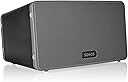
The Sonos Play:3 (2011) is a wireless speaker delivering richer, deeper sound with 3.0 audio channels and a 5-inch woofer. It supports multi-room streaming over Wi-Fi, voice control via Alexa, and quick setup in under five minutes. Compatible with major music services and designed for flexible placement, it’s perfect for creating an immersive, expandable home audio system.




| ASIN | B005441AJC |
| Additional Features | Wireless |
| Antenna Location | Music |
| Audio Driver Size | 5 inches |
| Audio Driver Type | Dynamic Driver |
| Audio Output Mode | Stereo , Surround |
| Best Sellers Rank | #2,979 in Home Audio Speakers #4,031 in Portable Bluetooth Speakers #28,133 in MP3 & MP4 Player Accessories |
| Brand | Sonos |
| Built-In Media | Power Cprd |
| Color | Black |
| Compatible Devices | Kindle_compatible, iOS_compatible |
| Connectivity Protocol | Wi-Fi |
| Connectivity Technology | Wireless |
| Control Method | Voice |
| Controller Type | Amazon Alexa, vera |
| Customer Package Type | Standard Packaging |
| Customer Reviews | 4.2 out of 5 stars 1,542 Reviews |
| Enclosure Material | Plastic or rubberized material |
| Global Trade Identification Number | 00180501002014, 00780746388661 |
| Is Waterproof | FALSE |
| Item Dimensions D x W x H | 9.5"D x 12.3"W x 8.6"H |
| Item Weight | 2.6 kg |
| Manufacturer | Sonos |
| Material | Plastic or rubberized material |
| Model Name | Play:3 |
| Model Number | PLAY3US1BLK |
| Mounting Type | Play |
| Number Of Circuits | 3 |
| Number of Audio Channels | 3 |
| Number of Batteries | 1 Lithium Ion batteries required. |
| Number of Items | 1 |
| Number of Power Levels | 128 |
| Power Source | AC |
| Series Number | 3 |
| Speaker Maximum Output Power | 80 watts |
| Speaker Size | 9.5 inches |
| Speaker Type | Multi Room |
| Specific Uses For Product | home audio systems, music streaming, multi-room audio |
| Subwoofer Connectivity Technology | Wireless |
| Total Ethernet Ports | 2 |
| UPC | 180501002014 780746388661 |
| Unit Count | 1 Count |
| Warranty Description | 1 Year |
| Warranty Type | 12 |
| Water Resistance Level | Not Water Resistant |
| Wireless Technology | Wi-Fi |
| Woofer Diameter | 5 inches |
A**G
SONOS PLAY:3 and the SONOS BRIDGE .
Not a lot can be said that hasn't been said already about what a great system this is for getting music off your media player or PC out to where you want it. I've had the Sonos 3 and a SONOS BRIDGE for about a year and it's one of the best things I've ever purchased. We have a modest house - about 2800 square feet with a pretty open first floor - and this thing puts out such a good sound you can hear the music in nearly any room in the house. It doesn't have a big booming, cloudy sound, like from an old boom box, but it's also not weak in the lower ranges. I can play anything from electronic to jazz to classical clearly and loudly (as loud as the wife will let me) and it sounds just great. I'm still amazed at what a great sound profile this thing can put out, and then I think I haven't even tried out a Sonos 5 yet. That's going to be my next purchase. A lot of people still don't realize what you really need to get this up and running, so let me clarify. I've got all kinds of networking going on in my house, especially when it comes to moving, saving and playing media files. This is dead easy, but I can see where the novice user might get a little confused. The Sonos 3/ 5 are great SPEAKER systems, really, for your music, especially if you don't need, or don't have the space for, a full stereo or a bunch of larger speakers. The way to get your music to a Sonos 3/ 5 is to hook it up to your network so it can play tunes off your computer or other media device, like your NAS. The Snos 3/ 5 themselves will require an ethernet connection to your network router (or switch) so you can send tunes to it with the Sonos app for PC or Mac (or Android or iPhone). The Sonos 3/ 5 can do wireless, but not the typical wireless you might have in your wireless router/ AP at home. If you want to use the wireless capabilities for the Sonos, you have to invest in the Sonos Bridge, but it's well worth it. The Sonos Bridge also needs an ethernet connection to your home network, but if you get one hooked up, the bridge itself will allow you to stream all the music you own plus anything off the internet. (You can still stream internet stuff to your Sonos 3/ 5 by themselves, but your home computer has to be on with the Sonos app running to do that.) Plus, if you get more than one Sonos in the house, the bridge makes it much easier to manage all of them together or separately. The bridge also makes it easy to put the speakers anywhere in the house and get music to them, like out in the garage or the backyard. You just need power for the speakers and you're set. Overall a great investment, especially if you've got all your music in one place like the hard drive of you computer and especially if you've got a smartphone you already use for everything. And if you think it's a little pricey, especially if you have to throw in the bridge, just go shopping at Amazon Warehouse where all the returns end up. Most of the time, the stuff I get there has been opened once, or never opened at all, and there's a good cut in the cost of a new one. Highly recommended.
R**W
12 Minutes to amazing sound quality
I have a Sonos system already with two ZP120's and two ZP90's as well as an iPod dock and to unpack and have Pandora playing on my Sonos Play 3 was 12 minutes. The large majority of the time was a software update and carefully cutting away the tape at the top of the package. Like all Sonos components, the set-up is easy and fast. Friends of mine have been blown away by how good my speakers sound running Pandora, internet radio and my iTunes library and I am not sure I understand WHY either-just that it is. Sonos sounds great. Positives: This item is not very big but produces big sound with full bass. I am a slight audiophile and cannot imagine being able to get much better sound out of a box that size. Great mids and excellent detail on the highs. I have it in a bedroom that is medium sized and of course it fills up the whole room with more than enough sound. I cannot imagine someone not being happy with this quality of sound given the size of this box. Easy to set-up and melds beautifully with your other Sonos components. Ability to meld with a 2nd Play 3 to form a more robust sound. Great sized footprint-not too big not too small. Only one wire-and that's the power plug. That gets you basically unlimited music from your library or online streaming as well as a robust and beautiful sound. Negatives: The item is average looking and not extremely attractive-but then again it's just a box No connections on the back except an ethernet port. No line in and certainly no option to power additional speakers off of this unit. Literally, there are NO other connections on this item and most "Dock" like speakers have a line in. What this means is that if you want to use it as your speaker for your DVD player, DVR or a music player not connected wirelessly with Sonos, you are not going to be able to. Not cheap. The comparison I can think of off hand is the Bose Sounddock-which obviously does not have the wireless capability that this item has-and the Sounddock is more expensive than the Play 3-so considering all that can be done with this Play 3-it's probably priced about right but there are no giveaways here. Summary: I am thrilled with this item and will now probably look to get a Play 5 for a larger room downstairs and get rid of my ZP120 down there. The Play 5 does have a deeper more full sound but it's $100 more and has a much larger footprint. Also, I will probably get two Play 5's and then I can use them as stereo or move them around the house easily and still connect to my Sonos network. If you have a space where you don't need/want a lot of wires and don't have a lot of space for speakers with a ZP120 or ZP90 with an amp-this item is for you. In small to medium rooms, this will give you the sound you want. An extremely impressive product that I cannot speak highly enough about!
A**R
Remarkable Home Wireless Music System
I've been using the Sonos Play 3 for a couple of weeks now with a Sonos wireless bridge and I have to say it is quite a remarkable system. I never give 5 stars, but I have never been so impressed with a technology system before. Very simple to use, well designed, and the controller app for PC and IOS is excellent. The Play 3 sound quality is quite good for a small set of powered speakers. The major benefit of the Play 3 is the easy portability of the system. I can move it to the porch or garage and within a minute the system is linked (you can easily tell its status - when the white led stops blinking, it is connected) and can use my ipad or iphone to control what I want to listen to. The ease of set up with the bridge is quite good. The system uses a simple auto-connect process to add devices to the Sonos network where, after being prompted by the application software, you press a button on the Sonos device and it automaitcally searches for a Sonos network to join. This is similar to the easy connect process many new wireless routers use to add devices. No passwords, but secure. The Sonos wireless bridge does not use a standard wifi network, it creates its own proprietary wireless Sonos network which cannot be seen by standard wifi devices. I believe the Sonos uses some of the channels in the 2.4GHz range. I have not seen any interference issues with my existing wifi network. You should do the initial set up from a PC or Mac, not a mobile device. I tried to do the initial set up from my ipad but when I added the app to my PC, the devices weren't recongnized and I had to reinitialize the system. To be fair, the Sonos app warned me that it is recommended to initialize the system from the pc app, so I don't consider this a problem - it was no big deal. The design of the components is very good, not cheap or cheesy looking, and the ease of use is excellent. One's reaction is that this is the wireless music system I'd expect to see come from Apple in terms of robustness, design, and ease of use. Although my first reaction was that the system seemed to be a bit expensive, the Play 3 is not much more than a set of of higher end powered PC speakers, and when you include the Sonos functionality, my assessment changed to thinking it was actually a good value. The system integrates easily with iTunes library and seems to support almost any media library. I've only really started to explore this aspect. Setting up music queues and playlists is trivially simple. The biggest drawback is that it is addictive - since getting the Play 3, I've added a Play Connect to my existing stereo amp and speakers. I can play to and from the Sonos system with my stereo now. This is really cool - I can play different streaming radio or music library tunes on the different Sonos devices in different rooms, or the same, or whatever the heck I want to do - all easily controlled from the Sonos app. I'm just seeing how soon before I justify another Sonos component. It's clear there is a very complex technological base for the Sonos system, both hardware and software, but that complexity is well hidden behind a simple to use interface for the user. Sonos may not be the "cheapest" system for home music, but it is the best. I did a lot of research before purchasing and no one else nailed this application nearly as well as Sonos. It just does this, but it does it exceptionally well. Over the years, we've made a significant investment in our music library and I view the Sonos as a great way to unlock the value in this investment by making it easy for me to enjoy my library wherever I am in the house. Kudos to the Sonos team for a job well done.
T**D
Doesn't get 5 stars due to cost, but works well
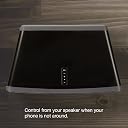
I've been looking at the Sonos system for several years. I never pulled the trigger as I had gotten burned by earlier wireless music server efforts from Creative and others. I just received a Play:5, Play:3 and a Bridge for Christmas, so I had to try it out. One important fact to remember about all Sonos devices is they are useless without the Sonos software. If the company ever goes belly up, you're going to be left with expensive and useless electronics. The company also has a bit of a reputation for eliminating features without warning. This review covers the Bridge and Play:3. If you want to use any of the Sonos devices wirelessly, you need to purchase the Bridge. If you don't want to shell out for the Bridge, you'll have to connect at least one Sonos device to your network via Ethernet cable. The Bridge is a small device that you attach to your router. The Bridge connects all the Sonos units to your Wi-Fi setup. The Sonos system doesn't use your Wi-Fi when streaming. It uses a proprietary wireless mesh network to stream. This prevents dropouts and other issues as the mesh network is separate from your Wi-Fi network. Once the Bridge is installed, you only have to interact with it when you add new Sonos devices. After the Bridge was connected to my router, I installed the Sonos software on my desktop computer. After the install, the software can look for music files on your computer automatically or you can choose the location yourself. The software quickly found the Bridge and the music I have on my computer. Presently I have around 28,000 songs in my collection in both MP3 (320 kbs) and WMA Lossless. The Sonos system does not support WMA lossless, so I had it search for the MP3 files. It did this quite quickly and within 10 minutes had indexed all 28K MP3 files. Sonos has a limit of 65,000 songs, so I was far below that limit. I have read a fair share of complaints as to the time it takes to index large collections, but I was impressed with how quickly the software indexed my collection. I then unpacked the Play:3 and proceeded to connect it with the Bridge wirelessly. To do this you simply select 'add new Sonos Device' from the menu on the software. I then went to the Play:3 and depressed two of the three buttons on the device and in a few moments the devices were talking to each other. Again this process was pain free and quick. Just a few moments after unpacking, I was listening to the Play:3. The fit and finish on the Play:3 is very good. It appears the Sonos people have used Apple as their model. The packaging and presentation of the product is first rate. The Play:3 has a sensor that can tell how the unit is orientated. When placed horizontally, the unit is in stereo mode, when vertical, the software blends the 2 stereo channels. The trim on the sides of the unit is covered with a rubbery type material that keeps the speaker from moving around. There is a mounting hole with a threaded opening to connect to many 3rd party wall and ceiling mounts. The three buttons on the speaker are for up/down volume and mute. You'll hardly ever control the speaker using these buttons. You'll use either your smartphone or tablet to do so, but it's nice to have those buttons if your phone/tablet is not handy. The Sonos logo does not rotate, so if placed in the vertical position, the logo is sideways. The grill is not removable. The speaker weighs in about 7 pounds or so. Because the unit has an integrated amp within, it has cooling slots on the back. Sonos does not recommend outdoor installation. How does the Play:3 sound? Pretty darn good! Since it is a single speaker, you're not going to get much in the way of stereo separation, but it sounds very pleasing and smooth at low to medium levels. After you push the volume up past 60%, the speaker appears to struggle with bass notes and sounds somewhat harsh, especially with compressed MP3 material. This speaker is not about blasting your eardrums, it is more for enjoying music at reasonable levels in any location in your home that has 110V power. The Play:3 sounds much better than the Big Jambox my wife has, with deeper more extended bass and crisper mids and highs. That being said, this is not a hi fi speaker. It sounds quite good considering how smalll it is. If you compare the sound of the Play:3 to most any $300 bookshelf speakers the Sonos will lose every time. You're paying extra for the electronics inside and the software. If you want to move the unit to a different location, you don't have to go through the install again. You simply plug it in to the new ouitlet and in a few moments it connects to the Bridge. When the speaker is oriented with the back facing a wall, the bass is pleasing and surprsing for such a small speaker. When nothing is behind the speaker, the bass output almost disappears. While this is typical for most speakers, it seems more pronounced on the Play:3. You may also pair the Play:3 with another Play:3 to create a stereo pair. I have not done this so I can't comment. You can control the Sonos system from either your iOS or Android device as well as your laptop or desktop WIN/mac computer. I have my software installed on a Windows 7 desktop and a Samsung Galaxy III phone. I've had no problems with either, save for the occasional glitch. You can't listen to your music while at the computer using the Sonos software. You can control every aspect of the system, but can't hear what is playing unless you're within earshot of a Sonos speaker. The same applies to the phone or tablet you're going to use as well. I've read many negative comments about this, but it makes sense from Sonos' standpoint. They want you to buy Sonos gear to hear the system. If they allowed this, there would be much less reason to purchase other Sonos units. I consider this a small drawback. To install the software on your phone or tablet, you'll need to download the app from either the Apple App Store or the Android Play Store. What I find quite nice about the phone/tab software is you can control all the aspects of the system just as you can from your PC. This makes it easy to add new devices and manage the system. While you can listen to your private collection, you can also enjoy many Internet music streaming sites, many local radio stations and also the Amazon Cloud Player (ACP). I use ACP and it works quite well and is integrated within the Sonos system very nicely. Since the ACP files are of lower quality (typically 256 kbs), the audio quality of these files is not as good as even the 320 kbs MP3 files. Switching from one song to another takes a little longer than a typical CD player, especially if you're listening to anything streamed. The delay is not that bad, but it does take a moment longer than you may expect. Playlists are easy to import and create. Sonos has a different take on how to create playlists, but it works okay once you get the idea. When adding new music you'll need to copy/encode the files and then have the Sonos software re-index your collection. This takes a few minutes typically. If you choose to have your music stored on your laptop/desktop PC, the computer needs to be powered up at all times so that the Sonos can find the music. You can access ACP and other streaming sites when your PC is powered down, but you lose the ability to hear the music stored on the PC. You may also store your music on a NAS. I have a 500GB hard drive connected to my router via USB 2. The system found the NAS drive quickly and effortlessly. Now that I have my music on this NAS drive, I don't lose my collection when I power down my PC. Since I have all my files encoded at both MP3 and WMA lossless, I was unable to use my WMA files as they are not supported by Sonos. Lower bit rate WMA files are supported, but not lossless. This was a bit of a bummer since the WMA files sound so much better than the MP3 files. I have begun to re-encode my entire collection using FLAC lossless, a supported format. This is the one fly in the ointment for me as it will take me weeks to do this re-encoding of 3500 or so CD's. If I was considering purchasing anything Sonos, I would spend some time on the Sonos users forums and see what other people are saying. While I've experienced a few small glitches, many others suffer with compatibility issues with software and/or network issues. Since receiving the Sonos as a gift, I've purchased another Play:3, Play:5 and 2 Connect units. They have all been easy to setup and work perfectly. I've noticed that as I've expanded the system glitches happen more frequently and the software struggles a bit more, but over all I'm very pleased. The big plus with the system is we are all listening to more music and watching less TV. The system also is a platform for sharing my music collection with my children. They also get to share their stuff with me. Just remember that this is all computer type equipment. When you upgrade to a new phone/tablet/desktop or laptop, your may have issues that you didn't before. Sonos, also in a very Apple way, stops supporting older OS's without warning. You could come home from work one day and the system won't be working. It appears best to have automatic updating on the Sonos software turned off, so this won't happen. Overall a winner, with caveats.
J**N
READ BEFORE YOU BUY....WORST EASE OF USE EVER......PRETTY GOOD SPEAKER SOUND QUALITY....DOESN't MAKE UP FOR THE OTHER ISSUES....
This product does have great sound quality, it's extremely loud and pretty clear, deep bass is kind of lacking. MOST IMPORTANTLY ...... I WILL NEVER BUY anything from this company again unless they make some serious changes. Why ? Ease of use, SUCKS!!!! NO BLUETOOTH ..KEEP READING.... In order to play you have to connect to a wi-fi network and you have to have it plugged in to the router unless you buy an extra accessory. The bridge at $29.99 ( A scam to make sure you buy more products). A LA CARTE speaker system for wireless.....that doesn't have blue tooth. Next issue, is that you have to download an app in order to actually use this product. LAME, what happened to plug and play. Every other audio equipment that any of my friends own or that I have been able to use, literally you just search the network and link....why does it have to be so complicated SONOS ?.... it get's worse lol ! SO once you actually download the app....you can access certain music programs like spotify, amazon, soundcloud and so on... At first you think yeah, this might be okay...however user functionality is terrifying. IT makes you want to never use audio equipment again. EXAMPLE..... 1. Soundcloud..... So typically when you use soundcloud, a user is able to to access his or her playlist. Once the playlist is loaded up the user can pick a song and it will play and automatically continue on playing songs, even on shuffle mode. SO you would think one would have the same power when using Soundcloud through the SONOS APP. NOT THE CASE. IN order to play music through the app (SONOS) you have to add the song or playlist to the SONO queue or playlist.... The problem is that you have to load every song you want to hear, SONOS completely takes away from the SOuncloud program....why ? WHY DO YOU have to make it more complicated SONOS ? Every other audio piece on the market you can just access the program you want to use and just play....none of this queue shenanigans and loading a song....only to hear it play one song and going back to the list and adding another one.... Another issue while using the soundcloud app....you can't do a normal search. Meaning normally in soundcloud a user can search an artist and it searches the entire site/app. However in SONOS you can only search through your profile, people you follow, or that follow you.....so once again SONOS takes away from the user friendliness that SOUNCLOUD OFFERS. SPOTIFY...same type of issues across the board, I would hate to see what the other apps are like.....oh I didn't see an option for youtube either. SONOS knows how to make a product that will produce good sound....USER F,RIENDLINESS = 1 they should be embarrassed. Also there customer support line might be one of the worst I have encountered. One last note to mention: One speaker is roughly 200 to 300$ ....ok not bad....however you need the bridge $29.99 ....however check out the price of the subwoofer.....every good system needs one and I have to say that their listed price is insane..... IF you are going to charge this much money for A LA CARTE speaker system.....at least make it bluetooth and most importantly change your SONOS application. WORST EVER !!!! HOW can I return this product.....?
E**N
Wow!!! Don't think about it just buy it.
Ok so its a little early to review a product (I've only had it for about 3hrs now)but holy crap. Setup eh! Physical setup couldn't be easier, in fact they really should say "Yeah that's it plug it in and follow the directions on your smartphone or controller". Tried setting up on my Windows 7 pc and ran into Firewall issue or something not sure what, never got around to figuring it out. I tried 2-3 things then skipped it and tried setting it up on my phone (Android) and it took me a whole 1-2 minutes couldn't have been easier. Shared out a folder on my computer called Music and found it in the Controller menu on my phone and let it "index" it (this took a few as it was a ton of music). Controller! Takes a little getting used to setting up accounts to Pandora, Amazon Music and more are real easy its more about the navigation. Not the easiest to find your way around but definitely not hard. The control over the music is outstanding!! Volume is very easy not to touchy or difficult. Selecting music to queue up changing order, removing and adding songs is really pretty easy once you get the hang of it. The real test will be if I can show my wife and how she takes to it. Options! (yes ! everywhere, I am that happy) Like I mentioned earlier Pandora, Amazon Music, iTunes, Slacker Radio, adding your own network shared music and more. Not to mention the little things they don't seem to mention anywhere like Sleep option (off in 15min, 30min...) Alarm, yes set any Play system to turn on at a certain time and at what volume level. Over All! I have to say very impressed with the sound quality the ease of setup for the abilities. It will force you to organize your music better (if your like me) or create some new Pandora/Slacker stations. Would I suggest it absolutely, is it pricey yes but worth it for what you get. Will I get more for my house? Yes as soon as I can afford it they still aren't cheap! I have the Play3 with the wireless bridge. The bridge is very small tucks away nicely and its a 2 port network switch so it can act like a pass through for something else if you don't have any free network ports on your home router. ***Update (2 weeks later): Came home the other night and my wife was using it and loves it. This proves that its easy to use and everyone will want to use it. One more plus it's helping me organize my mp3's and I get to enjoy them so much more now...
K**R
Sonos is worth it.
Let's start with some level-setting. I'm not an audiophile. I can't tell the difference between an 128K and a 192K recording. I don't have an encyclopedic knowledge of music. I've never built a playlist. Seriously, not once. I will also mention that I work in technology, have built networks for a living, and understand a network capture. I say all this to make sure you understand what my opinion encompasses. So I'm a tech guy for whom music is a nice background noise. With that said, my Sonos network is great! Yeah, the individual units are pricey, but they do the job I want so well. I have a distributed music system throughout my house which plays our collection of MP3s as well as streaming music (Pandora almost exclusively). My fiance' and I can listen to different things and control is available on a host of platforms. Sonos just works and is really easy to deploy. Sound quality is fine for my plebian ears. We have 5 units deployed (4 Play 3s and one Play 5). I haven't noticed a real sound improvement with the Play 5 so I can't suggest spending the extra money (but remember my level-setting above). They do everything I need and just work. I will mention that I've had a few issues with specific controllers (PCs and one Ipod touch) having problems connecting to the network. Sonos support did an okay job walking through the problem with me (they have some issues with my network config and DHCP addressed devices that change IPs. That's the controllers changing, not the Sonos units.) Network traffic hasn't been too intensive for what it does and I've never experienced any sound quality issues. Support for Pandora streaming is always great and I've never had to think about my music library once I pointed the first Sonos unit to the file share on my server. That part might be a bit more complicated for the average person, but I don't think so. I do wish they had a controller app for Windows Phone, but the third-party Phonos app does okay. It takes awhile to locate the Sonos devices (10-15 seconds) and it does have an up-front cost (around $11 I if I remember). But the developer works hard to keep improving it and has released a number of updates. Price would be the number one reason not to invest in Sonos, but I don't know of a good alternative to recommend. I've tried a number of things, but none come close, in my opinion. In the words of Ferris Bueller, "If you have the means, I highly recommend picking one up." Well, one would be silly. Pick up a couple.
M**S
The Play 5 is much better
Let me start by saying that for years I've found the Sonos system to be fantastic. You can play the same music on every Sonos device in your house, but you don't have to--each device can play different music simultaneously. If someone in your household is not technical and is easily frustrated by setup and remotes, you'll love Sonos. It's simple to set up and simple to use. The free Sonos app for the iPad in particular is excellent (probably because there was so much more real estate for the developers to work with). The proprietary peer-to-peer mesh network Sonos uses to broadcast music to each device is very reliable--probably more so than your home wireless network used by AirPlay speakers. While Sonos dropped the ball for Mac users on the upgrade to OSX Lion, they did get their act together and worked hard to update their software. I participated in the OSX Lion beta testing and thought the developers were great. I also had a problem when I bought my first Sonos unit, because it didn't work with my aging router (which I ended up replacing). However, I've always found the Sonos support personnel to be very knowledgeable and very helpful, either by telephone or by email. Now for the Play 3. We're remodeling our kitchen, and we planned to install two wired speakers in the ceiling. I decided to give the Sonos powered speakers a try first, since we already have two Sonos Zone Players (now called "Connect") in our house and love the Sonos system. Unfortunately, I found the Play 3 to be disappointing. With this unit oriented horizontally, it uses some sort of DSP processing to try to create a wider sound field, but the result is not good. I couldn't listen to it in the horizontal position for longer than about 15 minutes without having it really bother me. If you rotate the speaker to the vertical position, the DSP processing turns off and the sound is much crisper, cleaner, and centered. However, it then sounds like 1930's radio, with all the music coming from a single, point source. Two Play 3 units would take up more room than we want on the counter top, might look ugly hanging from the wall, and would be pretty expensive. At this point, I was sure I would have to install a pair of wired ceiling speakers to get any kind of wide, full sound in the kitchen. Before giving up altogether, I decided to try the more expensive Sonos 5. As it turns out, the difference between these two Sonos wireless speakers is like night and day. The Sonos 5, which only sits in a horizontal position, produces a rich, full, clean sound that fills our kitchen and sounds great. By contrast, the Play 3 treble sounds weaker, the midrange is somewhat muddy, and the bass is smaller and seems distorted. If you have the space, for a third more money you can get at least three times better sound by going with the Play 5 instead of the Play 3. Pros: The Play 3 is relatively light and doesn't take up much space, especially in a vertical orientation. This unit includes a screw hole in the back and could be mounted on a wall or a ceiling using a strong enough bracket. You can pair two Play 3 units to produce true stereo sound (though I haven't tried this) Cons: The Play 3 has no bass driver and only one tweeter. The sound it generates is fairly limited, and it seems especially distorted when the unit is oriented horizontally. Unlike the larger Play 5, this unit does not include a second Ethernet port, a headphone jack, or an analog line-in jack. This powered speaker works with all the Sonos features and thus could make a nice addition to your home audio system. However, before you buy a Sonos Play 3, I recommend you compare it to the Sonos Play 5. To my ear, the difference in sound quality is well worth the extra cost.
E**T
Flexible and expandable whole home sound system.
Perfect little speaker for a medium size room on its own, or to add to an existing Sonos system. I already have a Play5 and a Play3, so this was to be added to an existing Sonos environment so as to expand our current Sonos system. Needed something for the living room after all. If you have a Sonos already you know it is basically plug-n-play. If this is your first, then minimal setup effort is needed (more to do with setting up the bridge - but still minimal). Sonos works well on its own with , and does sync to your current iTunes music library. Do note: your music server does have to be up and running for Sonos to access and play the music. But in the end, Sonos will turn your iTunes into a virtual "book shelf" of music (ie: no need for Airplay, at least with your music) - Tip: you can setup your music on a NAS to help reduce overhead operational cost of a standalone server. This also affords you the luxury of network storage for other things like photos, movies, etc... As for network, Sonos works over your wireless network, so not need, or worry, about having a network drop nearby. If you have one, great as I would always advocate a wired connection over wireless, but not to the point of retrofitting or reconstruction. Personally, I like static IP addresses even my wireless environment (IT Techie), so I went the extra step in setting up my Sonos system. In the end, works like a charm and now we have music all over the house.... I also bought two Play1 to have as "floater" speakers. One for the patio in the summer, garage when working out there, etc...
K**A
This speaker completes my suround system & the sound is very good. Unfortunately Sonos has no customer care in India ...
I have bought a complete Sonos system In the US last year , It takes a short while to familiarise to the sonos way then its a breeze setting up.This speaker completes my suround system & the sound is very good . Unfortunately Sonos has no customer care in India so all repairs are handled by the country you have purchased them fortunately there is a 2 year warranty which will only cover the units located in the USA.
F**A
Excelente calidad de sonido con un diseño sumamente atractivo
Tenía algún tiempo considerando comprar una de estas bocinas conectadas mediante WiFi. Al final decidí comprar una SONOS. Para empezar, su configuración fue bastante sencilla: simplemente con descargar la aplicación, encontrar el dispositivo y emparejar las distintas cuentas de música en la nube para que tenga opciones para reproducción. Para su control instalé aplicaciones para Android, iOS en iPad y aplicaciones para Mac y PC. Estoy muy contento con la bocina, tanto su calidad de construcción, sonido y diseño son muy buenos. De manera particular, la calidad de sonido de la bocina es sensacional, realmente superó mis expectativas: el sonido es muy claro y suficientemente fuerte para llenar el nivel inferior de nuestra casa. En mi opinión las frecuencias bajas son adecuadas: no soy una persona que disfruta particularmente de música con bajos muy potentes, así que, en mi caso personal, el sonido que emite esta bocina, para el tipo de música que escucho, es más que adecuado, sin embargo es algo que a alguien podría no serle suficiente porque busquen alguna opción con un bajo más marcado. Como puntos negativos solamente pondría que la bocina tuviera la capacidad de conectarse de manera "offline" a mis dispositivos: si no estuviera inscrito a servicios de música en la nube la bocina sería, básicamente, inservible; eso significa también que si no tuviera servicio de Internet (o fuera de una mala calidad) también no podría hacer mucho con ella; no es un problema en mi caso (y creo que para la mayoría de la gente tampoco debería serlo), pero sí es algo a tomar en cuenta que podría evitar que SONOS se convirtiera en el sistema de sonido principal de su hogar. Recientemente adquirí una bocina Alexa (Echo Dot de 3a generación) y le instalé la skill de SONOS; de esta manera puedo iniciar la reproducción de música en mi bocina SONOS mediante instrucciones habladas hacia Alexa. Aunque la experiencia no es completamente impecable, creo que es lo suficientemente buena para poder realizar tareas de reproducción comunes sin tanto problema. Una característica que me agrada es que, cuando la reproducción de la SONOS es iniciada por Alexa, cuando ésta última recibe una instrucción por voz, el volumen de la SONOS es reducido para que no exista interferencia al hablar a la bocina de Amazon.
S**T
Great quality sound and convenience; but no aux input
The speaker was a little bigger than I expected, but still relatively small. The speaker itself feels solid and has a good build quality. Overall the sound quality is great and is more or less accurately described by other online reviews. For its size, it gives good room-filling sound (purchased for the bedroom, so the room size isn't too big). The bass is not strong, but it's expected and it's perfect for smaller rooms and those living in condos/apartment buildings who don't want room-shaking bass levels. Some things people should be aware of before buying: - There is no aux input on this speaker, which is why this is 4/5 stars. No Bluetooth either. - i.e. you can't use it as a speaker for your computer or phone (unless you have another Sonos product with aux input). Therefore the only thing you can use this for is to listen to music (and internet radio) from your own library or a streaming service. There is also no support for Youtube, Netflix, or any other video services at the moment if you're planning on using it as speakers while watching video on a phone/tablet. That being said, this is great with Spotify. - Likely not a problem for most, but you WILL need a smart device (smartphone or tablet) to set up the Sonos system initially. - It is rather expensive for a speaker like many have mentioned. However you're not just paying for the speaker. You're also paying for the system and the convenience that comes with it. The speaker can independently connect to the internet and stream music, and is controllable from any device anywhere in range of your WiFi network. Conclusion: While I would've liked to see an aux input option; overall the speaker and the convenience that comes with it is well worth the price.
P**P
It does one thing beautifully, but ONLY ONE THING
The sound quality of the Sonos speaker is truly as good as you've heard, and truly as good as you have read in the 5-star reviews. The top-quality cones deliver crisp highs, rich mids, and super-beautifully defined bass. Best sound for the price point you're going to find anywhere. That's all I'll say about that. CONS: Sonos advertises itself as a music streaming system, and you need to understand that STREAMING MUSIC IS THE ONLY THING IT DOES. It will not play any video-related software. It will not amplify your phone calls. It will not play the audio from movies on your laptop. It will not play the system sounds from your device. It will not play the audio output from games or phone apps. YouTube, Netflix, iMovie, iTunes films, Headspace, Guitar Hero, NFL Game Pass, Periscope, WhatsApp, Messenger, Facebook, Skype, Instagram vids, news apps, sports casts, Chrome, Safari, Firefox and Opera are all screwed with a Sonos speaker. If you only want a speaker for your streaming music (Spotify, Pandora, internet radio, or from your device's music storage) then get Sonos for unparalleled sound quality. If you want a computer speaker or a complete home audio system, buy another product.
Trustpilot
3 weeks ago
3 weeks ago