Desertcart purchases this item on your behalf and handles shipping, customs, and support to Kyrgyzstan.
🛰️ Navigate smarter, not harder — never lose your way again!
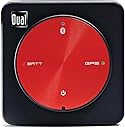
The Dual Electronics XGPS150A is a compact, portable Bluetooth GPS receiver featuring WAAS technology for high-precision location tracking within ±2.5 meters. Compatible with iOS, Android, Mac, and Windows devices, it offers 8.5 hours of battery life and comes with a complete accessory kit for secure mounting. Ideal for professionals and adventurers needing reliable GPS in remote areas, it supports a wide range of applications from aerial navigation to fitness tracking, backed by a 2-year warranty for lasting confidence.


| ASIN | B006M49G80 |
| Additional Features | Bluetooth |
| Battery Average Life | 8.5 hours |
| Best Sellers Rank | #1,921 in GPS System Accessories |
| Brand | Dual Electronics |
| Built-In Media | XGPS150A |
| Compatible Devices | Smartphone |
| Compatible with Vehicle Type | Car |
| Connectivity Protocol | Bluetooth |
| Connectivity Technology | Bluetooth |
| Control Method | Touch |
| Customer Reviews | 4.2 out of 5 stars 1,874 Reviews |
| Display Type | Digital |
| Global Trade Identification Number | 00827204108635 |
| Human-Interface Input | Buttons |
| Item Dimensions L x W x H | 2.24"L x 2.24"W x 0.75"H |
| Item Highlight | Universal Bluetooth GPS for tablets & devices, WAAS precision, portable rechargeable design, wide compatibility, black |
| Item Type Name | Dual Electronics XGPS150A Multipurpose Portable Universal Bluetooth GPS Receiver | Wide Area Augmentation System |
| Item Weight | 1.76 ounces |
| Manufacturer | Dual Electronics |
| Map Types | Satellite |
| Memory Storage Capacity | 16 GB |
| Mfr Part Number | XGPS150A |
| Model Name | Dual Electronics XGPS150A Multipurpose Portable Universal Bluetooth GPS Receiver | Wide Area Augmentation System Model Name Dual Electronics XGPS150A Multipurpose Portable Universal Bluetooth GPS Receiver | Wide Area Augmentation System See more |
| Model Number | XGPS150A |
| Model Year | 2014 |
| Mounting Type | Dashboard Mount |
| Number of Items | 1 |
| Operating System | Android, Windows |
| Resolution | 480 x 272 |
| Screen Size | 0.75 centimeters |
| Special Feature | Bluetooth |
| Sport Type | Fishing, Running |
| Supported Satellite Navigation System | GPS |
| Touch Screen Type | No Touchscreen |
| UPC | 640649748644 827204108635 |
| Unit Count | 1 Count |
| Vehicle Service Type | Car |
| Warranty Description | Manufacturers Warranty |
D**N
Dual Electronics XGPS150A works very well, a great choice for use with non cell enabled iPads.
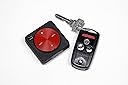
This XGPS150A works well, it allows my non cell enabled iPad Pro to work as a mapping device, such as with Google Maps. I still need to tether the iPad to my cell phone to get the maps. Apple does not allow its phone to send GPS information to a tethered iPad. If an iPad doesn't have the cellular hardware, it lacks the tiny inexpensive chip that would enable GPS reception. There used to be an app that would allow the phone to send GPS location data to an iPad but that app has been removed, rendering non cell enabled devices pretty much useless for GPS. Not only does the XGPS150A restore GPS function, it seems much more accurate than cell phone GPS. There is a disk displayed around the mapped location indicating the uncertainty of the mapped location. That disk is much smaller with this XGPS150A than it is with the iPhone location mapping. This 150A not only places me on the correct side of a divided highway, it follows as we move into an exit lane. I believe location accuracy is claimed within 10 feet and it seems well within that. We used it on a 6 hour trip so I can tell you battery life is longer than that. When I ordered it I had the idea it was much larger than it really is. The unit is small, it weighs 48g and measures 2.2" square and 3/4" thick. It has a molded in loop on the back for a strap and that adds a bit to the thickness, otherwise it would be thinner. It comes with a Velcro type strap and a handy rubbery molded pad so it stays put on top of the dash. Others have noted that the charging cord can't be used while it is in the rubbery pad. That isn't really right because you can put it into the molded pad tilted with one edge up. It is still held well enough that it stays put on the dash but can still be charged. My previous iPad mini was cell enabled and I didn't realize when I bought my current iPad Pro that the non cell enabled iPads were so GPS crippled. It makes little sense to me that a tethered iPhone can't send GPS location to an iPad. Anyway, this XGPS150A restores the GPS function and it seems to markedly improve on the iPhone's location accuracy in the process. The difference on this 150A model and the next higher one is this will connect to just one device at a time. There are just 4 status LEDs on GPS antenna. There is a downloadable app that gives information about which satellites are being used and an indication about position and accuracy, but that accuracy is indicated with a nonspecific word such as "good" but not in the much better way such as an estimate in feet or meters. It comes with a charging cord but no wall charger. It does have a cigarette lighter type plug for 12V charging. I'm happy with this GPS receiver and would purchase it again.
A**6
Outstanding item for the price.
After doing a lot of research I previously had used a Bad Elf GPS dongle for my flying needs. When I upgraded to an iPhone 5 and iPad Mini, my old 30 pin Bad Elf became an expensive and obsolete key chain. I tried using the 30pin-Lightning adapter, but found it awkward on the yoke and decided it was time for an upgrade. I don't fly enough to justify an expensive ADS-B receiver, and I didn't want to make the mistake of a plug-in unit again, so I set out to do some research. Having been happy with Bad Elf, I considered the Bad Elf Pro because one feature I thought I needed was tracking, something the Dual 150 doesn't have. What changed my mind was the price. Even though the 150 is an "older" model, I was able to pick it up for almost half the price of the Bad Elf Pro and it seems like it's made for flying. The rubber dash grip and small size are great on the glare shield of the plane. I was very impressed with how fast it got a cold signal and the accuracy was also great. The battery life is excellent for even long cross country flights or drives. I love how there's nothing to it, and the free iPad/iPhone application made it fun to see how well it was working. If you're not flying with Foreflight, you're missing out. I'm sure that Wing-X and Garmin Pilot are great too, but I've been using Foreflight for years and have nothing but praise for the application. There was no work to get this working with Foreflight. I use a wireless only iPad mini, so I otherwise didn't have airspeed, altitude etc. All of that shows up the instant you start up Foreflight with the GPS connected. No set up required. The GPS works great on sunny days and in clouds, It also doesn't seem to mind getting hot on the dash. The only big difference between this model and the newer one is the 150 can only connect with one device at a time. For me, this wasn't a deal breaker and it still isn't. For the simple VFR flier like me, I only use the GPS as a back up and wouldn't see a need for more than one device to be connected. Bottom line: If you want to get GPS function on your iPad for a low price, this is the unit for you. If I had the spare $700 laying around, I'd probably go buy a Stratus, but this will do just fine for me in the mean time.
K**E
Excellent, but beware of app incompatibility
I just used the Dual XGPS150 on a recent trip, and found that it worked very well indeed. The only issue I have encountered is potential incompatibility with specific applications that, by the express intent of the provider of the application, are not compatible with external GPS receivers. This is the sort of thing that many people would not anticipate, because it is counter to common sense, but it is real. I recommend that prior to purchasing any external GPS receiver, that you start by identifying the particular application that you expect to use, and that you confirm with the supplier of that application that the application is compatible with external GPS receivers. I'll discuss this further in a bit. I did not encounter any issues with the Bluetooth connection between the iPad2 WiFi and the Dual XGPS150a. The XGPS150a did not exhibit any problems with maintaining continuity of satellite reception or continuity of its knowing its precise location. It was highly accurate. I am particularly pleased with how quickly it figures out its location after having been powered off for a while. It does this within just a few seconds, which is a small fraction of the time that my high-end Garmin Nuvi needs to figure out where it is. There is a competing device that hangs directly from the docking port, and I just think that this is a very dumb idea. Yeah, there is nothing about the docking port that prevents this sort of thing, but it is suitable only for cables and cradles. Nothing should be attached there in the way that that thing does. It is only a question of when, not whether, you snap it off, ruining the accessory at least and possibly even damaging the port on the iPad or iPhone, which I expect would be a costly repair. For owners of WiFi-only devices, there are generally two issues that you have to sort through when it comes to applications. The first issue is the issue of off-line maps. As most people quickly figure out, Google Maps on the iPhone/Pod/Pad relies on continual Internet connectivity to download pieces of the map on the fly, as you travel or even as you scroll around the map without moving. The same behavior applies to most of the map apps that you can buy at the app store. This is obviously an issue for mobile use of WiFi-only devices, but it is even an issue for devices enabled with cellular-based data communications (3G, etc.), because in rural areas, loss of data connectivity is even more prevalent than loss of voice service. (And as has been reported elsewhere, it is all too common for 4G services to revert to 3G, in which case the data rate plummets from something remarkably fast to something more like a very slow DSL connection, which could adversely affect the ability for the map application to update the map as you are moving.) When you evaluate specific applications relative to this need, you need to pay close attention to the particulars of how you select the map segments that get stored in the device. And ignore all the misinformation that you find on web forums, telling you about some trick for forcing Google Maps and similar apps to cache maps in the device. Categorically, those tricks do not work. The other issue is with forced incompatibility. Fundamentally, there is no apparent reason why an application that works with internal GPS receiver would not work with an external GPS receiver. In fact, it might not even be possible for the application to detect the difference. Nevertheless, the provider of the application can flag the application such that you cannot even download the application into the device if the device does not have an internal GPS receiver. In particular, I discovered that this is what MotionX, the supplier of several navigation applications, does. If your device does not have an internal GPS receiver, you cannot buy MotionX GPS applications directly from the device (via the app store application), and if you go the iTunes route, you can buy the app but then during the app synching phase, iTunes will give you a message saying that the app could not be downloaded into the device because the application is not compatible with that device. This is not some sort of oversight or snafu or whatever. It seems counterintuitive, but MotionX's concern is presumably that without this restriction, some people (cheaters) who use external GPS devices would purchase the app and then demand a refund, claiming that the app is not compatible with the device. It remains to be seen whether MotionX and Apple will figure out a better way to address this concern, but for the time being at least, you cannot download MotionX GPS applications into devices that lack internal GPS receivers. This concern is potentially an issue for GPS applications in general, which is why I recommend that you start by selecting the application that you intend to use, and make certain that there is no compatibility issue of this sort, before you purchase any external GPS receiver. I had hoped to use MotionX GPS HD, mainly because it is so much less expensive than TomTom, which is a very expensive application at around $50. Before buying the TomTom application and then finding out that I had wasted my money, I attempted to get confirmation from TomTom that there were no issues similar to the situation with MotionX. I called their tech support number and then waited on hold for a long time and eventually spoke to someone in Mexico who absolutely assured me that TomTom would work only with either the internal GPS receiver or else their own docking cradle (for the iPod/iPhone - not sure if they even have anything for the iPad). Then I sent an email asking for clarification, and I got a response that was confusing but that seemed to corroborate what I was told over the phone. I sent a reply to that email, and a day or two later I got another reply correcting the earlier reply, stating definitively that TomTom GPS app is compatible with all external GPS devices. That second reply even included a link for a page on their web site that indicated the same thing, although not as definitively as I would have liked. I have not decided whether to purchase TomTom, but I am confident at this point that should I choose to do so, I would not encounter an issue similar to the issue with MotionX, and in the unlikely event of such an issue, there should be no difficulty in getting a refund through the app store. Garmin also makes a car navigation app, but presently it is an iPhone-only app. Presumably it would run on the iPAd, but either using only a small part of the screen or else blown up with lousy resolution. I only really wanted a good map application anyway, as opposed to full-blown turn-by-turn navigation with route planning and so forth. I found two good applications: PocketEarth, and MapsWithMe. Of the two, I like PocketEarth better, because the graphical representation of the maps was easier to read and interpret, particularly with respect to freeway ramps, which sometimes are incredibly complex. PocketEarth even shows bypasses and roads that are presently under construction but not yet completed. They were indicated using dashed lines to distinguish them from existing roads, but even the ramps were indicated. This was impressive to say the least. My final observation is for the benefit of anyone who has not purchased an iPad and who is debating whether to get the WiFi-only version or the version enabled with mobile data capability (3G, etc.). I recently had a discussion on this question with a friend who is considering buying an iPad. Notwithstanding the availability of external GPS receivers, and notwithstanding that you can get those little devices that translate 3G (or whatever) to WiFi, and notwithstanding that the offline maps issue is an issue even for devices that are enabled with mobile data communications, we agreed that for anyone wanting to use an iPad for navigation purposes, it is wise to spend the extra money on the iPad with the data capability (3G, etc.) and then purchase service for it on a monthly basis as needed, which is a nice thing that you can do with the iPad.
D**.
Love it.
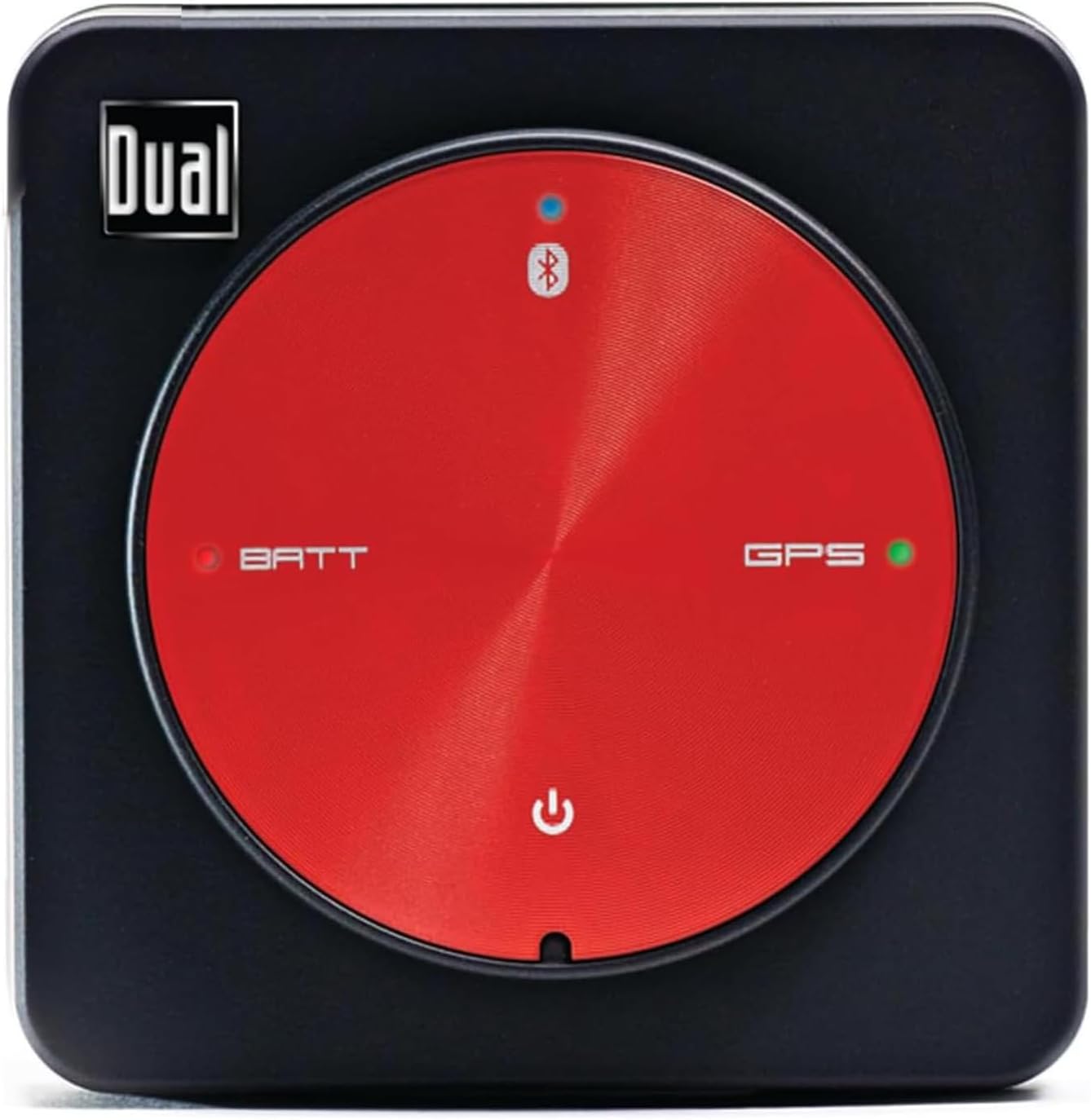
If you just got your shiny new iPad or are a bit under impressed with the TomTom car adapter this is for you. This unit is deceptively small and uses your Bluetooth connection to connect to your phone. The battery lasts for 10+ hours of continuous signal acquisition. It is able to see it's position in 3D space so with the arm strap you could use it for geocaching or to capture signal for your sports apps that track your position for speed and distance. I live in the sticks and quite frankly am less than impressed with aGPS signal acquisition. It is a really nifty app that lets you see how many satellites are overhead, and which ones it was able to use to construct your position and then gives a reliability rating for its trustworthiness. Even in a building I was able to get at least 4 satellites. It has a 20 channel signal and up to a 5 Hz refresh rate. Way better than a standalone GPS unit. I love the fact that where my GPS apps used to grey out or bounce around the map or show my position several yard off, now it is razor accurate. Its only downside, is that it takes a bit to lock into the satellites, but it is a small price to pay for this level of accuracy. It is not waterproof, but since it is Bluetooth, putting it in a baggy for protection is simple and effective without stopping its usefulness. It comes with a rubber sticky square so you can throw it on the dash of your car (even a curved part) and it will mold and hold to the dash give it great line of site to improve your acquisition rate. It also comes with a Velcro strap that can be doubled to fit on your arm or leg (or really big arm) for motorcycle, bike, or running. The strap fits through two small loops on the bottom of the unit so you don't have to worry about losing it in the woods. I love it.
B**R
DO NOT BUY IF YOU WANT TO USE IN A JET !
I fly a Boeing 777 for an Asian carrier. I've brought at least ten of these DUAL 150 / 150A units back from the USA for other local pilots. The units purchased a year or two ago work ok most of the time - maybe 75% of the time as long as the flight level is FL 350 or lower. None of the 150A units will lock on or function at or above FL 370. If you are willing to move the 150A out of the cockpit and can find an available passenger window you have a good chance that the unit will work about 50% of the time if you are below FL 350. Recently, over the last several months I've purchased five more of the 150A units and not one of them will work in the cockpit of a jet / 777. All of these non functional units have firmware version 1.0.34 which is an older version of the firmware. Apparently, Amazon is closing out this model and the 150A units now being sold are from old stock and being discounted. Units purchased a few months ago have firmware version 1.3.2 which does work in the 777. The DUAL website offers a firmware version upgrade to ver 1.2.6, and I did make the firmware upgrade offered but this version also will not work in an airplane at high altitude and speed. For some inexplicable reason DUAL will not supply the latest firmware 1.3.2 - probably because the older units I bought a month ago won't accept that new firmware. The older DUAL 150 units (not 150A) had a decent battery life of six or seven hours, the new units I received have a battery that lasts three to four hours. More indication that the Amazon supplier is dumping old stock. Be careful! This unit will not even lock on when behind any window of my home, even on a clear day with a 180 degree view of the southern sky. Outside with a clear view of the sky the 150A locks on and works unless there is heavy cloud cover or rain - then it won't work. This is a CRAP GPS unit if you are considering using it in a jet. If you want a cheap GPS unit for your car or boat - it is ok. If you buy this unit immediately download the DUAL app, make a bluetooth connection and see if the firmware version is 1.0.34 (old unit). If your out of the box unit has this firmware put it back in the box and send it back to Amazon. They are trying to dump old stock on you. My experience with DUAL customer service has not been good. They do answer the phone and are polite, but they seem unable to do anything. I was promised that support would contact engineering to see if an update to ver 1.3.2 was available. I sent support requested screen shots of the app and the failure to connect or track satellites. I waited TWO WEEKS without an answer. When I called back support promised they would contact management and engineering the same day to try to resolve my issue. Two days later support finally emailed me back. Support told me they were unable to resolve my problem with 5 brand new units (about $450) and suggested that I buy their new XGPS 160 unit for $150. So this company's solution to five of their 150A units not performing as promised on their website for to try to sell the customer yet another unit? Amazing! If you read the reviews on the XGPS 160, the reviews are mixed, some people love it and others are having problems. Of specific interest is people who are shipped an early release version with firmware that can't be updated. Stay away from DUAL and especially this unit if you want an aviation unit.
J**E
Perfect little device, and great battery life
It does exactly what I need. I have an iPod Touch, so I've been dependent on public WiFi hotspots for my maps. Then I got this. I got an offline map app (I use PocketEarth, but there are a fair number of them) and the combination is great. Somewhat to my surprise, this can actually track satellites from inside buildings ... not WELL but it can ... unlike my car satnav, which has to have a very good view of the sky or it sits and sulks. Plus they actually under-estimate the battery life -- I've gotten close to 10 hours out of it. I would buy this again in a heartbeat. By the way, it works just fine with iOS 8.1. Update: 3 years later, the battery life has declined somewhat, which is only to be expected. But I still use it all the time, and still love it. I was in the path of totality for the eclipse -- used this to feed my coords to my eclipse app and it gave me a nice countdown to totality. (which was mind-blowing) And I use it to play Pokemon Go on an iPod Touch. If your device doesn't have a built-in GPS -- or even if it does but you want a better one -- this is what you want. There aren't all that many things that work exactly how they're supposed to, no fuss, no muss, but this is one. After three years, I'd give it six stars if Amazon would let me glue an extra one on the end.
R**Z
Update the firmware as soon as you get it
At the time that I bought XGPS150A, I was debating between it and the Emprum UltiMate GPS Receiver, to use in conjunction with an iPhone app that necessitated a GPS device capable of 5Hz sampling rates. I opted for the Dual Electronics unit over the Emprum device for two reasons, the XGPS150A is a standalone device with its own battery and, again, at the time, was thirty dollars less expensive. The packaging for the XGPS150A is somewhat reminiscent of an Apple product. If you've ever opened an iPhone or iPod touch, you will recognize the Apple design cues of the XGPS packaging quickly. The same cannot be said for the external markings however. The contents are quite secure in the packaging, so much so that I needed to use a letter opener just to pry the box open. Once inside, the contents reveal themselves quickly, albeit wrapped in far more plastic than necessary. It really was excessive. Once I was able to remove all of the wrappings, I ended up with the GPS receiver, a rubberized dashboard "mount", an adjustable armband (can be used on a backpack as well), a car accessory port USB adapter, a reasonably long mini-USB cable, and an instruction manual. To my surprise, and despite the instruction manual's statement to the contrary, the battery on the GPS unit was completely dead and needed to be charged. Fortunately, the XGPS150A is designed to work while connected to a USB power source. As stated in the manual, it took about 2.5 hours to fully charge the battery. Connecting the XGPS150A to my iPhone was quite easy since the unit was already set to "iOS mode". Once I downloaded the native app from the App Store, I was able to view the connectivity status of the GPS unit as well as the battery level, configurable settings, and firmware version. When I set out to test the XGPS150A with my third party iOS app, I was surprised to find that the unit was functioning in 1Hz mode instead of 5Hz mode. A quick Google search revealed that the firmware that shipped with my GPS unit was VERY old (1.0.34) and needed to be updated in order for 5Hz mode to become available. (At the time of this writing, the latest firmware available from Dual Electronics is 1.2.6.) The firmware upgrade process was straight forward, albeit a bit restrictive as it requires access to a Windows PC. Mac users are out of luck unless they are running Windows in a VM or via Bootcamp. While this wasn't a problem for me, it might be for some. Therefore, I've docked the rating one star. (They have an iOS and Android app. IMO, there's no reason why they can't have a firmware updater for OSX.) Once the firmware was updated, the XGPS150A worked as expected. 5Hz mode was in full effect and my third party app was happy with the data it received. Unfortunately, I had a minor issue with the dashboard mount. The dashboard mount is made of a very soft rubber material which, sadly, has developed a tear around the edge that holds the XGPS150A in place after only a few uses. I wasn't rough or abrupt with the insertion and removal of the XGPS150A from the dashboard mount. It seems that the mount's material is extremely delicate and not well suited for its intended purpose. I've docked the rating one star for this shortcoming as well. I haven't used the armband or car charger yet so I cannot comment on those items. I will be putting the unit through its paces under more strenuous circumstances in a couple of weeks, at which point I will update my review to include my experiences. ********* Update 1/3/14 ************* Well, I've had an opportunity to really put this GPS through its paces. Overall, the GPS unit met my expectations with a few exceptions. 1 - Although I was able to achieve the advertised 5Hz functionality, this only occurred once - immediately after the firmware upgrade. After that, the best I could achieve was 4Hz. After doing some research, I found that I am not the only one having this problem and it appears the manufacturer is aware of the problem. I have my doubts whether this issue will ever be resolved since the AGPS160 has been released. 2 - For whatever reason, there is a known connectivity bug that exists between iOS 6.1 and this unit. At some point, this GPS will stop communicating with your iOS device and the only way to fix the problem is to use the "Forget This Device" feature in iOS' bluetooth menu then reconnect. The manufacturer suggests that the problem is with Apple's implementation of Bluetooth in iOS 6.1.x. This issue was supposedly fixed in iOS 7, however I chose not to upgrade since my iOS device is an iPhone 4 and the iPhone 4 experiences performance issues running iOS 7. While this isn't a knock on the GPS device, it is certainly an issue that everyone should be aware of. (At the time, iOS 7.0.2 was the latest version available and it ran poorly on my other iPhone 4 phones.) 3 - Even with a direct line of sight to the open sky, this unit takes several minutes to acquire signals from nearby satellites. Again, this may not be an issue with the GPS itself, but I found myself having to plan ahead and allow extra time for the GPS unit to be ready before I could confidently record the telemetry provided by the GPS. Once it was up and running, however, the telemetry was fairly solid. 4 - The software I used to gather the GPS telemetry (Sailor/GPS Buddy/Harry's Lap Timer) was able to calculate the accuracy of my GPS on the fly. The best the GPS could manage was three feet of accuracy while connected to 12 satellites simultaneously. Not a deal breaker for my purposes, but still an important statistic nonetheless. 5 - My intended usage for this device was in a motor vehicle, and I must admit the mounting options are quite limiting. The rubberized dash mount is completely useless in a moving vehicle. Had it not been for the fact that I drive a convertible, the armband would have been equally useless. I ended up securing the GPS by wrapping the arm band around my passenger sun visor, then I positioned the GPS to face the sky while the top was down. This sufficed, for the most part, although I did have some concerns regarding the velcro strap and whether it would hold in place. Fortunately, the velcro held just fine. In conclusion, this GPS unit met my expectations, even with its quirks, so I've decided to keep my star rating as is. Hopefully someone will find my feedback helpful in their purchasing decision.
P**E
Wonderful Product
This is the coolest thing for my iPad. I wish I had purchased the 3G iPad that comes with a GPS Receiver, but since I didn't, this device makes it possible for me to use many GPS enabled iPad apps. Some apps will not install on the iPad if it is not 3G even if you have this device so use caution when buying the apps. I do experience an issue when switching between apps while I am using this device. The iPad seems to lose the GPS even though the utility with this device shows that it is clearly working. I DO NOT believe that the issue is with this device, I believe it is a software issue, but it's something to be aware of if you use this. The remedy is to shut down both applications (if you can figure out how to do that on an iPad) or shut the iPad off and then back on which is what I do. It doesn't take very long, but if you are in the city and using this for navigation and your turn is coming up, watch out!! Again, I don't think it's the device's issue. I use this with the CoPilot navigation app and the What's Next app and a few others. 8/7/2012 - I took this device on a 2400 mile trip and it worked great with my iPad 2 and CoPilot and other apps. One thing I learned about my iPad is how to actually shut apps down without rebooting the thing. I'm a pretty tech savvy guy so when someone asked me about shutting the app down and restarting it I had to say I didn't know how and eat a bit of crow. Shoot, for all of you who have iPads and don't know, double-tap the center button and little window at the bottom opens/raises up and shows you all the apps that are running. Hold your finger down on one of the app icons until they start shaking and have a red minus sign on them. Touch the minus sign of the ones you want to shut down and viola, you are done. Click the button once to get them to stop shaking, click again to exit. I thought I was shutting down all my apps when I rebooted the darn thing, but no. When I double-tapped that button the first time, EVERY app on my iPad was running because at one time or another I had opened it and never closed them. I guess you learn something new all the time even when you thought you knew it ALL already.
V**2
Buono e funzionale
È Un ottimo prodotto, buona qualità prezzo! Lo utilizzo in aereo con ottimi risultati. Lo consiglio per la navigazione aerea.
L**.
Excelente
Trabaja perfectamente
M**N
Parfait pour l’instant.
Utilisé hier pour la premiere fois avec Foreflight sur Ipad dans un gyrocoptere, le tout a bien fonctionné. S’est déconnecté a 2 reprises De foreflight, mais probablement un probleme avec foreflight. Si vous voulez utilisé ceci en aviation, je vous recommanded’acjeter plutot le DUAL XGPS170D ADS-B / GPS BLUETOOTH TRAFFIC & WEATHER RECEIVER qui vous donnera Dans Foreflight les cartes météo ainsi que la position des avions équipés de transpondeur.
R**Z
Funciona bien con el iPad
Lo hemos estado probando en un viaje de 3 semanas por los EEUU, con Sigic como navegador y ha funcionado muy bien, la batería dura tanto como la del iPad y tiene una pulsera por si quieres llevarlo como "reloj" cuando vas por la calle. Muy recomendable para el iPad wifi
M**T
Excellent GPS for iPod
Delivery of the Dual XGPS150 was very prompt. I had read there are 2 versions, a 150A (America) and 150E (Europe) My conclusion is that they are the same device. Mine is a 150A and works fine in the UK. I've used this GPS twice and so far I'm very impressed. I'm using it for hiking in the UK with the latest iPod. Unfortunately the iPod doesn't come with GPS, so you either have to buy a plug in GPS like Bad Elf (more expensive) or one that works using bluetooth. The Dual XGPS150 is very small and light, so it fits easily into a jacket or rucksack pocket. There is a small switch on the side of the device which needs setting for Android or Apple devices. The default is set for Apple, so I didn't have to change it. Switching on the Dual at first was a little tricky, as you have to apply pressure to the top of the device for 3 seconds. I found it needed some pressure from my thumb to hold down, but this is probably not a bad idea as it avoids accidently switching on or off the device when it's in your pocket. After I had switched on the XGPS150 I switched on my iPod bluetooth connection. The two devices paired very quickly. I'm using Ordnance Survey maps of the UK National Parks at a scale of 1:25 000, downloaded using the 'Outdoors App'. These are offline maps so scrolling is instantaneous. I have found the XGPS150 to be very accurate and really helpful for navigation. After a full charge (2 and a half hours) the XGPS150 was showing 45% battery left after 5 hours of hiking. I also downloaded the Dual App, though you don't have to do this to use the device. However the App usefully shows you satellites, battery status, latitude, longitude and altitude. So far, so good. I'm very pleased. But a word of warning if you are thinking of buying this product elsewhere. Initially I ordered the XGPS150 from an internet company called 'Proviation'. Do not buy from this company as it appears to be a rogue internet company. I did not receive the device and I'm still trying to get my money back. In contrast Oasis Pilot and Amazon have been great. I'd like to add another warning. If you are using a wifi only iPad or iPod DO NOT upgrade your Apple operating software to OS8.3, released in April 2015. There is a bug which stops the Dual GPS device from working with map Apps when using Bluetooth. I'm hoping Apple are working on a fix as OS8.3 has rendered my Dual GPS as useless. I can now add that since Apple updated their software my Dual GPS works fine again, and I have now upgraded to OS9 and can confirm it works ok.
Trustpilot
2 weeks ago
1 month ago