Desertcart purchases this item on your behalf and handles shipping, customs, and support to Kyrgyzstan.
🎮 Level up your retro gaming with crystal-clear HD — don’t get left behind!
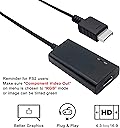
This LevelHike HDMI adapter cable converts analog RGB signals from PlayStation 1 and 2 consoles into crisp 720p HDMI output, delivering significantly improved video quality on modern HDTVs and monitors. Featuring plug-and-play simplicity, a 4:3/16:9 aspect ratio switch, and ultra-low latency, it revives classic gaming with vibrant colors and sharp details. Compatible with all PS1/PS2 models, it includes a detachable HDMI cable and a 1-year warranty, making it the ultimate affordable upgrade for retro enthusiasts.
| ASIN | B07MYVF61Y |
| Best Sellers Rank | #572 in Video Games ( See Top 100 in Video Games ) #3 in PlayStation 2 Games, Consoles & Accessories #6 in PlayStation Accessories |
| Brand | LEVELHIKE |
| Built-In Media | HDMI Adapter, HDMI Cable, USB Cable |
| Color | Green |
| Compatible Devices | Gaming Console, Monitor, Projector, Television |
| Connector Type | HDMI |
| Customer Reviews | 4.4 out of 5 stars 3,962 Reviews |
| Finish | Glass |
| Item Dimensions | 6.1 x 3.94 x 2.36 inches |
| Item Weight | 0.22 kg |
| Item dimensions L x W x H | 6.1 x 3.94 x 2.36 inches |
| Manufacturer | LevelHike |
| Mfr Part Number | RM |
| Model Number | RM |
| Number of Items | 1 |
| Number of Ports | 1 |
| Package Quantity | 1 |
| Power Plug Type | No Plug |
| Specific Uses For Product | TV, Monitor |
| UPC | 743815983150 |
| Unit Count | 4 Count |
| Warranty Type | Limited |
F**E
Working great. Incredible value for the money. Get one!
I bought this for my PSXs and did not have big expectations after having used similar products for PS2 and Wii, where at best, there was a noticeable lag that hampers many games. My first nice surprise was that the cables are all of very good quality, definitely not expected at this price range. You get good solid thick cables for both the HDMI cable and the USB cable used to power up the device. The adapter uses the RGB signals from the Multi-ouput port, the same points used for the S-Video cables that offer the best quality on these systems. The result is incredibly superior to the regular composite (the usual yellow RCA connector). I was completely shocked when I saw it working for the first time. For reference, just buying a second-hand S-Video cable for the PS1 will cost you at least $40, and of course you would need a S-Video capable TV too. I wanted to try this on a SCPH-1001 (the first revision that came out in the US) that had some video issues using the regular composite, where the letters appear like doubled with an horizontal offset. This makes reading text even more terrible that it already is in these consoles when using the standard connector. Apparently, this effect is introduced due to a signal stronger than necessary. I have got yet to replace the capacitors on this unit to see if this issue is resolved. But to my surprise, the image through the adapter was very sharp and precise, perfect. Not a single trace of this problem, I guess this is because it uses RGB signal that provides so much better quality over the composite. My next test was to check if there was any lag introduced by the adapter, as some other reviewers mention. If there is any lag, I was not able to notice it. I have got to say that I mostly play Tomb Raider games, but also loaded Ms Pac-Man and the movements seem to occur in a very precise manner. Your mileage may vary with other type of games. I am sure that other devices like the Retrotink 5X pro will produce a better image with no lag, but they are also $300, plus you need to procure a PSX RGB cable (probably the S-Video cable + an adapter). For a tenth of the cost you get an all-in-one very convenient solution, a very capable adapter that is already a huge improve in image quality and also cleans the image from artifact and noise. I highly recommend this adapter. I don't write many reviews, but this product deserved it. There is definitely one con, the connector that goes in the PS1 is slightly bigger than it should, so you need to apply some force (and care!) to plug it in. I initially wanted to take off one star because of this, but I think overall the product is fantastic, so I am keeping the 5-stars review.
J**A
They work!
I recently bought a new 2025 model Samsung Q8F 4k 120hz tv, and it does not have any composite/component inputs that I can see. I was planning originally to mod my ps2 slim with the hispeedido hdmi kit, (still may) however the more I researched into the ps2 hdmi conversion kits, the more confusing it got! Ultimately, you can spend a lot of money on a scaler or hdmi mod (retrotink/retrogem) but for someone that just wants a plug and play solution this cable is pretty awesome! The picture is surprisingly good, and theres no install needed, just plug it in! The colors are good for the most part, I have noticed some cut scenes/ into scenes here and there can have a bit too much green, red, or blue tint. For example I am playing grand turismo 3 currently and have noticed the green blue and red colors during the introduction scenes, but looks pretty great during game play. I believe my television has a built in AI upscaling feature that may be affecting the final results, and your results may vary from mine however my experience so far is overwhelmingly positive. Thank you levelhike for the handy cables!
C**Y
Impressive brings retro gaming to a new peak!
This LevelHike HDMI adapters are impressive at their price point. Believe me you will not be disappointed and will not get a better full set adapter for only $30 dollars. I Have 3 PS2 consoles. The SCPH-39001, SCPH-70001 and SCPH-77001. Also Nintendo GameCube and Nintendo Wii. All 5 consoles using basically the same adapter. They all work flawlessly and look very good on my LG QNED 85A 100 inch tv. It also plays PS1 games on the PS2 very good as well. Some people have complained about this HDMI not working and turning there start up screen on PS2 green. It’s not because the HDMI Adapter is not working properly. As you as you start it up on your PS2 you need to go to your system configuration and go to Component Video Out switch it over to RGB and they should resolve all the green screen issues and you be able to play without any problems.
T**Y
A bit quirky but great.
It creates a great picture although bit fuzzy compared to the component cables I had going through a HDMI converter. I believe the cable is between 6 and 7 feet. It comes with instructions but so easy to use you hardly need it. Still great reliability with the only minor complaint being having to unplug and plug in the power cord. Overall a great item for the PS2 console and highly recommend buying one yourself. Also adjustment of tv settings can fix most issues.
P**E
A Great Solution for PS2 on HDTV
With more and more HDTV's excluding component inputs, an HDMI solution for the Playstation 2 was needed. This is the best I've found yet. No, it won't make your games look like HD upscaled versions, but it will give you a clean PS2 image without all the blur and softness of other cables. It's also the most affordable solution I've found as good quality scalers can cost hundreds on dollars. I've seen cheaper converters but the picture tends to look much worse. It's also nice to have the option of selecting wide or standard screen with a switch on the device which is also conveniently powered by a usb connection to the PS2. I prefer the standard as that os what most games were made for. I found that the 'screen fit' option on my TV widened the image enough without stretching out the picture too much. Once, I got playing, I forgot to notice that it wasn't full widescreen anymore. I'm very happy with how my games look. I still have have a PS2 Slim and hundreds of games so this was a big deal for me. Without something like this to play it on modern TV's, it's almost worthless. This was well worth the asking price and I've experienced no problems with a number of games over the last month that I've had it. I'm including some screenshots of my PS2 games on my HDTV. Looks even better in person. ***For some reason, it will not allow me to turn on Progressive Scan in God of War. The screen just goes black until I turn it off. Perhaps it's doing that itself. Not sure but the image still looks good. See for yourself. Recommended.
O**R
Updated Review - Everything working great, a fine product for the price
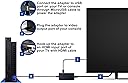
UPDATE: 1 star to 5 stars, thanks to great customer service! I had originally posted the review below and had some significant frustrations with the product. After posting the review, a rep from LevelHike contacted me and was sincerely interested in helping resolve the issue. They stated that the product I unfortunately originally received was defective, and they assured me that a replacement would not have the same issue. They were right! I can now enjoy my classic slim PS2 on my HDMI compatible TV, with zero issues. The picture looks great and the cable and housing are solid - nothing on the product is sensitive to the touch like the previous item I had received. Outside of the product itself, I would like to commend them for taking the steps to work with a less-than-satisfied customer. It is not often that you find this level of post-sale service, and this company does want to create a well made product that customers will be happy with - and it shows. I have no issue recommending this product to friends that want to get their retro-gaming system working on their modern TVs. Thanks LevelHike! ======== ORIGINAL REVIEW BELOW ======== I purchased this cable to try and get the best possible picture out of my PS2 and modern TV. I read a few reviews and figured why not, it's got to be better than the composite cables that came with the console, right? I couldn't have been more wrong. The device ships in a small cardboard box. It includes all the cables you would need to hook up to your HDMI based TV, as well as a basic instruction manual. It's quite easy to use - you plug in the HDMI cable to your monitor, the av port to the PS2, and the USB cable to the device and then the PS2 USB port. You then need to configure the PS2 to use RGB output by going into the PS2 menu. After setup, I immediately noticed that the colors were not correct. They seemed washed out. So I made sure the device was plugged in properly to the PS2. Then everything went to a green tint. Touched the device again, it went back to color. Strange. So I tried playing a game. Everything was fine for 30 seconds, until it went to a green tint again. Touch the cable, back to washed out colors. Touch it again, back to a green tint. Wonderful. These are obviously the tell-tale signs of a poorly made electronic device. Enough of this, it's getting sent back to Amazon. I switched to using proper component cables and an HDMI upscaler - and I couldn't be happier. Your mileage may vary.
E**Y
Terrific! Works right out of the box, <5 minutes
PS2 slim model -> Samsung Smart TV Extremely easy to set up and makes a very noticeable difference. I play a lot of RPGs so text clarity is very important to me and the text is crystal clear. I haven't experienced any latency issues either. Cutscenes are beautiful as well. If you're particularly focused on graphical quality hardcore above all else, you'll probably be better off with a pricier, bulkier alternative. But for someone who just wants enough upscaling in order to enjoy classic games on an HD TV without breaking the bank, this is a perfect option. My only quibble is that the included USB to MicroUSB cord is very short, which is fine, as I use the PS2 USB port for power. But comparatively, the SCART cord and the included HDMI cable is extremely long, leaving a ton of slack on one of the wires regardless of where the USB is plugged in. And I would have maybe liked to see a headphone jack as an option. But these are such small complaints and, again, for this price, you get quality upscaling out of the box that meets the minimum requirements for any HDTV to handle the signal, ease of setup, easy 4:3 to 16:9 conversation, PAL compatibility, AND a 1 year warranty. (I found this item from a very good article comparing different PS2 upscaling alternatives and the only real conthey mentioned was that it was a bit bulky. I very much disagree! I think they were either referring to a different model or a different product entirely, as this product is very small and easy to position around the PS2, and this was that articles only true con.)
T**S
This product is awesome when it worked
I purchased this a few weeks ago when I did an x-station install on my PS1 console. It’s basically a disc emulator so you can play PS1 games from an SD card on the original playstation hardware. This levelhike cable worked really well for the first week or so. The picture was a lot more clear than composite so I was very happy. Then after a few days I started getting audio issues. Basically I start the PS1 console and hear the sony logo audio sound that PS1s are known for but it starts a bit late so when the audio kicks in it’s already towards the end of that first part of the Sony logo sound while the screen is white. Then the screen turns black and you see the playstation logo. After that the x-station will load to a menu with the game list and of course there is no sound in this menu but once I load a game from that point on it will have no audio while I play the game. To fix this issue I have found that while the game is playing I can unplug the USB cable that powers this LevelHike device and then plug it back in and then the audio will start playing. It’s almost like theres a glitch and you have to keep reseting the device by cutting the power to it and then plug it back in and it will function properly but I have to keep repeating this process every time I load a new game. So I was doing this for a few days and all was fine. Every time I played a new game I would have to repeat this process which sucks because I have to keep getting up to unplug it then plug it back in. So to solve this problem I decided to use the TV usb port and just turn the TV off while the console is still on so that it cuts the power to the LevelHike device and then turn the TV back on to feed it power again and that worked ok for a few days. Anyway, after that the problem progressed to the point that it no longer works at all. All I get now is a black screen with no picture or audio. The TV says no signal. So I tried messing with different HDMI ports on the TV. Changed the aspect ratio on the LevelHike back and forth from 4:3 to 16:9 and cutting power on and off to it multiple times with no luck. I went and did a return with Amazon and they sent out a replacement right away. I just got that replacement today and this one was even worst than the first LevelHike device I received. This one doesn’t work at all. I tried troubleshooting and there is no audio or picture. The TV is just black and says no signal. I contacted LevelHike’s email cause they give you card that tells you that you have a 1 year warranty but it also lists all the problems on the warranty card and one of the problems listed is all the problems I mentioned above with audio and no TV signal so it seems like this is a common issue with their products. Which leads me to believe they don’t sell quality items. They basically apologize on their warranty card saying that if this happens to you then you got a faulty cable and to let them know and they will send out a new one. So that’s why I emailed them but we shall see how good their customer service is but I am already disappointed that their quality control was not better to begin with and I don’t know if I can trust their products in the future. I give it a 1 star because of all the headaches and even if they give me another device for the 3rd time, I wonder how long will it last? I don’t have faith it will make it past a few months. So ultimately I recommend all of you to look else where for another more high quality product. These cheap solutions are not worth the hassle if you ask me. Thanks for reading and hope this helped you out.
み**ら
映像があまりボケず、音がとても良い
この商品は映像や文字があまりクッキリしてないがノイズがきちんとおさえられている、あと音は低音がよく出て迫力があった、良くなかったところはしいていえば、もう少し輝度が高くてもよかった点で、これはモニターで調整すれば良いと思った。
I**S
Compatible with PsOne
Upscaling is good and sound quality does not breaks or static noise, only thing I noticed is the conector might be just a little bit bigger than the original cables so I had to apply some wiggling to push it in but it works fine. I used it for my original PsOne with an LGC1 model 65inch and it runs soooo smooth
E**T
Not the best solution ever, but definitely the best for this price
I bought this on a whim as a way of simplifying my set-up a bit. My PlayStation has normally been hooked up via an S-Video cable running into an adapter (the RetroScaler 2x), but I wanted something a bit more convenient. While I know there are better options than this out there, this was definitely the most cost efficient one. (This cable cost C$35, while something like the Rad 2X - after conversion - comes out to over C$100!) I gave it a quick gander, and I’m pretty happy with the results. The video is definitely clearer than S-Video (with both putting the standard composite to shame), and it does what it can with the PS’s native resolution of 240p/480i. While this does upscale it to 720p for its output, I found those results a bit iffy at points - though I am running this on a 4K TV with a resolution of 2160p. There were definitely some jagged lines and blurriness looking at it up close, but from a distance, it wasn’t as noticeable. I think ultimately my personal preference would’ve been to just have it output its native resolution for my TV to upscale, but most modern TVs don’t handle those resolutions well, so I understand LevelHike’s rationale. For fun, I did hook this up to my PlayStation 2 as well just to see how it looked with that system. I don’t intend on keeping it on that system, as I have a proper YPbPr adapter for the PS2. I put on both a PS2 game and a PS1 game to see the differences. I found the quality comparable for the PS1 games, though it may have looked slightly better coming from the PS2 than it did the PS1. The PS2 game did look better than the PS1 games in general, but that was to be expected. I would still leave my PS2 outputting via component/YPbPr, though. Overall, I do think this adapter is a great solution for the price, hence my 5 stars. There are definitely some faults, but for the price, I can’t complain. I think if you’re just wanting a simple plug and play solution without taking a hit to your wallet, this will more than suffice. I’ve attached some photos, though be aware they are taken from my cellphone so they may not be completely representative of the quality of this adapter. The last three are the SpongeBob PS1 game running on the PS2.
M**.
Produto de alta qualidade
Entrega o que propõe, único porém é que para quem deseja fazer upscaling para resoluções full HD o dispositivo não suporta.
J**D
Broken cable pink color
Cable doesnt work. I email levelhike, who were initially very supportive and said they would ship a new one after i showed them pictures of the problem and my invoice. After seeing i am from belgium their customer support said they dont ship to belgium and i would just have to return the item via amazon. So i did, this week received the item back from amazon returns saying this item isnt part of their return policy. Levelhike also never responded again after being told this happened. Hopefully receiving refund.
Trustpilot
1 month ago
4 days ago